1. Вступ
Дякуємо за покупкуasing the SEIKO SQ767W Digital Alarm Clock. This compact and versatile clock features a digital display, dual alarms, a calendar, and displays both temperature and humidity. It is designed for convenience on your bedside table or desktop. This manual provides essential information for setup, operation, and maintenance to ensure optimal performance.
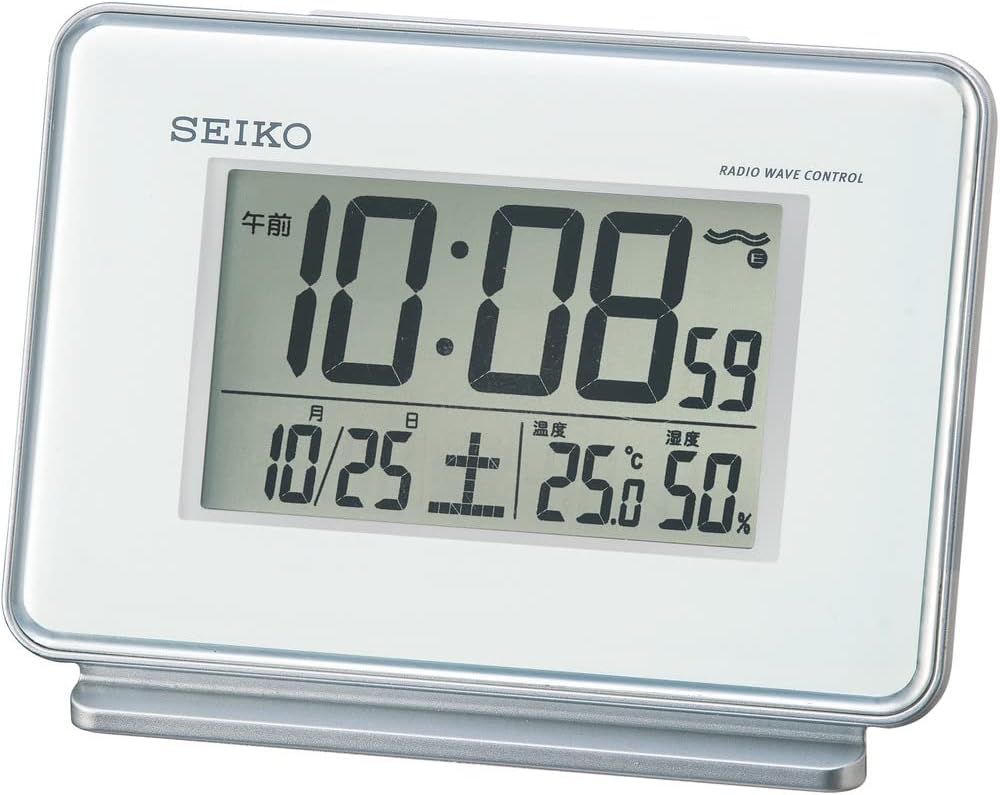
Малюнок 1: Спереду view of the SEIKO SQ767W Digital Alarm Clock.
2. Особливості продукту
- Подвійні будильники: Set two independent alarm times.
- Radio Wave Correction: Automatically corrects time by receiving standard radio waves (40 kHz/60 kHz automatic selection). Includes a radio wave off function.
- Цифровий дисплей: Clear display of time, date, temperature, and humidity.
- Функція затримки: Temporarily pauses the alarm.
- Функція світла: Підсвічує дисплей для кращої видимості в умовах слабкого освітлення.
- Alarm Monitor: Allows checking the alarm sound.
- Alarm Auto Stop: Alarm automatically stops after 5 minutes.
- Повністю автоматичний календар: Displays the correct date automatically.
- Temperature/Humidity Display: Provides current room temperature and humidity readings.
3. Налаштування
3.1 Встановлення батареї
- Відкрийте кришку батарейного відсіку на задній панелі годинника.
- Insert two (2) AA manganese batteries, ensuring correct polarity (+/-).
- Надійно закрийте кришку батарейного відсіку.
The clock requires 2 AA batteries, which are included with the product.
3.2 Початкове увімкнення та прийом радіохвиль
Upon battery installation, the clock will attempt to receive radio waves to set the time automatically. For best reception:
- Поставте годинник біля вікна.
- Avoid locations with potential radio interference, such as:
- Inside buildings, basements, or areas with thick walls.
- Поблизу високої гучностіtage lines, TV towers, or train rails.
- Close to electronic appliances (TVs, refrigerators, air conditioners, computers, etc.).
- In vehicles (automotive, train, airplane).
- Near metal furniture like steel desks.
If radio waves are not received, the clock will operate with quartz accuracy. Reception may vary depending on environmental conditions.

Figure 2: Radio wave coverage map for time synchronization.
4. Інструкція з експлуатації
The control buttons are located on the back of the clock. Refer to Figure 3 for button identification.

Малюнок 3: Задня частина view з кнопками керування.
4.1 Встановлення часу та дати
- Automatic Setting (Radio Wave): The clock attempts to set the time and date automatically via radio wave reception. Ensure the clock is placed in an optimal reception area.
- Ручне налаштування: If radio wave reception is not possible or desired, you can manually set the time and date using the '時刻/日付合わせ' (Time/Date Adjustment) button and other relevant controls on the back. Consult the detailed instructions for specific button sequences.
4.2 Налаштування будильників (Будильник 1 та Будильник 2)
The clock features two independent alarms.
- Use the 'アラーム時刻合わせ' (Alarm Time Adjustment) button to select Alarm 1 or Alarm 2.
- Adjust the desired alarm time using the appropriate adjustment buttons.
- Toggle the 'アラーム1 ON/OFF' or 'アラーム2 ON/OFF' switch to activate or deactivate each alarm.
4.3 Snooze and Light Function
Press the large button on top of the clock to activate the snooze function when an alarm sounds. This button also illuminates the display temporarily when pressed outside of an alarm event.
4.4 Відображення температури та вологості
The clock continuously displays the current room temperature and humidity on its screen. No special action is required to view ці читання.

Figure 4: Close-up of the digital display.
5. Технічне обслуговування
5.1 Очищення
Wipe the clock with a soft, dry cloth. Do not use abrasive cleaners or solvents, as they may damage the casing або дисплей.
5.2 Заміна батареї
Replace batteries when the display dims or the clock's functions become unreliable. Always replace both batteries at the same time with new AA manganese batteries. Dispose of used batteries according to local regulations.
6. Вирішення проблем
- Clock not displaying time/functions: Перевірте встановлення батарейок та переконайтеся, що батарейки не розряджені.
- Час неправильний: Ensure the clock is in an optimal location for radio wave reception. If automatic correction fails, manually set the time.
- Сигналізація не звучить: Verify that the alarm is set to 'ON' and the alarm time is correctly configured.
- Дисплей тьмяний: Замініть батареї.
- Radio wave reception issues: Relocate the clock away from electronic devices, metal objects, or large structures that may interfere with signals.
7. Технічні характеристики
| Особливість | Деталь |
|---|---|
| Бренд | SEIKO |
| Номер моделі | SQ767W |
| Тип дисплея | цифровий |
| Колір | Білий |
| Розміри продукту | 3.5 x 5.0 x 2.3 дюйми (9.0 x 12.7 x 5.8 см) |
| Вага товару | 0.4 lbs (210 grams / 7.4 ounces) |
| матеріал | пластик |
| Джерело живлення | Живлення від батарейок (потрібні 2 батарейки типу АА, входять до комплекту) |
| Особливості | Calendar Display, Loud Alarm, Temperature/Humidity Display, Radio Wave Correction |
| Alarm Channels | 2 |
| Alarm Auto Stop | 5 хвилин |
| Технологія підключення | радіо |
| Тип монтажу | Автономний |
| Країна походження | Китай |
8. Гарантія та підтримка
For warranty information or technical support, please refer to the documentation included with your purchase or contact SEIKO customer service. Keep your purchase receipt as proof of purchase.


