1. Вступ
The VOLTCRAFT DSO-2020 USB is a PC-based digital storage oscilloscope designed for precise signal measurement and analysis. This device connects to your computer via USB, utilizing software to display and process waveforms. It features a 20 MHz bandwidth, two independent channels, and a real-time sampling rate of 48 MSa/s, making it suitable for various electronic testing and development applications. This manual provides essential information for the safe and effective use of your oscilloscope.
2. Інформація про безпеку
Будь ласка, прочитайте та зрозумійте всі інструкції з безпеки перед використанням пристрою. Недотримання цих інструкцій може призвести до травмування або пошкодження пристрою.
- Always connect the oscilloscope to a computer using a certified USB cable.
- Ensure proper grounding of the PC and the measurement setup to prevent electrical shock.
- Не перевищуйте максимальний вхідний об’ємtage ratings for each channel (e.g., MAX 45V for CH1/CH2).
- Avoid operating the device in wet or damp умови.
- Не відкривайте пристрій casinг; всередині немає деталей, які може обслуговувати користувач.
- Use only probes and accessories specified for this oscilloscope.
3. Продукт закінчивсяview
The VOLTCRAFT DSO-2020 USB is a compact unit designed for portability and ease of use with a personal computer. Below are images illustrating the device and its key connection points.
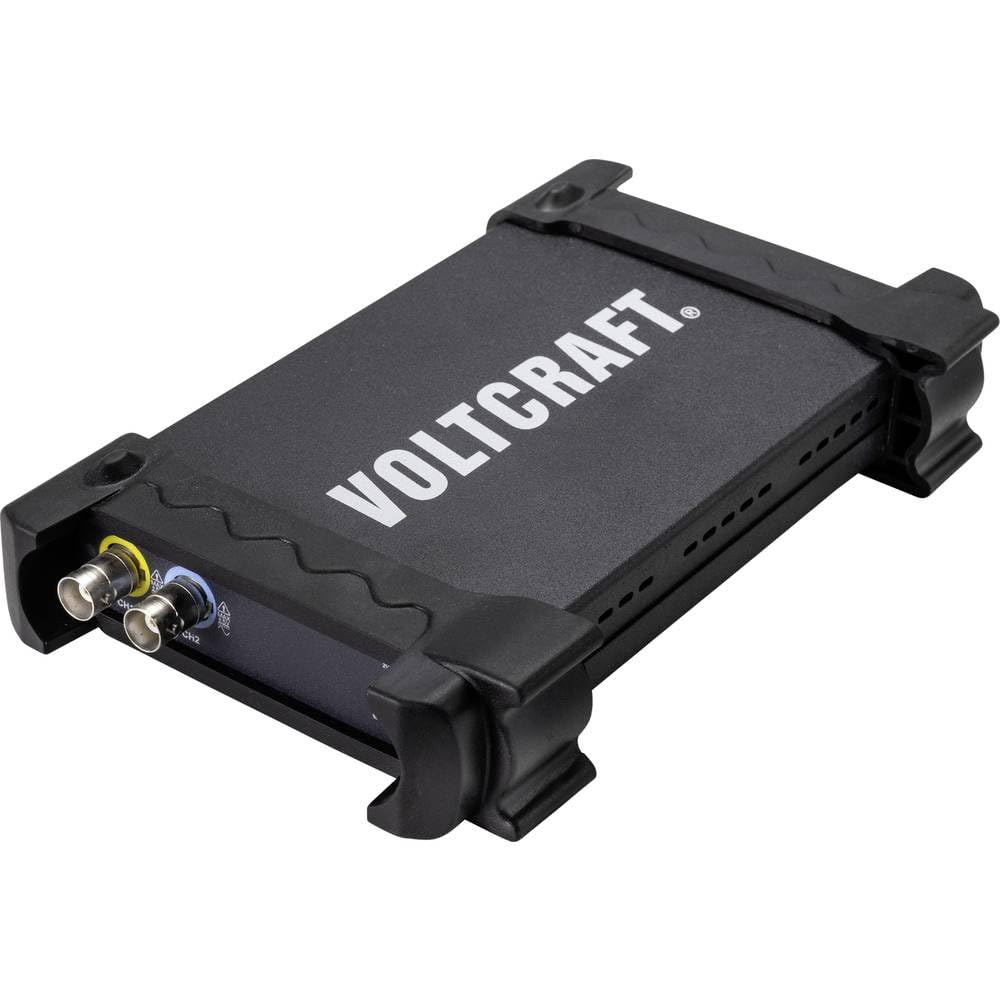
Малюнок 3.1: Спереду view of the VOLTCRAFT DSO-2020 USB PC Oscilloscope, showing its compact design and protective casing.

Рисунок 3.2: Кутовий view of the oscilloscope, highlighting the USB-B port for PC connection and the USBXI port.
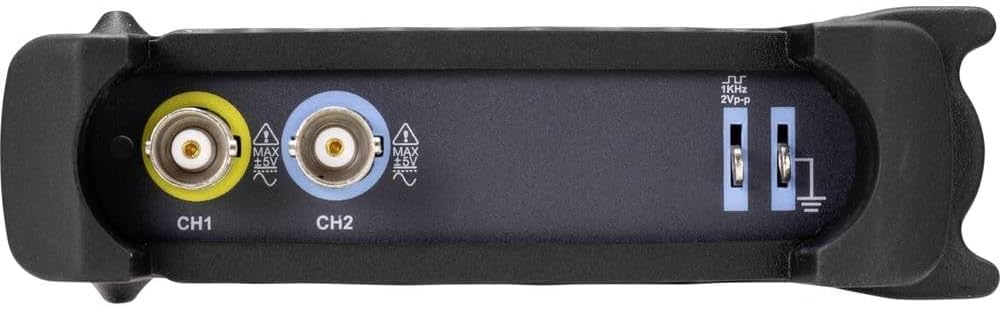
Малюнок 3.3: Задня частина view showing the BNC input connectors for Channel 1 (CH1) and Channel 2 (CH2), along with the 1KHz 2Vp-p calibration output and ground terminals.
4. Налаштування
4.1 Встановлення програмного забезпечення
Before connecting the DSO-2020 USB, install the necessary software and drivers on your computer. Refer to the included software CD or the manufacturer's website for the latest version and installation instructions. Typically, this involves running an installer and following on-screen prompts.
4.2 Підключення обладнання
- Connect the USB cable from the DSO-2020 USB device to an available USB port on your computer.
- Once connected, your operating system should detect the device. If drivers were installed correctly, the device should be recognized by the oscilloscope software.
- Connect your oscilloscope probes to the CH1 and/or CH2 BNC input connectors as required for your measurement. Ensure probes are securely attached.
- For accurate measurements, perform probe compensation if using passive probes. Refer to your probe's manual for specific instructions.
5. Інструкція з експлуатації
This section outlines the basic steps for operating your VOLTCRAFT DSO-2020 USB oscilloscope.
5.1 Launching the Software
After successful installation and connection, launch the VOLTCRAFT oscilloscope application from your computer's desktop or start menu. The software interface will display a virtual oscilloscope screen, similar to a traditional benchtop unit.
5.2 Basic Signal Acquisition
- Підключення сигналу: Attach the probe to the circuit point you wish to measure.
- Вибір каналу: In the software, enable the desired channel (CH1 or CH2).
- Вертикальна шкала (вольти/поділ): Adjust the vertical scale to fit the signal amplitude on the screen.
- Горизонтальна шкала (час/поділ): Adjust the horizontal scale to view the signal's period or frequency.
- Налаштування тригера: Configure the trigger source, type (edge, pulse), and level to stabilize the waveform. The software provides controls similar to a physical oscilloscope.
- Автоматичне налаштування: Utilize the automatic setup function within the software. This feature automatically adjusts the vertical and horizontal settings to display the input signal optimally.
5.3 Data Processing and Export
The DSO-2020 USB allows for advanced data processing and storage:
- Зберігання сигналів: Captured waveforms can be saved directly to your computer for later analysis.
- Функції вимірювання: The software includes various automatic measurement functions (e.g., Vpp, Vrms, Frequency, Period).
- Експорт даних: Measurement data can be exported to formats such as Excel for further analysis and reporting.
- ЛабораторіяVIEW Сумісність: The device is compatible with LabVIEW, allowing for integration into custom measurement and automation systems.
6. Технічне обслуговування
Правильне обслуговування забезпечує довговічність та точність вашого осцилографа.
- Прибирання: Використовуйте м’яку суху тканину для очищення зовнішньої частини пристрою. Не використовуйте абразивні засоби для чищення або розчинники.
- Зберігання: Store the oscilloscope in a dry, dust-free environment when not in use. Avoid extreme temperatures.
- Догляд за зондом: Handle probes carefully. Avoid bending or stressing the cables. Store them properly to prevent damage.
- Оновлення програмного забезпечення: Regularly check the VOLTCRAFT webсайт для оновлень програмного забезпечення та драйверів, щоб забезпечити оптимальну продуктивність та сумісність.
7. Вирішення проблем
У цьому розділі розглядаються поширені проблеми, з якими ви можете зіткнутися.
- Пристрій не розпізнано:
- Ensure the USB cable is securely connected to both the oscilloscope and the PC.
- Перевірте, чи правильно встановлено драйвери. За потреби перевстановіть їх.
- Спробуйте інший порт USB на комп’ютері.
- Сигнал не відображається:
- Check that the probe is properly connected to the input channel and the circuit under test.
- Ensure the correct channel is enabled in the software.
- Налаштуйте вертикальну (Вольти/Поділ) та горизонтальну (Час/Поділ) шкали.
- Check trigger settings; an incorrect trigger level can prevent a stable display.
- Verify the signal source is active and within the oscilloscope's measurement range.
- Нестабільна форма хвилі:
- Adjust the trigger level and trigger type (e.g., edge trigger).
- Ensure the trigger source is set to the channel with the signal.
- Check for noise in the measurement environment.
8. Технічні характеристики
The following table details the technical specifications of the VOLTCRAFT DSO-2020 USB PC Oscilloscope.
| Особливість | Специфікація |
|---|---|
| Виробник | ВОЛТКРАФТ |
| Номер моделі | DSO-2020 USB |
| Пропускна здатність | 20 МГц |
| Канали | 2 |
| Sampling Rate (Real-time) | 48 Мвиб/с |
| Глибина пам'яті | 1 Мп |
| роздільна здатність | 8 біт |
| Розміри (Д x Ш x В) | 20.5 х 3.8 х 12.5 см |
| вага | 430 г |
| Тип джерела живлення | Hand-operated (USB powered) |
| Особливості | Two independent channels, display similar to standard oscilloscope, automatic setup function, data export to Excel, LabVIEW сумісний. |
| Включені компоненти | 1 unit (oscilloscope) |
| Потрібні батареї | немає |
9. Гарантія та підтримка
For warranty information, technical support, or service inquiries, please refer to the documentation provided with your purchase or visit the official VOLTCRAFT website. Contact details for customer support can typically be found on the manufacturer's product page or in the included warranty card.
10. Офіційні відео про продукт
No official product videos from the seller were found in the provided data for this specific model. Please refer to the manufacturer's website or official channels for any available video resources.


