1. Вступ
This manual provides essential information for the safe and effective use of your Leica M (Typ 240) Digital Rangefinder Camera, model 10770. The Leica M is engineered for superior image quality, precise focusing, and robust performance, featuring a 24-megapixel CMOS sensor and the Leica Maestro image processor.
Ключові особливості:
- High-resolution 24-megapixel CMOS sensor for exceptional detail.
- Fast Leica Maestro image processor for rapid image handling.
- Жити View with 10x magnification and Focus Peaking for precise focusing.
- Splash-proof camera body for enhanced durability.
- 3-inch TFT LCD screen with 920,000 pixels and Corning Gorilla glass protection.
- Full 1080p HD video recording capabilities.
2. Налаштування
2.1 Розпакування та перевірка вмісту
Carefully unpack your camera and verify that all components are present. The standard package for model 10770 includes the camera body only. Inspect the camera for any signs of damage before proceeding.
2.2 Встановлення батареї
The Leica M (Typ 240) uses one Lithium Metal battery (included). To install the battery:
- Locate the battery compartment cover, typically on the bottom of the camera.
- Open the cover by turning the locking mechanism.
- Вставте батарейку відповідно до індикаторів полярності всередині відсіку.
- Надійно закрийте кришку батарейного відсіку.
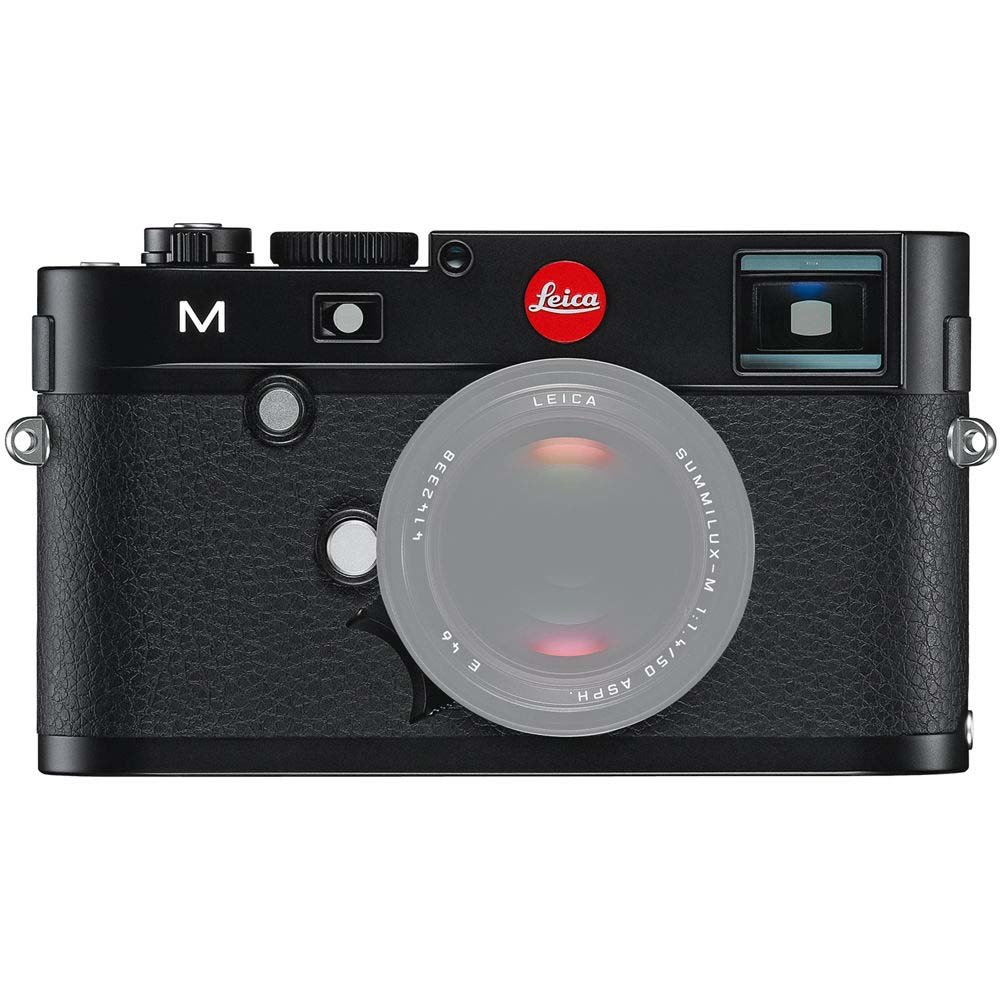
Фронт view of the Leica M (Typ 240) Digital Rangefinder Camera, showing the lens mount and body design. This image illustrates the camera's exterior, which houses the battery compartment and other controls.
2.3 Встановлення карти пам'яті
Insert a compatible SD card into the memory card slot. Ensure the card is inserted in the correct orientation until it clicks into place. Refer to the camera's display for confirmation of card recognition.
2.4 Кріплення об'єктива
The Leica M (Typ 240) uses the Leica M mount. To attach a lens:
- Зніміть кришку корпусу з камери та задню кришку з об’єктива.
- Зіставте червону точку на об'єктиві з червоною точкою на кріпленні об'єктива камери.
- Gently insert the lens into the mount and turn it clockwise until it locks into place.
2.5 Початкове увімкнення та основні налаштування
After installing the battery and memory card, turn on the camera using the power switch. The first time you power on, you may be prompted to set the date, time, and language. Follow the on-screen instructions to configure these basic settings.
3. Робота з камерою
3.1 Контроль надview
The Leica M (Typ 240) features a classic rangefinder design with intuitive controls. Familiarize yourself with the shutter speed dial, aperture ring (on the lens), focus ring (on the lens), and the various buttons and dials on the camera body for menu navigation and function selection.
3.2 Фокусування
The camera offers multiple focusing methods:
- Rangefinder System: The classic method for precise manual focusing. Align the split or superimposed images in the viewшукач.
- Жити View Масштаб: When using Live View on the LCD screen, you can magnify the image up to 10x for critical focus assessment.
- Жити View Підкреслення фокуса: This feature automatically highlights sharp contours in red on the Live View display, providing visual confirmation of focus.
3.3 Налаштування експозиції
The Leica M (Typ 240) provides comprehensive control over exposure. You can manually set aperture (via the lens), shutter speed (via the top dial), and ISO sensitivity. The camera also offers various metering modes, including Center Weighted, to assist in achieving correct exposure.
3.4 Shooting Still Images
To capture a still image:
- Скомпонуйте знімок за допомогою viewпошук або пряма трансляція View.
- Adjust focus using one of the methods described above.
- Set your desired exposure parameters (aperture, shutter speed, ISO).
- Press the shutter button halfway to activate the meter, then fully to capture the image.
3.5 Запис відео
The Leica M (Typ 240) supports 1080p full-HD video recording. To record a video:
- Switch the camera to video mode (if applicable, refer to the camera's menu).
- Compose your shot and adjust focus.
- Press the dedicated video recording button or the shutter button (depending on configuration) to start and stop recording.
3.6 Відтворення зображень
Повторноview зняті зображення та відео:
- Натисніть кнопку відтворення.
- Use the navigation controls to scroll through your media.
- The 3-inch TFT LCD screen provides a clear display for reviewробити свої знімки.
4. Технічне обслуговування
4.1 Очищення камери
- Корпус камери: Використовуйте м’яку суху тканину для протирання корпусу камери. Для стійкого бруду злегкаamp Можна використовувати тканину, але уникайте надмірного зволоження.
- Об'єктив: Use a lens brush or air blower to remove dust, then gently clean with a microfiber lens cloth and a specialized lens cleaning solution if necessary.
- датчик: Очищення сенсора слід проводити з особливою обережністю. Якщо на зображеннях з’являються плями пилу, рекомендується звернутися до авторизованого сервісного центру для професійного очищення сенсора.
- РК-екран: Use a soft, lint-free cloth. Avoid harsh chemicals.
4.2 Зберігання
When not in use, store the camera in a cool, dry place away from direct sunlight, high humidity, and extreme temperatures. Use a desiccant pack if storing in humid environments. Remove the battery if the camera will not be used for an extended period.
4.3 Догляд за акумулятором
Charge the battery fully before first use. For optimal battery life, avoid completely discharging the battery regularly. Store batteries in a cool, dry place. If storing for extended periods, charge them to approximately 50% capacity.
5. Вирішення проблем
5.1 Камера не вмикається
- Переконайтеся, що акумулятор правильно вставлено та повністю заряджено.
- Check that the battery contacts are clean.
- Спробуйте інший заряджений акумулятор, якщо він є.
5.2 Images Are Out of Focus
- Verify that the lens is correctly attached and the focus ring is being adjusted properly.
- Ensure you are using the rangefinder or Live View focusing aids correctly.
- Check the diopter adjustment on the viewfinder if images appear blurry through it.
5.3 Image Quality Issues (e.g., Noise, Color Cast)
- Шум: High ISO settings can introduce noise. Try lowering the ISO or using a brighter aperture/slower shutter speed.
- Кольори: Check the white balance settings. Adjust to match the lighting conditions. Firmware updates may also address color rendition issues.
- Dust Spots: If dark spots appear on images, especially at smaller apertures, the sensor may require cleaning.
5.4 Помилки карти пам'яті
- Ensure the memory card is fully inserted.
- Try formatting the card in the camera (note: this will erase all data).
- Перевірте з іншою, сумісною картою пам'яті.
6. Технічні характеристики
| Особливість | Деталь |
|---|---|
| Бренд | Leica |
| Номер моделі | 10770 |
| Розміри продукту | 5.47 x 1.65 x 3.15 дюймів |
| Вага товару | 1.29 фунта |
| Акумулятори | 1 літій-металева батарея (у комплекті) |
| Сумісні кріплення | Лейка М |
| Технологія фотосенсора | CMOS |
| Підтримується File Формат | JPEG, RAW |
| Стабілізація зображення | цифровий |
| Оптичний зум | 1x |
| Максимальна діафрагма | 3.5 Millimeters (Note: This refers to the camera body's internal specification, actual lens aperture varies.) |
| Розширений мінімум ISO | 100 |
| Опис вимірювання | Центрально-зважений |
| Дата першої доступності | 2 лютого 2010 р |
7. Гарантія та підтримка
For detailed warranty information, please refer to the warranty card included with your product or visit the official Leica webсайт. Зберігайте чек про покупку для гарантійних претензій.
For further assistance, technical support, or service, please contact Leica customer service or visit an authorized Leica service center. You can find more information and resources on the Магазин Leica на Amazon.


