1. Вступ
This manual provides instructions for the APEX LD200RM remote control, designed for use with various APEX LCD and LED television models. This remote control offers full functionality for your compatible APEX television, ensuring convenient operation of all features.
Compatible APEX TV Models:
- LD3249
- LD3288, LD3288T, LD3288M
- LD4077, LE4077M
- LD4088
- LD4688
- LE3212, LE3212D
- LE4012
- LE4612
- LE3242
- LE3942
- LE40B12
- LE4243
- LE4643
- LE5043
2. Налаштування
2.1 Встановлення батареї
The APEX LD200RM remote control requires two (2) AA batteries for operation. Follow these steps to install the batteries:
- Знайдіть кришку батарейного відсіку на задній панелі пульта дистанційного керування.
- Натисніть на язичок і зніміть кришку.
- Вставте дві батарейки типу АА, переконавшись, що позитивний (+) та негативний (-) полюси правильно збігаються з позначками всередині відсіку.
- Засуньте кришку батарейного відсіку назад на місце, доки вона надійно не клацне.
Примітка: Завжди замінюйте обидві батарейки одночасно. Не використовуйте разом старі та нові батарейки, а також батарейки різних типів.
2.2 Початкове використання
The APEX LD200RM remote control is an original replacement and typically does not require any programming or pairing. Once batteries are installed, point the remote control towards your compatible APEX television and begin operation.
3. Інструкція з експлуатації
This section details the functions of the buttons on your APEX LD200RM remote control.
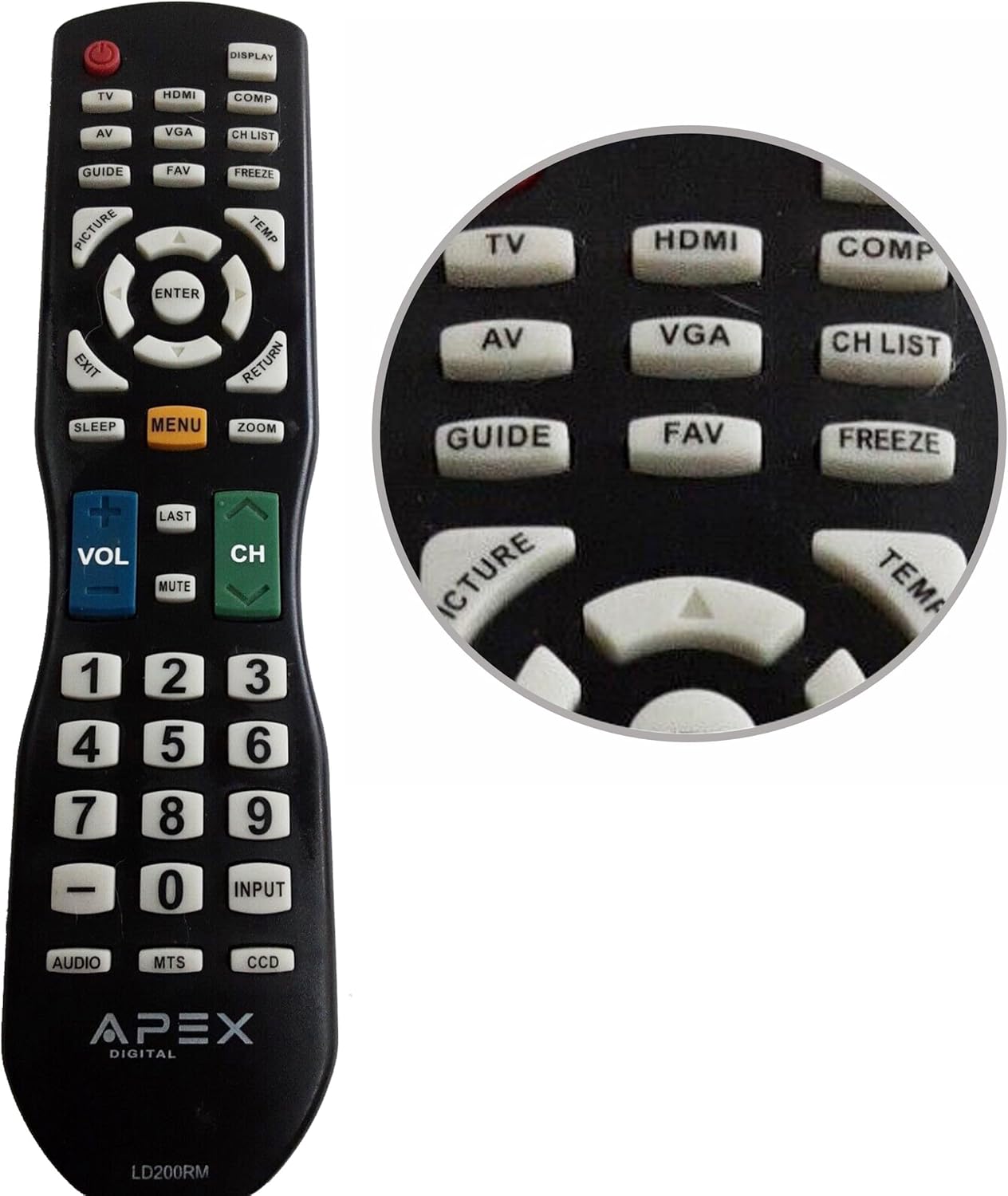
Figure 1: APEX LD200RM Remote Control Layout. This image displays the entire remote control, highlighting the arrangement of its various function buttons, including power, input selection, navigation, volume, channel, and numeric keypad.

Figure 2: Close-up of APEX LD200RM Remote Control Top Buttons. This image provides a detailed view of the upper section of the remote, focusing on buttons such as TV, HDMI, AV, VGA, COMP, CH LIST, DISPLAY, GUIDE, FAV, FREEZE, PICTURE, TEMP, MENU, ENTER, EXIT, RETURN, SLEEP, and ZOOM.
3.1 Power and Input Selection
- ЖИВЛЕННЯ (червона кнопка): Вмикає або вимикає телевізор.
- телевізор: Selects the TV tuner input.
- HDMI: Selects the HDMI input.
- AV: Selects the Audio/Video input.
- VGA: Selects the VGA input.
- COMP: Selects the Component video input.
- ДИСПЛЕЯ: Shows on-screen display information.
3.2 Channel and Volume Control
- ГУЧНІСТЬ (+/-): Збільшує або зменшує рівень гучності.
- CH (Вгору/Вниз): Змінює телевізійний канал вгору або вниз.
- ОСТАННІ: Повертається до попереднього viewредагований канал.
- МУК: Вимкнення або ввімкнення звуку телевізора.
- СПИСОК СН: Відображає список каналів.
3.3 Меню та навігація
- МЕНЮ: Відкриває головне меню телевізора.
- Введіть: Confirms a selection within the menu.
- Кнопки зі стрілками (Вгору/Вниз/Вліво/Вправо): Navigates through menu options and adjusts settings.
- ВИХІД: Вихід з поточного меню або екранного меню.
- ПОВЕРНЕННЯ: Повернення до попереднього меню або екрана.
3.4 Numeric Keypad and Special Functions
- 0-9 (Numeric Buttons): Безпосереднє введення номерів каналів.
- ВХОД: Перемикає доступні джерела вхідного сигналу.
- ПОСІБНИК: Відображає електронний телегід (якщо доступний).
- Улюблене: Доступ до улюблених каналів.
- ЗАМОРОЖИТИ: Freezes the current image on the screen.
- КАРТИНА: Налаштовує параметри зображення.
- ТЕМП: (Function may vary by model, often related to picture temperature or a specific mode).
- СОН: Встановлює таймер сну.
- ЗООМ: Налаштовує рівень масштабування екрана.
- АУДІО: Selects audio modes or tracks.
- МТС: Multi-channel Television Sound (stereo/SAP).
- DCC: Closed Captioning Display.
4. Технічне обслуговування
4.1 Заміна батареї
When the remote control's performance degrades or it stops responding, it is likely time to replace the batteries. Refer to Section 2.1 for detailed battery installation instructions. Always use fresh AA batteries.
4.2 Очищення
Для очищення пульта дистанційного керування використовуйте м’яку суху тканину. Для стійкого бруду злегкаampПротріть тканину водою або м’яким неабразивним засобом для чищення. Уникайте використання агресивних хімікатів або абразивних матеріалів, оскільки вони можуть пошкодити поверхню пульта дистанційного керування або внутрішні компоненти.
4.3 Зберігання
Store the remote control in a cool, dry place away from direct sunlight and extreme temperatures. If the remote will not be used for an extended period, it is advisable to remove the batteries to prevent leakage and potential damage.
5. Вирішення проблем
- Пульт дистанційного керування не реагує:
- Переконайтеся, що батарейки встановлені правильно з дотриманням полярності (+/-).
- Replace old batteries with new AA batteries.
- Check for any obstructions between the remote control and the television's infrared sensor.
- Ensure you are within the effective range of the television's IR receiver.
- Деякі кнопки не працюють:
- Це може свідчити про низький заряд батареї. Замініть батареї.
- Переконайтеся, що пульт дистанційного керування чистий і під кнопками немає сміття.
- Verify that the button function is applicable to your specific TV model. Some functions may not be supported by all compatible TVs.
- Television is not turning on/off:
- Переконайтеся, що телевізор підключено до справної розетки.
- Try using the power button directly on the television to rule out a TV issue.
6. Технічні характеристики
| Особливість | Деталь |
|---|---|
| Номер моделі | LD200RM |
| Бренд | Апекс |
| Сумісні пристрої | APEX LCD & LED Televisions |
| Джерело живлення | 2 батарейки типу АА (не входять в комплект) |
| Розміри продукту | 10 x 6 x 2 дюйма (приблизно) |
| Вага товару | 3.2 унції (приблизно) |
| Колір | чорний |
| Особливість | Ергономічний дизайн |
7. Інформація про гарантію
This APEX LD200RM remote control typically comes with a 30-day warranty from the date of purchase. This warranty covers manufacturing defects. For specific details regarding warranty claims, returns, or replacements, please refer to your purchase documentation or contact the seller directly.
8. Підтримка
If you encounter issues not covered in this manual or require further assistance, please contact the retailer or the manufacturer's customer support. When contacting support, please have your product model number (LD200RM) and your television model number readily available.


