1. Вступ
This manual provides essential instructions for the proper setup, operation, and maintenance of your Onkyo RC-487S Audio Remote Control. Please read this manual thoroughly before using the remote control to ensure correct usage and to maximize its lifespan. Keep this manual for future reference.
2. Продукт закінчивсяview
The Onkyo RC-487S is a dedicated audio remote control designed for use with compatible Onkyo audio components. It allows convenient control over various functions such as power, volume, input selection, and playback controls from a distance.

малюнок 1: Фронт view of the Onkyo RC-487S Audio Remote Control. This image displays the layout of the buttons and the overall design of the remote.
3. Налаштування
3.1 Встановлення батареї
The RC-487S remote control requires two AA (1.5V) alkaline batteries for operation. Batteries are not included with the remote control.
- Знайдіть кришку батарейного відсіку на задній панелі пульта дистанційного керування.
- Посуньте кришку відсіку для батарейок вниз або натисніть на засувку та підніміть її, щоб відкрити.

малюнок 2: Назад view of the remote control with the battery compartment cover visible. This shows the location of the cover before opening.
- Insert two new AA (1.5V) alkaline batteries, ensuring the positive (+) and negative (-) terminals are aligned correctly according to the diagram inside the compartment.
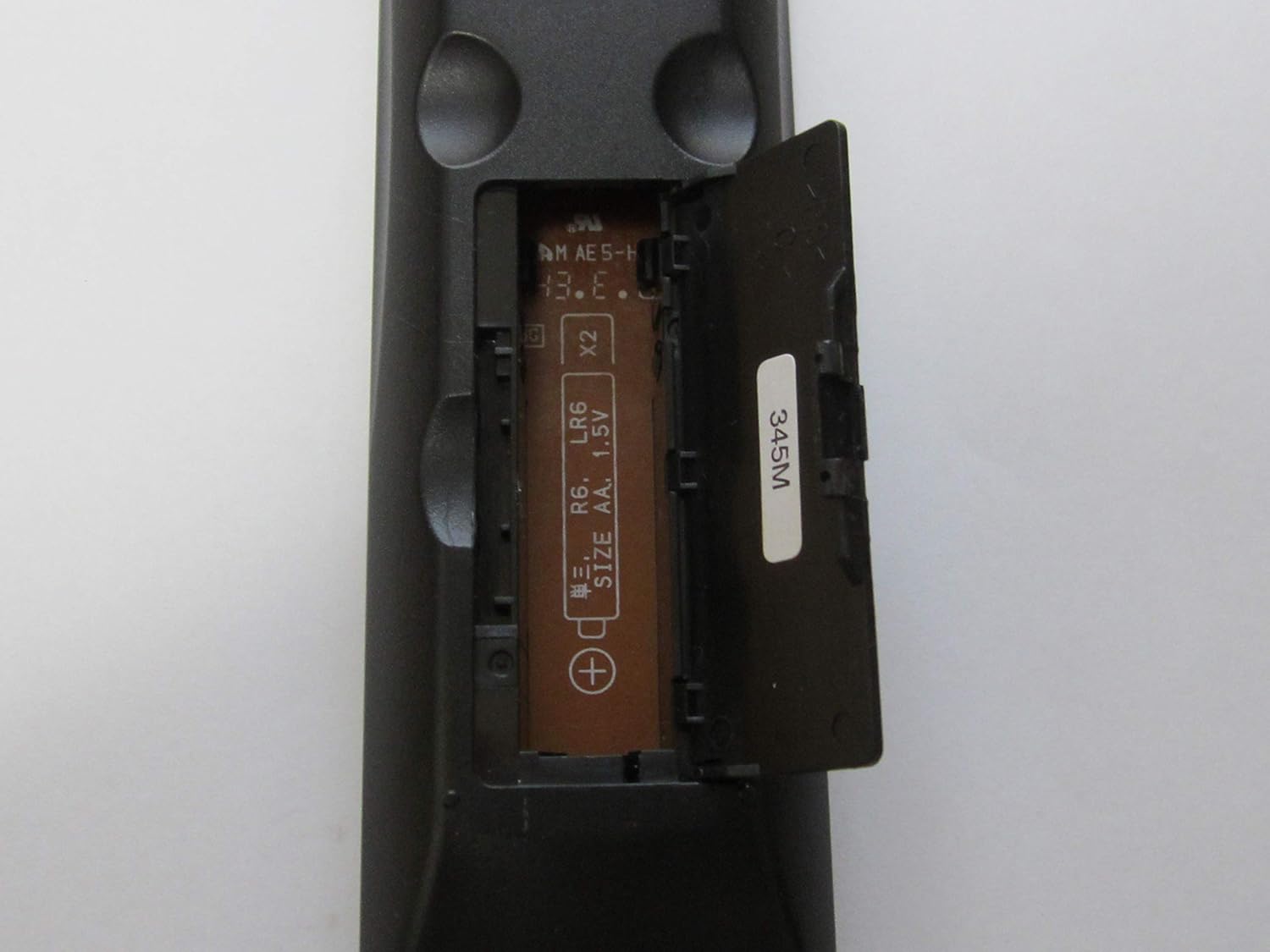
малюнок 3: Remote control with the battery compartment open, revealing the slots for two AA batteries and polarity markings.
- Встановіть кришку відсіку для батарейок, зсунувши її на місце до клацання.
4. Інструкція з експлуатації
To operate your Onkyo audio component using the RC-487S remote control, point the remote directly at the component's infrared sensor. Ensure there are no obstructions between the remote and the component.
- Увімкнення/вимкнення живлення: Натисніть ПОТУЖНІСТЬ button to turn the audio component on or off.
- Регулювання гучності: Використовуйте ОБ'ЄМ + і ОБСЯГ - кнопки для регулювання рівня звуку.
- Вибір входу: Press the designated input buttons (e.g., CD, DVD, TUNER, AUX) to switch between different audio sources.
- Елементи керування відтворенням: For compatible devices, use buttons such as ГРАТИ, ПАУЗА, СТІЙ, ПРОПУСТИТИ, і ПЕРЕМОТУВАННЯ НАЗАД/ВПЕРЕД to control media playback.
Refer to your Onkyo audio component's specific instruction manual for detailed functions corresponding to each button on the RC-487S remote control.
5. Технічне обслуговування
Proper maintenance ensures the longevity and reliable performance of your remote control.
- Прибирання: Протирайте пульт дистанційного керування м’якою сухою тканиною. Не використовуйте абразивні засоби для чищення, віск або розчинники.
- Заміна батареї: Replace both batteries with new ones when the remote control's range decreases or it stops responding. Always replace both batteries at the same time and use the same type (AA alkaline).
- Зберігання: Якщо пульт дистанційного керування не використовуватиметься протягом тривалого часу, вийміть батарейки, щоб запобігти витіканню та можливому пошкодженню.
6. Вирішення проблем
If you experience issues with your RC-487S remote control, refer to the following common solutions:
| проблема | Рішення |
|---|---|
| Пульт не працює. |
|
| Зменшується радіус дії пульта дистанційного керування. |
|
7. Технічні характеристики
- Номер моделі: RC-487S
- Бренд: Onkyo
- колір: Silver metallic (Note: Product appearance may vary)
- Розміри (прибл.): 19.2 х 7 х 3.3 см
- Вага (прибл.): 74 г
- Джерело живлення: 2 x AA (1.5V) Alkaline Batteries (not included)
8. Гарантія та підтримка
For warranty information and technical support, please refer to the documentation that came with your Onkyo audio component or visit the official Onkyo webсайт. Зберігайте чек про покупку як підтвердження покупки для будь-яких гарантійних претензій.
If you require further assistance, please contact Onkyo customer support.


