вступ
This manual provides essential information for the safe and efficient operation of your Sony KDL-55W900A 55-Inch 3D Internet LED HDTV. Please read these instructions thoroughly before using the television and retain them for future reference.
The Sony KDL-55W900A features a 55-inch display with 1080p resolution, 240Hz refresh rate, 3D capabilities, and integrated internet connectivity. It incorporates X-Reality PRO for enhanced detail and a TRILUMINOS display for brilliant colors.

зображення: Фронт view of the Sony KDL-55W900A 55-Inch 3D Internet LED HDTV, showcasinйого елегантний дизайн та дисплей.
Що в коробці
Перевірте, чи всі наступні елементи входять до комплекту вашого телевізора:
- Television Unit (Sony KDL-55W900A)
- Пульт дистанційного керування
- Підставка для телевізора
- Шнур живлення
- Active 3D Glasses (quantity may vary, typically 4 pairs)
- AA Batteries (2 for remote control)
- Documentation (Quick Setup Guide, Safety Information)
Налаштування
1. Кріплення підставки для телевізора
Place the TV screen face down on a soft, clean surface to prevent damage. Align the stand with the mounting holes on the bottom of the TV and secure it using the provided screws. Ensure the stand is firmly attached before proceeding.

зображення: Diagram showing the dimensions of the Sony KDL-55W900A TV, including width, height, and depth.

зображення: сторона view of the Sony KDL-55W900A TV, highlighting its slim profile.
2. Підключення периферійних пристроїв
Connect your external devices such as Blu-ray players, gaming consoles, or cable/satellite boxes to the appropriate input ports (HDMI, USB, etc.) on the rear of the TV.
- HDMI: Для аудіо та відео високої чіткості.
- USB: Для підключення USB-накопичувачів.
- Ethernet: Для дротового підключення до Інтернету.
- РФ: Для підключення антени або кабелю.
3. Підключення живлення
Підключіть шнур живлення до входу живлення телевізора, а потім до розетки.
4. Майстер початкового налаштування
Upon first power-on, the TV will guide you through an initial setup process. This includes language selection, time zone, channel scanning, and network configuration.

зображення: A person interacting with a tablet displaying a program guide, with the Sony TV visible in the background, demonstrating smart TV control.
Інструкція з експлуатації
1. Основні функції телевізора
- Потужність: Натисніть кнопку живлення на пульті дистанційного керування або телевізорі, щоб увімкнути/вимкнути його.
- Вибір входу: Use the "Input" or "Source" button on the remote to switch between connected devices (HDMI 1, HDMI 2, TV, etc.).
- обсяг: Adjust using the Volume Up/Down buttons.
- канал: Change channels using the Channel Up/Down buttons or number pad.
2. Smart TV Features and Internet Connectivity
Your TV can connect to the internet via Wi-Fi or Ethernet. Access various online services and applications through the Smart TV interface.
- Navigate the Smart TV menu using the remote's directional pad.
- Select apps like Netflix, Hulu, or Amazon Prime Video for streaming content.
- Використовуйте вбудований web browser for internet surfing.

зображення: A family enjoying content on the Sony TV, with a smartphone mirroring its display to the TV, illustrating connectivity features.
3. Налаштування зображення та звуку
Access the "Picture" and "Sound" menus to customize your viewвідчуття та прослуховування.
- Режими зображення: Choose from Standard, Vivid, Cinema, Game, etc.
- Яскравість, контрастність, колір: Adjust these settings to your preference.
- X-Reality PRO: This feature enhances detail and texture.
- Дисплей TRILUMINOS: Provides a wider spectrum of colors.
- Motionflow XR 960: Покращує чіткість руху для швидкозмінних сцен.

зображення: A split-screen comparison demonstrating the enhanced detail and clarity provided by X-Reality PRO technology on the Sony TV.
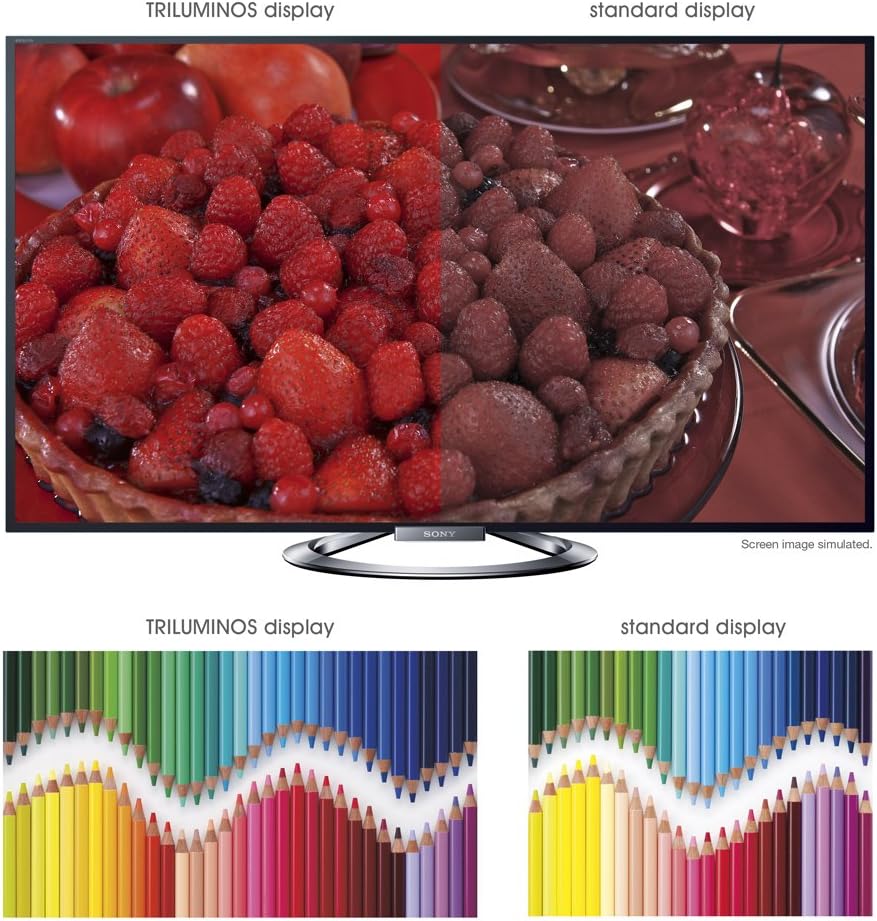
зображення: A split-screen comparison illustrating the vibrant and expanded color palette of the TRILUMINOS display versus a standard display.
4D Viewінж
To enjoy 3D content, ensure you have active 3D glasses and a 3D-compatible source (e.g., 3D Blu-ray player).
- Put on the active 3D glasses.
- Play 3D content from a connected source. The TV should automatically detect and switch to 3D mode.
- If 3D mode does not activate automatically, check the TV's picture settings for 3D options.
- Ensure 3D glasses are charged or have fresh batteries.
Технічне обслуговування
1. Очищення телевізора
- екран: Обережно протріть екран м’якою сухою тканиною з мікрофібри. Для стійких плям злегка протрітьampпротріть тканину водою або спеціалізованим засобом для чищення екранів (не розпилюйте безпосередньо на екран).
- Кабінет: Протріть корпус телевізора м’якою сухою тканиною. Уникайте використання абразивних засобів для чищення, воску або розчинників.
- Завжди відключайте телевізор від мережі перед чищенням.
2. Оновлення програмного забезпечення
Періодично перевіряйте наявність оновлень програмного забезпечення, щоб забезпечити оптимальну продуктивність і доступ до найновіших функцій.
- Navigate to the "Settings" menu on your TV.
- Look for "System Software Update" or similar options.
- Follow the on-screen instructions to download and install updates. Ensure the TV remains powered on during the update process.
3. 3D Glasses Care
- Clean lenses with a soft, dry cloth.
- Store glasses in a protective case when not in use.
- Replace batteries as needed (typically AA batteries).
Усунення несправностей
| проблема | Можлива причина / рішення |
|---|---|
| Немає живлення |
|
| Немає зображення / Чорний екран |
|
| Немає звуку |
|
| Проблеми з підключенням до мережі |
|
| 3D Image is Blurry or Not Working |
|
If the problem persists after attempting these solutions, please refer to the support section for further assistance.
Технічні характеристики
| Особливість | Деталь |
|---|---|
| Бренд | Sony |
| Номер моделі | KDL-55W900A |
| Розмір екрана | 55 дюймів |
| Технологія дисплея | LED |
| роздільна здатність | 1080p |
| Частота оновлення | 240 Hz (Motionflow XR 960) |
| Співвідношення сторін | 16:9 |
| Особливості | Flat, 3D Capable, Internet TV, X-Reality PRO, TRILUMINOS Display, Dynamic Edge LED Backlight |
| Технологія підключення | Ethernet, HDMI, радіочастотний інтерфейс, USB, Wi-Fi |
| Розміри виробу (з підставкою) | 48.9 дюйма (Ш) x 29.9 дюйми (В) x 11.8 дюймів (Г) |
| Розміри виробу (без підставки) | 48.9 дюйма (Ш) x 28.5 дюйми (В) x 2.5 дюймів (Г) |
| Вага товару | 48.5 фунта |
| Потрібні батареї | 2 батарейки типу АА (для пульта дистанційного керування) |
| Дата першої доступності | 7 січня 2013 р |
Інформація про гарантію
Your Sony KDL-55W900A television is covered by a limited warranty. The specific terms and duration of the warranty may vary by region and purchase date. Please refer to the warranty card included with your product or visit the official Sony support webсайт для отримання детальної інформації щодо гарантійного покриття, умов та положень.
Зберігайте підтвердження покупки (чек), оскільки воно знадобиться для будь-яких гарантійних претензій.
Підтримка клієнтів
For further assistance, technical support, or service inquiries regarding your Sony KDL-55W900A, please contact Sony customer support.
- Інтернет-підтримка: Відвідайте офіційну службу підтримки Sony webсайт із поширеними запитаннями, посібниками з усунення несправностей, завантаженням програмного забезпечення та варіантами зв’язку.
- Підтримка по телефону: Refer to the contact information provided in your product documentation or on the Sony support webсайт для регіональних телефонних номерів.
When contacting support, please have your TV model number (KDL-55W900A) and serial number ready.


