1. Вступ
This manual provides detailed instructions for the installation, configuration, operation, and maintenance of your D-Link DNS-320L Cloud Storage 2-Bay Network Attached Storage (NAS) device. Please read this manual thoroughly before using the device to ensure proper setup and optimal performance. The DNS-320L is designed to provide a centralized storage solution for your home or small office network, offering data redundancy, remote access, and media streaming capabilities.
2. Інформація про безпеку
- Переконайтеся, що пристрій розміщено на стійкій, рівній поверхні, щоб запобігти випадковому падінню.
- Не піддавайте пристрій впливу води, вологи або екстремальних температур.
- Use only the power adapter supplied with the device. Using an incorrect adapter may damage the device and void the warranty.
- Не відкривайте пристрій casing. Звертайтеся до кваліфікованого персоналу з усіх питань технічного обслуговування.
- Тримайте вентиляційні отвори вільними, щоб запобігти перегріву.
- Від’єднайте кабель живлення перед чищенням або переміщенням пристрою.
3. Вміст упаковки
Переконайтеся, що ваш пакет містить такі елементи:
- D-Link DNS-320L Cloud Storage 2-Bay NAS Enclosure
- Адаптер живлення
- Кабель Ethernet
- Посібник із швидкого встановлення
- Resource CD (may include software and full manual)
Якщо будь-які елементи відсутні або пошкоджені, зверніться до продавця або до служби підтримки D-Link.
4. Фізичний overview
Familiarize yourself with the ports, buttons, and indicators on your DNS-320L device.
Малюнок 4.1: Спереду View of D-Link DNS-320L. This image displays the front panel of the DNS-320L, typically showing LED indicators for power, network activity, and hard drive status. It may also feature a power button and a USB port for quick access.
4.1 Передня панель
- Світлодіод живлення: Вказує на стан живлення.
- HDD 1/2 LEDs: Indicate hard drive activity and status for each bay.
- Порт USB: For connecting external USB storage devices or printers.
- Кнопка живлення: Щоб увімкнути/вимкнути пристрій.
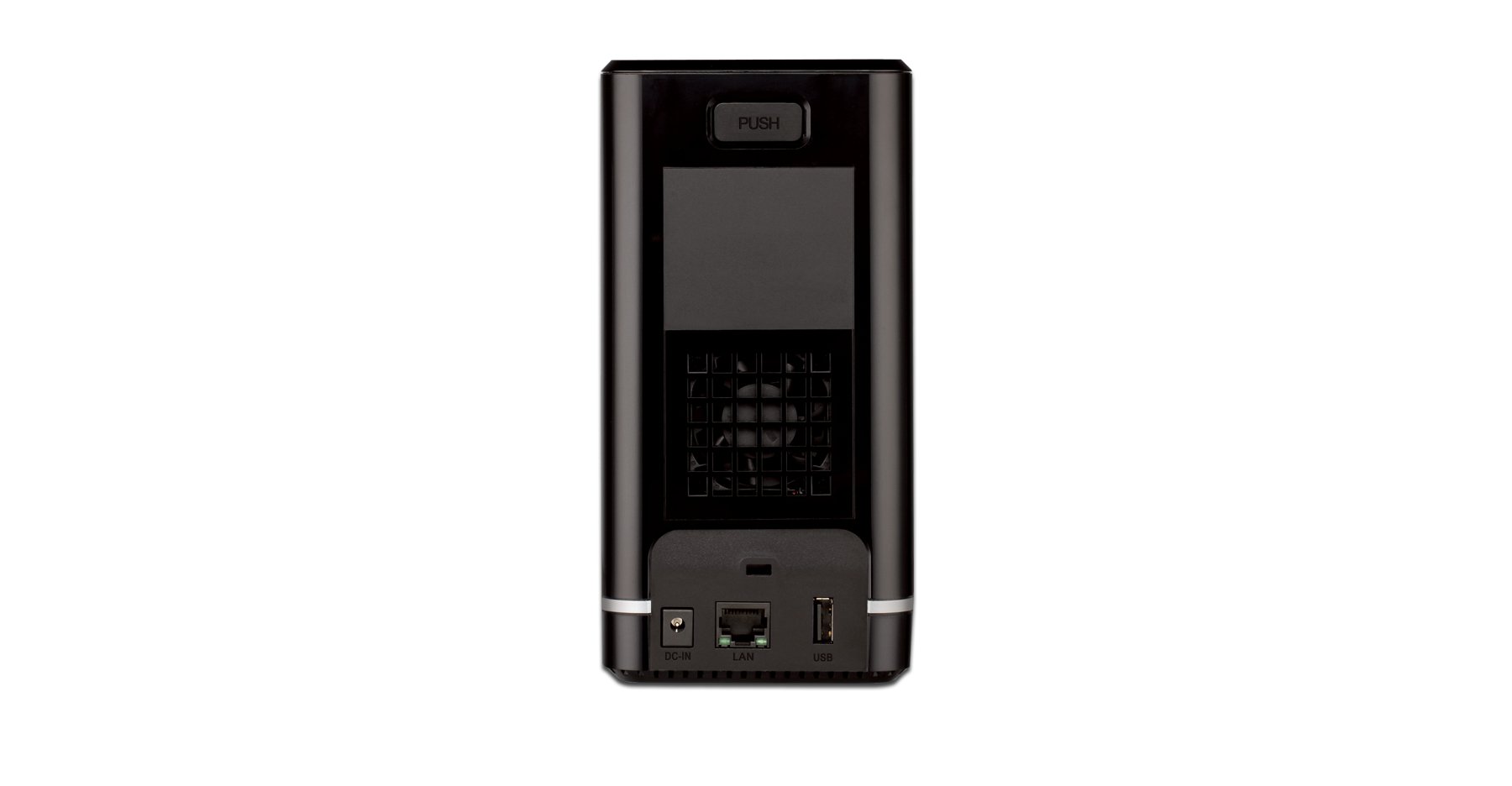
4.2 Задня панель
- Порт Gigabit Ethernet: Connects the NAS to your network router or switch.
- Роз'єм живлення: Для підключення адаптера живлення.
- Кнопка скидання: Used to restore factory default settings (requires a paperclip or similar pointed object).
- Слот замка Kensington: Для фізичної безпеки.
5. Встановлення обладнання
This section guides you through installing hard drives and connecting the DNS-320L to your network.
5.1 Встановлення жорстких дисків
The DNS-320L supports two 3.5-inch SATA hard drives. Ensure your drives are compatible and unformatted for initial setup.
- Ensure the DNS-320L is powered off and disconnected from the power outlet.
- Gently slide open the front cover of the NAS enclosure.
- Slide each hard drive into an available bay until it clicks into place, ensuring the SATA connectors align properly. No screws are typically required for tool-less installation.
- Надійно закрийте передню кришку.
Figure 5.1: Hard Drive Installation. This image illustrates the process of inserting a 3.5-inch SATA hard drive into one of the bays of the DNS-320L, highlighting the tool-less design.
5.2 Connecting the NAS to Your Network
- Connect one end of the Ethernet cable to the Gigabit Ethernet port on the rear of the DNS-320L.
- Підключіть інший кінець кабелю Ethernet до вільного порту LAN маршрутизатора або мережевого комутатора.
- Connect the power adapter to the power connector on the rear of the DNS-320L, then plug the adapter into a power outlet.
- Press the Power button on the front panel to turn on the device. The Power LED will illuminate, and the HDD LEDs will flash during startup.
6. Початкове налаштування
After hardware installation, you will need to configure the DNS-320L using its web-інтерфейс управління.
6.1 Доступ до Web Інтерфейс
- Ensure your computer is connected to the same network as the DNS-320L.
- Відкрийте a web браузер (наприклад, Chrome, Firefox, Edge).
- The DNS-320L typically obtains an IP address automatically via DHCP. You can use the D-Link ShareCenter Utility (if provided on the Resource CD or D-Link website) to discover its IP address. Alternatively, try accessing
http://dlinksharecenterorhttp://dlinksharecenter.local. - Введіть ім'я користувача за замовчуванням (зазвичай
admin) and leave the password blank (oradmin) to log in for the first time. You will be prompted to change the password.
6.2 Running the Setup Wizard
Upon first login, a setup wizard will guide you through essential configurations:
- Disk Volume Creation: You will be prompted to create a disk volume. Options typically include:
- Стандарт: Each drive is treated as a separate volume.
- RAID 0 (чергування): Combines drives for maximum capacity and performance, but offers no data redundancy. If one drive fails, all data is lost.
- RAID 1 (дзеркалювання): Mirrors data across both drives, providing data redundancy. If one drive fails, data is preserved on the other. Capacity is limited to the size of one drive.
- JBOD (Just a Bunch Of Disks): Combines drives into a single large volume sequentially. No performance or redundancy benefits.
Choose RAID 1 for data protection. RAID 0 offers speed but no protection.
- User Account Creation: Create at least one user account with administrative privileges.
- Налаштування мережі: Confirm or adjust network settings (DHCP or static IP).
- часовий пояс: Встановіть правильну дату та час.
7. Operating the DNS-320L
This section covers common operational tasks for your NAS.
7.1 Accessing Shared Folders
After setup, shared folders will be accessible from your network:
- Windows: ВІДЧИНЕНО File Explorer, type
\DNS-320L(or its IP address) in the address bar, and press Enter. - macOS: In Finder, go to Перейдіть> Підключитися до сервера, вид
smb://DNS-320L(or its IP address), and click Connect. - Linux: Використовуйте свій file manager's network browsing feature or mount the share using SMB/CIFS.
7.2 User and Group Management
Manage who can access your NAS and what permissions they have:
- Увійдіть до web interface as an administrator.
- Перейдіть до Management > User Management or similar section.
- Create new users, assign passwords, and add them to groups.
- Configure folder permissions for users and groups (Read/Write, Read Only, No Access).
7.3 Cloud Access and Remote Management
The DNS-320L supports D-Link's Cloud features for remote access.
- Register your device with the D-Link Cloud service (if applicable, refer to D-Link's official documentation for specific steps).
- Use the D-Link mobile app (e.g., mydlink ShareCenter) to access files remotely from your smartphone or tablet.
- Configure port forwarding on your router if direct remote access to the web interface is desired (advanced users only, consult your router manual).
7.4 USB Device Functionality
The USB 2.0 port on the front panel can be used for:
- Зовнішня пам'ять: Connect USB hard drives or flash drives to expand storage or for backup purposes. These devices will appear as shared folders.
- USB-принтер: Connect a compatible USB printer to share it across your network.
8. Технічне обслуговування
Regular maintenance ensures the longevity and reliability of your DNS-320L.
8.1 оновлень мікропрограми
Periodically check for and install firmware updates from the D-Link support website. Firmware updates can provide new features, performance improvements, and security patches.
- Завантажте останню прошивку file for your DNS-320L model from the official D-Link support site.
- Log in to the NAS web interface as an administrator.
- Перейдіть до Management > Firmware Upgrade or a similar section.
- Перейдіть до завантаженої мікропрограми file and initiate the upgrade process. Do not power off the device during the update.
8.2 Резервне копіювання даних
While RAID 1 provides redundancy against a single drive failure, it is not a substitute for a comprehensive backup strategy. Regularly back up critical data from your NAS to an external drive or another storage location.
8.3 Очищення
Keep the device clean to ensure proper airflow and prevent dust buildup.
- Перед очищенням вимкніть пристрій і від'єднайте його від мережі.
- Використовуйте м’яку, суху тканину для протирання зовнішньої поверхні.
- Використовуйте стиснене повітря для очищення вентиляційних отворів від пилу.
9. Вирішення проблем
This section addresses common issues you might encounter with your DNS-320L.
| проблема | Можливе рішення |
|---|---|
| Пристрій не включається. | Ensure the power adapter is securely connected to both the device and a working power outlet. Test the outlet with another device. |
| Cannot access the NAS on the network. | Verify the Ethernet cable is properly connected. Check network settings on your computer and router. Ensure the NAS has an IP address (use the D-Link utility). Try restarting the NAS and your router. |
| Hard drive LED is red or flashing abnormally. | This may indicate a drive error or failure. Check the NAS web interface for drive status. If a drive has failed in a RAID 1 configuration, replace the faulty drive and rebuild the array. |
| Забув пароль адміністратора. | Use the reset button on the rear panel to restore factory default settings. Warning: This will erase all configurations, but typically not data on the drives. You will need to reconfigure the NAS. |
| Повільно file швидкість передачі. | Ensure all network components (NAS, router, computer) support Gigabit Ethernet. Check for network congestion or faulty cables. |
10. Технічні характеристики
Key technical specifications for the D-Link DNS-320L:
| Особливість | Деталь |
|---|---|
| Номер моделі | DNS-320L |
| Привідні відсіки | 2 x 3.5-inch SATA I/II/III HDD |
| Підтримка RAID | Standard, JBOD, RAID 0, RAID 1 |
| Мережевий інтерфейс | 1 x Gigabit Ethernet (10/100/1000 Мбіт/с) |
| USB порти | 1 x USB 2.0 |
| Апаратна платформа | Мак, ПК |
| Розміри (ДxШxВ) | 3.54 x 5.68 x 7.61 дюймів |
| Вага товару | 1.39 pounds (without drives) |
| Колір | чорний |
| матеріал | метал |
| Сумісні пристрої | CPU, Desktop, Laptop, Server |
11. Гарантія та підтримка
Щоб отримати інформацію про гарантію, зверніться до гарантійного талона, що додається до вашого продукту, або відвідайте офіційний веб-сайт D-Link. website. D-Link provides technical support and resources to assist you with your DNS-320L.
- Інтернет-підтримка: Відвідайте www.dlink.com/support for FAQs, troubleshooting guides, firmware downloads, and product documentation.
- Технічна підтримка: Contact D-Link technical support for assistance with installation, configuration, or troubleshooting issues that cannot be resolved using this manual or online resources. Contact details are available on the D-Link support webсайт для вашого регіону.


