1. Важливі інструкції з техніки безпеки
Please read these instructions carefully before operating the unit and retain them for future reference. Following these guidelines will ensure safe and proper use of your GPX R602B radio.
- Вода і вологість: Do not use this apparatus near water. Avoid exposure to rain or moisture.
- Джерела тепла: Не встановлюйте поблизу будь-яких джерел тепла, таких як радіатори, обігрівачі, печі або інші пристрої (включаючи ampліфікатори), які виробляють тепло.
- Вентиляція: Забезпечте належну вентиляцію. Не блокуйте вентиляційні отвори.
- Джерела живлення: Працюйте лише від джерела живлення того типу, який зазначено на маркувальній етикетці.
- Прибирання: Чистіть тільки сухою ганчіркою.
- Додатки: Використовуйте лише насадки/аксесуари, зазначені виробником.
- Обслуговування: Звертайтеся до кваліфікованого сервісного персоналу. Обслуговування потрібне, якщо пристрій було пошкоджено будь-яким чином, наприклад, пошкоджено шнур живлення або вилка, була пролита рідина або всередину пристрою потрапили предмети, пристрій піддався впливу дощу або вологи, не працює належним чином , або було видалено.
Безпека батареї
- Не змішуйте старі та нові батареї.
- Не змішуйте лужні, стандартні (вуглець-цинкові) або акумуляторні (нікель-кадмієві) батареї.
- Insert batteries correctly, observing the + and - polarities.
- Негайно вийміть розряджені батареї.
- Утилізуйте батареї належним чином. Не спалюйте.
2. особливості
The GPX R602B Portable AM/FM Radio offers a range of features designed for convenience and versatility:
- Portable AM/FM radio with a built-in handle for easy transport.
- Integrated speakers with analog volume control and durable metal grills.
- Digital clock with user-friendly setting buttons.
- Operates using the built-in AC power cable.
- Can also be powered by 3 C batteries (sold separately) for portable use.
- 3.5mm audio line input jack for connecting external audio devices.
- Telescopic antenna for improved FM reception.
- Stereo headphone jack for private listening.

Figure 2.1: Key features and connection points of the GPX R602B radio.
3. Вміст упаковки
Upon unpacking your GPX R602B radio, please ensure all the following items are present:
- GPX R602B Portable AM/FM Radio Unit
- Інструкція з експлуатації
- Built-in AC Power Adapter
4. Елементи керування та індикатори
Familiarize yourself with the controls and indicators on your radio for optimal operation.
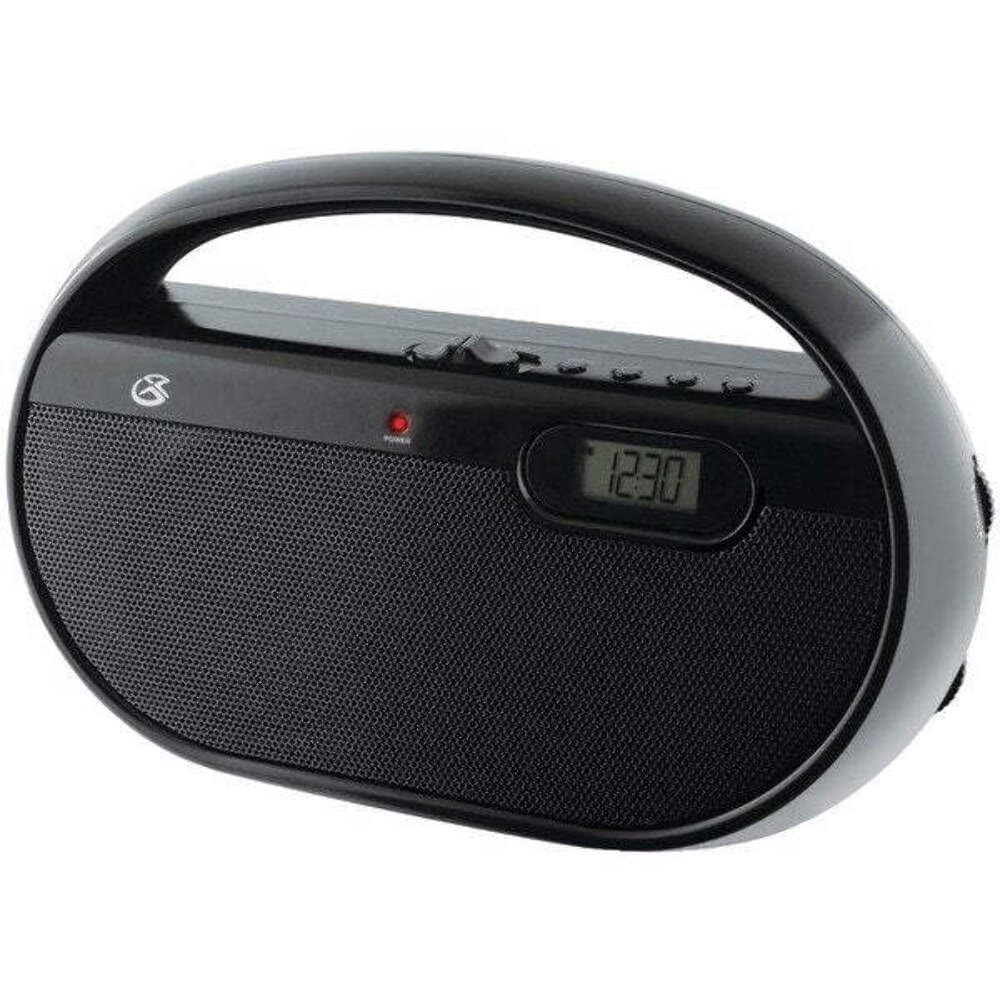
Малюнок 4.1: Спереду view of the GPX R602B radio.
Control Layout (Refer to Figure 4.1)
- Ручка живлення/гучності: Rotates to turn the unit ON/OFF and adjust the volume level.
- Ручка налаштування: Rotates to select AM or FM radio stations.
- Перемикач діапазону: Slides to select between AM and FM radio bands.
- Цифровий дисплей: Shows the current time or radio frequency.
- Set Time Button: Used in conjunction with H/M buttons to set the clock.
- H/M Buttons: Used to adjust hours and minutes when setting the clock.
- Display Time Button: Briefly shows the time when the radio is playing.
- Aux In Jack (3.5mm): Підключіть зовнішні аудіопристрої.
- Гніздо для навушників (3.5 мм): Підключіть навушники для приватного прослуховування.
- Telescopic FM Antenna: Витягніть та відрегулюйте для оптимального прийому FM.
5. Живлення блоку
The GPX R602B radio can be powered by either AC power or batteries.
Робота змінного струму
- Locate the built-in AC power cord. This cord is typically stored in the battery compartment when not in use.
- Plug the AC power cord into a standard wall outlet (120V AC, 60Hz).
- Тепер агрегат готовий до роботи.
Робота від батареї
For portable use, the radio requires 3 'C' size batteries (not included).
- Відкрийте кришку батарейного відсіку, розташовану на задній панелі пристрою.
- Insert 3 'C' size batteries, ensuring the correct polarity (+ and -) as indicated inside the compartment.
- Надійно закрийте кришку батарейного відсіку.
- The unit is now ready for battery-powered operation.

Figure 5.1: Power options for the GPX R602B radio.
6. Налаштування та основні операції
Початкове налаштування
- Підключення живлення: Connect the radio to AC power or insert batteries as described in Section 5.
- Регулювання антени: For FM reception, extend the telescopic antenna fully. For AM reception, the unit has a built-in antenna, so no external adjustment is needed. Position the unit for best AM reception.
Керування радіо
- Увімкнути: Rotate the Power/Volume knob clockwise until it clicks and the unit powers on.
- Виберіть діапазон: Slide the Band Selector switch to either AM or FM.
- Налаштування станції: Rotate the Tuning knob to find your desired radio station. The frequency will be displayed on the digital screen.
- Регулювання гучності: Поверніть ручку живлення/гучності, щоб налаштувати рівень звуку.
- Вимкнути: Rotate the Power/Volume knob counter-clockwise until it clicks and the unit powers off.
Using the Line Input (Aux In)
You can connect external audio devices, such as smartphones or MP3 players, to play audio through the radio's speakers.
- Connect a 3.5mm audio cable (not included) from the headphone jack or line-out jack of your external device to the Aux In jack on the radio.
- Turn on the radio and your external device.
- Adjust the volume on both the radio and your external device for optimal sound.

Figure 6.1: Devices compatible with the Aux In feature.
Використання навушників
For private listening, plug standard 3.5mm headphones (not included) into the Headphone Jack. The internal speakers will automatically mute.
Налаштування цифрового годинника
The digital clock can be set when the radio is turned off.
- Ensure the radio is turned OFF using the Power/Volume knob.
- Натисніть і утримуйте обидва Встановити час кнопку та H/M кнопку одночасно.
- Тримаючи Встановити час button, repeatedly press the H/M button to adjust the hour and then the minutes.
- Відпустіть Встановити час button once the desired time is set.
- до view the time while the radio is playing, press the Час відображення button. The time will appear briefly on the digital display.
7. Технічне обслуговування
Proper care and maintenance will ensure the longevity of your GPX R602B radio.
- Прибирання: Протріть зовнішню частину пристрою м’якою сухою тканиною. Не використовуйте абразивні засоби для чищення, віск або розчинники.
- Заміна батареї: If using batteries, replace all three 'C' batteries when the unit's performance diminishes. Always replace with new batteries of the same type.
- Зберігання: Якщо пристрій зберігатиметься протягом тривалого часу, вийміть батарейки, щоб запобігти витіканню та корозії.
8. Вирішення проблем
If you encounter issues with your GPX R602B radio, refer to the following common problems and solutions:
| проблема | Можлива причина | Рішення |
|---|---|---|
| Немає живлення | AC cord not plugged in; Batteries exhausted or incorrectly inserted. | Ensure AC cord is securely plugged into a live outlet. Replace batteries with new ones, checking polarity. |
| Поганий радіоприйом | Antenna not extended (FM); Unit poorly positioned (AM); Weak signal. | Extend and adjust the telescopic FM antenna. For AM, rotate the unit for better reception. Try moving the radio to a different location. |
| Немає звуку з динаміків | Гучність занадто низька; підключено навушники. | Increase the volume using the Power/Volume knob. Disconnect headphones if not desired. |
| Clock not setting correctly | Неправильна послідовність натискань кнопок. | Ensure the radio is OFF. Press and hold both 'Set Time' and 'H/M' buttons simultaneously, then repeatedly press 'H/M' to adjust. Release 'Set Time' when done. |
| Звук спотворений або нечіткий | Volume too high; Poor reception; External device volume too high. | Lower the volume. Adjust antenna or unit position for better reception. If using Aux In, adjust volume on the external device. |
9. Технічні характеристики
Detailed technical specifications for the GPX R602B Portable AM/FM Radio:
- Номер моделі: R602B
- Розміри продукту (Д x Ш x В): 9.62 x 3.74 x 6.3 дюйми (24.43 x 9.50 x 16.00 см)
- Вага товару: 1.76 фунта (0.80 кг)
- Джерело живлення: AC 120V, 60Hz or 3 x 'C' size batteries (not included)
- Технологія тюнера: AM/FM
- Підтримувані радіодіапазони: 2-Band (AM/FM)
- Технологія підключення: Radio, 3.5mm Aux In
- Особливості: Built-In AM Antenna, Built-In Clock, Portable, Telescopic FM Antenna, 3.5mm Headphone Jack
- колір: чорний
- Виробник: Digital Products International, Inc.
- Дата першої доступності: 5 червня 2012 р
10. Гарантія та підтримка
For warranty information and customer support regarding your GPX R602B radio, please refer to the warranty card included with your purchase or visit the official GPX webсайт. Зберігайте чек про покупку як підтвердження покупки для будь-яких гарантійних претензій.
If you require technical assistance or have questions not covered in this manual, please contact GPX customer service directly. Contact details are typically available on the manufacturer's webсайту або в упаковці продукту.


