1. Вступ
This manual provides essential information for the proper installation, operation, and maintenance of your Alpine VIE-X08VS 7-inch WVGA HDD Navigation and AV Integrated System. Please read this manual thoroughly before using the product to ensure safe and optimal performance. Keep this manual for future reference.
2. Інформація про безпеку
ПОПЕРЕДЖЕННЯ: Недотримання цих інструкцій з безпеки може призвести до пожежі, ураження електричним струмом або інших травм чи пошкоджень.
- Do not attempt to install or service this product yourself. Installation and service should be performed by qualified professionals.
- Не використовуйте систему таким чином, щоб це відволікало вас від керування автомобілем. Завжди ставте безпеку дорожнього руху на перше місце.
- Переконайтеся, що вся проводка підключена правильно, щоб запобігти короткому замиканню або пошкодженню.
- Keep the unit free from moisture and extreme temperatures.
- Не розбирайте та не модифікуйте пристрій. Це може призвести до несправності або травмування.
3. Вміст упаковки
Перевірте наявність усіх елементів в упаковці:
- Alpine VIE-X08VS Main Unit
- Film TV Antenna (4 front pieces)
- Hands-free Call Microphone (4m cable)
- Посібник користувача (цей документ)
- Керівництво по установці
4. Налаштування та встановлення
Professional installation is highly recommended for this integrated system. Incorrect installation can lead to damage to the unit or your vehicle's electrical system.
4.1. Перевірки перед встановленням
- Перед початком встановлення переконайтеся, що акумулятор автомобіля від’єднаний.
- Confirm compatibility with your vehicle's dashboard and wiring harness.
4.2. Встановлення антени
Install the included film TV antennas on the front windshield according to the separate installation guide. Ensure proper placement for optimal digital TV reception.
4.3. Розміщення мікрофона
Mount the hands-free microphone in a location that allows clear voice pickup, typically near the driver's sun visor or rearview mirror. Route the cable discreetly to the main unit.
4.4. Initial Power-On and Settings
After installation, reconnect the battery. Upon first power-on, the system may guide you through initial setup steps, including language selection, time zone, and basic navigation preferences. Follow the on-screen prompts.
5. Інструкція з експлуатації
The Alpine VIE-X08VS offers a comprehensive range of features. This section outlines the basic operation of key functions.
5.1. Навігаційна система
The 7-inch WVGA LCD provides clear map displays. The system supports both 2D and 3D map views for enhanced situational awareness. Utilize the Eco-Guide display function to support fuel-efficient driving.
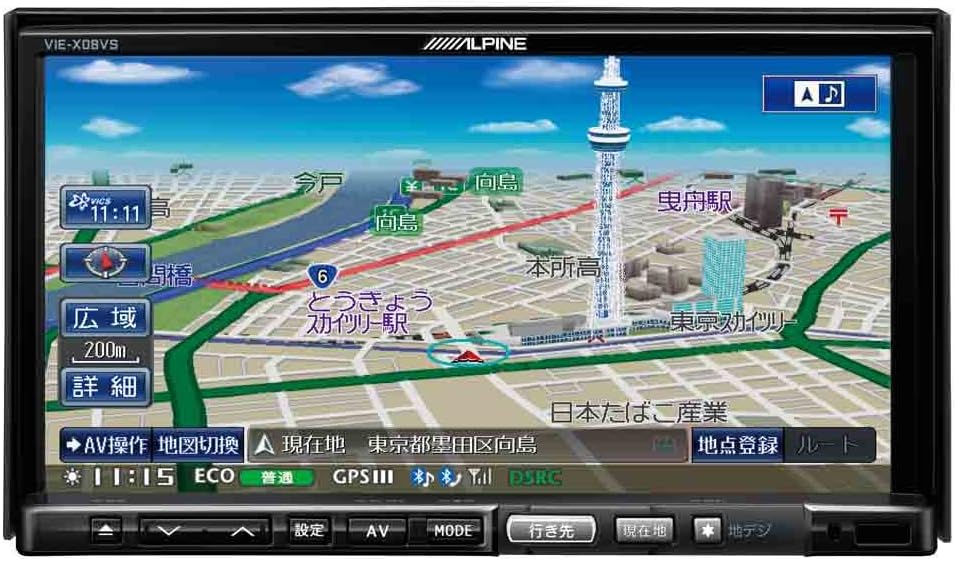
Малюнок 1: Спереду view of the Alpine VIE-X08VS unit displaying a detailed navigation map with Tokyo Skytree visible.

Рисунок 2: Кутовий view of the Alpine VIE-X08VS unit, showing the navigation map and side profile.
5.1.1. Оновлення карти
The system includes free map updates until the 2015 edition. For information on subsequent map updates, please refer to the Alpine support webсайту або зверніться до свого дилера.
5.2. Audio/Video (AV) Features
The VIE-X08VS integrates various AV sources for your entertainment.
- HDD Music Storage: The built-in 60GB HDD is designed for audio, capable of automatically recording approximately 5,500 songs.
- Цифрове ТБ: Access digital terrestrial TV broadcasts using the easy-to-use one-touch key.
- Відтворення DVD-V/CD: Insert DVDs or CDs into the disc slot for video and audio playback.
- Підключення Bluetooth: Pair your Bluetooth-enabled devices for audio streaming and hands-free calling.
- USB/SD-носій: Підключіть USB-пристрої або вставте SD-карти для відтворення сумісного аудіо та відео files.
- 5.1ch Decoder: Enjoy enhanced audio quality with the built-in 5.1ch decoder.
- Rear Vision Link: Transmit high-quality video to rear monitors. This function also allows for navigation screen display and operation from the rear, enhancing the overall driving experience for passengers.
- Sony Walkman Compatibility: Connect compatible Sony Walkman devices for music playback.
5.3. Dual-Screen Display
The system supports a dual-screen display, allowing you to view both navigation and AV content simultaneously. This feature can be accessed via the on-screen menu or dedicated buttons.
6. Технічне обслуговування
Regular maintenance helps ensure the longevity and optimal performance of your Alpine VIE-X08VS unit.
6.1. Очищення дисплея
Use a soft, dry cloth to gently wipe the display screen. For stubborn smudges, slightly dampen the cloth with water or a screen-cleaning solution specifically designed for electronic displays. Avoid harsh chemicals or abrasive materials.
6.2. Генеральне прибирання
Протріть зовнішню частину пристрою м’якою сухою тканиною. Не допускайте потрапляння рідини всередину пристрою.
6.3. Disc Slot Care
Keep the disc slot free of dust and debris. Avoid inserting bent, scratched, or dirty discs, as this can damage the disc drive.
7. Вирішення проблем
If you encounter issues with your Alpine VIE-X08VS, refer to the following common problems and solutions before contacting support.
| проблема | Можлива причина / рішення |
|---|---|
| Немає живлення | Check vehicle's fuse box. Ensure all power cables are securely connected. |
| Ні звуку | Verify volume level. Check speaker connections. Ensure audio source is selected correctly. |
| Втрата сигналу GPS | Переконайтеся, що GPS-антена має чіткий view of the sky. Move to an open area away from tall buildings or tunnels. |
| Пристрій Bluetooth не підключається | Ensure Bluetooth is enabled on both the unit and your device. Place devices close together. Delete previous pairings and try again. |
| Проблеми з відтворенням дисків | Ensure the disc is clean and free of scratches. Verify the disc format is supported. |
8. Технічні характеристики
Detailed technical specifications for the Alpine VIE-X08VS unit:
| Особливість | Специфікація |
|---|---|
| Виробник | Альпійський |
| Назва моделі | VIE X08VS |
| Номер моделі товару | VIE-X08VS |
| Розміри продукту (ДxШxВ) | 18.73 х 17.8 х 10 см |
| Вага товару | 3.2 кілограма |
| Розмір екрана | 7 дюймів |
| Тип дисплея | WVGA LCD |
| Ємність пам'яті | 60 GB (HDD) |
| Технологія підключення | Bluetooth, USB |
| Підтримувані носії | DVD-V, CD, USB, SD |
| Тип карти | вул |
| Тип монтажу | Панельне кріплення |
| Особливості | Hands-free calling, Digital TV, 5.1ch Decoder, Eco-Guide, Rear Vision Link |
| Сумісний тип автомобіля | Легковий автомобіль |
9. Гарантія та підтримка
Щоб отримати інформацію про гарантію, зверніться до гарантійного талона, що додається до вашого продукту, або відвідайте офіційний веб-сайт Alpine. webсайт. Зберігайте чек про покупку для гарантійних претензій.
9.1. Підтримка клієнтів
If you require technical assistance, have questions about your product, or need to arrange service, please contact Alpine customer support through their official webсайт або контактну інформацію, надану в документації до вашого продукту.


