1. Вступ
This manual provides detailed instructions for the installation, operation, and maintenance of your Gewiss GW10701 Programmable Thermostat. This device is designed to control heating and air conditioning systems, allowing you to manage room temperature efficiently and comfortably. Please read this manual thoroughly before installation and use to ensure proper functionality and safety.
2. Інформація про безпеку
Завжди дотримуйтесь наступних запобіжних заходів, щоб запобігти травмам або пошкодженню пристрою:
- Встановлення повинен виконуватися лише кваліфікованим персоналом відповідно до місцевих електротехнічних норм та правил.
- Перед встановленням або обслуговуванням термостата відключіть живлення системи опалення/охолодження за допомогою головного автоматичного вимикача.
- Не піддавайте термостат впливу води або надмірної вологості.
- Використовуйте лише зазначений тип батареї та дотримуйтесь правильної полярності під час встановлення.
- Зберігайте батарейки у недоступному для дітей місці. Не викидайте батарейки у вогонь.
- Do not attempt to open or repair the thermostat yourself. Contact qualified service personnel.
3. Продукт закінчивсяview
The Gewiss GW10701 is a wall-mounted programmable thermostat featuring an LCD display and intuitive controls for temperature management.
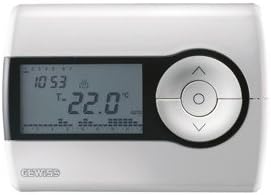
малюнок 1: Фронт view of the Gewiss GW10701 Thermostat. It features a clear LCD screen displaying time and temperature, alongside a circular control panel with directional buttons and a central confirmation button for easy navigation and setting adjustments.
3.1. Компоненти
- РК-дисплей: Shows current time, temperature, operating mode, and programming settings.
- Кнопки управління: Typically include UP/DOWN arrows for temperature adjustment, MODE button for selecting operating modes (e.g., Heat, Cool, Auto, Off), and a SET/PROG button for accessing programming menus. (Note: Specific button functions may vary slightly; refer to on-screen prompts.)
- Батарейний відсік: Located on the rear or side, houses the power supply batteries.
- Пластина для монтажу: Для надійного монтажу на стіну.
4. Монтаж
4.1. Вибір місця розташування
Select a central location on an interior wall, approximately 1.5 meters (5 feet) above the floor. Avoid locations near heat sources (lamps, direct sunlight, fireplaces), drafts (windows, doors), or areas with poor air circulation.
4.2. Монтаж термостата
- Відключити живлення: Вимкніть живлення системи опалення/охолодження за допомогою головного автоматичного вимикача.
- Separate Base Plate: Carefully detach the front cover of the thermostat from its base plate.
- Розмітка та свердління: Hold the base plate against the wall at your chosen location. Mark the drilling points. Drill holes and insert wall anchors if necessary.
- Безпечна опорна плита: Fasten the base plate to the wall using the provided screws.
- Проводка (якщо застосовується): Connect the system wires to the appropriate terminals on the base plate. Refer to the wiring diagram provided with your heating/cooling system or consult a qualified electrician. Note: While the thermostat is battery-powered, it controls a 230V system. Ensure correct wiring.
- Встановіть акумулятори: Insert the required batteries into the battery compartment, observing correct polarity (+/-).
- Підключити термостат: Carefully reattach the thermostat front cover to the base plate, ensuring it clicks securely into place.
- Відновлення живлення: Turn on the power to your heating/cooling system at the main circuit breaker.
5. Операція
5.1. Початкове налаштування
Upon first power-up or after battery replacement, you may need to set the current time and date. Follow the on-screen prompts or refer to the programming section.
5.2. Встановлення температури
Використовуйте UP і ВНИЗ arrow buttons to adjust the desired temperature. The display will show the set temperature temporarily, then revert to the current room temperature.
5.3. Режими роботи
Натисніть РЕЖИМ button (or similar) to cycle through available operating modes:
- ТЕПЛО: Термостат активує систему опалення, коли температура в приміщенні падає нижче встановленого значення.
- ОХЛАЖДЕННЯ: The thermostat will activate the air conditioning system when the room temperature rises above the set temperature.
- АВТО: Термостат автоматично перемикається між режимами обігріву та охолодження, щоб підтримувати встановлений діапазон температури.
- ВИМКНЕНО: Системи опалення та охолодження вимкнені.
6. Програмування
The Gewiss GW10701 allows you to create custom heating/cooling schedules for different times of the day and days of the week. This feature helps optimize energy consumption and comfort.
6.1. Встановлення часу та дати
- Натисніть НАБІР or ПРОГ кнопку, щоб увійти в меню налаштувань.
- Navigate using the arrow buttons to find "Time" or "Date" settings.
- Use the arrow buttons to adjust the values (hour, minute, day, month, year).
- Підтвердьте кожне налаштування за допомогою НАБІР or central button.
6.2. Creating a Program Schedule
The thermostat typically offers daily or weekly programming options. You can set different temperatures for various periods (e.g., Wake, Day, Evening, Sleep).
- Натисніть ПРОГ кнопку для входу в режим програмування.
- Select the day or group of days you wish to program (e.g., Mon-Fri, Sat-Sun, or individual days).
- For each period (e.g., "Wake"), set the desired start time and temperature using the arrow buttons.
- Advance to the next period and repeat the process.
- Save your program and exit programming mode.
Consult the on-screen menu and specific button labels on your device for precise programming steps, as interfaces can vary.
7. Технічне обслуговування
7.1. Заміна батареї
The thermostat is powered by batteries. When the battery indicator appears on the display, replace the batteries promptly to ensure continuous operation. Typically, 2x AA or AAA alkaline batteries are required.
- Обережно зніміть передню кришку термостата.
- Вийміть старі батареї та утилізуйте їх відповідально.
- Вставте нові батареї, дотримуючись правильної полярності.
- Знову прикріпіть передню кришку.
7.2. прибирання
Clean the thermostat's exterior with a soft, dry cloth. Do not use abrasive cleaners, solvents, or spray cleaners directly onto the device, as this can damage the display or internal components.
8. Вирішення проблем
| проблема | Можлива причина | Рішення |
|---|---|---|
| Дисплей порожній або тьмяний. | Низький або розряджений акумулятор. | Замініть батарейки на нові. |
| Система опалення/охолодження не реагує. |
|
|
| Показники температури здаються неточними. | Розташування термостата залежить від протягів або джерел тепла. | Переконайтеся, що термостат не піддається впливу прямих сонячних променів, протягів або приладів, що випромінюють тепло. |
9. Технічні характеристики
- Виробник: Гевісс
- Номер моделі: GW10701 (Chorus)
- Розміри (Д x Ш x В): 13 х 2.3 х 9.2 см
- вага: 9.07 г
- колір: Білий
- матеріал: пластик
- Джерело живлення: Працює від акумулятора
- Перемикання Voltage: 230 Volt (for controlled system)
- Тип дисплея: LCD або LED
- Тип монтажу: Настінні
- Особливості управління: Programmable, Button control
- Використання: Heating systems, Air conditioning systems
10. Гарантія та підтримка
For warranty information, technical support, or service inquiries regarding your Gewiss GW10701 Thermostat, please refer to the warranty card included with your product or visit the official Gewiss website. You may also contact your local Gewiss distributor or retailer for assistance.
Gewiss Official Webсайт: www.gewiss.com


