1. Вступ
The Genius GX-Gaming SW-G2.1 3000 is a 2.1 channel speaker system designed to enhance audio experiences for gaming, music, and movies. It features a powerful subwoofer for deep bass and two satellite speakers for clear mid and high-range sounds. The system includes a dedicated control box for convenient adjustments and multiple input options for various devices.
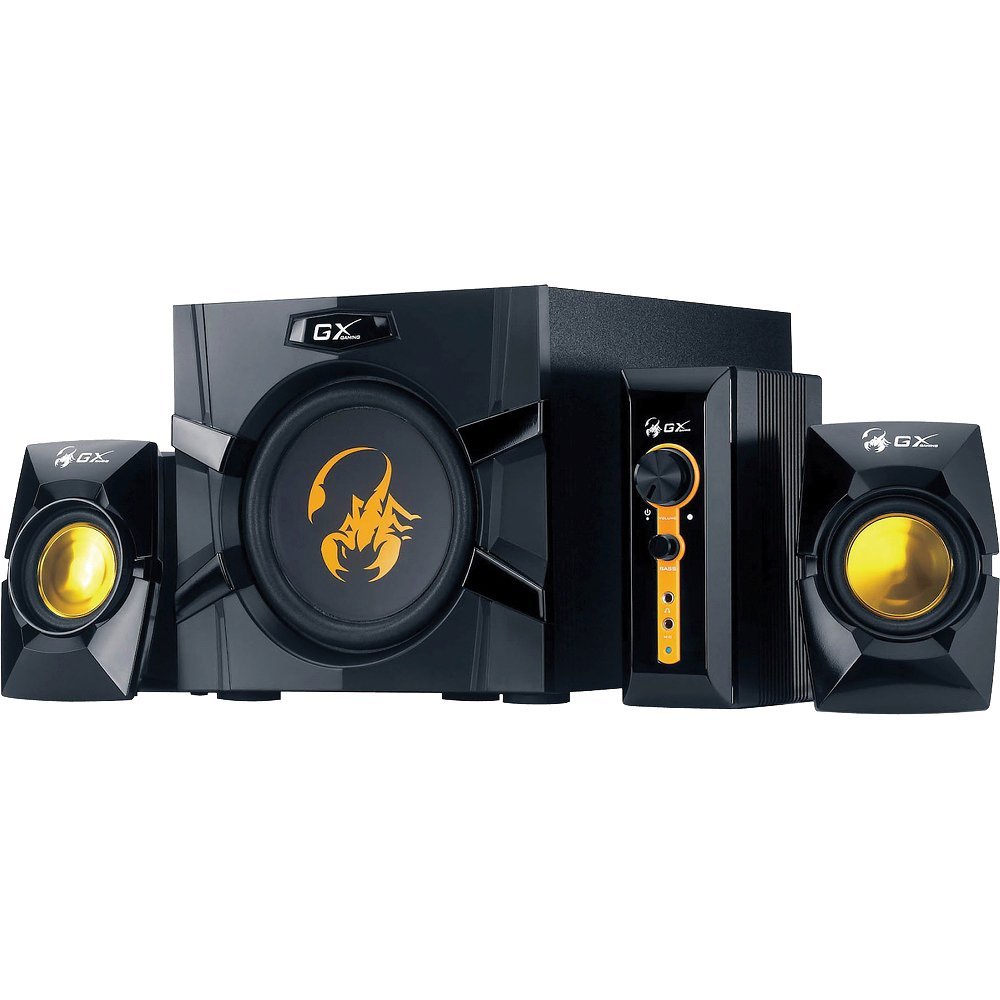
An image showing the Genius GX-Gaming SW-G2.1 3000 speaker system, featuring the subwoofer, two satellite speakers, and the control unit.
2. Вміст упаковки
Будь ласка, перевірте, чи всі перелічені нижче предмети входять до вашої упаковки:
- One (1) Wooden Cabinet Subwoofer
- Два (2) сателітні динаміки
- One (1) Control Box
- One (1) Stereo RCA to 3.5mm Audio Cable
- One (1) 3.5mm Plug Audio Cable
- One (1) Microphone Jack Cable
- One (1) Headphone Jack Cable
- One (1) Multi-language User Manual
3. Особливості продукту
- Загальна вихідна потужність: 70 Вт (середньоквадратичне значення)
- Сабвуфер: Wooden cabinet with a 6.5-inch driver for deep bass
- Сателітні динаміки: Two curvaceous speakers with 3-inch metal drivers for clear mid and high tones
- Блок управління: Independent controls for volume and bass adjustment
- Підключення: Two input jacks (3.5mm standard and two RCA) for PC, TV, DVD, and game devices
- Аудіороз'єми: Dedicated microphone jack for online communication and headphone jack for private listening
- АЧХ: 35 Hz ~ 20K Hz
- Коефіцієнт сигнал-шум: 85 дБ
- Режим енергозбереження: Automatically enters sleep mode after 1 minute of inactivity. To resume, ensure audio input device volume is at least 50%.
4. Інструкції з налаштування
- Розташування динаміків: Place the subwoofer on a stable surface, preferably on the floor, for optimal bass. Position the satellite speakers on either side of your listening area, facing you.
- Підключення сателітних динаміків: Connect the cables from the two satellite speakers to the corresponding output ports on the subwoofer.
- Підключення блоку керування: Plug the control box cable into the designated port on the subwoofer.
- Підключення джерела аудіо:
- For PC, MP3/CD players: Use the 3.5mm audio cable to connect your device's audio output to the 3.5mm input on the control box.
- For Game Consoles, DVD Players, TV: Use the stereo RCA to 3.5mm cable. Connect the RCA ends to your device's audio output and the 3.5mm end to the corresponding input on the control box.
- Підключіть живлення: Plug the subwoofer's power cord into a standard electrical outlet (110V or 220V AC, depending on your region).
- Увімкнення: Turn on the power switch, usually located on the subwoofer. The system is now ready for use.
5. Інструкція з експлуатації
- Регулювання гучності: Use the large knob on the control box to adjust the overall volume of the speaker system.
- Регулювання басів: Use the dedicated bass knob on the control box to increase or decrease the subwoofer's bass output.
- Використання мікрофона: Connect a microphone to the MIC jack on the control box for online communication.
- Використання навушників: Plug your headphones into the headphone jack on the control box for private listening. This will mute the speakers.
- Режим енергозбереження: If the system enters sleep mode due to inactivity, ensure your audio input device's volume is set to 50% or higher, then adjust the system's volume using the control box to resume audio.
6. Технічне обслуговування
- Прибирання: Use a soft, dry cloth to clean the surfaces of the speakers and control box. Avoid using liquid cleaners or abrasive materials.
- Розміщення: Тримайте динаміки подалі від прямих сонячних променів, джерел тепла та надмірної вологи. Забезпечте належну вентиляцію навколо сабвуфера.
- Управління кабелем: Ensure all cables are securely connected and not tangled or pinched to prevent damage.
- Зберігання: Якщо система зберігатиметься протягом тривалого часу, від’єднайте її від живлення та зберігайте у прохолодному сухому місці.
7. Вирішення проблем
- Немає звуку:
- Ensure the power cable is securely plugged in and the power switch is on.
- Check all audio cables are correctly connected between the source device, control box, and subwoofer.
- Verify the volume knob on the control box is turned up.
- Ensure the audio source device (PC, TV, etc.) is playing audio and its volume is not muted or too low.
- If in Power Saving Mode, increase the audio source device's volume to at least 50%.
- Спотворений звук:
- Reduce the volume on both the speaker system and the audio source device.
- Adjust the bass level on the control box.
- Переконайтеся, що кабелі динаміків не пошкоджені та нещільно підключені.
- Один динамік не працює:
- Check the connection of the non-working satellite speaker to the subwoofer.
- Test with another audio source or swap the satellite speaker connections (if possible) to isolate the issue.
8. Технічні характеристики
| Загальна вихідна потужність | 70 Вт (середньоквадратичне значення) |
| Супутникова енергія | 2 х 15 Вт |
| Потужність сабвуфера | 40 Вт |
| Блоки драйверів | Satellites: 2 x 3 inches, Subwoofer: 1 x 6.5 inches |
| АЧХ | 35 Hz ~ 20K Hz |
| Співвідношення сигнал-шум | 85 дБ |
| Розміри сабвуфера (ШxВxГ) | 230 x 314 x 215 мм (прибл. 9 x 12.4 x 8.5 дюйма) |
| Satellite Dimensions (WxHxD) | 99 x 115 x 143 мм |
| Controller Dimensions (WxHxD) | 60 x 154 x 170 мм |
| Вага системи | 4.66 кг (прибл. 10.27 фунта) |
| Джерело живлення | 110 В або 220 В змінного струму |
| Сумісні пристрої | Personal Computer, Television, DVD Players, Game Consoles, MP3/CD players |
| Вхідні гнізда | 3.5mm standard input, two RCA jacks |
| Спосіб контролю | Knobs/Buttons (listed as 'Touch' in some specifications) |
9. Гарантія та підтримка
This Genius GX-Gaming SW-G2.1 3000 speaker system comes with a Обмежена гарантія. For specific details regarding warranty coverage, duration, and terms, please refer to the warranty card included in your product packaging or visit the official Genius webсайт.
For technical support, troubleshooting assistance, or service inquiries, please contact Genius customer support through their official website or the contact information provided in your product documentation. When contacting support, please have your product model number (SW-G2.1 3000) and purchase information readily available.


