1. Вступ
This manual provides essential information for the safe and efficient operation of your Alto Professional TMX160 DFX 16-Channel Powered Mixer. The TMX160 DFX is a versatile audio mixing console featuring 16 input channels, a built-in Alesis digital effects processor, and an integrated power amplifier capable of delivering 750W stereo output at 4Ω or 1500W mono output at 8Ω. It includes 12 XLR microphone inputs with phantom power, 16 line inputs, and stereo RCA inputs, along with a 3-band equalizer on each mono and stereo channel.
Please read this manual thoroughly before using the product to ensure proper setup and operation. Keep this manual for future reference.
2. Інформація про безпеку
Завжди дотримуйтесь основних запобіжних заходів під час використання цього виробу, щоб зменшити ризик пожежі, ураження електричним струмом та травмування людей.
- Джерело живлення: Підключайте пристрій лише до розетки змінного струму зазначеної напруги.tage.
- Заземлення: Ensure the unit is properly grounded. Do not defeat the safety purpose of the polarized or grounding-type plug.
- Вода і вологість: Do not expose this equipment to rain or moisture. Do not use near water.
- Вентиляція: Забезпечте належну вентиляцію. Не блокуйте вентиляційні отвори.
- Тепло: Не встановлюйте поблизу будь-яких джерел тепла, таких як радіатори, обігрівачі, печі або інші пристрої (включаючи ampліфікатори), які виробляють тепло.
- Кабелі: Захищайте шнури живлення від наступання або защемлення.
- Обслуговування: Звертайтеся до кваліфікованого сервісного персоналу з усіх питань. Не намагайтеся обслуговувати цей виріб самостійно.
3. Налаштування
3.1 Розпакування та перевірка
Carefully unpack the TMX160 DFX mixer and inspect it for any signs of damage that may have occurred during transit. If any damage is found, contact your dealer immediately.
3.2 Підключення живлення
Connect the supplied AC power cord to the mixer's power input and then to a suitable grounded AC power outlet. Ensure the mixer's power switch is in the OFF position before connecting to power.
3.3 Підключення входів
The TMX160 DFX offers a variety of input options:
- Microphone Inputs (MIC 1-12): Use XLR cables to connect microphones to the 12 XLR inputs. Phantom power (+48V) can be activated for condenser microphones.
- Лінійні входи (канали 1-16): Use 1/4-inch TRS or TS cables for line-level instruments or devices. Channels 13/14 and 15/16 are stereo line inputs, also accepting RCA for 2-Track In.
- 2-Track In: Connect external audio sources like CD players or media players using RCA cables.
3.4 Підключення виходів
Connect your speakers or monitoring system to the appropriate outputs:
- Виходи для динаміків: Connect passive speakers to the power amplifier outputs. Ensure the impedance of your speakers matches the mixer's output capabilities (e.g., 4Ω for 750W stereo, 8Ω for 1500W mono).
- Monitor/Aux Outputs: Use these outputs to send signals to stage monitors or external effects processors.
- Stereo Out/Mono Out: These outputs provide the main mix signal for recording or connecting to additional sound systems.
3.5 Початкове ввімкнення
After all connections are made, ensure all channel faders and the main mix fader are at their lowest settings. Turn on any connected devices (e.g., microphones, instruments) first, then power on the TMX160 DFX mixer. Finally, turn on your power amplifiers або активні колонки.
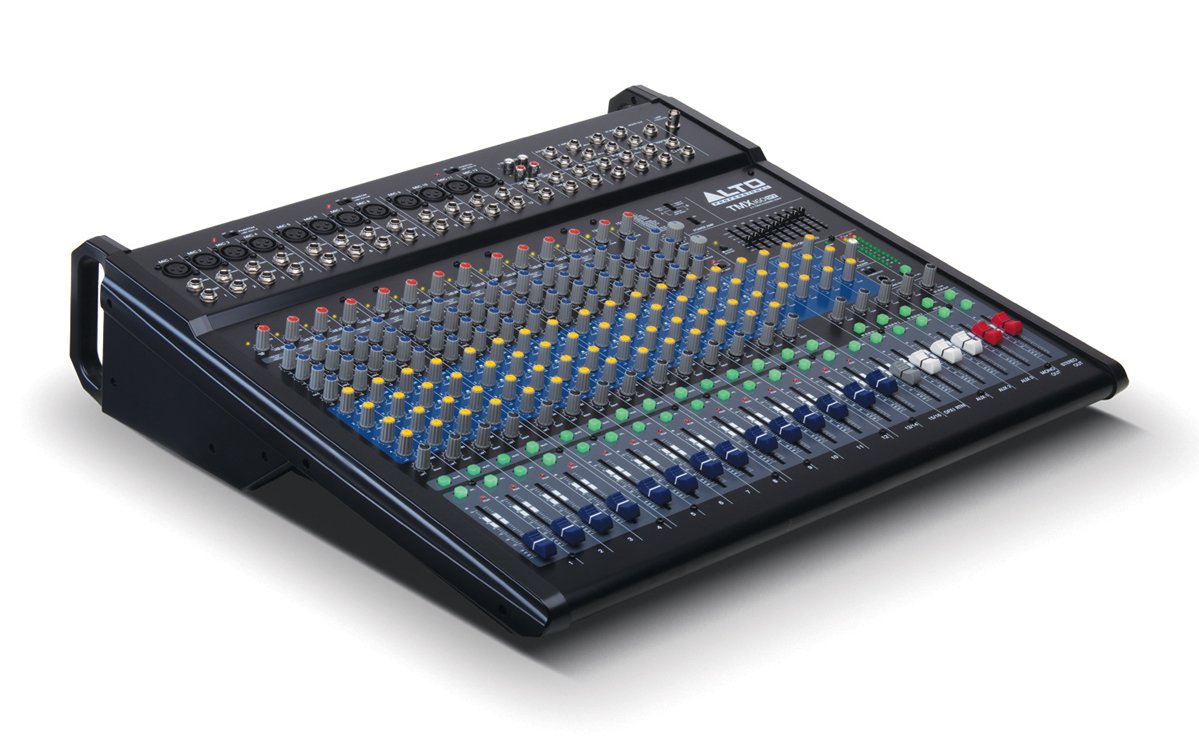
Малюнок 1: передня панельview of the Alto Professional TMX160 DFX mixer. This image shows the comprehensive layout including microphone and line inputs at the top, channel controls in the middle, and faders at the bottom.
4. Операція
4.1 Елементи керування каналом
Each input channel (1-16) features a set of controls to shape its sound:
- ПІДИМОК: Adjusts the input sensitivity for the connected microphone or line-level device. Set this to achieve a strong signal without clipping (distortion).
- EQ (високий, середній, низький): A 3-band equalizer allows you to boost or cut frequencies (treble, midrange, bass) for each channel.
- Надсилання AUX: Controls the amount of signal sent from the channel to the auxiliary outputs (e.g., for monitors or external effects).
- ПАН: Розташовує сигнал каналу в стереополі (зліва направо).
- LEVEL Fader: Контролює загальну гучність каналу в основному міксі.
4.2 Головна секція
The master section controls the overall output of the mixer:
- Головні фейдери міксу: Control the overall volume of the stereo output.
- DFX (Digital Effects) Controls: Select and adjust parameters for the built-in Alesis digital effects.
- Stereo Graphic EQ: A 7-band graphic equalizer allows for fine-tuning the overall frequency response of the main mix.
- потужність Amp Елементи керування: Adjust the output level and mode (Stereo/Mono) for the integrated power ampліфірник.
4.3 Built-in Alesis Digital Effects
The TMX160 DFX features a high-quality Alesis digital effects processor. Use the DFX controls in the master section to browse and select from various effects such as reverb, delay, chorus, and more. Adjust the effect send levels on individual channels and the overall effect return level in the master section to blend the effects into your mix.
Малюнок 2: Детально view of the input channels, showing individual GAIN, EQ, AUX, PAN, and LEVEL controls for precise audio shaping.
5. Технічне обслуговування
Proper maintenance ensures the longevity and optimal performance of your TMX160 DFX mixer.
- Прибирання: Використовуйте м’яку суху тканину для очищення зовнішньої частини міксера. Уникайте використання абразивних засобів для чищення, розчинників або воску.
- Пил: Регулярно видаляйте пил з вентиляційних отворів, щоб запобігти перегріву.
- Зберігання: Якщо міксер не використовується протягом тривалого часу, зберігайте його в прохолодному, сухому місці, подалі від прямих сонячних променів та екстремальних температур.
- Фейдери та ручки: Avoid applying excessive force to faders and knobs. Keep them free from dust and debris.
6. Вирішення проблем
If you encounter issues with your TMX160 DFX, refer to the following common problems and solutions:
- Немає живлення:
- Check if the power cord is securely connected to both the mixer and the AC outlet.
- Перевірте, чи розетка змінного струму справна.
- Переконайтеся, що вимикач живлення на міксері знаходиться в положенні ON (УВІМК.).
- Немає вихідного звуку:
- Перевірте всі підключення вхідних та вихідних кабелів.
- Ensure channel GAIN and LEVEL faders are appropriately set.
- Verify the Main Mix faders are raised.
- Check if connected speakers or power amplifiers are turned on and functioning.
- Забезпечте потужність Amp controls are set correctly for your speaker configuration.
- Спотворений звук:
- Reduce the GAIN setting for the input channel.
- Lower the channel LEVEL fader or Main Mix faders.
- Перевірте наявність пошкоджених кабелів.
- Ефекти не чути:
- Ensure the DFX send controls on the channels are turned up.
- Verify the DFX return level in the master section is raised.
- Check the selected effect program.
If the problem persists after trying these steps, contact Alto Professional customer support.
7. Технічні характеристики
| Особливість | Специфікація |
|---|---|
| Бренд | Альто Професіонал |
| Модель | TMX160 DFX |
| Кількість каналів | 16 |
| Вага товару | 12.5 кілограма |
| Технологія підключення | Допоміжний |
| Аудіо вхід | XLR, RCA, Line, AUX, 2-Track |
| Виробник | у музиці |
| ASIN | B007T1VZ52 |
| Power Output (Stereo) | 750 Вт при 4 Ом |
| Power Output (Mono) | 1500 Вт при 8 Ом |
| Еквалайзер | 3-band EQ per channel, Stereo Graphic EQ |
| Ефекти | Built-in Alesis Digital Effector (24-bit A/D and D/A converters) |
| Розміри (Ш x Г x В) | прибл. 21.9 x 22.2 x 5.7 дюйма (555 x 565 x 145 мм) |
8. Гарантія та підтримка
For warranty information and technical support, please refer to the documentation included with your product or visit the official Alto Professional webсайт. Зберігайте чек про покупку як підтвердження покупки для гарантійних претензій.
For further assistance, you may contact Alto Professional customer service directly.


