вступ
Дякуємо за покупкуasing the GPX Weatherx WR282B Weather and Alert Radio. This portable radio is designed to provide you with AM/FM radio reception and access to all 7 NOAA weatherband channels, ensuring you stay informed during various conditions. It offers flexible power options, operating on either AC power or D-size batteries, making it suitable for both indoor and outdoor use.
Please read this manual thoroughly before operating the device to ensure proper use and to maximize its performance and longevity.
Важлива інформація з безпеки
- Прочитайте інструкції: Перед початком експлуатації виробу необхідно ознайомитися з усіма інструкціями з техніки безпеки та експлуатації.
- Зберігайте інструкції: Інструкції з техніки безпеки та експлуатації слід зберегти для використання в майбутньому.
- Зверніть увагу на попередження: Необхідно дотримуватися всіх попереджень на виробі та в інструкції з експлуатації.
- Дотримуйтесь інструкцій: Слід дотримуватися всіх інструкцій з експлуатації та використання.
- Вода і вологість: Do not use this product near water (e.g., near a bathtub, washbowl, kitchen sink, laundry tub, in a wet basement, or near a swimming pool).
- Прибирання: Чистіть тільки сухою ганчіркою.
- Вентиляція: Не блокуйте вентиляційні отвори. Встановлюйте відповідно до інструкцій виробника.
- Тепло: Не встановлюйте поблизу будь-яких джерел тепла, таких як радіатори, обігрівачі, печі або інші пристрої (включаючи ampліфікатори), які виробляють тепло.
- Захист шнура живлення: Захищайте шнур живлення від наступання або защемлення, особливо біля вилок, розеток і в місці виходу з пристрою.
- Блискавка: Відключайте цей пристрій від мережі під час грози або якщо він не використовується протягом тривалого часу.
- Обслуговування: Звертайтеся до кваліфікованого сервісного персоналу. Обслуговування потрібне, якщо пристрій було пошкоджено будь-яким чином, наприклад, пошкоджено шнур живлення або вилка, була пролита рідина або всередину пристрою потрапили предмети, пристрій піддався впливу дощу або вологи, не працює належним чином , або було видалено.
особливості
- AM/FM Radio Tuner
- Weatherband - All 7 NOAA Channels
- Swivel Telescopic Antenna
- Регулювання гучності
- Audio Line Input (Auxiliary Input)
- Вбудована ручка для перенесення
- Dual Power Options: AC/DC Adapter or 3 x 'D' Batteries
Вміст упаковки
- GPX Weatherx WR282B Weather and Alert Radio
- Адаптер змінного/постійного струму
- Посібник користувача (цей документ)
Елементи управління та індикатори
Familiarize yourself with the various controls and indicators on your WR282B radio.
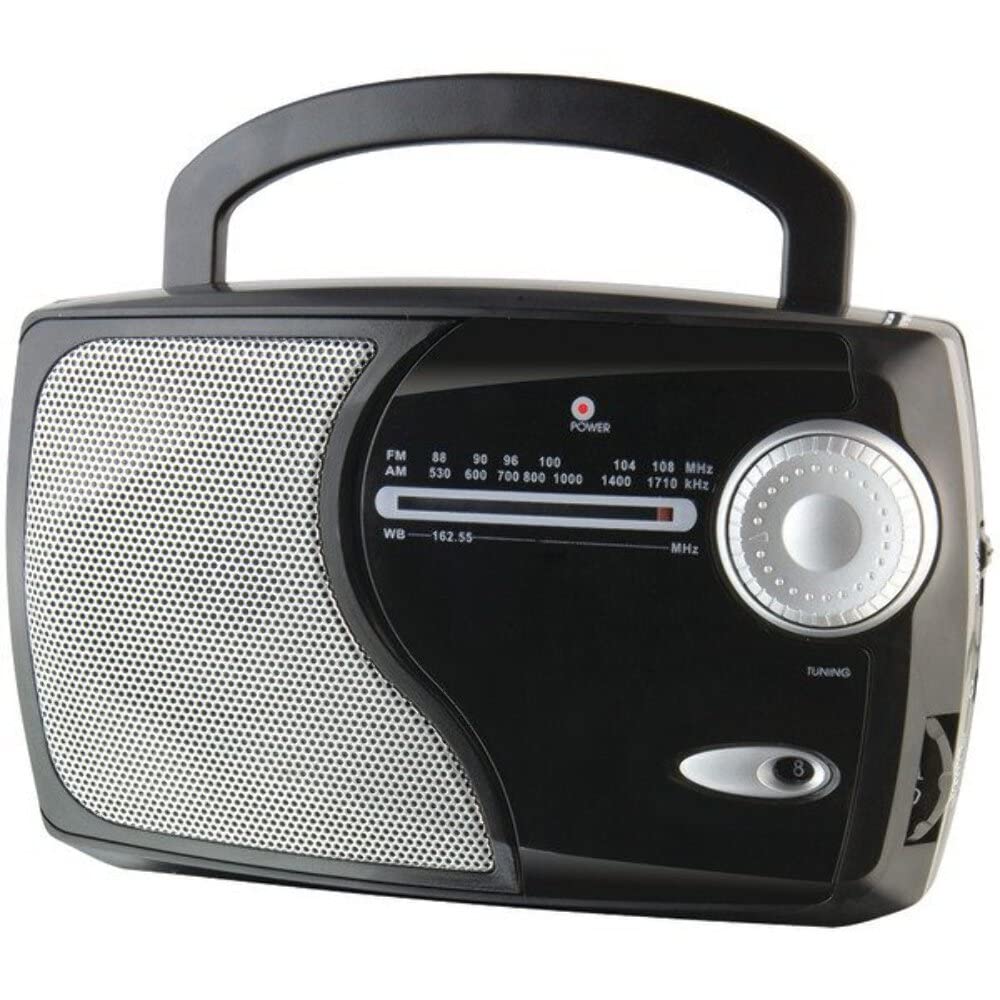
Зображення: спереду view of the GPX Weatherx WR282B radio, showing the speaker, tuning dial, and control knobs.
- Ручка живлення/гучності: Turns the radio on/off and adjusts the audio output level.
- Перемикач діапазону: Selects between AM, FM, and Weatherband (WB) modes.
- Ручка налаштування: Adjusts the frequency to tune into desired radio stations or weather channels.
- Tuning Indicator: Illuminates when a strong signal is received.
- Набір частоти: Відображає поточну радіочастоту.
- Телескопічна антена: Extendable antenna for improved FM and Weatherband reception.
- Допоміжний вхід (AUX IN): 3.5-мм роз'єм для підключення зовнішніх аудіопристроїв.
- Вхід живлення змінного струму: Jack for connecting the included AC/DC power adapter.
- Батарейний відсік: Located on the back, holds 3 'D' size batteries.
- Ручка для перенесення: Для легкої транспортування.
Налаштування
Живлення радіо
The WR282B radio can be powered using either the included AC/DC power adapter or three 'D' size batteries.
1. AC Power Operation
- Ensure the radio is turned off by rotating the Power/Volume knob counter-clockwise until it clicks.
- Insert the small plug of the AC/DC power adapter into the AC Power Input jack on the radio.
- Plug the other end of the AC/DC power adapter into a standard wall outlet (AC 120V~60Hz).
- The radio is now ready for use with AC power.
Примітка: When the AC adapter is connected, battery power is automatically disconnected.
2. Battery Power Operation
- Переконайтеся, що радіо вимкнено.
- Знайдіть батарейний відсік на задній панелі радіо.
- Відкрийте кришку батарейного відсіку.
- Insert three (3) 'D' size batteries (not included) into the compartment, observing the correct polarity (+/-) as indicated inside the compartment.
- Надійно закрийте кришку батарейного відсіку.
- The radio is now ready for use with battery power.
Важливо: Вийміть батарейки, якщо радіостанція не використовуватиметься протягом тривалого часу, щоб запобігти витіканню та пошкодженню.
Інструкція з експлуатації
1. Turning On and Adjusting Volume
- Обертайте Ручка живлення/гучності clockwise to turn on the radio. Continue rotating to increase the volume to a comfortable listening level.
- Щоб вимкнути радіо, поверніть Ручка живлення/гучності counter-clockwise until it clicks.
2. Selecting a Radio Band (AM/FM/Weatherband)
- Використовуйте Перемикач діапазону to choose your desired listening mode:
- AM: для Amplitude Modulation radio stations.
- FM: For Frequency Modulation radio stations.
- WB: For NOAA Weatherband channels.
3. Tuning to a Station or Channel
- Розширити Телескопічна антена fully for optimal FM and Weatherband reception. For AM reception, the radio has a built-in antenna, and adjusting the radio's position may improve reception.
- Обертайте Ручка налаштування to scan through frequencies on the Набір частот.
- When a strong signal is received, the Індикатор налаштування засвітиться світло.
- For Weatherband (WB) mode, tune to one of the 7 NOAA weather channels (162.400 MHz to 162.550 MHz).
4. Using the Auxiliary Input (AUX IN)
- Connect a 3.5mm audio cable (not included) from your external audio device (e.g., MP3 player, smartphone) to the Допоміжний вхід (AUX IN) jack on the radio.
- Ensure the radio is turned on and the volume is adjusted.
- The audio from your external device will now play through the radio's speaker. Control playback and track selection from your external device.
Технічне обслуговування
- Прибирання: Протріть зовнішню частину радіоприймача м’якою сухою тканиною. Не використовуйте абразивні засоби для чищення, віск або розчинники.
- Заміна батареї: Replace all three 'D' batteries when the radio's performance diminishes or if the unit will not be used for an extended period. Always replace with new batteries of the same type.
- Зберігання: When storing the radio for a long time, remove the batteries to prevent leakage. Store in a cool, dry place away from direct sunlight and extreme temperatures.
- Догляд за антеною: Обережно поводьтеся з телескопічною антеною, щоб уникнути згинання або зламу.
Усунення несправностей
| проблема | Можлива причина | Рішення |
|---|---|---|
| Немає живлення |
|
|
| Поганий радіоприйом |
|
|
| Немає звуку з AUX IN |
|
|
Технічні характеристики
- модель: WR282B
- Радіо діапазони: AM, FM, Weatherband (7 NOAA channels)
- Джерело живлення: AC 120V~60Hz (via included adapter) or 3 x 'D' Batteries (not included)
- Підключення: Допоміжний вхід 3.5 мм
- Антена: Telescopic (FM/WB), Built-in Ferrite Bar (AM)
- Розміри продукту: 8.86" L x 2.76" W x 5.51" H (approximately)
- Вага товару: 1.06 фунта (без батарей)
Гарантія та підтримка
For detailed warranty information and customer support, please refer to the warranty card included with your product or visit the official GPX webсайт. Зберігайте чек про покупку як підтвердження покупки для будь-яких гарантійних претензій.
If you experience issues not covered in the troubleshooting section, please contact GPX customer service for assistance.


