1. Вступ
Дякуємо за покупкуasing the GPX Portable Top-Loading CD Boombox, Model BC112B. This device offers versatile audio playback options including a top-loading CD player, AM/FM radio, and a 3.5mm auxiliary line-in for connecting external audio devices. Designed for portability and ease of use, this boombox can be powered by AC current or batteries, making it suitable for various environments. This manual provides comprehensive instructions to help you set up, operate, and maintain your new audio system.
2. Вміст упаковки
Будь ласка, переконайтеся, що всі перелічені нижче предмети входять до вашого пакету:
- GPX Portable Top-Loading CD Boombox (Model BC112B)
- Кабель змінного струму
- Керівництво користувача
- Гарантійний талон
Note: 6 "C" batteries are required for portable operation and are sold separately.
3. Продукт закінчивсяview
Familiarize yourself with the components and controls of your boombox.

Малюнок 3.1: Спереду view of the GPX Portable CD Boombox, showing the top-loading CD compartment, control buttons, and dual speakers.

Figure 3.2: Labeled diagram of the GPX CD Boombox, highlighting the foldable handle, CD player, AM/FM radio, and program/shuffle/play controls.
Елементи керування та функції:
- CD-програвач із верхнім завантаженням: Supports CD and CD-R/RW discs with 20-track programmable memory.
- AM/FM радіо: Direct tune radio with telescopic FM antenna and built-in AM antenna.
- 3.5mm Audio Line Input: Connect external MP3 players or other audio devices.
- Вбудовані динаміки: Вбудовані стереодинаміки для виведення звуку.
- 2-Digit Red LED Display: Shows track number or radio frequency.
- Складна ручка: Для легкої транспортування.
- Параметри живлення: Operates with included AC power cable or 6 "C" batteries (sold separately).
4. Налаштування
4.1 Підключення живлення
- Переконайтеся, що пристрій ВИМКНЕНО.
- Insert the included AC power cable into the AC power input jack on the back of the unit.
- Plug the other end of the AC power cable into a standard wall outlet.
Note: Disconnect the AC power cable when using batteries.
4.2 Встановлення батареї
For portable use, install 6 "C" size batteries (not included).
- Знайдіть батарейний відсік на нижній панелі пристрою.
- Відкрийте кришку батарейного відсіку.
- Вставте 6 батарейок типу «C», дотримуючись правильної полярності (+/-), як зазначено всередині відсіку.
- Надійно закрийте кришку батарейного відсіку.
Увага: Do not mix old and new batteries. Do not mix alkaline, standard (carbon-zinc), or rechargeable (nickel-cadmium) batteries. Remove batteries if the unit is not used for an extended period.
Video 4.1: This video demonstrates the battery installation process and highlights the portability of the GPX CD Boombox. It also shows the AC power connection and the AM/FM switch on the back of the unit.
5. Операція
5.1 Відтворення CD
- Slide the function switch (located on the back) to the "CD/LINE IN" position.
- Open the top-loading CD compartment by gently lifting the lid.
- Place a CD or CD-R/RW disc onto the spindle with the label side facing up.
- Close the CD compartment lid securely. The display will show "00" or the number of tracks.
- Натисніть Play/Pause (►⏸) button to begin playback. The track number will appear on the LED display.
- Використовуйте Skip Forward (►►) or Skip Back (◄◄) кнопки для навігації між треками.
- Натисніть Зупинка (■) , щоб зупинити відтворення.
- Щоб запрограмувати треки, натисніть кнопку Програма (P) button while the CD is stopped. Select tracks using the Skip buttons and press Program again to confirm each track. Press Play to start the programmed sequence.
5.2 AM/FM радіо
- Slide the function switch (located on the back) to the "FM" or "AM" position.
- Extend the telescopic FM antenna for optimal FM reception. For AM reception, the unit has a built-in antenna.
- Обертайте Тюнінг dial (located on the side) to select your desired radio station.
- Відрегулюйте Обсяг налаштуйте потрібний рівень прослуховування.
5.3 Line-In (Auxiliary Input)
Connect an external audio device (e.g., MP3 player, smartphone) to play audio through the boombox speakers.
- Slide the function switch (located on the back) to the "CD/LINE IN" position.
- Connect a 3.5mm audio cable (not included) from the headphone jack or line-out of your external device to the ЛІНІЙНИЙ ВХІД jack on the back of the boombox.
- Почніть відтворення на зовнішньому аудіопристрої.
- Відрегулюйте гучність за допомогою Обсяг dial on the boombox and/or the volume controls on your external device.
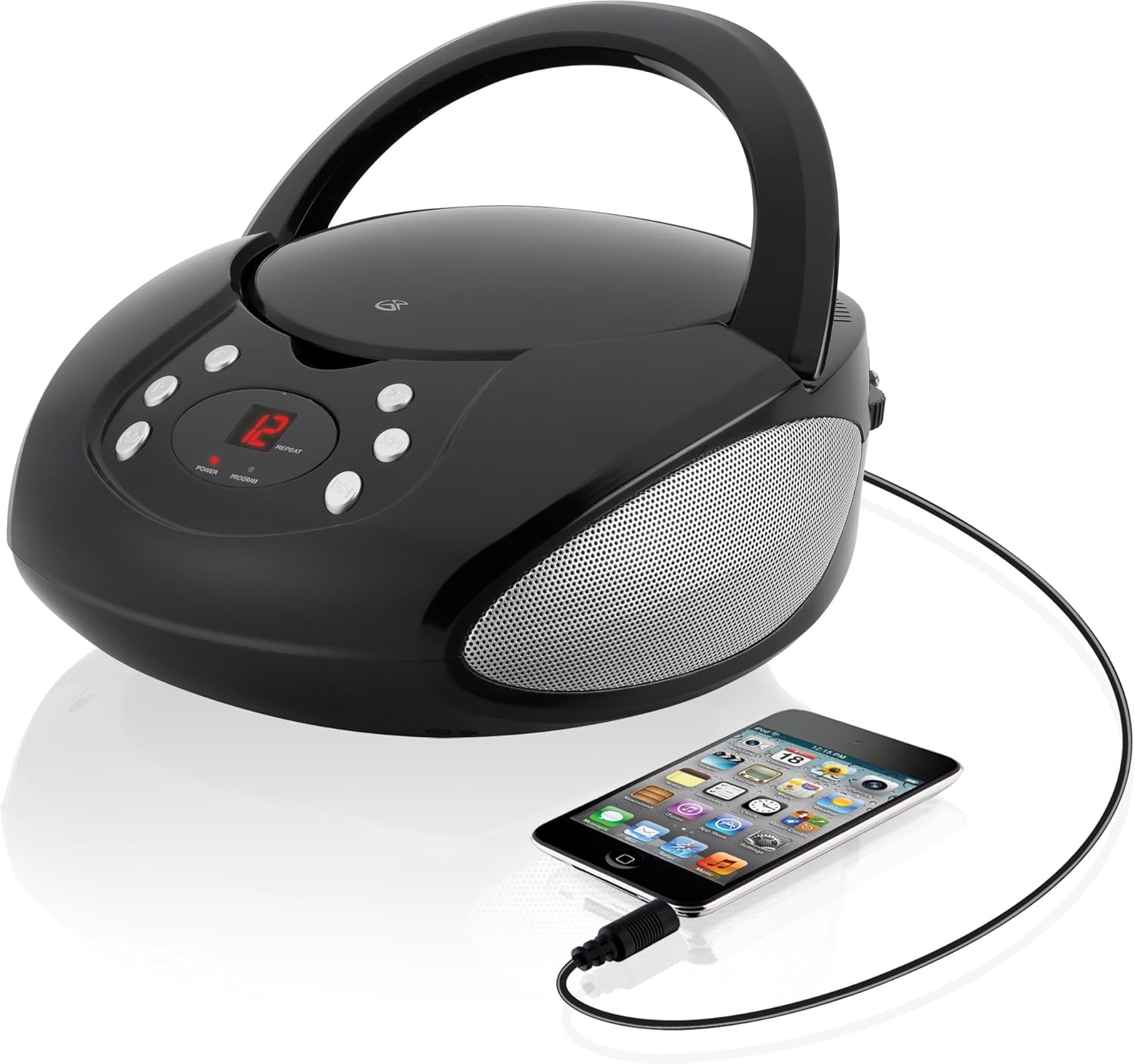
Figure 5.1: The GPX CD Boombox with a smartphone connected via the 3.5mm Line-In port, demonstrating auxiliary audio playback.
6. Технічне обслуговування
- Прибирання: Використовуйте м’яку суху тканину для очищення зовнішньої частини пристрою. Не використовуйте абразивні засоби для чищення або розчинники.
- Догляд за CD-програвачем: Keep the CD compartment clean and free of dust. Avoid touching the lens inside the CD player.
- Зберігання: Якщо пристрій не використовується протягом тривалого часу, зберігайте його в прохолодному, сухому місці. Вийміть батарейки, якщо зберігатимете його протягом тривалого часу, щоб запобігти витіканню.
- Догляд за антеною: Handle the telescopic FM antenna gently to prevent damage.
7. Вирішення проблем
| проблема | Можлива причина | Рішення |
|---|---|---|
| Немає живлення | AC cable not connected; Batteries depleted or incorrectly installed. | Ensure AC cable is securely plugged in. If using batteries, check battery polarity and replace if necessary. |
| CD not playing / "ER" displayed | CD inserted incorrectly; Disc is dirty or scratched; Function switch not in CD/LINE IN mode. | Re-insert CD with label side up. Clean the disc. Set function switch to CD/LINE IN. |
| Поганий радіоприйом | FM antenna not extended; Unit too close to interference sources. | Fully extend the FM telescopic antenna. Reposition the unit away from other electronic devices. |
| No sound from Line-In | Audio cable not connected; Volume too low on boombox or external device. | Ensure 3.5mm audio cable is securely connected. Increase volume on both the boombox and the external device. |
8. Технічні характеристики
- модель: BC112B
- Джерело живлення: AC 120V ~ 60Hz or 6 x "C" Batteries (DC 9V)
- Сумісність з CD: CD, CD-R / RW
- Радіочастоти: AM, FM
- входи: Лінійний аудіовхід 3.5 мм
- Розміри (Д x Ш x В): 9.19 x 5.17 x 10.42 дюймів
- вага: 2.51 фунта
- Виробник: DPI
9. Гарантія та підтримка
This product comes with a limited warranty. Please refer to the included warranty card for detailed terms and conditions, including warranty period and coverage. For technical support or service inquiries, please contact GPX customer service. Contact information can typically be found on the warranty card or the official GPX webсайт.
Пропозиція 65 Попередження: Цей продукт може містити хімічні речовини, відомі штату Каліфорнія, що спричиняють рак та вроджені вади або інший репродуктивний шкоду.


