1. Вступ
Thank you for choosing the Tuncmatik Lite 850 VA Uninterruptible Power Supply (UPS). This device is designed to provide reliable power backup and protection for your electronic equipment against power outages, surges, and fluctuations. This manual will guide you through the installation, operation, and maintenance of your UPS to ensure its optimal performance and longevity.
The Tuncmatik Lite 850 VA UPS features a compact design, 850 VA / 480 W capacity, and two Type F AC outlets, making it suitable for home and small office environments. It incorporates a Sealed Lead Acid (VRLA) battery for dependable backup power.
2. Техніка безпеки
Please read and follow these safety instructions carefully before installing or operating your Tuncmatik Lite 850 VA UPS. Failure to do so may result in electric shock, fire, or serious injury.
- Електрична безпека: Цей блок містить небезпечні обtages. Do not attempt to disassemble the UPS. There are no user-serviceable parts inside. Refer all servicing to qualified service personnel.
- Безпека батареї: The UPS contains a sealed lead-acid battery. Do not dispose of the battery in a fire, as it may explode. Do not open or mutilate the battery. Released electrolyte is harmful to the skin and eyes.
- Середовище: Install the UPS in a well-ventilated area, free from excessive dust, humidity, and extreme temperatures. Avoid direct sunlight and heat sources.
- Розміщення: Ensure the UPS is placed on a stable, flat surface. Do not block the ventilation openings.
- Підключення: Connect the UPS to a grounded AC power outlet. Do not use extension cords or power strips to connect the UPS to the wall outlet.
- навантаження: Do not connect non-computer related equipment such as medical devices, life support equipment, or household appliances to the UPS.
3. Вміст упаковки
Carefully unpack the UPS and inspect its contents. The package should contain the following items:
- Tuncmatik Lite 850 VA UPS Unit
- Power Cord (integrated or separate, depending on region)
- Посібник користувача (цей документ)
Якщо якісь предмети відсутні або пошкоджені, негайно зверніться до свого дилера.
4. Продукт закінчивсяview
The Tuncmatik Lite 850 VA UPS is a compact device designed for efficient power protection. Below is a general representation of the unit and its key components.
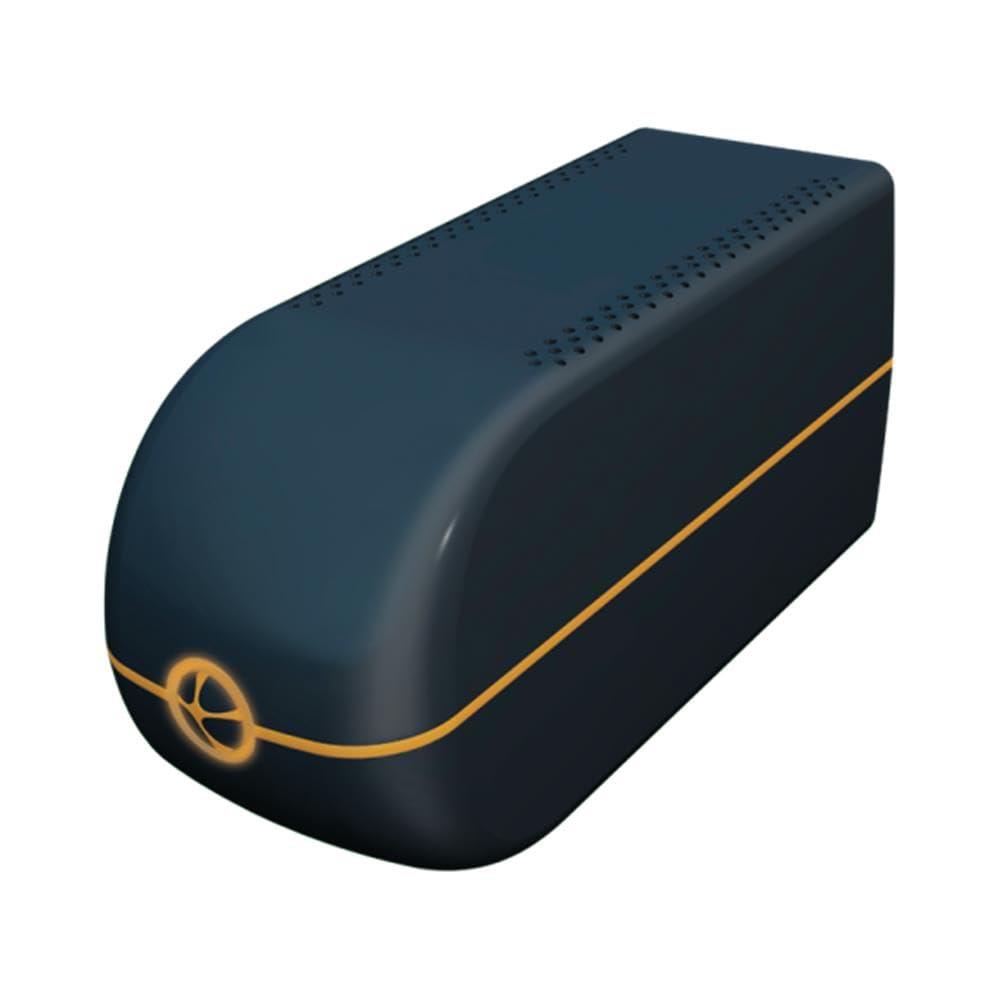
малюнок 1: Tuncmatik Lite 850 VA UPS. This image shows the compact black unit, highlighting its general form factor and the location of its power outlets and indicators.
4.1. Передня панель
- Кнопка живлення: Використовується для ввімкнення або вимкнення ДБЖ.
- Світлодіодні індикатори: Provide status information (e.g., AC mode, battery mode, fault, battery low).
4.2. Задня панель
- Вхід змінного струму: Connects the UPS to the wall power outlet.
- AC Output Outlets (2 x Type F): Connect your electronic devices to these outlets for power backup and surge protection.
5. Налаштування
Follow these steps to set up your Tuncmatik Lite 850 VA UPS:
- Розпакуйте та перевірте: Remove the UPS from its packaging. Inspect for any shipping damage.
- Початковий заряд батареї: Before initial use, connect the UPS to a standard wall outlet and allow it to charge for at least 8 hours. This ensures the battery is fully charged and ready to provide maximum backup time. The UPS will charge whether it is turned on or off.
- Підключення до джерела змінного струму: Plug the UPS power cord into a grounded 220-240V AC wall outlet.
- Підключити обладнання: Plug your computer, monitor, and other critical electronic devices into the UPS output outlets. Ensure the total power consumption of connected devices does not exceed the UPS's capacity (480 W).
- Turn On UPS: Press the power button on the front panel to turn on the UPS. The LED indicators will illuminate, indicating the UPS is operational.
6. Інструкція з експлуатації
6.1. Увімкнення/вимкнення ДБЖ
- Увімкнути: Press and hold the power button for approximately 2 seconds until the UPS beeps and the indicators light up.
- Вимикати: Press and hold the power button for approximately 2 seconds until the UPS beeps and the indicators turn off.
6.2. LED Indicators and Audible Alarms
The UPS provides visual and audible signals to inform you of its status.
- Режим змінного струму: When the UPS is connected to utility power and providing power to connected devices, a specific LED will be lit.
- Режим батареї: When utility power fails, the UPS automatically switches to battery power. An audible alarm will sound (typically beeping every few seconds), and a specific LED will be lit.
- Низький заряд батареї: If the battery level becomes critically low during battery mode, the alarm will sound more frequently (e.g., rapid beeping), indicating that you should save your work and shut down connected equipment.
- Перевантаження: If the connected load exceeds the UPS's capacity, an alarm will sound, and an overload indicator will light up. Immediately disconnect non-essential equipment.
- Несправність: If a system fault occurs, a fault indicator will light up, and an alarm may sound continuously. Disconnect all equipment and contact support.
- Заміна батареї: The UPS is equipped with an alarm to indicate when the battery needs replacement. This alarm will sound periodically.
6.3. Функція холодного запуску
The Tuncmatik Lite 850 VA UPS supports a cold start function. This allows you to power on the UPS and connected equipment using battery power even when there is no utility power available. To perform a cold start, ensure the UPS is off, then press and hold the power button for an extended period (e.g., 5-7 seconds) until the UPS powers on and provides battery output.
6.4. Overload and Surge Protection
The UPS provides built-in protection against overloads and power surges. In case of an overload, the UPS will alert you and may shut down to protect itself and connected equipment. For surge protection, the UPS filters incoming power to shield your devices from harmful voltage шипи.
7. Технічне обслуговування
Proper maintenance ensures the longevity and reliability of your UPS.
- Догляд за акумулятором: The sealed lead-acid battery is designed for a specific lifespan. Regular full discharge and recharge cycles are not recommended. Keep the UPS connected to AC power to keep the battery fully charged. If the UPS is stored for an extended period, recharge it every 3 months to prevent battery degradation.
- Заміна батареї: When the 'Battery Replacement' alarm sounds, it indicates the battery has reached the end of its service life. Contact qualified service personnel or your dealer for battery replacement. Do not attempt to replace the battery yourself.
- Прибирання: Keep the UPS clean and free of dust. Use a dry, soft cloth to wipe the exterior. Do not use liquid cleaners or solvents. Ensure ventilation openings are clear of obstructions.
- Зберігання: If storing the UPS for an extended period, turn it off, disconnect it from AC power, and store it in a cool, dry place. Recharge the battery every 3 months for 8 hours to maintain its capacity.
8. Вирішення проблем
У цьому розділі розглядаються поширені проблеми, з якими ви можете зіткнутися під час використання вашого ДБЖ. Якщо проблема не зникає після виконання цих кроків, зверніться до служби підтримки клієнтів.
| проблема | Можлива причина | Рішення |
|---|---|---|
| ДБЖ не вмикається. | Battery discharged or not connected to AC power. | Ensure the UPS is plugged into a live AC outlet. Allow 8 hours for initial battery charge. |
| UPS is in battery mode frequently. | Unstable utility power or frequent power fluctuations. | This is normal operation. If it happens excessively, check your building's electrical wiring or consult an electrician. |
| UPS emits continuous alarm in battery mode. | Низький заряд батареї або перевантаження. | Save your work and shut down connected equipment immediately. Reduce the load if it's an overload. |
| Battery replacement alarm sounds. | Термін служби батареї досяг кінця. | Contact service personnel for battery replacement. |
| Connected equipment does not receive power. | UPS is off, battery discharged, or overload. | Ensure UPS is on. Check battery charge. Reduce connected load. |
9. Технічні характеристики
Detailed technical specifications for the Tuncmatik Lite 850 VA UPS (Model: LITE-850).
| Особливість | Специфікація |
|---|---|
| Модель | ЛАЙТ-850 |
| Ємність | 850 ВА / 480 Вт |
| Вхідний об'ємtage Дальність | 162 В - 290 В |
| Вхідна частота | 50/60 Гц |
| Вихідний випtage (номінальний) | 220-240 В |
| Вихідні розетки змінного струму | 2 x Тип F |
| Час передачі | 6 мс |
| Тип батареї | Герметичний свинцево-кислотний (VRLA) |
| Типовий час резервного копіювання (при повному завантаженні) | 20 хвилин |
| Час зарядки акумулятора | 8 години |
| Розміри (Д x Ш x В) | 28.7 x 10 x 14.2 см (11.3 x 3.9 x 5.6 дюйма) |
| вага | 4.9 кг (10.8 фунта) |
| Робоча температура | 0 - 40 °C |
| Audible Noise Level | 40 дБ |
| Колір | чорний |
| Сертифікати | CE, ISO9001 |
| особливості | Overload Protection, Surge Protection, Cold Start Function |
10. Гарантія та підтримка
Tuncmatik products are designed for reliability and performance. For information regarding the warranty period and terms for your Tuncmatik Lite 850 VA UPS, please refer to the warranty card included with your purchase or visit the official Tuncmatik webсайт.
If you encounter any issues that cannot be resolved using the troubleshooting guide, or if you require technical assistance, please contact Tuncmatik customer support or your authorized dealer. Please have your product model (LITE-850) and serial number ready when contacting support.
For the latest support information and contact details, please visit: www.tuncmatik.com.tr (Примітка: Це посилання-заповнювач, будь ласка, перевірте фактичну підтримку URL).


