1. Вступ
The SIIG Analog to Digital Audio Converter (Model CE-CV0111-S1) is designed to convert analog left/right stereo audio input into simultaneous Coaxial and Toslink digital audio outputs. This device facilitates the integration of analog audio sources with modern digital audio systems, ensuring clear and reliable audio transmission.
Ключові особливості:
- Converts analog L/R stereo audio to Coaxial and Toslink digital outputs simultaneously.
- Supports audio sampling rate at 48KHz.
- Provides uncompressed 2-channel LPCM digital audio output.
- Features a durable metal housing for enhanced RF shielding.
2. Вміст упаковки
Будь ласка, перевірте наявність усіх предметів у вашій упаковці:
- SIIG Analog to Digital Audio Converter (CE-CV0111-S1)
- Адаптер живлення 5 В постійного струму
- Посібник користувача
3. Діаграма продукту
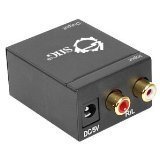
малюнок 1: Фронт view of the SIIG Analog to Digital Audio Converter. This image displays the DC 5V power input port on the left and the red (Right) and white (Left) RCA analog audio input ports on the right.
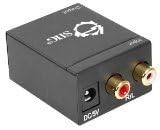
малюнок 2: Задня view of the SIIG Analog to Digital Audio Converter. This image shows the digital audio output ports: a Coaxial port and a Toslink (optical) port.
4. Налаштування та встановлення
Connecting the Audio Converter
- Connect Analog Audio Input: Using an RCA stereo audio cable (not included), connect the analog L/R audio output from your source device (e.g., TV, DVD player, game console) to the L/R RCA input ports on the SIIG Analog to Digital Audio Converter. Ensure the red connector goes to the 'R' (Right) input and the white connector goes to the 'L' (Left) input.
- Connect Digital Audio Output: Choose one or both digital output options:
- Коаксіальний вихід: Connect a Coaxial audio cable (not included) from the Coaxial output port on the converter to the Coaxial digital audio input on your amplifier, receiver, or soundbar.
- Toslink (Optical) Output: Connect a Toslink optical audio cable (not included) from the Toslink output port on the converter to the optical digital audio input on your amplifier, receiver, or soundbar.
- Підключіть живлення: Plug the included 5V DC power adapter into the 'DC 5V' input port on the converter. Then, plug the power adapter into a standard electrical outlet. The converter will power on automatically.
- Перевірте підключення: Переконайтеся, що всі кабелі надійно під’єднано до відповідних портів.
5. Інструкція з експлуатації
Once all connections are made and the converter is powered on, the device operates automatically. It will continuously convert the incoming analog L/R stereo audio signal into both Coaxial and Toslink digital audio signals simultaneously.
- Ensure your source device is playing audio through its analog L/R outputs.
- Select the appropriate digital input (Coaxial or Toslink) on your receiving audio device (amplifier, receiver, etc.) to hear the converted audio.
- The converter supports uncompressed 2-channel LPCM audio at a 48KHz sampлінг -курс.
6. Вирішення проблем
| проблема | Можлива причина | Рішення |
|---|---|---|
| Немає аудіовиходу | 1. Нещільно закріплені кабельні з'єднання. 2. Incorrect input/output selection on receiving device. 3. Power adapter not connected or faulty. 4. Source device not outputting analog audio. | 1. Check all RCA, Coaxial, and Toslink cable connections. 2. Переконайтеся, що ваші amplifier/receiver is set to the correct digital input (Coaxial or Optical). 3. Verify the power adapter is securely connected and the power outlet is functional. 4. Confirm the source device's analog audio output is active and functioning. |
| Distorted or poor audio quality | 1. Poor quality audio cables. 2. Перешкоди від інших електронних пристроїв. 3. Volume levels too high on source or receiving device. | 1. Use high-quality shielded audio cables. 2. Ensure the converter is placed away from strong electromagnetic interference sources. 3. Adjust volume levels on both the source and receiving devices to prevent clipping or distortion. |
| Only one digital output works | Faulty Coaxial or Toslink cable/port. | Test with a different cable for the non-working output. If the issue persists, the port may be faulty. |
7. Технічні характеристики
- модель: CE-CV0111-S1
- введення: Analog L/R Stereo Audio (RCA)
- Вихід: Coaxial Digital Audio, Toslink (Optical) Digital Audio
- Аудіо Sampлінг -курс: 48 кГц
- Формат аудіо: Uncompressed 2-channel LPCM
- Розміри (Д x Ш x В): 1.57 x 1.97 x 1.38 дюйма (40 x 50 x 35 мм)
- вага: 9.6 унцій (272 грам)
- Джерело живлення: 5V DC (included adapter)
- Житло: метал
- Виробник: SIIG Inc.
- ASIN: B006ZB2LJ6
- UPC: 662774014524, 745449847037
8. Інформація про безпеку
- Не піддавайте цей пристрій дії води або надмірної вологи.
- Не намагайтеся відкривати або модифікувати пристрій. Усередині немає деталей, які може обслуговувати користувач.
- Use only the provided 5V DC power adapter. Using an incorrect power adapter may damage the device and void the warranty.
- Розмістіть пристрій у добре провітрюваному місці, щоб запобігти перегріванню.
- Зберігати в недоступному для дітей місці.
9. Гарантія та технічна підтримка
SIIG Inc. products are designed for reliability and performance. For warranty information or technical assistance, please refer to the official SIIG website or contact their customer support directly. Please have your product model number (CE-CV0111-S1) and purchase details available when seeking support.
For the most current support information, visit the SIIG Store on Amazon or the official SIIG webсайт.


