вступ
This manual provides essential information for the safe and effective use of your Sony Cyber-shot DSC-WX50 digital camera. Please read it thoroughly before operating the camera and retain it for future reference. The DSC-WX50 is a compact digital camera featuring a 16.2 MP Exmor R CMOS sensor, 5x optical zoom, and Full HD 1080/60i video recording capabilities.
Що в коробці
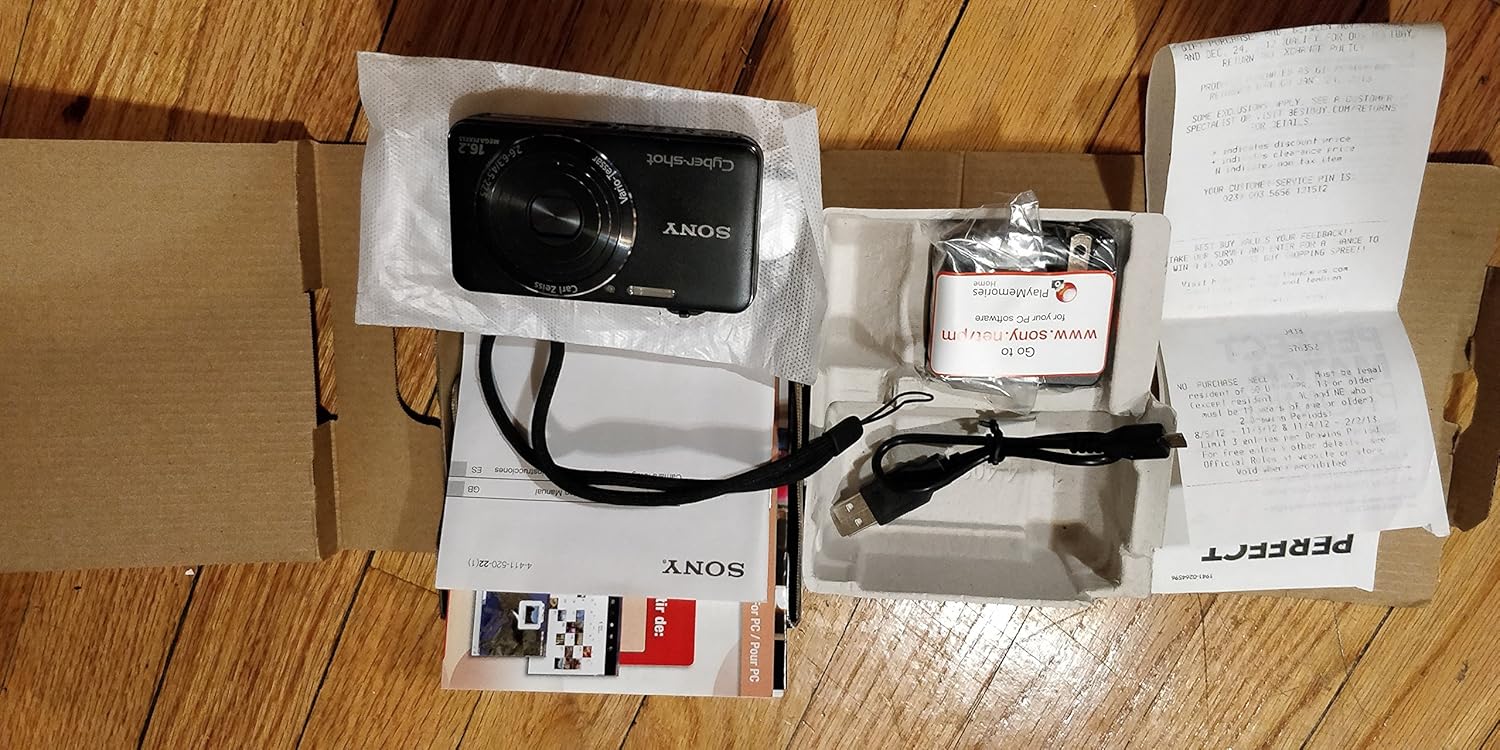
Carefully unpack your camera and ensure all items are present. The standard package contents include:
- Sony Cyber-shot DSC-WX50 Digital Camera
- Акумуляторна батарея
- Адаптер змінного струму
- USB-з'єднувальний кабель
- Ремінець на зап'ясті
- Інструкції з експлуатації та документація
- HDMI Cable (Built-in Media)

Image: All contents of the Sony Cyber-shot DSC-WX50 package, including the camera, cables, and documentation, laid out.

Зображення: Закривач view of the included accessories, such as the charger and USB cable, within their packaging.
Налаштування
1. Зарядка батареї
Before first use, fully charge the supplied battery pack. Connect the camera to the AC adaptor using the USB cable, then plug the AC adaptor into a wall outlet. The charge lamp will light up during charging and turn off when complete.
2. Встановлення акумулятора та карти пам’яті
Open the battery/memory card cover on the bottom of the camera. Insert the charged battery pack firmly until it locks into place. Insert a compatible memory card (SD/SDHC/SDXC or Memory Stick Duo/Pro Duo/Pro-HG Duo) into the memory card slot until it clicks. Close the cover securely.

Зображення: спереду view of the Sony Cyber-shot DSC-WX50 camera, showing the lens and flash.
3. Початкові налаштування
When you turn on the camera for the first time, you will be prompted to set the date, time, and time zone. Follow the on-screen instructions to complete these settings.
Керування камерою
Увімкнення/вимкнення живлення
Натисніть ПОТУЖНІСТЬ кнопку, щоб увімкнути або вимкнути камеру. Об’єктив висунеться після ввімкнення живлення.
Basic Still Image Shooting (Intelligent Auto Mode)
- Увімкніть камеру.
- Встановіть перемикач режимів у положення Інтелектуальний авто (green camera icon).
- Frame your subject on the 2.7-inch LCD screen.
- Press the shutter button halfway down to focus. The focus indicator will turn green when focus is achieved.
- Повністю натисніть кнопку спуску затвора, щоб зробити знімок.
Зображення: Задня частина view of the Sony Cyber-shot DSC-WX50, highlighting the 2.7-inch LCD screen and control buttons.
Функція масштабування
Use the zoom lever around the shutter button to adjust the focal length. The camera features 5x optical zoom and Clear Image Zoom for enhanced magnification without significant quality loss.
Video Recording (Full HD 1080/60i)
To record movies, press the dedicated КІНО button. Press it again to stop recording. The camera supports Full HD 1080/60i video in AVCHD format, allowing for high-quality video capture with Optical SteadyShot Active Mode for reduced blur.
Special Shooting Modes and Features
- Покращений автоматичний режим: Automatically detects 33 scenes and optimizes settings for dynamic pictures with reduced noise and improved clarity.
- Intelligent Sweep Panorama HR: Capture wide panoramic images by sweeping the camera. The camera stitches multiple frames automatically.
- 3D Still Image & 3D Sweep Panorama: Create 3D images for viewing on compatible 3D displays.
- Ефект зображення: Apply creative filters to your photos, such as Toy Camera, Pop Color, Partial Color, and more.
- Розфокусування фону: Blurs the background to emphasize your subject, similar to DSLR effects.
- Режим м’якої шкіри: Enhances portraits by reducing the appearance of blemishes and wrinkles.
- Face Detection & Smile Shutter: Automatically detects faces and can trigger the shutter when a smile is detected.
- Anti-blink Function: Helps prevent photos with subjects blinking by capturing multiple shots.
- Природний спалах: Corrects colors for more lifelike images when using flash.
- Виявлення руху: Налаштовує ISO та витримку, щоб зменшити розмиття рухомих об'єктів.
- Sweep Multi Angle Mode: Captures 15 images at different angles to create a 3D-like view on the camera's LCD when tilted.
Технічне обслуговування
Очищення камери
- Корпус камери: Протріть м’якою сухою тканиною. Для стійкого бруду використовуйте тканину, злегка протертуampводою або м’яким миючим засобом, потім витріть насухо.
- Об'єктив: Використовуйте щіточку для об’єктивів, щоб видалити пил, потім обережно протріть тканиною для чищення об’єктивів. Уникайте дотику до поверхні об’єктива пальцями.
- РК-екран: Обережно протріть м’якою сухою тканиною. Уникайте сильного натискання на екран.
Догляд за акумулятором
To prolong battery life, avoid exposing it to extreme temperatures. Store the battery in a cool, dry place when not in use. If the camera will not be used for an extended period, remove the battery.
Memory Card Care
Always format new memory cards in the camera before first use. Avoid removing the memory card while the camera is writing data (indicated by a flashing access lamp) to prevent data corruption.
Усунення несправностей
Якщо у вас виникли проблеми з камерою, зверніться до наступних поширених рішень:
| проблема | Рішення |
|---|---|
| Камера не вмикається. |
|
| "Writing to Memory card was incomplete" error. |
|
| Зображення розмиті. |
|
| Спалах не спрацьовує. |
|
For further assistance, please contact Sony customer support.
Технічні характеристики
| Особливість | Деталь |
|---|---|
| Ефективне вирішення проблеми | 16.2 Мп |
| Технологія фотосенсора | BSI CMOS |
| Оптичний зум | 5x |
| Цифровий зум | 20x |
| Розмір екрана | 2.7 дюймів |
| Тип дисплея | ЖК |
| Стабілізація зображення | Оптичний стабілізатор SteadyShot |
| Роздільна здатність відео | Full HD 1080p (1080/60i AVCHD) |
| Підтримується File Формат | JPEG (Exif 2.3), 3D: MPF, Video: MPEG-4, AVCHD |
| Сумісність з картою пам'яті | SD/SDHC/SDXC, Memory Stick Duo/Pro Duo/Pro-HG Duo |
| Підключення | HDMI, USB |
| Мінімальна фокусна відстань | 25 міліметрів |
| Максимальна фокусна відстань | 125 міліметрів |
| Максимальна діафрагма | f/6.3 |
| Мінімальна витримка | 4 секунди |
| Максимальна витримка | 1/1600 секунди |
| Вага товару | 0.26 фунта |
Гарантія та підтримка
Щоб отримати інформацію про гарантію та підтримку клієнтів, зверніться до документації, що додається до вашого продукту, або відвідайте офіційний сайт підтримки Sony. webсайт. Зберігайте чек про покупку для гарантійних претензій.
Офіційна підтримка Sony: www.sony.com/electronics/support


