1. Вступ
This manual provides essential information for the safe and efficient installation, operation, and maintenance of your Antec MT-352 Micro ATX Power Supply. Please read this manual thoroughly before installation and retain it for future reference. The Antec MT-352 is a 350W Micro ATX power supply designed for personal computer systems, offering 88% efficiency and compatibility with 110V AC and 220V AC input voltagес.
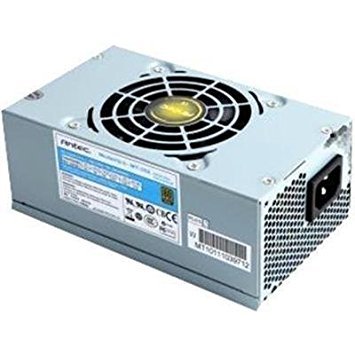
Figure 1: Antec MT-352 Micro ATX Power Supply unit.
2. Інформація про безпеку
Завжди дотримуйтесь наступних запобіжних заходів, щоб запобігти травмам та пошкодженню обладнання:
- Небезпека ураження електричним струмом: Не відкривайте блок живлення. Висока гучністьtages are present inside, even when the system is turned off and unplugged. There are no user-serviceable parts inside.
- Відключення живлення: Always disconnect the power cord from the wall outlet before installing, removing, or servicing the power supply or any other system components.
- Правильне заземлення: Ensure your system is properly grounded. Use only the power cord provided with the unit or a suitable replacement that meets local safety standards.
- Вентиляція: Забезпечте достатню циркуляцію повітря навколо блока живлення. Не блокуйте вентиляційні отвори.
- Вологість і температура: Do not operate the power supply in high humidity environments or near water. Avoid extreme temperatures.
- Перевантаження: Не перевантажуйте блок живлення понад зазначене значення потужностіtage.
3. Вміст упаковки
Verify that all items are present in your Antec MT-352 package:
- Antec MT-352 Micro ATX Power Supply Unit
- Шнур живлення змінного струму
- Монтажні гвинти
- Посібник користувача (цей документ)
4. Налаштування та встановлення
Follow these steps carefully to install your Antec MT-352 power supply:
- Приготування: Turn off your computer and disconnect the power cord from the wall outlet. Open your computer case. If replacing an existing power supply, disconnect all cables from the old PSU and remove it.
- Монтаж блоку живлення: Carefully slide the Antec MT-352 into the power supply bay of your Micro ATX case. Ensure the fan faces the correct direction for optimal airflow (typically facing downwards or towards the rear vent, depending on case design). Secure the power supply to the case using the provided mounting screws. (An image showing the PSU being mounted into a case would be helpful here.)
- Connecting the Motherboard:
- 20+4 Pin ATX Connector: Connect the main 20+4 pin ATX power connector to the corresponding socket on your motherboard. Ensure both parts of the connector are securely latched. (An image illustrating the 20+4 pin ATX connector connection would be helpful here.)
- 4-Pin ATX 12V (CPU) Connector: Connect the 4-pin ATX 12V connector to the CPU power socket on your motherboard. This is usually located near the CPU socket. (An image showing the 4-pin ATX 12V connector connection would be helpful here.)
- Підключення периферійних пристроїв: Connect the SATA power connectors to your hard drives, SSDs, and optical drives. Use the 4-pin Molex connectors for older peripherals or case fans if needed. Ensure all connections are firm. (An image demonstrating SATA and Molex connections would be helpful here.)
- Управління кабелем: Route cables neatly to improve airflow and aesthetics. Use cable ties if necessary.
- Остаточні перевірки: Двічі перевірте всі з'єднання, щоб переконатися в їх надійності. Закрийте корпус комп'ютера.
5. Операція
After successful installation, follow these steps to operate your system:
- Підключіть живлення: Plug the AC power cord into the power supply's AC inlet and then into a grounded wall outlet.
- Увімкнення: Press the power button on your computer case. The system should boot up normally.
- Вимкнення живлення: To turn off your system, use the operating system's shutdown procedure. For a hard shutdown, press and hold the power button on your case for several seconds. Always ensure the system is fully shut down before disconnecting the power cord.
6. Технічне обслуговування
Правильне обслуговування забезпечує довговічність та оптимальну роботу вашого блоку живлення:
- Видалення пилу: Periodically clean the power supply's fan and vents to prevent dust buildup, which can impede airflow and cause overheating. Use compressed air to gently blow dust out of the unit. Ensure the system is powered off and unplugged before cleaning.
- Потік повітря: Ensure that your computer case has good airflow. Avoid placing the computer in enclosed spaces that restrict ventilation.
- Управління кабелем: Maintain tidy cable routing to prevent obstruction of airflow within the case.
7. Вирішення проблем
If you encounter issues with your Antec MT-352 power supply, refer to the following common problems and solutions:
| проблема | Можлива причина | Рішення |
|---|---|---|
| Система не вмикається. | Нещільно прикріплений кабель живлення, вимикач блоку живлення вимкнений, несправний компонент. | Check AC power cord connection. Ensure PSU switch (if present) is ON. Verify all internal power connectors are secure. Test with a different power outlet. |
| Система вмикається, але одразу вимикається. | Overload, short circuit, overheating, faulty component. | Disconnect non-essential peripherals to check for overload. Inspect for any loose screws or components causing a short. Ensure adequate ventilation. |
| Незвичайні звуки з блоку живлення. | Засмічення вентилятора, несправний підшипник вентилятора. | Power off and unplug the system. Carefully inspect the fan for obstructions (e.g., loose cables). If noise persists, contact support. |
| System instability or random reboots. | Insufficient power, faulty PSU, other component issues. | Ensure your system's power requirements do not exceed 350W. Check for other faulty components (RAM, GPU). |
If troubleshooting steps do not resolve the issue, contact Antec customer support for further assistance.
8. Технічні характеристики
The following are the technical specifications for the Antec MT-352 Micro ATX Power Supply:
- модель: МТ-352
- Форм-фактор: Micro ATX
- Вихідна ватtage: 350 Вт
- Ефективність: 88%
- Вхідний об'ємtage: 110V AC - 220V AC (Minimum Input Voltage: 110 Volts, Maximum Input Voltage: 220 Вольт)
- Спосіб охолодження: повітря
- Тип роз'єму: ATX (20+4 Pin, 4-Pin ATX 12V, SATA, Molex)
- Сумісні пристрої: Персональний комп'ютер
- Вага товару: 3.1 фунтів (приблизно 1.4 кг)
- Виробник: Antec
- ASIN: B0065OD10G
- Дата першої доступності: 10 листопада 2011 р
9. Гарантія та підтримка
На продукцію Antec надається гарантія виробника. Щоб дізнатися про конкретні гарантійні умови, зверніться до гарантійного талона, що додається до вашого продукту, або відвідайте офіційний веб-сайт Antec. webсайт. Зберігайте чек про покупку для гарантійних претензій.
For technical support, troubleshooting assistance, or warranty inquiries, please contact Antec customer service through their official webсайт або контактну інформацію, зазначену на упаковці вашого продукту.
Примітка: У наданих даних для вбудовування не знайдено офіційних відео продукту.


