1. Продукт закінчивсяview
The POLY Plantronics CS540/A is a wireless DECT monaural headset designed for clear communication in professional environments. This convertible headset offers multiple wearing styles to suit individual preferences, providing comfort and flexibility for extended use. It features a lightweight design and intuitive call controls.
Ключові характеристики:
- Wireless DECT connectivity for extended range and security.
- Convertible design for multiple wearing styles (ear hook, headband).
- Lightweight construction for all-day comfort.
- Intuitive call control buttons on the headset.
- Noise-canceling microphone for clear voice transmission.
Що в коробці:
- CS540/A Wireless Headset
- Базова станція
- Ear hook and Headband wearing styles
- Адаптер живлення
- Телефонний інтерфейсний кабель
- Lithium Polymer Battery (pre-installed or separate)

Image 1.1: The Plantronics CS540/A wireless headset docked in its base station.
2. Посібник із налаштування
2.1 Заряджання гарнітури
- Підключіть адаптер живлення до базової станції та вставте його в розетку.
- Place the headset into the charging cradle of the base station. The charge indicator light on the headset will illuminate to confirm charging.
- Allow approximately 3 hours for a full charge. A fully charged headset provides up to 6 hours of talk time.
2.2 Connecting to a Desk Phone
The CS540/A connects to most standard desk phones. Refer to your phone's user manual for specific port locations.
- Disconnect the handset coil cord from the base of the desk phone.
- Connect the telephone interface cable from the CS540/A base station to the handset port on the desk phone.
- Connect the desk phone's handset coil cord to the handset port on the CS540/A base station.
- Ensure the compatibility switch on the CS540/A base station is set to the correct position for your desk phone. Test by making a call and adjusting if necessary.
2.3 Носіння гарнітури
The CS540/A offers convertible wearing styles. Choose the one that provides the most comfort and stability.
- Вушний гачок: Attach the ear hook to the headset. Gently place the ear hook over your ear, positioning the speaker comfortably against your ear and the microphone near your mouth.
- пов'язка на голову: Attach the headband to the headset. Adjust the headband for a secure yet comfortable fit, ensuring the speaker rests on your ear and the microphone is positioned for optimal voice pickup.
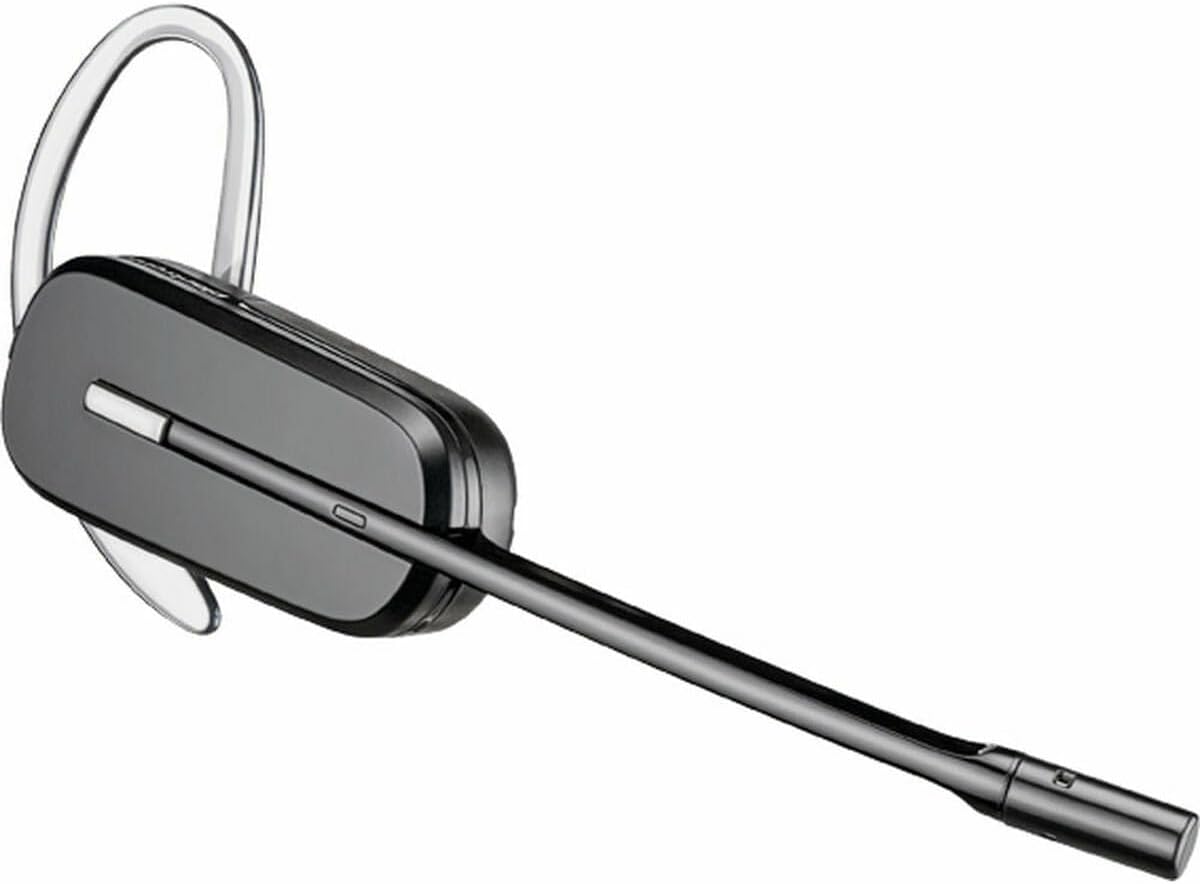
Image 2.1: The CS540/A headset configured with an ear hook.

Image 2.2: The CS540/A headset configured with a headband.
3. Інструкція з експлуатації
3.1 Здійснення та відповідь на дзвінки
- Щоб відповісти на дзвінок: Натисніть кнопку керування дзвінками на гарнітурі.
- Щоб завершити дзвінок: Press the Call Control button again.
- Щоб зателефонувати:
- Ensure the headset is powered on and connected to the base.
- Натисніть кнопку керування дзвінками на гарнітурі.
- Dial the number on your desk phone.
3.2 Регулювання гучності
Use the volume rocker switch on the headset to adjust the listening volume.
- Натисніть + side to increase volume.
- Натисніть - side to decrease volume.
3.3 Функція вимкнення звуку
To mute the microphone during a call, press the Mute button on the headset. Press it again to unmute.

Image 3.1: A user wearing the Plantronics CS540/A headset during a call.
4. Технічне обслуговування
4.1 Cleaning the Headset
Регулярне чищення допомагає підтримувати продуктивність та гігієну гарнітури.
- Wipe the headset and base station with a soft, dry, anti-static cloth.
- Не використовуйте агресивні хімікати або абразивні миючі засоби.
- Уникайте вологи в отворах.
4.2 Догляд за акумулятором
The headset uses a Lithium Polymer battery. To maximize battery life:
- Повністю зарядіть гарнітуру перед першим використанням.
- Уникайте екстремальних температур.
- If the headset will not be used for an extended period, charge it periodically.
- The battery is replaceable; contact support for replacement options if needed.
5. Вирішення проблем
If you encounter issues with your CS540/A headset, try the following solutions:
5.1 No Dial Tone or Audio
- Переконайтеся, що гарнітура повністю заряджена та увімкнена.
- Verify all cables are securely connected between the base station and the desk phone.
- Check the compatibility switch on the base station. Adjust it to different positions until a dial tone is heard.
- Confirm the desk phone's handset is properly seated or lifted (if not using an electronic hookswitch).
5.2 Погана якість звуку
- Adjust the listening volume on the headset.
- Ensure the microphone is positioned correctly, approximately two finger-widths from your mouth.
- Перевірте наявність перешкод від інших бездротових пристроїв. Перемістіть базову станцію подалі від іншої електроніки.
- If using a desk phone, adjust the transmit and receive volume controls on the base station (if available).
5.3 Headset Not Pairing with Base
- Ensure both the headset and base are powered on.
- Place the headset in the charging cradle. The charge indicator should light up.
- If pairing is lost, refer to the full Plantronics CS540/A user guide for re-pairing instructions, which typically involves pressing a pairing button on the base and headset.
6. Технічні характеристики
| Особливість | Деталь |
|---|---|
| Назва моделі | CS540A |
| Номер моделі товару | 84693-02 |
| Бренд | POLY (formerly Plantronics) |
| Технологія підключення | Бездротовий зв'язок (DECT) |
| Технологія бездротового зв'язку | DECT 6.0 (1920-1930 MHz) |
| Стиль носіння | Convertible (Ear Hook, Headband) |
| Термін служби батареї (час розмови) | До 6 годин |
| Час зарядки | Приблизно 3 години |
| мікрофон | Шумозаглушення |
| Тип управління | Call Control, Volume, Mute |
| Вага товару | 0.7 Ounces (headset only) |
| Розміри продукту | 8.07 x 5.51 x 4.53 inches (packaging/base) |
| матеріал | пластик |
| Джерело живлення | AC Adapter (for base station) |
7. Гарантія та підтримка
7.1 Обмежена гарантія
This product is covered by a limited warranty provided by POLY. The warranty typically covers manufacturing defects for a specified period from the date of purchase. Please retain your proof of purchase for warranty claims. For specific warranty terms and conditions, refer to the official POLY webсайт або гарантійний талон, що додається до вашого продукту.
7.2 Підтримка клієнтів
For further assistance, technical support, or to inquire about replacement parts, please visit the official POLY support website or contact their customer service. You can often find detailed FAQs, troubleshooting guides, and contact information on their webсайт.
Official POLY Webсайт: www.poly.com


