1. Вступ і даліview
Цей посібник містить важливу інформацію для правильного налаштування, експлуатації та обслуговування вашого ViewSonic VA2231WM-LED 22-inch widescreen LED monitor. Please read these instructions carefully before using your monitor.

Малюнок 1.1: Спереду view з ViewSonic VA2231WM-LED monitor displaying an environmental message.
Ключові характеристики:
- 22-inch (21.5-inch viewable) Full HD 1080p widescreen display.
- Mercury-free LED backlight for energy efficiency.
- 10,000,000:1 Dynamic Contrast Ratio for enhanced image depth.
- Automatic Aspect Ratio Adjustment to prevent image stretching.
- Integrated stereo speakers for multimedia audio.
- DVI and VGA input options for versatile connectivity.
- VESA mountable (100mm x 100mm) for flexible installation.
- Eco-mode function for up to 35% energy savings.
- ENERGY STAR 5.0 and EPEAT Silver certified.
2. Інструкції з налаштування
2.1 Розпакування монітора
Carefully remove the monitor and all components from the packaging. Ensure all items listed in the packing list are present. Retain the original packaging for future transport or service needs.

Малюнок 2.1: Сторона view of the monitor, showcasinйого тонкий дизайн.
2.2 Прикріплення підставки
- Покладіть монітор екраном вниз на м’яку, чисту поверхню, щоб запобігти подряпинам.
- Align the stand base with the monitor's neck and secure it according to the diagram provided in the quick start guide (not included in this document).
- Ensure the stand is firmly attached before placing the monitor upright.
2.3 З'єднувальні кабелі
Connect the necessary cables to the corresponding ports on the back of the monitor and your computer.

Figure 2.2: Rear panel connections including power input, audio input, DVI, and VGA ports.
- Кабель живлення: Підключіть кабель живлення до входу живлення монітора, а потім до заземленої електричної розетки.
- Video Cable (DVI or VGA):
- For digital signal, connect a DVI cable from your computer's DVI output to the monitor's DVI input.
- For analog signal, connect a VGA cable from your computer's VGA output to the monitor's VGA input.
- Аудіокабель: If using the integrated speakers, connect an audio cable from your computer's audio output to the monitor's audio input.
2.4 Кріплення VESA
The VA2231WM-LED monitor is VESA compliant (100mm x 100mm), allowing for alternative mounting solutions such as wall mounts or monitor arms.
- Ensure the monitor is powered off and disconnected from all cables.
- Carefully detach the original stand by unscrewing the four screws located on the back of the monitor.
- Attach your VESA-compatible mount using the appropriate screws (typically M4 x 10mm, not included).
- Follow the instructions provided with your VESA mounting kit for secure installation.
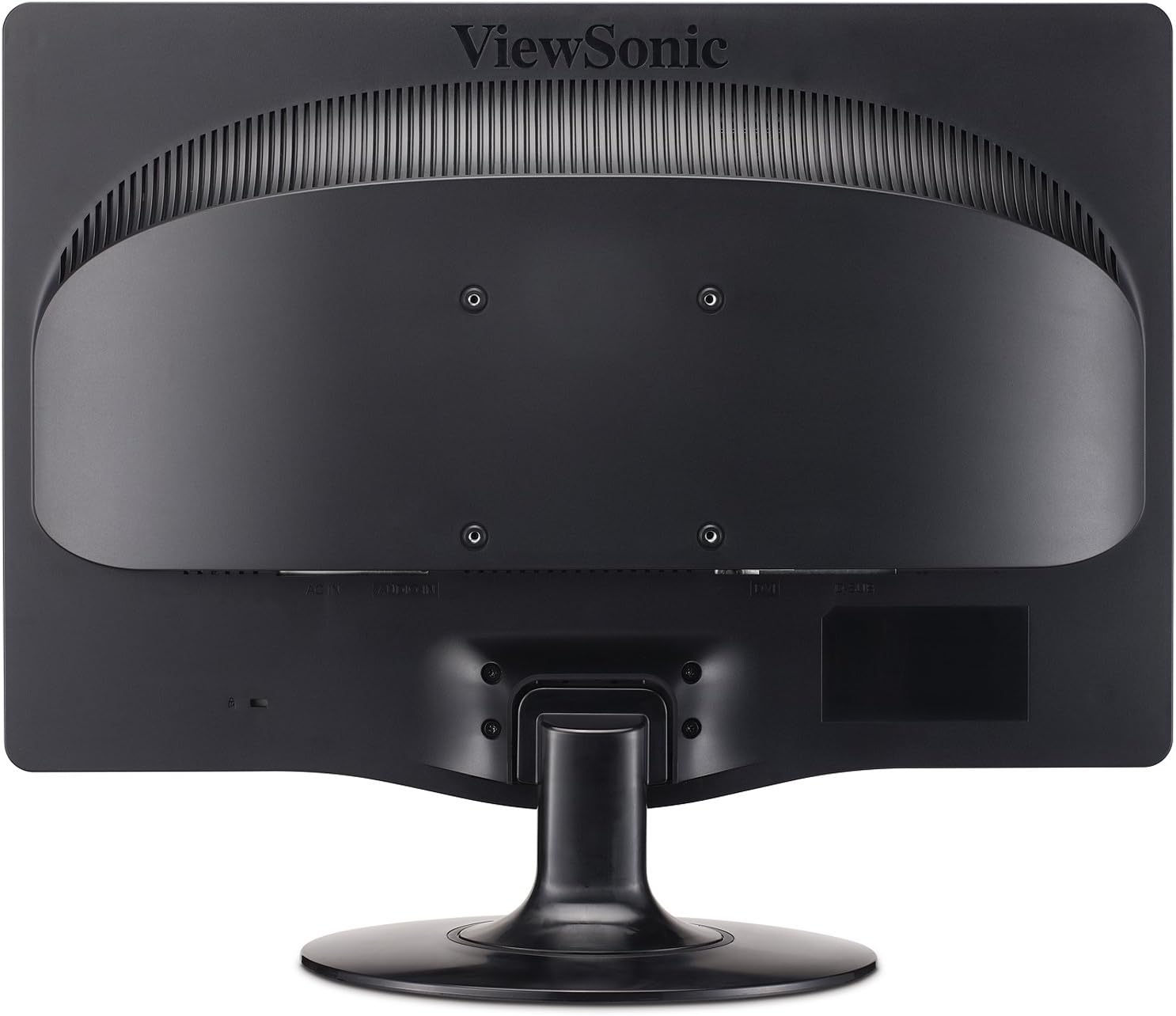
Малюнок 2.3: Задня частина view highlighting the 100mm x 100mm VESA mounting pattern.
3. Інструкція з експлуатації
3.1 Увімкнення/вимкнення
- Press the power button located on the front bezel of the monitor to turn it on or off.
- The power indicator light will illuminate when the monitor is on.
3.2 Екранне меню (OSD)
The OSD menu allows you to adjust various display settings. Use the control buttons located on the front bezel to navigate and select options.
- Кнопка меню: Відкриває екранне меню.
- Стрілки вгору/вниз: Навігація параметрами меню.
- Кнопка вибору: Підтверджує вибір або входить до підменю.
- Кнопка виходу: Вихід з поточного меню або екранного меню.
3.3 Налаштування параметрів дисплея
- Яскравість/Контрастність: Adjust these settings to optimize image visibility for your environment.
- Еко-режим: Select "Optimize" or "Conserve" to reduce power consumption and prolong lamp life. This can save up to 35% energy.
- Співвідношення сторін: The monitor features automatic aspect ratio adjustment. For 4:3 input signals, the image will be centered with sidebars, preventing stretching.
- Вибір входу: Manually switch between DVI and VGA inputs if auto-detection does not select the correct source.
- Аудіо: Adjust the volume for the integrated stereo speakers.
4. Технічне обслуговування
4.1 Очищення монітора
- Завжди вимикайте монітор та від’єднуйте шнур живлення від мережі перед чищенням.
- Злегка протріть м’якою тканиною без ворсу dampводою або м’яким, неабразивним засобом для чищення екранів.
- Не розпилюйте засіб для чищення безпосередньо на екран. Спочатку нанесіть його на тканину.
- Avoid using benzene, thinner, ammonia-based cleaners, or abrasive cleaning agents, as these can damage the display surface.
4.2 Загальний догляд
- Тримайте монітор подалі від прямих сонячних променів, надмірного тепла або вологості.
- Забезпечте належну вентиляцію навколо монітора, щоб запобігти перегріву.
- Уникайте розміщення важких предметів на моніторі або його кабелях.
- Do not attempt to disassemble the monitor; refer all servicing to qualified personnel.
5. Вирішення проблем
If you encounter issues with your monitor, refer to the following common troubleshooting steps.
| проблема | Можлива причина | Рішення |
|---|---|---|
| Немає живлення | Power cable not connected; power outlet not active; monitor power button off. | Ensure power cable is securely connected. Check power outlet with another device. Press the monitor's power button. |
| Немає сигналу | Video cable not connected; incorrect input source selected; computer not powered on. | Verify video cable (DVI/VGA) is securely connected to both monitor and computer. Use OSD to select correct input source. Ensure computer is powered on and outputting video. |
| Зображення розмите або спотворене | Incorrect resolution; loose video cable; OSD settings incorrect. | Set computer's display resolution to 1920x1080. Check video cable connection. Adjust OSD settings like 'Auto Adjust' (for VGA) or 'Phase/Clock'. |
| Dead Pixels | Manufacturing characteristic of LCD panels. | Зверніться до ViewSonic's pixel performance policy for warranty coverage regarding dead pixels. |
6. Технічні характеристики
| Особливість | Деталь |
|---|---|
| Номер моделі | VA2231WM-LED |
| Розмір екрана | 22 дюймів (21.5 дюйма) viewздатний) |
| роздільна здатність | 1920 x 1080 (повна HD 1080p) |
| Співвідношення сторін | 16:9 |
| Тип панелі | РК-дисплей зі світлодіодним підсвічуванням |
| Динамічний коефіцієнт контрастності | 10,000,000:1 |
| Час відгуку | 5 мс (типова) |
| Підключення | 1x DVI, 1x VGA |
| Аудіо | Integrated Stereo Speakers, Audio In |
| Сумісне з кріпленням VESA | 100 мм х 100 мм |
| Розміри (ДxШxВ) | 7.7 x 20.2 x 15.3 дюйма (з підставкою) |
| вага | 8.6 фунтів (з підставкою) |
| Споживана потужність | Eco-mode for reduced consumption |
| Сертифікати | ENERGY STAR 5.0, EPEAT Silver |
7. Гарантія та підтримка
7.1 Обмежена гарантія
The ViewSonic VA2231WM-LED monitor is backed by a 3 рік обмеженої гарантіїЦя гарантія поширюється на дефекти матеріалів та виготовлення за умов нормального використання. Будь ласка, збережіть чек про покупку для пред'явлення претензій за гарантією.
7.2 Pixel Performance Policy
ViewSonic is committed to using high-grade panels and offers an industry-leading pixel performance policy. For detailed information regarding acceptable pixel anomalies and warranty coverage, please refer to the official ViewСоник webсайту або зв’яжіться зі службою підтримки клієнтів.
7.3 Підтримка клієнтів
For technical assistance, warranty service, or further information, please visit the official ViewСоник website or contact their customer support department. Contact details can typically be found on the ViewСоник webсайті або в оригінальній документації до продукту.


