1. Вступ
The j5create USB 2.0 to VGA Display Adapter provides a convenient solution for adding an external VGA display to your computer via a USB 2.0 port. This adapter supports multiple display modes and is compatible with both Windows and Mac operating systems, allowing for enhanced productivity through extended or mirrored desktop environments.

Image 1.1: The j5create USB 2.0 to VGA Display Adapter, a compact silver device with a VGA port on one end and a USB cable on the other.
2. особливості
- USB-підключення Plug-and-Play: Easy driver installation for immediate use.
- Підтримка кількох моніторів: Allows for up to 4 adapters in Windows and up to 2 adapters in Mac systems.
- Three Display Modes: Supports Primary, Extended, and Mirror display configurations.
- Поворот дисплея: Offers 0°, 90°, 180°, and 270° rotation (Windows only).
- Міцна конструкція: Housed in a non-toxic and recyclable aluminum enclosure.
3. Системні вимоги
- Доступний порт USB 2.0.
- VGA-compatible monitor or display.
- Сумісність з операційною системою:
- Windows 8 and later.
- Mac OS X Panther and later.
- Примітка для користувачів Mac: Currently not compatible with macOS 11 Big Sur. Functionality may be limited with macOS High Sierra (e.g., extended mode with laptop closed). It is advised to delay updating to macOS 11 Big Sur or refer to j5create support for specific macOS version compatibility.
4. Налаштування
4.1 Вміст упаковки
- j5create USB 2.0 to VGA Display Adapter (Model: FBA_JUA210)
- Короткий посібник з встановлення (якщо входить до комплекту)
4.2 Підключення адаптера
- Connect one end of a VGA cable (not included) to the VGA port on your external monitor.
- Connect the other end of the VGA cable to the VGA port on the j5create USB 2.0 to VGA Display Adapter.
- Plug the USB connector of the j5create adapter into an available USB 2.0 port on your computer.
- The necessary drivers should install automatically (Plug-and-Play). If prompted, follow the on-screen instructions to complete the driver installation.

Image 4.1: The j5create USB 2.0 to VGA Display Adapter connected to a laptop's USB port, with the VGA port ready for a monitor connection.

Зображення 4.2: Крупний план view of the VGA port on the j5create adapter, showing the pin configuration and connection point for a VGA cable.
5. Операційна
5.1 Режими відображення
Once connected, your computer should detect the new display. You can configure the display settings through your operating system's display preferences.
- Основний режим: The external display acts as your main screen.
- Розширений режим: The external display extends your desktop, providing more screen space for multitasking.
- Дзеркальний режим: The external display duplicates the content of your primary screen, ideal for presentations.

Image 5.1: A business meeting scenario where a laptop is connected to a large display via the j5create adapter, demonstrating mirror mode for presentations.
5.2 Multiple Adapters
The j5create USB 2.0 to VGA Display Adapter supports multiple units for expanded display setups:
- Up to 4 adapters can be used simultaneously on Windows systems.
- Up to 2 adapters can be used simultaneously on Mac systems.

Image 5.2: A workstation featuring a computer connected to three external monitors, illustrating the capability of the j5create adapter for multi-display setups.
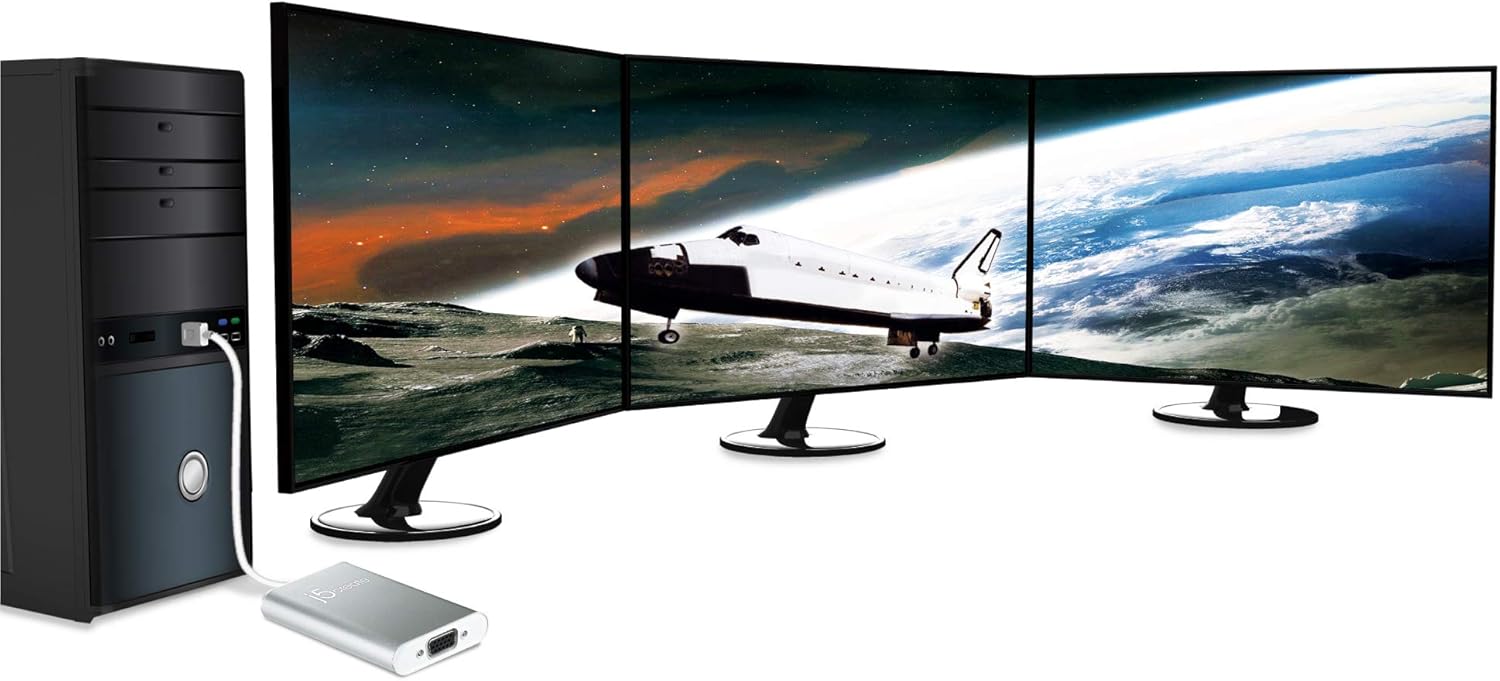
Image 5.3: A desktop computer tower connected to three external monitors, showcasing an advanced multi-display configuration possible with multiple j5create adapters.
5.3 Display Rotation (Windows Only)
On Windows operating systems, the display output can be rotated to 0°, 90°, 180°, or 270° through the display settings. This feature is not available on Mac operating systems.
6. Технічне обслуговування
To ensure optimal performance and longevity of your j5create USB 2.0 to VGA Display Adapter, follow these guidelines:
- Keep the adapter in a clean, dry environment, away from extreme temperatures and direct sunlight.
- Avoid exposing the adapter to liquids or excessive moisture.
- Не намагайтеся розбирати або модифікувати адаптер, оскільки це призведе до анулювання гарантії та може призвести до пошкодження.
- Протирайте зовнішню частину м’якою сухою тканиною. Не використовуйте агресивні хімікати або абразивні засоби для чищення.
- Handle the cables and connectors gently to prevent bending or breaking.
7. Вирішення проблем
7.1 Немає виводу на дисплей
- Перевірте підключення: Ensure all cables (USB, VGA) are securely connected to both the adapter, computer, and monitor.
- Перевірити потужність: Ensure your monitor is powered on and set to the correct input source (VGA).
- Встановлення драйвера: Confirm that the necessary drivers have been installed. If not, try disconnecting and reconnecting the adapter, or visit the j5create webсайт для завантаження драйверів.
- Перезавантажте комп'ютер: A system restart can often resolve display detection issues.
- Test with Another Port/Computer: Try connecting the adapter to a different USB port on your computer, or test it on another computer to rule out port or system-specific issues.
7.2 Display Flickering or Poor Quality
- Якість кабелю: Ensure you are using a high-quality VGA cable. Damaged or low-quality cables can cause signal degradation.
- Параметри роздільної здатності: Adjust the display resolution and refresh rate in your operating system's display settings to a supported value for your monitor and adapter.
- Перешкоди: Keep the adapter and cables away from sources of electromagnetic interference.
7.3 Mac Specific Issues
- macOS Big Sur: The adapter is currently not compatible with macOS 11 Big Sur.
- macOS High Sierra: Limitations exist, particularly with extended mode when the laptop lid is closed. Ensure your macOS version is fully supported or consult j5create support for workarounds.
- Конфлікти драйверів: Avoid combining different brands of USB display adapters on a single Mac machine, as this can lead to software conflicts.
8. Технічні характеристики
| Бренд | j5create |
| Номер моделі | FBA_JUA210 |
| Тип роз'єму | USB 2.0 (Input), VGA (Output) |
| Підтримка операційної системи | Windows 8; Mac OS X Panther and later (with noted exceptions) |
| Вага товару | 2.56 унції (приблизно 72.5 грамів) |
| Розміри продукту (ДxШxВ) | 7.75 x 5 x 1.6 дюймів (приблизно 19.7 x 12.7 x 4.1 см) |
| Матеріал корпусу | Алюміній |
9. Інформація про гарантію
For detailed warranty information regarding your j5create USB 2.0 to VGA Display Adapter, please refer to the warranty card included with your product or visit the official j5create webсайт. Гарантійні умови можуть відрізнятися залежно від регіону та продукту.
10. Підтримка
If you encounter any issues or have questions not covered in this manual, please contact j5create customer support. You can find support resources, FAQs, and contact information on the official j5create webсайт:


