1. Вступ
This manual provides detailed instructions for the installation, operation, and maintenance of your JVC KDR820BT Wireless Bluetooth Dual USB-CD Receiver. Please read this manual thoroughly before using the unit to ensure proper operation and to prevent damage.
The JVC KDR820BT is designed to provide versatile audio playback and communication features in your vehicle. It includes built-in Bluetooth for hands-free calling and audio streaming, dual USB ports for device connectivity, and CD playback capabilities. The unit also features a customizable display with variable color options.
2. Вміст упаковки
Перед початком встановлення переконайтеся, що всі елементи присутні в упаковці:
- JVC KDR820BT Head Unit
- Wireless Remote Control (RM-RK52)
- USB-адаптер Bluetooth
- Дротовий мікрофон
- Джгут
- Монтажне обладнання
- Посібник користувача (цей документ)
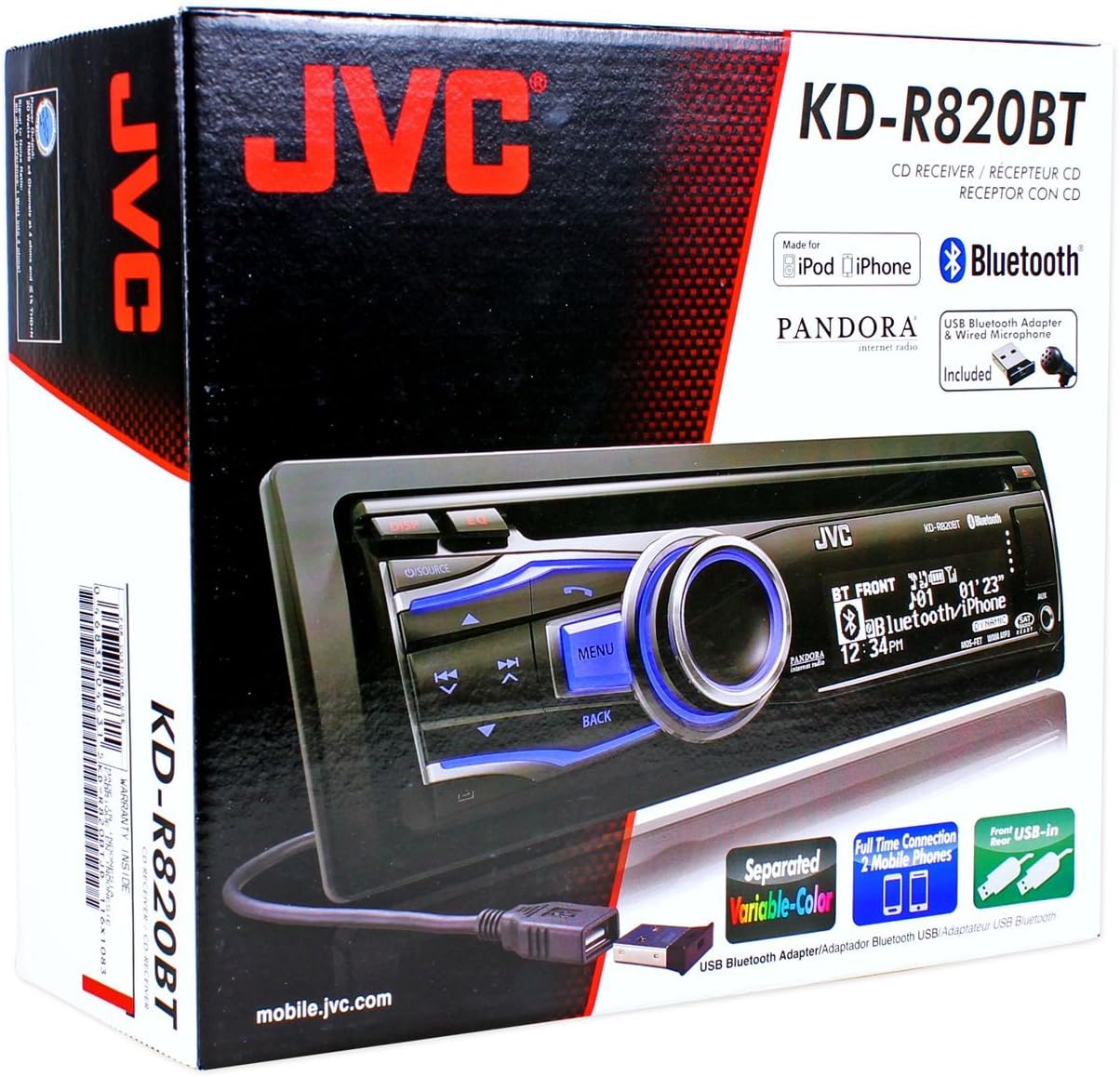
Figure 2.1: JVC KDR820BT Product Packaging. The box illustrates the main unit, remote, USB Bluetooth adapter, and wired microphone.
3. Монтаж
Professional installation is recommended. Ensure the vehicle's battery is disconnected before starting installation to prevent electrical damage.
3.1 Підключення проводів
Connect the wiring harness to the vehicle's electrical system and speakers. Refer to your vehicle's wiring diagram for specific connections.
- Жовтий дріт: Підключіть до постійної напруги 12 В.
- Червоний дріт: Connect to switched 12V accessory power.
- Чорний дріт: Підключіть до заземлення шасі автомобіля.
- Синій/білий дріт: Підключіть до живлення антену або ampкабель дистанційного включення lifier.
- Провід динаміка: Підключіть до динаміків автомобіля (дотримуючись правильної полярності).
- RCA Pre-out Jacks: Для підключення зовнішніх ampдинаміки (фронтальні, задні, сабвуфер).
- Вхід мікрофона: Connect the supplied wired microphone for hands-free calling.
- Порти USB: Front USB for general connectivity, Rear USB for additional devices or the Bluetooth adapter.

Figure 3.1: Rear Panel Connections. This image displays the rear of the receiver with its wiring harness, RCA pre-outs, and antenna input.
3.2 Встановлення пристрою
Install the mounting sleeve into the vehicle's dashboard opening. Secure the unit by sliding it into the sleeve until it locks into place. Attach the trim ring.
3.3 Connecting the Bluetooth Adapter
The supplied USB Bluetooth adapter must be connected to one of the USB ports (front or rear) for Bluetooth functionality. For a cleaner installation, the rear USB port is often preferred.
4. Початкове налаштування
After installation, reconnect the vehicle battery. The unit will power on. Follow these steps for initial configuration:
- Початкове ввімкнення: Натисніть ДЖЕРЕЛО для включення пристрою.
- Налаштування годинника: Access the system menu to set the current time.
- Параметри звуку: Adjust basic audio settings such as bass, treble, balance, and fader.
- Колір дисплея: Customize the display and button illumination colors using the variable color settings.
5. Інструкція з експлуатації

Рисунок 5.1: Передня панель зверхуview. This image shows the main controls and display of the JVC KDR820BT.

Figure 5.2: Receiver with Remote Control. The image displays the head unit and the included wireless remote control (RM-RK52).
5.1 Основні елементи керування
- Кнопка живлення/джерела: Press to turn on/off or change audio source (FM/AM, CD, USB, Bluetooth Audio, AUX).
- Регулятор гучності: Rotate to adjust volume. Press to mute/pause audio.
- Кнопка меню: Access system settings and advanced options.
- Кнопка Назад: Return to the previous menu or display.
- Skip/Seek Buttons: Navigate tracks, radio stations, or menu options.
5.2 Робота радіо (AM/FM)
- Прес ДЖЕРЕЛО to select FM or AM.
- Використовуйте шукати buttons to find stations automatically.
- Щоб налаштувати вручну, натисніть і утримуйте шукати кнопки.
- To store a preset, tune to the desired station, then press and hold a preset number button (1-6).
5.3 Відтворення CD
- Вставте компакт-диск у дисковод. Пристрій автоматично перемкнеться на джерело компакт-диска та розпочне відтворення.
- Використовуйте Пропустити кнопки для зміни треків.
- Натисніть Ручка регулювання гучності щоб призупинити/відтворити.
- Натисніть Витягнути кнопку, щоб вийняти компакт-диск.
5.4 USB Device Playback
- Connect a USB device (flash drive, iPod/iPhone, digital audio player) to either the front or rear USB port.
- Прес ДЖЕРЕЛО щоб вибрати USB.
- Використовуйте Пропустити кнопки для навігації по треках.
- Натисніть Меню button to browse folders and files.
5.5 Функції Bluetooth
Ensure the USB Bluetooth adapter is connected to the unit.
5.5.1 Сполучення пристрою Bluetooth
- Увімкніть Bluetooth на своєму мобільному пристрої.
- On the JVC KDR820BT, select the Bluetooth source.
- шукати available devices on your mobile phone. Select "JVC unit" (or similar) from the list.
- Enter the PIN code (usually "0000") if prompted.
- Once paired, the Bluetooth indicator on the receiver will illuminate. The unit supports connecting two phones simultaneously.
5.5.2 Дзвінки в режимі «вільні руки»
- Здійснення дзвінка: Use your phone's voice dial feature (if supported) or dial directly from your phone. The audio will transfer to the receiver.
- Відповідь на дзвінок: Натисніть Телефон button on the receiver when an incoming call is detected.
- Завершення дзвінка: Натисніть Телефон ще раз, щоб закінчити дзвінок.
- Доступ до телефонної книги: The unit supports Phone Book Access Profile (PBAP) for transferring contacts.
5.5.3 Потокове передавання аудіо через Bluetooth
- Select Bluetooth Audio as the source.
- Play audio from your paired mobile device. The receiver will stream the audio wirelessly.
- Використовуйте Пропустити buttons on the receiver to control playback (play/pause, skip track).
- The unit supports Pandora Internet Radio control from an iPhone.
5.6 Параметри звуку
- 3-Band Parametric iEQ: Access the sound menu to adjust the equalizer settings for customized audio output.
- MOS-FET 50W x 4 Ampліфтер: Provides powerful audio output.
- TI/Burr-Brown 24-bit DAC: Ensures high-quality digital-to-analog audio conversion.
5.7 Налаштування дисплея
- Separated Variable Color: Customize the illumination color of the keys and LCD panel from over 30,000 choices. Access this setting through the system menu.
- Контроль яскравості: Adjust display brightness for day and night viewінж.
6. Технічне обслуговування
- Очищення пристрою: Використовуйте м’яку суху тканину для протирання передньої панелі. Для видалення стійкого брудуampпромийте тканину водою. Уникайте абразивних мийних засобів або розчинників.
- Догляд за CD-програвачем: Keep the disc slot free of dust and debris. Use only clean, scratch-free CDs.
- Зняття передньої панелі: The detachable faceplate can be removed for security. Store it in a protective case.
7. Вирішення проблем
Review the following common issues and solutions before seeking service.
| проблема | Можлива причина / рішення |
|---|---|
| Немає живлення | Check power and ground wiring connections. Ensure the vehicle's ignition is on. Check vehicle fuses. |
| Ні звуку | Check speaker wiring. Ensure volume is not muted or too low. Verify the power antenna/remote wire is connected if using an external ampліфірник. |
| Bluetooth echo during calls | Adjust microphone gain settings. Reposition the microphone away from reflective surfaces (e.g., windshield). Reduce the receiver's volume during calls. |
| Не вдається підключити пристрій Bluetooth | Ensure the USB Bluetooth adapter is securely connected. Make sure Bluetooth is enabled on your mobile device and the receiver is in pairing mode. Delete previous pairings from your phone and try again. |
| Unit loses settings after power off | The yellow constant 12V power wire may not be connected correctly or is losing power. This can also occur if the vehicle battery is disconnected. |
| Display text is truncated or difficult to read | The display has limited character space. Some long names may be truncated. There is no option to increase scroll speed for folder/file імена. |
| Buttons or rotary knob are unresponsive | Ensure the faceplate is securely attached. Clean around the buttons to remove any debris. If the issue persists, it may indicate a hardware malfunction. |
8. Технічні характеристики
| Особливість | Специфікація |
|---|---|
| Номер моделі | KDR820BT |
| Вихідна потужність | МОН-транзистор 50 Вт x 4 (20 Вт RMS x 4) |
| ЦАП | TI/Burr-Brown 24-bit |
| Еквалайзер | 3-Band Parametric iEQ |
| Підключення | Bluetooth, Dual USB (Front & Rear), AUX Input |
| Функції Bluetooth | Hands-Free Call, Audio Streaming, Phone Book Access Profile, Text Message Receipt Notification, Connects 2 Phones |
| Відтворення медіа | CD, MP3, WMA, WAV |
| Тип дисплея | LCD with Separated Variable Color |
| попередньоamp томtage | 2 вольт |
| Розмір шасі | Full-DIN |
| Розміри (Ш x В x Г) | 7.19 x 2.06 x 6.25 дюйми (приблизно) |
| вага | 4 фунта (приблизно) |
| Підтримувані Інтернет-послуги | Pandora Internet Radio |
| Спосіб контролю | Remote Control, Android (via USB) |
9. Гарантія та підтримка
JVC products are manufactured to high-quality standards. For specific warranty information, please refer to the warranty card included with your product or visit the official JVC webсайт. Зберігайте чек про покупку як підтвердження покупки для гарантійних претензій.
For technical support, service, or inquiries regarding your JVC KDR820BT receiver, please contact JVC customer service or visit their official support channels. Contact information can typically be found on the JVC webсайту або в упаковці продукту.