вступ
This manual provides essential instructions for the safe and effective use of your Olympus Infinity Zoom 210 Quartz Date 35mm Film Camera. This camera is designed for capturing moments with ease, featuring a zoom lens and autofocus capabilities. Please read this manual thoroughly before operating your camera to ensure optimal performance and longevity.
Налаштування
1. Прикріплення ремінця камери
The camera comes with a strap for secure handling. Thread the strap through the strap lug located on the side of the camera body. Ensure it is securely fastened to prevent accidental drops.
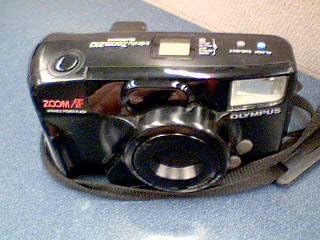
Image: The Olympus Infinity Zoom 210 camera with its strap attached, showing the overall design.
2. Встановлення батареї
Locate the battery compartment cover on the bottom or side of the camera. Open the cover and insert the required batteries (typically CR123A or similar, refer to the compartment label if present) according to the polarity indicators (+/-). Close the cover securely.
3. Завантаження плівки
- Open the camera back cover by sliding the latch located on the side of the camera.
- Place a new 35mm film cartridge into the film chamber.
- Pull the film leader across to the film take-up spool, ensuring it aligns with the sprocket teeth.
- Close the camera back cover firmly until it clicks. The camera will automatically advance the film to the first frame. The frame counter will display '1'.

Зображення: Задня частина view of the Olympus Infinity Zoom 210 camera, illustrating the film compartment door.
Керування камерою
1. Увімкнення/вимкнення живлення
To power on the camera, slide the lens barrier open or press the power button, depending on your model. The lens will extend. To power off, close the lens barrier or press the power button again.

Зображення: Верхня частина передньої частини view of the Olympus Infinity Zoom 210 camera, showing the lens extended and power button area.
2. Focusing and Zooming
- Автофокус (АФ): The camera features an autofocus system. Half-press the shutter button to activate autofocus. A green light or beep typically confirms focus lock.
- Масштаб: Use the zoom buttons (usually marked 'W' for Wide and 'T' for Telephoto) to adjust the focal length of the 38-76mm zoom lens. Look through the viewшукач, щоб скомпонувати знімок.

Image: Close-up of the Olympus Infinity Zoom 210 camera, highlighting the zoom controls and the lens.
3. Використання спалаху
The camera is equipped with a built-in variable power flash. The flash will typically fire automatically in low-light conditions. You can usually override this setting using the flash mode button (e.g., Auto, Fill-in, Red-eye Reduction, Flash Off). Refer to the icons near the flash button for specific modes.

Image: Detail of the Olympus Infinity Zoom 210 camera, focusing on the flash unit and flash mode selection buttons.
4. Зробити фотографію
- Увімкніть камеру.
- Перегляньте viewвидошукач і скомпонуйте кадр.
- Half-press the shutter button to activate autofocus and exposure metering. Wait for the focus indicator to confirm focus.
- Fully press the shutter button to take the picture. The camera will automatically advance the film to the next frame.
5. Using the Quartz Date Function
The Quartz Date function allows you to imprint the date or time onto your photographs. Use the 'MODE' and 'SET' buttons, typically located near the LCD display on the camera back, to set the current date and time. Select the desired display format (e.g., Year/Month/Day) before shooting.
Технічне обслуговування
- Очищення лінзи: Use a soft, lint-free cloth or a lens brush to gently clean the lens surface. Avoid touching the lens with your fingers.
- Корпус камери: Wipe the camera body with a dry, soft cloth. Do not use solvents or abrasive cleaners.
- Догляд за акумулятором: Вийміть батарейки, якщо камера не використовуватиметься протягом тривалого часу, щоб запобігти їх витіканню.
- Зберігання: Зберігайте камеру в прохолодному, сухому місці, подалі від прямих сонячних променів та екстремальних температур.
Усунення несправностей
- Камера не вмикається:
- Check if the batteries are inserted correctly and are not depleted. Replace batteries if necessary. Ensure the lens barrier is fully open.
- Film does not advance:
- Ensure the film is loaded correctly and the film leader is properly engaged with the take-up spool. Close the camera back firmly.
- Спалах не спрацьовує:
- Check the flash mode setting. Ensure it is not set to 'Flash Off'. Allow time for the flash to charge if the flash ready lamp не освітлюється.
- Фотографії розмиті:
- Ensure the autofocus system has locked onto the subject before fully pressing the shutter button. Hold the camera steady during exposure. Check for dirt or smudges on the lens.
- Date imprint not working:
- Verify that the date and time are correctly set using the 'MODE' and 'SET' buttons. Ensure the date imprint function is activated and not turned off.
Технічні характеристики
| Назва моделі | Olympus Infinity Zoom 210 Quartz Date |
| Бренд | Олімп |
| Тип формату фільму | 35 мм |
| Об'єктив | Zoom 38-76mm |
| Особливість | Built-in Flash, Autofocus |
| Розміри продукту | 15 x 10.51 x 2.99 дюймів |
| Вага товару | 12.8 унції (0.8 фунта) |
| ASIN | B004THNNV8 |
| Дата першої доступності | 23 березня 2011 р |
| Включені компоненти | ремінець |
Гарантія та підтримка
For information regarding warranty coverage, please refer to the documentation included with your purchase or contact Olympus customer support directly. Support contact details can typically be found on the manufacturer's official webсайт.
For further assistance or technical inquiries, please visit the official Olympus support webсайту або зв’яжіться зі своїм відділом обслуговування клієнтів.