вступ
The Logitech Z906 is a 5.1 surround sound speaker system designed to deliver an immersive audio experience. Certified by THX and featuring digital decoding for Dolby Digital and DTS encoded soundtracks, this system provides powerful and detailed sound for various entertainment needs. It offers versatile connectivity options and integrated controls for a customizable listening experience.
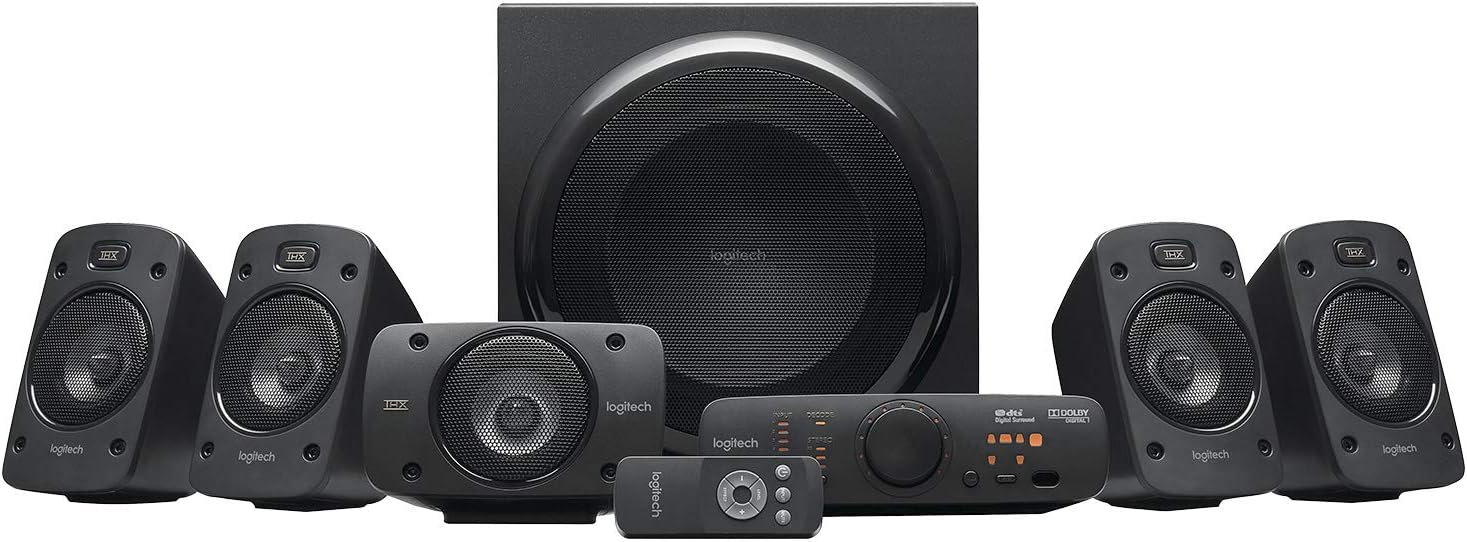
Малюнок 1: Закінченоview of the Logitech Z906 5.1 Surround Sound Speaker System, including the subwoofer, five satellite speakers, control console, and wireless remote.
Налаштування
Follow these steps to correctly set up your Logitech Z906 speaker system.
1. Розпакування та компоненти
Обережно вийміть усі компоненти з упаковки. Коробка містить:
- 1 Сабвуфер
- 5 Satellite Speakers (4 for surround, 1 for center)
- 1 Control Console
- 1 Wireless Remote Control (requires 3 AAA batteries)
- Акустичні кабелі
- Audio Cables (e.g., 3.5mm, RCA)

Рисунок 2: Усі компоненти, що входять до комплекту Logitech Z906.
2. Розміщення динаміків
Для оптимального об'ємного звуку 5.1 розташуйте динаміки наступним чином:
- Центральний спікер: Directly in front of your listening position, usually above or below your display.
- Фронтальні лівий/правий динаміки: To the left and right of your display, equidistant from the center speaker and your listening position.
- Rear Left/Right Speakers: To the left and right of your listening position, slightly behind you.
- Сабвуфер: On the floor, preferably in a corner or near a wall for enhanced bass response. Experiment with placement for best results.

Малюнок 3: Впрample of a 5.1 surround sound speaker setup with the Logitech Z906 system.
3. Підключення динаміків
Connect the satellite speakers to the subwoofer using the provided color-coded speaker cables. Ensure correct polarity (red to red, black to black) for each speaker.

Figure 4: Rear panel of the Z906 subwoofer showing speaker terminals and input connections. Connect the satellite speakers to the corresponding terminals.
4. Підключення джерел звуку
The Z906 system offers multiple input options for various devices:
- Цифровий оптичний: For high-quality audio from TVs, Blu-ray/DVD players, game consoles.
- Цифровий коаксіальний: Another digital option for compatible devices.
- Six-Channel Direct: For connecting to a 5.1 sound card in a PC.
- RCA: Standard stereo connection for various audio devices.
- 3.5mm Auxiliary: For connecting smartphones, tablets, or other portable devices.
Connect your desired audio sources to the corresponding inputs on the control console or directly to the subwoofer's rear panel.

Figure 5: The Z906 control console with various input options for connecting multiple devices.
5. Підключення живлення
Connect the subwoofer's power cable to a wall outlet. The system is now ready for operation.
Відео розпакування
Video 1: An unboxing demonstration of the Logitech Z906 speaker system, showing the contents and initial setup steps.
Операційна
1. Control Console Functions
The control console provides easy access to all system functions:
- Кнопка живлення: Вмикає або вимикає систему.
- Вибір входу: Cycle through available audio inputs (Optical, Coaxial, Six-Channel Direct, RCA, Aux).
- Регулювання гучності: Large rotary knob to adjust overall system volume.
- Вибір ефекту: Choose between various sound effects like Stereo 3D, 4.1, 2.1, or no effect.
- Регулювання рівня: Adjust individual speaker levels (front, rear, center, subwoofer) for balanced surround sound.
- Кнопка вимкнення звуку: Вимкнення або ввімкнення звуку.

Figure 6: Close-up of the Z906 control console, highlighting the main controls and indicators.
2. Бездротовий пульт дистанційного керування
The included wireless remote provides convenient control from a distance. It duplicates most functions available on the control console, including power, volume, input selection, and sound effects.

Figure 7: The wireless remote control for the Logitech Z906 system.
3. Використання навушників
A headphone jack is available on the control console for private listening. Plugging in headphones will automatically mute the speakers and divert audio to your headphones.
Технічне обслуговування
To ensure the longevity and optimal performance of your Logitech Z906 speaker system, follow these maintenance guidelines:
- Прибирання: Використовуйте м’яку суху тканину для очищення поверхонь динаміків. Уникайте абразивних засобів для чищення або розчинників.
- Розміщення: Keep speakers away from direct sunlight, heat sources, and excessive moisture. Ensure adequate ventilation for the subwoofer.
- Управління кабелем: Переконайтеся, що всі кабелі надійно підключені та не перетиснуті та не натягнуті.
- Батареї дистанційного керування: Replace AAA batteries in the wireless remote when performance degrades.
Усунення несправностей
If you encounter issues with your Z906 system, refer to the following common solutions:
- Немає звуку:
- Check all cable connections, including power, speaker wires, and audio input cables.
- Ensure the correct input source is selected on the control console.
- Verify that the system is not muted and the volume is turned up.
- If using a PC, check your computer's sound settings and ensure the Z906 is selected as the output device.
- Distorted Sound/Static:
- Reduce the volume of the audio source or the speaker system.
- Перевірте, чи не закріплені кабелі.
- Ensure the audio source is not sending a distorted signal.
- If static occurs when adjusting the volume knob, this may indicate wear over time.
- Без об'ємного звуку:
- Ensure your audio source is providing a 5.1 signal (e.g., Dolby Digital, DTS).
- Select the appropriate sound effect mode on the control console (e.g., Stereo 3D, 4.1, 2.1).
- Verify correct speaker placement and connections.
- Пульт дистанційного керування не працює:
- Замініть батарейки типу ААА.
- Ensure there are no obstructions between the remote and the control console.
Технічні характеристики
| Особливість | Специфікація |
|---|---|
| Бренд | Logitech |
| Назва моделі | Z906 |
| Номер моделі товару | 980-000469 |
| Тип динаміка | Об’ємний звук 5.1 |
| Total Watts (RMS) | 500 Вт |
| Пікова потужність | 1000 Вт |
| АЧХ | 20 Гц - 20 кГц |
| Співвідношення сигнал-шум | 6E+1 дБ |
| Технологія підключення | Optical, Coaxial, Six-Channel Direct, RCA, 3.5mm |
| Спосіб контролю | Дистанційний |
| Технологія бездротового зв'язку | Bluetooth (Note: Product specifications list Bluetooth, but primary connectivity is wired for 5.1 audio) |
| Діаметр сабвуфера | 29.2 сантиметри (11.5 дюйми) |
| Вага товару | 8.54 кілограмів (18.79 фунти) |
| Розміри продукту | 11.02" Г x 13.78" Ш x 11.5" В |
| Потрібні батареї | 3 батарейки типу AAA (для пульта дистанційного керування) |

Figure 8: The Logitech Z906 system is capable of 1000 Watts Peak Power output.

Figure 9: The Logitech Z906 speaker system is THX Certified for premium sound quality.
Гарантія та підтримка
For warranty information, technical support, or service inquiries, please refer to the official Logitech website or contact Logitech customer support directly. Keep your purchase receipt for warranty claims.


