вступ
This manual provides comprehensive instructions for the safe and efficient use of your BlackBerry HS-300 Wireless Bluetooth Headset. Please read this manual thoroughly before operating the device and retain it for future reference. The BlackBerry HS-300 is designed for hands-free communication with compatible Bluetooth-enabled devices.
Вміст упаковки
Переконайтеся, що ваш пакет містить такі елементи:
- BlackBerry HS-300 Wireless Bluetooth Headset
- Ear hook (optional, for secure fit)
- Ear gels/tips (various sizes for comfort)
- Зарядний кабель
- Посібник користувача (цей документ)
Пристрій закінчивсяview
Familiarize yourself with the components of your BlackBerry HS-300 headset.
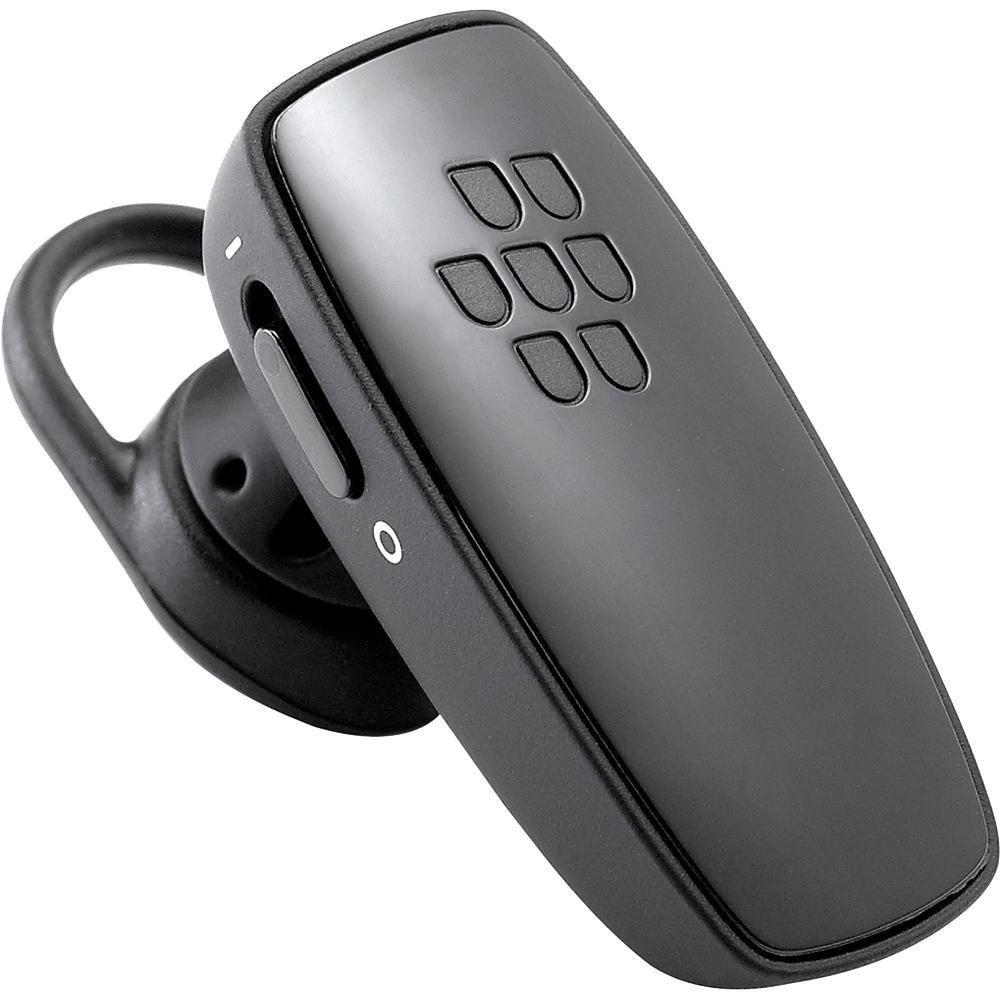
Зображення 1: Фронт view of the BlackBerry HS-300 Wireless Bluetooth Headset. The image displays the main body of the headset, featuring the BlackBerry logo (seven-dot pattern) on the front surface. A slender button, likely for volume control or multi-function, is visible on the side. An ear hook is attached, designed to secure the headset over the ear. A small indicator light is also present near the button.
- Багатофункціональна кнопка: Used for answering/ending calls, voice commands, and pairing.
- Кнопки регулювання гучності: Adjusts call and media volume.
- Світлодіодний індикатор: Відображає стан (живлення, сполучення, заряджання).
- Мікрофон: Captures your voice during calls.
- Вимикач живлення: Вмикає або вимикає гарнітуру.
- Порт зарядки: Connects to the charging cable.
Налаштування
1. Заряджання гарнітури
Before initial use, fully charge your headset. The HS-300 features rapid charge capabilities.
- Connect the charging cable to the headset's charging port and to a compatible USB power source.
- The LED indicator will show the charging status (e.g., solid red for charging, solid blue for fully charged).
- A full charge provides up to 4 hours of talk time.
2. Сполучення з пристроєм Bluetooth
To use your headset, it must be paired with a Bluetooth-enabled phone or device.
- Переконайтеся, що гарнітуру вимкнено.
- Press and hold the Multi-function Button until the LED indicator flashes blue and red alternately. This indicates pairing mode.
- On your phone, enable Bluetooth and search for new devices.
- Select "BlackBerry HS-300" from the list of available devices.
- Якщо буде запропоновано ввести пароль, введіть «0000» (чотири нулі).
- Після сполучення світлодіодний індикатор періодично блиматиме синім кольором.
Інструкція з експлуатації
Увімкнення/вимкнення живлення
- Щоб увімкнути: Slide the Power Switch to the 'On' position. The LED indicator will flash blue.
- Щоб вимкнути: Slide the Power Switch to the 'Off' position. The LED indicator will turn off.
Здійснення та отримання дзвінків
- Відповідь на дзвінок: Натисніть багатофункціональну кнопку один раз.
- Завершення дзвінка: Натисніть багатофункціональну кнопку один раз під час дзвінка.
- Відхилення дзвінка: Натисніть і утримуйте багатофункціональну кнопку приблизно 2 секунди.
- Здійснення дзвінка: Наберіть номер на своєму телефоні. Дзвінок буде автоматично переведено на гарнітуру, якщо вона підключена.
- Voice Dialing (if supported by phone): Press the Multi-function Button once when not on a call.
Регулювання гучності
- Use the Volume Control Buttons on the headset to adjust the call or media volume.
Технічне обслуговування
- Регулярно протирайте гарнітуру м’якою сухою тканиною.
- Уникайте впливу на гарнітуру екстремальних температур, вологи або агресивних речовин.
- Зберігайте гарнітуру в прохолодному сухому місці, коли вона не використовується.
- Do not attempt to disassemble or modify the headset, as this will void the warranty and may cause damage.
Усунення несправностей
| проблема | Рішення |
|---|---|
| Гарнітура не вмикається. | Ensure the headset is charged. Connect it to a power source using the charging cable. |
| Не вдається з’єднати гарнітуру з телефоном. |
|
| Немає звуку або погана якість звуку. |
|
| Гарнітура часто відключається. |
|
Технічні характеристики
| Особливість | Деталь |
|---|---|
| Номер моделі | HS-300 |
| Підключення | Bluetooth Wireless (Version 2.1) |
| Час розмови | До 4 годин |
| Зарядка | Rapid charge capable |
| Елементи керування | Volume control, Multi-function button |
| мікрофон | Інтегрований |
| Форм-фактор | On-ear (single ear) |
| вага | Приблизно 3.2 унції |
| Розміри | 2.5 x 2 x 6.5 дюйми (приблизно) |
Гарантія та підтримка
For warranty information and technical support, please refer to the documentation provided at the time of purchase or visit the official BlackBerry support webсайт. Зберігайте чек про покупку для гарантійних претензій.
Інтернет-підтримка: www.blackberry.com/support