Інструкція користувача домашнього кінотеатру Sunstech XD TH-35 із сабвуфером 5.1
Model: TH-XD 35
1. Вступ
This manual provides essential information for the safe and efficient operation of your Sunstech XD TH-35 Home Cinema 5.1 Subwoofer System. Please read this manual thoroughly before using the product and retain it for future reference.
The Sunstech XD TH-35 is a 5.1 channel home cinema system designed to deliver an immersive audio experience for movies, music, and games. It includes a main unit (DVD/CD/DivX player), a subwoofer, and five satellite speakers.
2. Інформація про безпеку
ПОПЕРЕДЖЕННЯ: щоб зменшити ризик ураження електричним струмом, не знімайте кришку (або задню частину). Всередині немає частин, які обслуговує користувач. Для обслуговування зверніться до кваліфікованого сервісного персоналу.
- Джерело живлення: Переконайтеся, що блок живлення обtage відповідає етикетці з характеристиками на пристрої.
- Вентиляція: Не блокуйте вентиляційні отвори. Встановлюйте відповідно до інструкцій виробника.
- Вода і вологість: Не піддавайте цей пристрій впливу дощу або вологи. Не ставте на пристрій предмети, наповнені рідинами, такі як вази.
- Тепло: Не встановлюйте поблизу будь-яких джерел тепла, таких як радіатори, обігрівачі, печі або інші пристрої (включаючи ampліфікатори), які виробляють тепло.
- Прибирання: Від’єднуйте цей пристрій від мережі під час грози або якщо він не використовується протягом тривалого часу. Протирайте лише сухою ганчіркою.
- Обслуговування: Звертайтеся до кваліфікованого сервісного персоналу. Обслуговування потрібне, якщо пристрій було пошкоджено будь-яким чином, наприклад, пошкоджено шнур живлення або вилка, була пролита рідина або всередину пристрою потрапили предмети, пристрій піддався впливу дощу або вологи, не працює належним чином , або було видалено.
3. Вміст упаковки
Будь ласка, перевірте, чи всі перелічені нижче предмети входять до вашої упаковки:
- Main Unit (DVD/CD/DivX Player)
- Сабвуфер
- Front Left Satellite Speaker
- Front Right Satellite Speaker
- Center Satellite Speaker
- Rear Left Satellite Speaker
- Rear Right Satellite Speaker
- Пульт дистанційного керування
- Аудіо/відео кабелі
- Посібник користувача (цей документ)
4. Продукт закінчивсяview
The Sunstech XD TH-35 system comprises a central player unit, a powerful subwoofer, and five compact satellite speakers, along with a remote control for convenient operation.
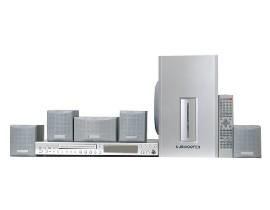
малюнок 4.1: закінченоview of the Sunstech XD TH-35 Home Cinema 5.1 Subwoofer System, showing the main unit, subwoofer, five satellite speakers, and remote control.
4.1 Main Unit (DVD/CD/DivX Player)
This unit serves as the central control hub, featuring disc playback capabilities for CD, DVD, and DivX formats. It includes various input/output ports for connecting to your television and other audio sources.
4.2 Сабвуфер
The subwoofer is responsible for reproducing low-frequency sounds, adding depth and impact to your audio experience. It connects directly to the main unit.
4.3 супутникові динаміки
Five satellite speakers (Front Left, Front Right, Center, Rear Left, Rear Right) provide the surround sound experience, distributing audio across your listening area for immersive soundscapes.
4.4 Пульт дистанційного керування
The included remote control allows for convenient adjustment of volume, input selection, playback controls, and other system settings from a distance.
5. Налаштування
5.1 Розміщення динаміків
Optimal speaker placement is crucial for achieving the best 5.1 surround sound experience.
- Центральний спікер: Place directly above or below your television, centered.
- Фронтальні лівий/правий динаміки: Position these speakers equidistant from the television, forming an equilateral triangle with your primary listening position.
- Rear Left/Right Speakers: Place these speakers to the sides or slightly behind your primary listening position, at ear level or slightly above.
- Сабвуфер: The subwoofer can be placed anywhere in the room, but typically performs well in a corner or near a wall to enhance bass response. Experiment with placement for best results.
5.2 Підключення динаміків
- Identify the speaker output terminals on the main unit and the corresponding input terminals on each speaker.
- Connect the Front Left speaker to the "FL" terminal, Front Right to "FR", Center to "CEN", Rear Left to "RL", and Rear Right to "RR".
- Connect the subwoofer to the dedicated "SUBWOOFER OUT" port on the main unit.
- Ensure all connections are secure and the correct polarity (+ to + and - to -) is observed for each speaker wire.
5.3 Connecting to a Television/Display
Use the provided audio/video cables to connect the main unit to your television. Common connection types include:
- Композитне відео: Connect the yellow video output from the main unit to the yellow video input on your TV.
- Стерео аудіо: Connect the red and white audio outputs from the main unit to the corresponding red and white audio inputs on your TV.
- (Note: Depending on your TV and the system's capabilities, other connections like S-Video or Component Video might be available for better picture quality. Refer to your TV's manual for input options.)
5.4 Підключення живлення
- Once all audio/video and speaker connections are made, plug the main unit's power cord into a wall outlet.
- Turn on the main unit using the power button on the front panel or the remote control.
6. Інструкція з експлуатації
6.1 Основи відтворення
- Увімкнення: Натисніть ПОТУЖНІСТЬ button on the main unit or remote control.
- Вставити диск: Gently insert a CD, DVD, or DivX disc into the disc tray. The tray will automatically close, and playback should begin.
- Виберіть вхід: If the system does not automatically switch to disc playback, press the ВХІД or ДЖЕРЕЛО button on the remote to select the correct input.
- Регулювання гучності: Використовуйте ГУЧНІСТЬ + і ГУЧНІСТЬ - кнопки на пульті дистанційного керування для регулювання загальної гучності.
- Елементи керування відтворенням: використання ГРАТИ, ПАУЗА, СТІЙ, ПРОПУСТИТИ, і ШВИДКА ПЕРЕМОТКА Уперед/НАЗАД buttons for disc navigation.
6.2 Параметри звуку
Access the system's on-screen menu (usually by pressing НАЛАШТУВАННЯ or МЕНЮ on the remote) to adjust audio settings such as:
- Speaker Levels: Adjust the individual volume levels for each speaker (Front, Center, Rear, Subwoofer) to balance the sound.
- Налаштування затримки: Compensate for different distances of speakers from the listening position.
- Режими звуку: Select from various preset sound modes (e.g., Movie, Music, Game) or customize equalizer settings.
6.3 Функції дистанційного керування
The remote control provides full functionality for the system. Familiarize yourself with the button layout for easy operation.
(Note: A detailed diagram of the remote control with button descriptions would typically be included here in a physical manual.)
7. Технічне обслуговування
7.1 Очищення пристрою
To maintain the appearance and performance of your system:
- Зовні: Протріть зовнішні поверхні м’якою сухою тканиною. Не використовуйте абразивні засоби для чищення, віск або розчинники.
- Лоток для диска: Тримайте лоток для дисків чистим і без пилу. Уникайте торкання лінзи всередині лотка для дисків.
- Вентиляція: Переконайтеся, що вентиляційні отвори чисті від пилу та сміття, щоб запобігти перегріву.
7.2 Догляд за диском
Handle discs by their edges. Store discs in their cases when not in use to prevent scratches and dust accumulation. Clean discs with a soft, lint-free cloth, wiping from the center outwards.
7.3 Батарейки пульта дистанційного керування
If the remote control's range decreases or it becomes unresponsive, replace the batteries with new ones of the specified type (e.g., AAA). Ensure correct polarity when inserting new batteries.
8. Вирішення проблем
If you encounter problems with your system, refer to the following table for common issues and solutions.
| проблема | Можлива причина | Рішення |
|---|---|---|
| Немає живлення | Шнур живлення не підключено; розетка несправна | Перевірте підключення шнура живлення; спробуйте іншу розетку |
| Ні звуку | Volume too low; Incorrect input selected; Speaker wires loose/incorrectly connected | Increase volume; Select correct input; Check all speaker connections and polarity |
| Немає зображення | Video cable loose/incorrectly connected; Incorrect TV input selected | Check video cable connections; Select correct input on TV |
| Диск не відтворюється | Диск вставлено неправильно; Диск брудний або подряпаний; Формат диска не підтримується | Re-insert disc correctly; Clean or replace disc; Check disc compatibility (CD, DVD, DivX) |
| Пульт не працює | Batteries depleted or inserted incorrectly; Obstruction between remote and unit | Replace batteries, check polarity; Remove obstructions; Ensure remote is pointed at the unit's sensor |
If the problem persists after trying these solutions, please contact Sunstech customer support or a qualified service technician.
9. Технічні характеристики
| Особливість | Деталь |
|---|---|
| Назва моделі | TH-XD 35 |
| Бренд | Sunstech |
| Конфігурація об'ємного звуку | 5.1 (5 Speakers + 1 Subwoofer) |
| Wattage | 170 Вт |
| Підтримувані типи медіа | CD, DVD, DivX |
| ASIN | B0044ALAEM |
| Перша доступна дата | 21 лютого 2020 р |
10. Гарантія та підтримка
For warranty information and customer support, please refer to the warranty card included with your product or visit the official Sunstech webсайт. Зберігайте чек про покупку для гарантійних претензій.
Інтернет-підтримка: www.sunstech.com/support (This is a placeholder link, please replace with the actual support URL якщо такі є)
Контакти: Refer to your regional Sunstech contact information for service inquiries.


