вступ
This manual provides essential information for the safe and effective use of your Lexmark E360, E460, E462 Series High Yield Return Program Toner Cartridge (Part Number E360H11A). This genuine Lexmark product is designed to deliver consistent, high-quality monochrome laser prints with an estimated yield of 9,000 pages. Please read this manual thoroughly before installation and use.
Інформація про безпеку
- Зберігайте тонер-картриджі в недоступному для дітей місці.
- Do not incinerate toner cartridges. Residual toner dust can ignite.
- Avoid inhaling toner dust. If toner gets on your skin or clothing, wash it off immediately with soap and cold water.
- Do not attempt to disassemble the toner cartridge.
- Зберігайте картриджі в оригінальній упаковці в прохолодному, сухому місці, захищеному від прямих сонячних променів.
Що в коробці
У вашому пакеті має бути наступний предмет:
- One (1) Lexmark E360, E460, E462 Series High Yield Return Program Toner Cartridge (Part Number E360H11A)
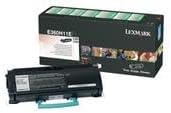
This image displays the Lexmark E360H11A High Yield Return Program Toner Cartridge alongside its retail packaging. The cartridge is black with a light blue handle, and the box features Lexmark branding and product details.
Налаштування та встановлення
Follow these steps to properly install the toner cartridge in your Lexmark E360, E460, or E462 series printer:
- Вимкнення принтера: Перш ніж розпочати процес встановлення, переконайтеся, що принтер вимкнено та від’єднано від розетки.
- Відкрити передню обкладинку: Open the front cover of your Lexmark printer to access the toner cartridge compartment.
- Вийміть старий картридж (якщо є): If replacing an old cartridge, carefully pull it straight out of the printer. Place it in a protective bag for recycling.
- Розпакуйте новий картридж: Remove the new Lexmark E360H11A toner cartridge from its packaging. Avoid touching the green drum surface.
- Струсніть картридж: Gently shake the new cartridge horizontally 5-6 times to distribute the toner evenly.
- Зніміть захисні пломби: Carefully remove any protective tapes or seals from the cartridge as indicated in your printer's specific manual.
- Вставте новий картридж: Align the new cartridge with the guides inside the printer and push it firmly until it clicks into place.
- Закрити передню обкладинку: Закрийте передню кришку принтера.
- Увімкнення принтера: Plug in and turn on your printer. The printer will typically perform a self-test and recognize the new cartridge.
Refer to your specific Lexmark printer's user manual for detailed instructions and illustrations.
Інструкція з експлуатації
Once the Lexmark E360H11A toner cartridge is installed, your printer is ready for operation. The cartridge functions automatically as part of the printing process.
- Друк: Initiate print jobs from your computer or device as you normally would. The printer will draw toner from the cartridge to create monochrome prints.
- Моніторинг рівня тонера: Most Lexmark printers provide a way to monitor toner levels through the printer's control panel or software utility. Monitor these levels to know when a replacement cartridge will be needed.
- Якість друку: If print quality degrades (e.g., faded prints, streaks), it may indicate a low toner level or an issue with the cartridge. Refer to the Troubleshooting section.
Технічне обслуговування
Правильне поводження та зберігання можуть подовжити термін служби та продуктивність вашого тонер-картриджа:
- Зберігання: Store unused cartridges in their original sealed packaging in a cool, dry environment, away from direct sunlight and extreme temperatures.
- Обробка: Always handle the cartridge by its designated handles or edges. Avoid touching the imaging drum.
- Утилізація/переробка: This is a Lexmark Return Program Toner Cartridge. Please return the empty cartridge to Lexmark for proper recycling. Instructions for return are typically included with the new cartridge or can be found on the official Lexmark website. Do not dispose of cartridges in regular waste.
Усунення несправностей
If you encounter issues with your toner cartridge, consider the following common solutions:
| проблема | Можлива причина | Рішення |
|---|---|---|
| Вицвілі або світлі відбитки | Низький рівень тонера; нерівномірний розподіл тонера. | Gently shake the cartridge horizontally. If problem persists, replace the cartridge. |
| Streaks or Lines on Prints | Dirty imaging drum; damaged cartridge. | Do not touch the drum. If the cartridge is new, ensure all seals are removed. If problem persists, replace the cartridge. |
| "Toner Low" or "Replace Cartridge" Message | Toner is genuinely low; cartridge not seated correctly. | Reseat the cartridge firmly. If message persists, replace with a new cartridge. |
| Картридж не розпізнано | Improper installation; faulty cartridge. | Remove and reinsert the cartridge, ensuring it clicks into place. Restart the printer. If issue continues, contact Lexmark support. |
For more complex issues, consult your printer's specific user manual or the Lexmark support webсайт.
Технічні характеристики
| Особливість | Деталь |
|---|---|
| Тип продукту | Тонер-картридж |
| Бренд | Lexmark |
| Номер деталі | E360H11A |
| Сумісність | Lexmark E360, E460, E462 Series Monochrome Laser Printers |
| технологія друку | Монохромний лазер |
| Ресурс сторінки | До 9,000 сторінок (ISO/IEC 19752) |
| Особливість | High Yield, Return Program Cartridge |
| Включені компоненти | Тонер-картридж |
| ASIN | B00434R3GI |
| Дата першої доступності | 15 вересня 2010 р |
Інформація про гарантію
Lexmark toner cartridges are manufactured to high quality standards. For specific warranty terms and conditions applicable to your Lexmark E360H11A toner cartridge, please refer to the documentation included with your printer or visit the official Lexmark webсайт. Гарантійне покриття зазвичай поширюється на дефекти матеріалів та виготовлення за умов нормального використання.
Підтримка
If you require further assistance or have questions regarding your Lexmark E360, E460, E462 Series High Yield Return Program Toner Cartridge, please contact Lexmark Customer Support:
- Lexmark Official Webсайт: www.lexmark.com/support
- Інтернет-ресурси: Access FAQs, drivers, and troubleshooting guides.
- Контактна інформація: Find phone numbers or chat options for direct support on the Lexmark support webсайт.
When contacting support, please have your printer model and toner cartridge part number (E360H11A) ready.


