вступ
The Olympus Stylus AF is a compact 35mm point-and-shoot film camera designed for ease of use and portability. Featuring an Olympus 35mm 1:3.5 lens and automatic focus, it is ideal for capturing everyday moments on film. This manual provides essential information for setting up, operating, and maintaining your camera.

Figure 1: Olympus Stylus AF 35mm Film Camera (Top View)
1. Налаштування
1.1. Встановлення батареї
The Olympus Stylus AF requires batteries for operation. Ensure you use the correct type and polarity as indicated inside the battery compartment.
- Locate the battery compartment cover, typically on the bottom or side of the camera.
- Відкрийте кришку, зсунувши або відсунувши її.
- Insert the required batteries, observing the correct positive (+) and negative (-) terminals.
- Надійно закрийте кришку батарейного відсіку.
1.2. Завантаження плівки
This camera uses standard 35mm film. Always load film in subdued light to prevent accidental exposure.
- Open the camera back by sliding the latch on the side of the camera.
- Place a new 35mm film cartridge into the film chamber on the left side.
- Pull the film leader across to the take-up spool on the right, ensuring it catches onto one of the spool's teeth.
- Щільно закрийте камеру назад, доки вона не зафіксується.
- Advance the film by pressing the shutter button or using the film advance lever (if present) until the frame counter shows '1'. This ensures the film is properly loaded and ready for the first shot.
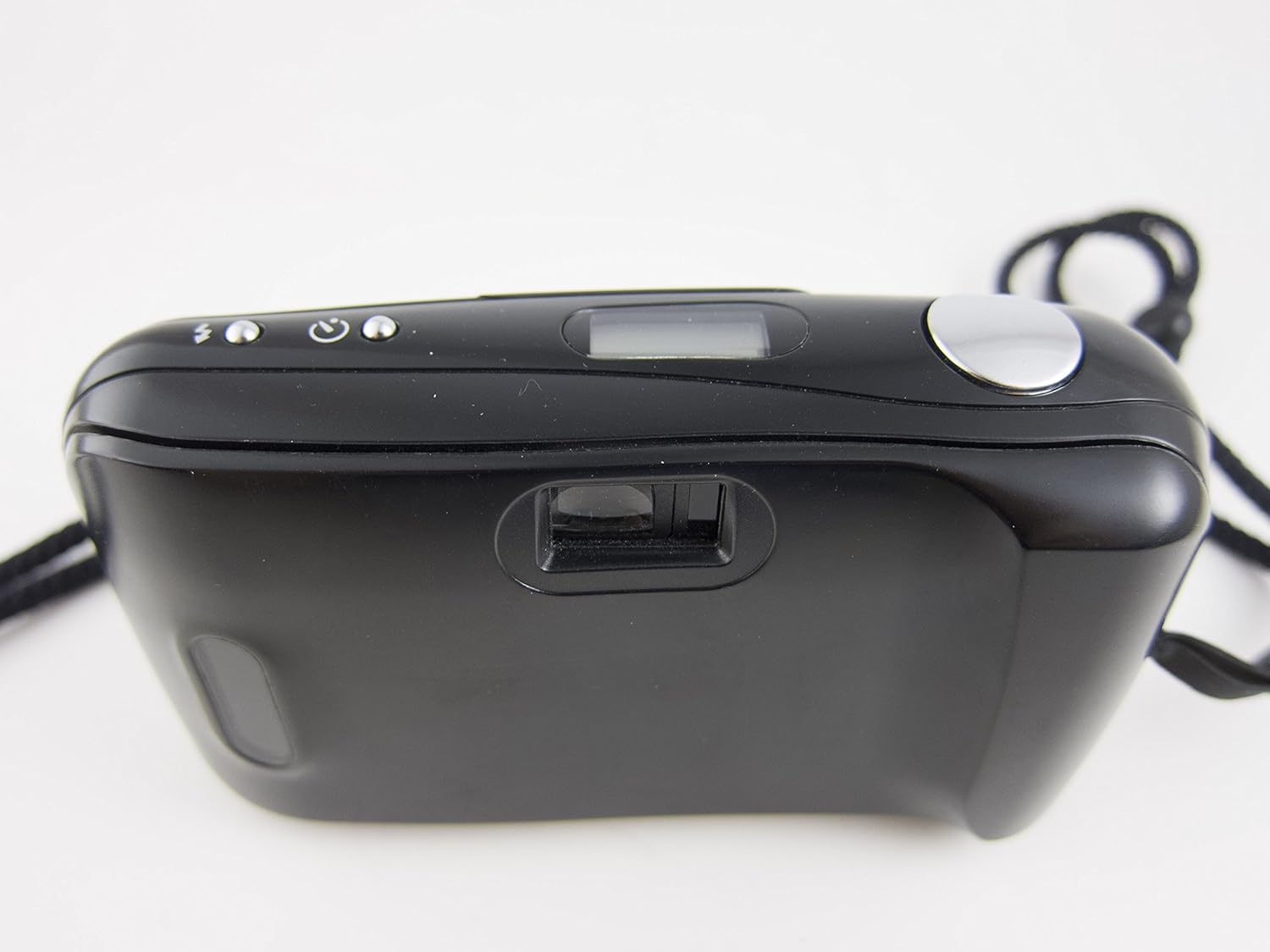
Figure 2: Camera Back and Viewшукач
2. Робота з камерою
2.1. Увімкнення/вимкнення живлення
To power on the camera, slide open the lens barrier. The camera will automatically power off when the lens barrier is closed.
2.2. Зробити фотографію
- Open the lens barrier to power on the camera.
- Перегляньте viewшукач, щоб скомпонувати знімок.
- Press the shutter button halfway down to activate the autofocus system. The camera will focus on your subject.
- Press the shutter button fully to take the picture. The film will automatically advance to the next frame.

Figure 3: Camera Front with Lens Open
2.3. Режими спалаху
The Olympus Stylus AF features a built-in flash with 'Auto' and 'Off' modes. Consult the small icons near the flash control button on the top of the camera to select the desired mode. In 'Auto' mode, the flash will fire automatically in low-light conditions. In 'Off' mode, the flash will not fire.
2.4. Перемотування плівки
Once all frames on the film roll have been exposed, the camera will typically rewind the film automatically. If manual rewind is necessary, locate the rewind button (usually on the bottom of the camera) and press it. Wait until the film counter indicates the film has fully rewound before opening the camera back.
3. Технічне обслуговування
3.1. Очищення камери
- Use a soft, lint-free cloth to gently wipe the camera body.
- Для об’єктива використовуйте спеціальну серветку для чищення об’єктивів та розчин для чищення об’єктивів. Уникайте дотику до поверхні об’єктива пальцями.
- Keep the film compartment clean and free of dust or debris.
3.2. Догляд за акумулятором
- Вийміть батарейки, якщо камера не використовуватиметься протягом тривалого часу, щоб запобігти їх витіканню.
- Replace batteries promptly when the low battery indicator appears or if camera functions become erratic.
3.3. Зберігання
Store the camera in a cool, dry place away from direct sunlight and extreme temperatures. Use a camera bag or case to protect it from dust and physical damage.
4. Вирішення проблем
| проблема | Можлива причина | Рішення |
|---|---|---|
| Камера не вмикається. | Dead or incorrectly installed batteries. Lens barrier not fully open. | Check battery installation and replace if necessary. Ensure lens barrier is fully slid open. |
| Затвор не спрацьовує. | No film loaded or film not advanced. Low battery. Camera not focused. | Ensure film is loaded and advanced. Replace batteries. Press shutter button halfway to allow autofocus to engage. |
| Спалах не спрацьовує. | Flash mode set to 'Off'. Low battery. | Check flash mode setting. Replace batteries. |
| Фільм не просувається вперед. | Film not properly loaded. End of film roll. | Re-load film carefully, ensuring leader is caught. If at end of roll, rewind film. |
5. Технічні характеристики
- Назва моделі: Olympus Stylus AF (Infinity Stylus AF)
- Об'єктив: Olympus Lens 35mm 1:3.5
- Тип плівки: 35mm film
- Тип фокусування: Auto Focus (Contrast Detection)
- Мінімальна фокусна відстань: 35 міліметрів
- Максимальна діафрагма: 3.5 міліметрів
- Витримка: 1/15 sec to 1/500 sec (Automatic)
- Спалах: Built-In (Auto, Off modes)
- Viewшукач: Оптичний
- Тип батареї: Requires Lithium Ion batteries (not included)
- Форм-фактор: Compact Point & Shoot
- Вага товару: Приблизно 0.35 фунтів
- Виробник: Marvel (as per provided data, though typically Olympus)
- Зроблено в: Японія
6. Інформація про гарантію
Цей продукт поставляється з a Гарантія 30 днів from the date of purchase. This warranty covers manufacturing defects and malfunctions under normal use. It does not cover damage caused by misuse, accidents, unauthorized repairs, or normal wear and tear. Please retain your proof of purchase for any warranty claims.
7. Підтримка клієнтів
For further assistance, technical support, or inquiries regarding your Olympus Stylus AF 35mm Film Camera, please refer to the contact information provided by your retailer or visit the official Olympus support website. Ensure you have your model name and any relevant purchase details ready when contacting support.
Ви можете відвідати Магазин Olympus на Amazon for more information on Olympus products.


