вступ
Welcome to the Greenlee DM-810A True RMS Digital Multimeter user manual. This document provides essential information for the safe and effective operation, maintenance, and troubleshooting of your device. The DM-810A is designed for accurate measurement of AC/DC voltage, AC/DC current, resistance, capacitance, frequency, and continuity, making it a versatile tool for electrical professionals.
Інформація про безпеку
Щоб забезпечити безпечну експлуатацію та обслуговування лічильника, дотримуйтесь цих інструкцій. Недотримання цих попереджень може призвести до серйозних травм або смерті.
- Always read and understand the entire instruction manual before using the meter.
- Не перевищуйте максимальні обмеження вхідного сигналу для будь-якої функції.
- Будьте обережні при роботі з обtagвище 30 В змінного струму RMS, 42 В пікового значення або 60 В постійного струму. Ці значенняtagце небезпека ураження електричним струмом.
- Always use the proper terminals, function, and range for your measurements. The DM-810A features a Beep-Jack audible and visible warning to guard against improper A and mA terminal plug-in.
- Перед кожним використанням перевіряйте вимірювальні дроти на наявність пошкодженої ізоляції або оголеного металу. Замініть їх, якщо вони пошкоджені.
- Не використовуйте глюкометр, якщо він виглядає пошкодженим або якщо корпус відкритий.
- Перед початком роботи переконайтеся, що кришка батарейного відсіку щільно закрита.
- Adhere to local and national safety codes. Use personal protective equipment (PPE) such as approved safety glasses and electrically insulated gloves when necessary.
Продукт закінченийview
This section identifies the key parts and controls of your Greenlee DM-810A multimeter.

малюнок 1: Фронт view of the Greenlee DM-810A Digital Multimeter, showing the display, function selector dial, and input jacks.
- Дисплей: Large LCD for clear readings, often with dual display capability.
- Function Selector Dial: Used to select the desired measurement function (e.g., V~, V-, A~, A-, Ω, CAP, Hz, Continuity).
- Вхідні гнізда:
- COM: Загальний (негативний) вхід для всіх вимірювань.
- ВОмГц: Позитивний вхід для об'ємуtagе., вимірювання опору, частоти та ємності.
- мА: Позитивний вхід для міліampтут і мікроampпоточні вимірювання.
- A: Позитивний внесок для ampпоточні вимірювання.
- кнопки:
- ВИБРАТИ: Toggles between functions on a single dial position (e.g., AC/DC voltagе., діод/безперервність кола).
- РЯД: Manually selects measurement range or returns to auto-ranging.
- △: Delta function for relative measurements.
- ТРИМАТИ: Заморожує поточне значення на дисплеї.
Налаштування
Установка батареї
The Greenlee DM-810A requires batteries for operation. Refer to the back of the meter for the battery compartment. Use a screwdriver to open the compartment, insert the specified batteries (typically AA or 9V, check the compartment label), observing correct polarity, and then securely close the cover.
Підключення тестових потенційних клієнтів
Always ensure test leads are properly connected before taking measurements.
- Вставте чорний тестовий провод у COM (загальний) вхідний роз'єм.
- Insert the red test lead into the appropriate positive input jack based on the measurement you intend to make:
- Для випtage, resistance, capacitance, or frequency, use the VΩHz Джек.
- Для міліampтут або мікроampere current, use the мАмА Джек.
- для ampere current, use the A Джек.
- The meter's Beep-Jack feature will provide an audible and visible alert if the function selector is set to a current measurement (A or mA) but the test lead is incorrectly plugged into a voltage/resistance jack, or vice-versa. This helps prevent damage to the meter and ensures correct setup.
Інструкція з експлуатації
This section details how to perform various measurements with your DM-810A multimeter.
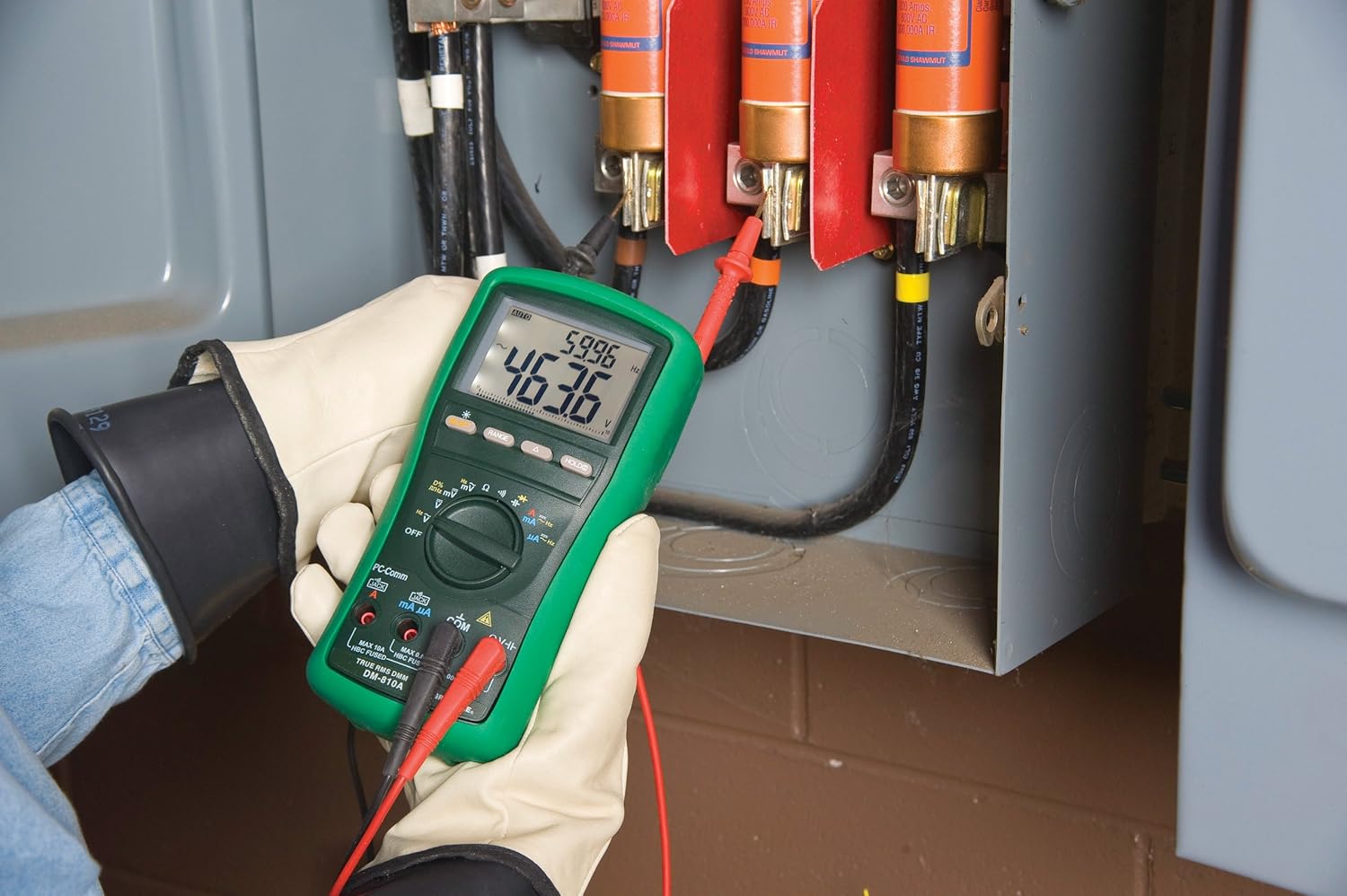
малюнок 2: The Greenlee DM-810A Digital Multimeter being used to take measurements within an electrical panel, demonstrating practical application.
Вимірювання AC/DC Voltage
- Set the function selector to V~ (AC Voltage) або V- (DC Voltage). Use the SELECT button to toggle if both are on one position.
- Підключіть чорний тест-провід до COM і червоний тестовий дріт до VΩHz.
- Підключіть вимірювальні щупи паралельно до кола або компонента, що вимірюється.
- Прочитайте томtage значення на дисплеї.
Вимірювання змінного/постійного струму
Важливо: Current measurements require the meter to be connected in series with the circuit. Ensure the circuit is de-energized before connecting the meter.
- Знеструмити ланцюг.
- Set the function selector to A~ (AC Current) or A- (DC Current), or mA~ / mA-.
- Підключіть чорний тест-провід до COM. Connect the red test lead to мАмА for small currents or A for larger currents (up to 10A). The Beep-Jack warning will activate if leads are in the wrong jacks for the selected function.
- Open the circuit where the current is to be measured and connect the meter in series.
- Re-energize the circuit and read the current value.
- Перед відключенням лічильника знеструмте коло.
Вимірювання опору (Ом)
- De-energize the circuit or component.
- Set the function selector to Ω.
- Підключіть чорний тест-провід до COM і червоний тестовий дріт до VΩHz.
- Підключіть вимірювальні щупи до компонента.
- Зчитайте значення опору.
Measuring Capacitance (CAP)
- Перед вимірюванням переконайтеся, що конденсатор повністю розряджений.
- Set the function selector to CAP.
- Підключіть чорний тест-провід до COM і червоний тестовий дріт до VΩHz.
- Підключіть вимірювальні щупи до клем конденсатора.
- Зчитайте значення ємності.
Частота вимірювання (Гц)
- Set the function selector to Hz.
- Підключіть чорний тест-провід до COM і червоний тестовий дріт до VΩHz.
- Підключіть вимірювальні щупи до джерела сигналу.
- Зчитайте значення частоти.
Тест безперервності
- De-energize the circuit or component.
- Set the function selector to the continuity symbol (often shared with diode test, use SELECT to toggle).
- Підключіть чорний тест-провід до COM і червоний тестовий дріт до VΩHz.
- Connect the test probes across the circuit path or component.
- Звуковий сигнал вказує на нерозривність ланцюжка (низький опір). На дисплеї відобразиться значення опору.
Технічне обслуговування
прибирання
Протріть лічильник рекламоюamp тканиною та м’яким миючим засобом. Не використовуйте абразивні засоби або розчинники. Перед використанням переконайтеся, що глюкометр повністю сухий.
Заміна батареї
When the battery indicator appears on the display, replace the batteries immediately to ensure accurate readings. Follow the battery installation steps outlined in the Setup section.
Заміна запобіжника
If the current measurement functions cease to work, the internal fuses may need replacement. Refer to the meter's internal diagram (usually accessible by opening the battery compartment or back casing) for fuse specifications and replacement instructions. Always replace fuses with those of the specified type and rating to maintain safety and performance.
Усунення несправностей
This section provides solutions for common issues encountered during the operation of your DM-810A multimeter.
| проблема | Можлива причина | Рішення |
|---|---|---|
| Немає дисплея або дисплей тьмяний | Батареї розряджені або розряджені | Замініть батареї. |
| Неправильні показання | Incorrect function/range selected; Damaged test leads; External interference | Verify function and range; Inspect and replace test leads; Move away from strong electromagnetic fields. |
| Вимірювання струму не працює | Blown fuse; Incorrect lead connection | Check and replace fuses; Ensure leads are in the correct A or mA jacks. |
| Beep-Jack warning active | Test leads connected to incorrect input jacks for the selected function | Adjust test lead connections to match the selected function on the dial. |
| Continuity test not beeping | Open circuit; High resistance | Ensure the circuit is closed; Check for breaks in the circuit or component. |
Технічні характеристики
The following table outlines the key technical specifications for the Greenlee DM-810A Digital Multimeter.
| Особливість | Значення |
|---|---|
| Бренд | Грінлі |
| Модель | DM-810A |
| Тип вимірювання | Цифровий мультиметр True RMS |
| Джерело живлення | Працює від батареї |
| Стиль | цифровий |
| Вага товару | 16 унцій (1 фунт) |
| Розміри продукту (Д x Ш x В) | 10 x 10 x 12 дюймів |
| Сертифікати | CE, CSA, UL |
| UPC | 783310087434 |
Гарантія та підтримка
Інформація про гарантію
The Greenlee DM-810A Digital Multimeter comes with a 1-річна гарантія виробникаЦя гарантія поширюється на дефекти матеріалів та виготовлення за умов нормального використання. Будь ласка, збережіть чек про покупку для пред'явлення претензій за гарантією.
Підтримка клієнтів
For technical assistance, warranty service, or to inquire about replacement parts, please contact Greenlee customer support. Refer to the official Greenlee webсайт або упаковку продукту для отримання найактуальнішої контактної інформації.


