1. Вступ
The X-keys XK-24 is a programmable keypad designed to enhance productivity by providing customizable shortcuts and macros. This device features 24 programmable keys with addressable blue and red backlighting, allowing for instant visual feedback and organization. It connects via a wired USB connection and is compatible with Windows and macOS operating systems. The relegendable keycaps enable users to create personalized layouts for various applications.

Figure 1: X-keys XK-24 Programmable Keypad.
2. Що в коробці
Upon opening your X-keys XK-24 package, please verify that all the following items are included:
- X-keys XK-24 Unit with 24 Blank Keys installed
- USB кабель
- Key-puller tool
- Blank Legend Sheet
- Pre-printed Legend Sheet

Figure 2: Included components of the X-keys XK-24 package.
3. Налаштування
3.1. Підключення пристрою
Connect the X-keys XK-24 to your computer using the provided USB cable. The device is plug-and-play, and your operating system should recognize it automatically.
3.2. Встановлення програмного забезпечення
To program your X-keys XK-24, download the latest programming software from the official X-keys website. The software is compatible with Windows XP-Windows 11 and macOS 10.14-macOS 13.
- Windows: Встановіть програмне забезпечення, дотримуючись інструкцій на екрані.
- macOS: Встановіть програмне забезпечення, дотримуючись інструкцій на екрані.
- Linux: Linux users should pre-program their X-keys in 'Hardware Mode' using a compatible Windows or macOS system before connecting to a Linux installation.
3.3. Understanding Programming Modes
The X-keys XK-24 supports two primary programming modes:
- Програмний режим: This mode allows for advanced features such as application-specific key functions. The programming software must be running in the background for these functions to operate.
- Апаратний режим: In this mode, all programmed commands (keys, macros, shortcuts) are stored directly on the device's internal memory. This allows the X-keys to function without the software running, making it ideal for use with systems where software installation is restricted or for cross-platform compatibility. The device will appear as a standard USB keyboard to the computer.
4. Operating the X-keys XK-24
4.1. Ключове програмування
Each of the 24 keys can be programmed to perform various functions, including:
- Inputting text strings
- Executing keyboard commands (e.g., Ctrl+C, Alt+Tab)
- Запуск програм
- Running macros or scripts
Refer to the X-keys programming software's help documentation for detailed instructions on creating and assigning commands to keys.
4.2. Backlighting Customization
The XK-24 features blue and red addressable backlighting for each key. This allows you to visually organize your key layouts or indicate different states. The backlighting can be configured through the X-keys software or a dedicated backlighting utility.

Figure 3: Keypad with blue backlighting.

Figure 4: Keypad with red backlighting.
4.3. Relegendable Keycaps and Labeling
The XK-24 uses relegendable keycaps, allowing you to insert custom labels for each key. Use the included key-puller tool to carefully remove the clear keycap covers. Place your custom label underneath and snap the cover back into place.
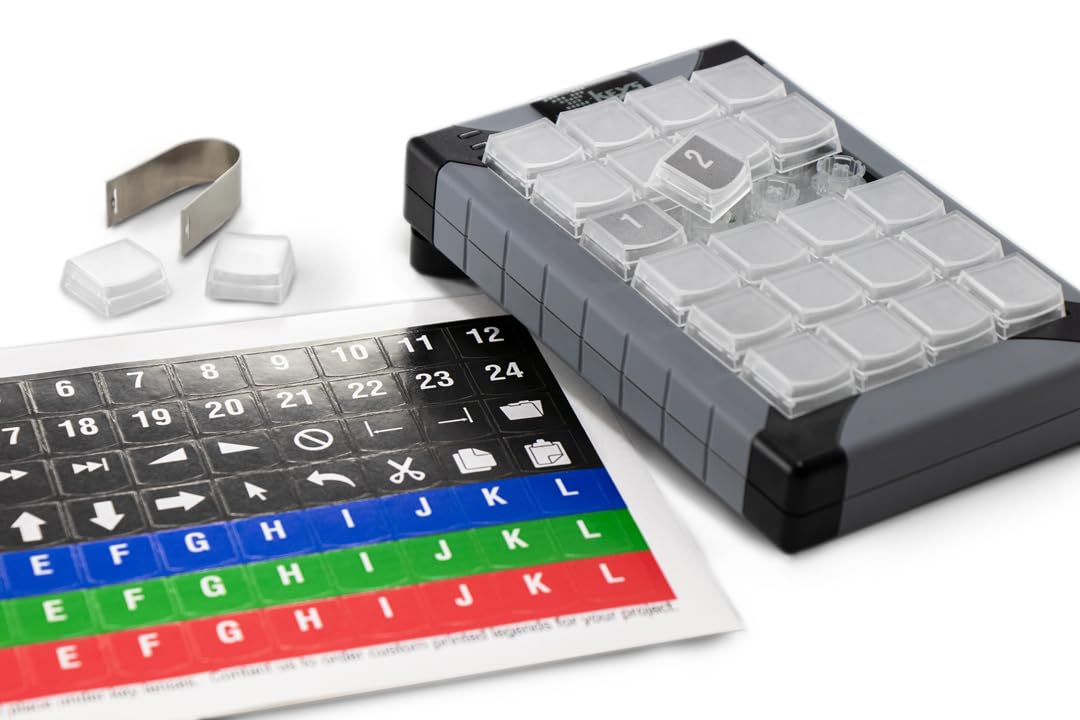
Figure 5: Keypad with key puller and legend sheets.

Figure 6: Demonstrating how to place a keycap.
4.4. Installing Key Blockers
Key blockers can be installed to prevent accidental presses of certain keys or to create custom layouts. This process involves removing the keycap and plunger, then inserting the key blocker. For a visual guide, refer to the official video below:
Video 1: How to Install X-keys Key Blockers. This video demonstrates the process of installing key blockers on an X-keys device to customize the keypad layout.
5. Технічне обслуговування
5.1. прибирання
To clean your X-keys XK-24, use a soft, dry cloth. For stubborn dirt, a slightly damp Можна використовувати тканину з м’яким милом, переконавшись, що рідина не потрапила всередину пристрою. Уникайте абразивних засобів для чищення або розчинників.
5.2. Keycap Handling
When removing keycaps, always use the provided key-puller tool to prevent damage to the keycaps or the underlying switches. Store spare keycaps and blockers in a safe place.
6. Вирішення проблем
- Backlighting Resets After Reboot: If your custom backlighting pattern resets after restarting your computer, ensure that 'scripted backlighting' is disabled in the Advanced Tools dropdown of the X-keys software. If the software is set to run at startup, it might override hardware settings.
- Keypad Not Responding in Certain Applications/Games: If the keypad is not functioning as expected in specific applications or games, try programming the device in 'Hardware Mode'. Some applications bypass software-level keyboard engines and interact directly with the hardware.
- Linux Compatibility Issues: For Linux users, it is recommended to program the X-keys in 'Hardware Mode' on a Windows or macOS system first. Firmware updates, if necessary, must also be performed on a Windows system.
- Key Testing: If you suspect a key is not functioning correctly, you can use the X-keys software's key testing utility to diagnose the issue.
Video 2: X-keys Key Testing. This video demonstrates how to use the key testing feature within the X-keys software to verify key functionality.
7. Технічні характеристики
| Номер моделі | XK-24 Keypad |
| Підключення | Wired USB (1.0 and up) |
| Кількість клавіш | 24 |
| Підсвічування | Blue and Red Addressable LEDs per key |
| Клавіатури | Relegendable |
| Сумісність операційної системи | Windows XP-Windows 11, macOS 10.14-macOS 13 |
| Розміри продукту | 6 x 4 x 1 дюймів |
| Вага товару | 10 унції |
7.1. Durability Testing
X-keys products undergo rigorous durability testing to ensure long-lasting performance. The elastomeric membranes used in X-keys devices are designed to withstand over one million operations per key.
Video 3: The P. I. Engineering KeySmasher 5000. This video demonstrates the durability testing process for X-keys products, showcasing the resilience of the elastomeric membranes.
8. Гарантія та підтримка
For warranty information, technical support, and additional resources, please visit the official PI Engineering Inc. website or contact their customer service department. Ensure you have your product model number (XK-24 Keypad) and purchase details available when seeking support.
Виробник: X-keys (PI Engineering Inc.)
Webсайт: www.xkeys.com


