1. Вступ
This manual provides essential information for the safe and efficient operation of your VOLTCRAFT GOS-632 FG Oscilloscope with Frequency Generator. Please read this manual thoroughly before using the device and keep it for future reference. The GOS-632 FG is a 30 MHz dual-channel analog oscilloscope integrated with a frequency generator, designed for various electronic measurement and testing applications.
2. Техніка безпеки
Завжди дотримуйтесь наступних запобіжних заходів, щоб запобігти ураженню електричним струмом, травмам або пошкодженню інструменту:
- Джерело живлення: Підключайте інструмент лише до джерела живлення із зазначеною потужністюtagе і частота.
- Заземлення: Переконайтеся, що інструмент належним чином заземлений, щоб запобігти ураженню електричним струмом.
- Вентиляція: Do not block ventilation openings. Ensure adequate airflow to prevent overheating.
- Середовище: Operate the oscilloscope in a dry, clean environment, away from direct sunlight, high temperatures, and excessive dust or humidity.
- зонди: Використовуйте лише зонди, розраховані на об'ємtage and frequency being measured. Ensure probes are in good condition.
- Обслуговування: Звертайтеся до кваліфікованого сервісного персоналу для проведення всіх робіт з обслуговування. Не намагайтеся самостійно відкривати або ремонтувати прилад.
- Контакт з рідиною: Avoid contact with liquids. If liquid enters the device, disconnect power immediately and have it inspected by a qualified technician.
3. Вміст упаковки
Please check the package contents upon receipt. If any items are missing or damaged, contact your dealer immediately.
- VOLTCRAFT GOS-632 FG Oscilloscope with Frequency Generator
- Шнур живлення
- Two (2) Oscilloscope Probes (1x/10x switchable)
- Посібник користувача (цей документ)
4. Продукт закінчивсяview
The VOLTCRAFT GOS-632 FG is a robust analog oscilloscope designed for reliable waveform analysis. Below is a general view пристрою.
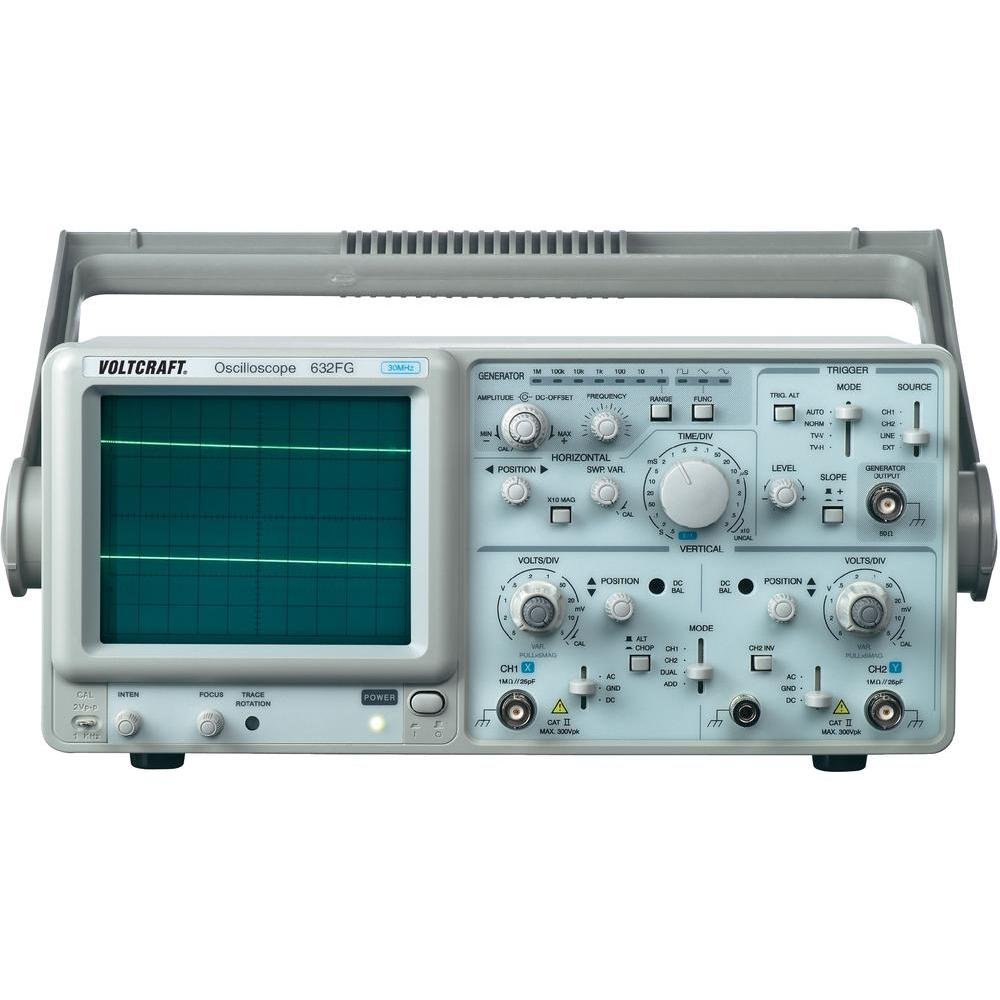
малюнок 4.1: Фронт view of the VOLTCRAFT GOS-632 FG Oscilloscope. This image shows the main display, control knobs, and input connectors for the two channels and the frequency generator output.
4.1. Елементи керування передньої панелі
- CRT Display: Shows the waveform.
- CH1/CH2 Input: BNC-роз'єми для підключення щупів осцилографа.
- VOLTS/DIV: Adjusts the vertical sensitivity for each channel.
- ПОСАДА: Adjusts the vertical position of the waveform.
- TIME/DIV: Adjusts the horizontal sweep speed.
- TRIGGER LEVEL: Встановлює об'ємtage level at which the sweep starts.
- РЕЖИМ: Selects trigger source (CH1, CH2, EXT, LINE).
- FREQUENCY GENERATOR OUTPUT: BNC connector for the integrated signal generator.
- FREQUENCY/AMPЛІТУД: Controls for the frequency generator output.
- Вимикач живлення: Вмикає або вимикає пристрій.
4.2. Підключення на задній панелі
- Вхід живлення змінного струму: Роз'єм для шнура живлення.
- Наземний термінал: For additional grounding if required.
5. Налаштування
- Розпакування: Carefully remove the oscilloscope from its packaging. Retain the packaging for future transport.
- Розміщення: Place the oscilloscope on a stable, level surface with adequate ventilation around the unit.
- Підключення живлення: Connect the supplied power cord to the AC power input on the rear panel and then to a grounded electrical outlet.
- Підключення зонда: Connect the oscilloscope probes to the CH1 and/or CH2 BNC input connectors on the front panel. Ensure a secure connection.
- Компенсація зонда: Before taking measurements, compensate your probes. Connect the probe tip to the probe compensation output (usually a square wave signal on the front panel) and adjust the probe's compensation trimmer until a flat-top square wave is displayed.
6. Робота з осцилографом
6.1. Основні вимірювання
- Увімкнення: Press the POWER switch to turn on the oscilloscope. Allow a few minutes for the display to stabilize.
- Вхідний сигнал: Підключіть зонд до точки кола, яку ви хочете виміряти.
- Vertical Adjustment (VOLTS/DIV & POSITION):
- Select the appropriate VOLTS/DIV setting to display the waveform within the screen.
- Use the POSITION knob to center the waveform vertically.
- Horizontal Adjustment (TIME/DIV & POSITION):
- Select the appropriate TIME/DIV setting to display several cycles of the waveform horizontally.
- Use the horizontal POSITION knob to move the waveform left or right.
- Налаштування тригера:
- Set the TRIGGER MODE (e.g., AUTO, NORM).
- Adjust the TRIGGER LEVEL knob until a stable waveform is displayed.
- Select the TRIGGER SOURCE (e.g., CH1, CH2).
6.2. Using the Frequency Generator
- Вихід підключення: Connect a BNC cable from the FREQUENCY GENERATOR OUTPUT to the circuit or device under test.
- Встановити частоту: Use the FREQUENCY control to select the desired output frequency.
- встановити AmpLitude: Використовуйте AMPLITUDE control to adjust the output signal strength.
- Вибір форми хвилі: If available, select the desired waveform type (e.g., sine, square, triangle).
7. Технічне обслуговування
- Прибирання: Від’єднайте шнур живлення перед чищенням. Використовуйте м’яку губку.amp cloth with a mild detergent to clean the exterior. Do not use abrasive cleaners or solvents.
- Зберігання: Якщо осцилограф не використовується протягом тривалого часу, зберігайте його в сухому, захищеному від пилу місці.
- Калібрування: For accurate measurements, periodic calibration by qualified personnel is recommended.
8. Вирішення проблем
| проблема | Можлива причина | Рішення |
|---|---|---|
| Після включення живлення дисплей відсутній | No power, brightness/focus too low | Check power cord, outlet. Adjust INTENSITY and FOCUS knobs. |
| Нестабільна форма хвилі | Incorrect trigger settings, signal too noisy | Adjust TRIGGER LEVEL, TRIGGER MODE, and TRIGGER SOURCE. Check signal integrity. |
| Сигнал не відображається | Probe not connected, incorrect VOLTS/DIV, signal outside range | Ensure probe is connected and making contact. Adjust VOLTS/DIV and POSITION. Check probe compensation. |
| Frequency generator output not working | Output cable not connected, amplitude set to zero | Check output cable connection. Increase AMPЛІТУДЕ. |
9. Технічні характеристики
| Особливість | Деталь |
|---|---|
| Номер моделі | GOS-632 FG |
| Виробник | ВОЛТКРАФТ |
| Пропускна здатність | 30 MHz (DC) |
| Канали | 2 аналогових каналів |
| Integrated Function | Генератор частоти |
| Вага продукту | 9.07 g (Note: This weight seems unusually low for an oscilloscope and might be a data entry error. Refer to product packaging for accurate weight.) |
| ASIN | B003IDBEYM |
| Перший доступний | 31 березня 2015 р |
10. Гарантія та підтримка
VOLTCRAFT products are designed for quality and reliability. For information regarding warranty terms, technical support, or service, please refer to the warranty card included with your product or visit the official VOLTCRAFT webсайт. Не намагайтеся ремонтувати пристрій самостійно, оскільки це може призвести до анулювання гарантії.
For further assistance, please contact your local VOLTCRAFT distributor or customer service center.