1. Вступ
The Polk Audio SWA500 Power Amplifier is engineered to provide dedicated power for Polk Audio CSW Series built-in subwoofers. This Class D digital amplifier delivers 500 watts into 4 ohms, ensuring robust and distortion-free bass performance. Its design prioritizes long-term reliability and efficient operation. This manual provides essential information for the safe and effective installation, operation, and maintenance of your SWA500 ampліфірник.
2. Важливі інструкції з техніки безпеки
- Уважно прочитайте ці інструкції перед початком експлуатації ampліфірник.
- Збережіть ці інструкції для використання в майбутньому.
- Зверніть увагу на всі попередження, зазначені на виробі та в цьому посібнику.
- Follow all instructions for safe use and installation.
- Не використовуйте цей пристрій поблизу води або вологи.
- Чистіть тільки сухою ганчіркою.
- Не блокуйте вентиляційні отвори. Встановлюйте відповідно до інструкцій виробника.
- Не встановлюйте поблизу будь-яких джерел тепла, таких як радіатори, обігрівачі, печі або інші пристрої (включаючи ampліфікатори), які виробляють тепло.
- Не порушуйте ціль безпеки поляризованої або заземленої вилки. Поляризована вилка має два контакти, один із яких ширший за інший. Вилка із заземленням має два контакти та третій заземлюючий контакт. Широке лезо або третій штифт призначені для вашої безпеки. Якщо надана вилка не підходить до вашої розетки, зверніться до електрика для заміни застарілої розетки.
- Захищайте шнур живлення від наступання або защемлення, особливо біля вилок, розеток і в місці виходу з пристрою.
- Використовуйте лише насадки/аксесуари, зазначені виробником.
- Відключайте цей пристрій від мережі під час грози або якщо він не використовується протягом тривалого часу.
- Звертайтеся до кваліфікованого сервісного персоналу. Обслуговування потрібне, якщо пристрій було пошкоджено будь-яким чином, наприклад, пошкоджено шнур живлення або вилка, була пролита рідина або всередину пристрою потрапили предмети, пристрій піддався впливу дощу або вологи, не працює належним чином , або було видалено.
УВАГА: Щоб зменшити ризик пожежі або ураження електричним струмом, не піддавайте цей пристрій дії дощу або вологи.
3. Налаштування та підключення
Перш ніж виконувати будь-які підключення, переконайтеся, що amplifier is powered off and unplugged from the AC outlet. The SWA500 is designed to power up to two Polk Audio CSW Series subwoofers of the same model.
3.1. SPEX Circuit Card Installation
The SWA500 amplifier utilizes SPEX circuit cards to optimize its performance for specific CSW subwoofer models. Ensure the correct SPEX card for your subwoofer model is inserted into the designated slot on the rear panel of the amplifier. These cards provide custom frequency shaping for optimal bass response.
3.2. Підключення на задній панелі
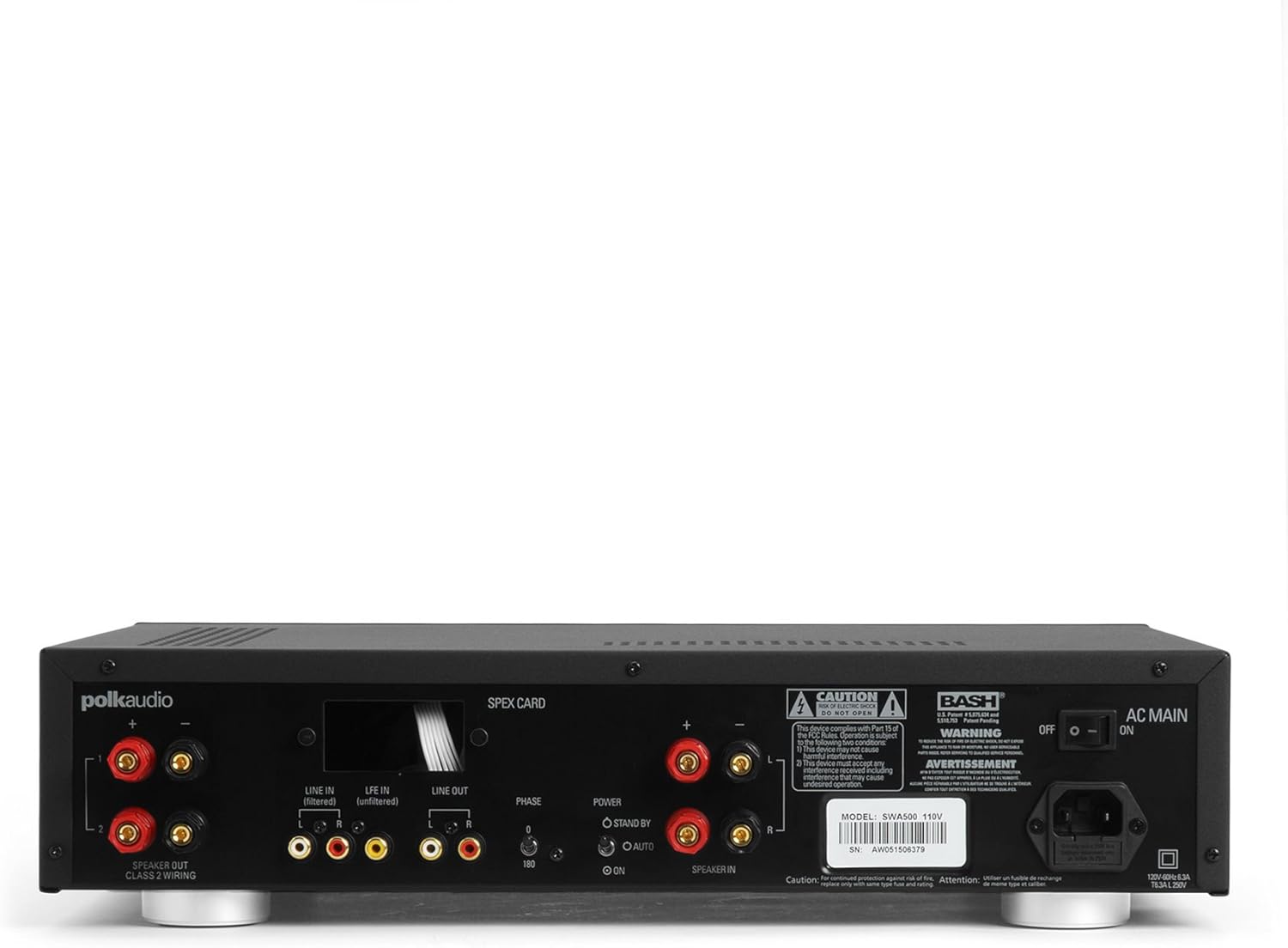
Figure 1: Rear panel of the SWA500 amplifier, illustrating various connection points including Line In, Line Out, Speaker Out, SPEX Card slot, Phase switch, Power mode switch, and AC Main input.
- Line In (Filtered/Unfiltered): Connect your audio source (e.g., AV receiver's subwoofer output) to the appropriate Line In jacks using RCA cables. The "Filtered" input applies a low-pass filter, while "Unfiltered" bypasses it, useful if your source provides its own filtered signal.
- Лінійний вихід: These RCA outputs can be used to pass the audio signal to another ampрятувальник або пристрій.
- Вихідний динамік: Connect your Polk Audio CSW subwoofer(s) to these terminals using appropriate speaker wire. Ensure correct polarity (+ to + and - to -). The SWA500 supports Class 2 wiring.
- Перемикач фаз: Adjust this switch (0° or 180°) to optimize the subwoofer's phase with your main speakers for seamless sound integration.
- Перемикач режиму живлення: Select between "ON" (always on), "AUTO" (turns on when an audio signal is detected), or "STANDBY" (low power mode, awaiting signal).
- Головна мережа змінного струму: Connect the supplied power cord to this input and then to a suitable AC power outlet.
4. Операція
Once all connections are made and the amplifier is plugged in, you can begin operating your SWA500.
4.1. Елементи керування передньої панелі

Figure 2: Front panel of the SWA500 amplifier, featuring the Power button, Protection indicator, Low Pass Filter control, and Volume control.
- Кнопка живлення: Натисніть, щоб повернути ampувімкнення або вимкнення пристрою. Індикатор живлення світитиметься, коли пристрій увімкнено.
- Індикатор захисту: This light illuminates if the amplifier enters protection mode due to overheating or an electrical fault. If this occurs, turn off the amplifier, check connections, and allow it to cool before restarting.
- Low Pass Filter (80Hz - 120Hz): This knob adjusts the upper frequency limit of the subwoofer's output. Adjust this to blend the subwoofer's sound seamlessly with your main speakers. Start with a setting around 80Hz and adjust by ear.
- Volume (Min - Max): This knob controls the overall output level of the subwoofer. Adjust to achieve the desired bass intensity relative to your main speakers.
4.2. Initial Sound Adjustment
Begin with the Low Pass Filter set to a mid-point (e.g., 100Hz) and the Volume knob at a low setting. Play a familiar piece of music or movie scene. Gradually increase the Volume until the bass is noticeable but not overpowering. Then, fine-tune the Low Pass Filter and Phase switch to achieve the most natural and integrated sound with your main speakers. The goal is for the subwoofer to enhance the low frequencies without drawing attention to its location.
5. Технічне обслуговування
- Прибирання: Disconnect the power cord before cleaning. Use a soft, dry cloth to wipe the exterior surfaces of the ampНе використовуйте рідкі засоби для чищення або аерозольні спреї.
- Вентиляція: Переконайтеся, що вентиляційні отвори на amplifier are not blocked. Proper airflow is crucial for preventing overheating and maintaining long-term reliability.
- Зберігання: Якщо зберігати amplifier for an extended period, unplug it from the power outlet and store it in a cool, dry place, away from direct sunlight and extreme temperatures.
6. Вирішення проблем
If you experience issues with your SWA500 ampрятувальника, зверніться до наступного посібника з усунення несправностей:
| проблема | Можлива причина | Рішення |
|---|---|---|
| Немає індикатора живлення | Power cord not connected; AC outlet not active; Power switch off. | Ensure power cord is securely connected. Check AC outlet with another device. Press the front panel power button. |
| Немає звуку з сабвуфера | Incorrect input connection; Speaker wires loose or incorrect polarity; Volume too low; SPEX card missing or incorrect; Amplifier in standby/auto mode without signal. | Verify RCA input connections. Check speaker wire connections and polarity. Increase volume. Ensure correct SPEX card is installed. Set Power Mode switch to "ON" for testing. |
| Distorted or poor quality sound | Volume too high; Incorrect Low Pass Filter setting; Phase mismatch; Damaged speaker wire or subwoofer. | Reduce volume. Adjust Low Pass Filter. Toggle Phase switch (0°/180°). Inspect speaker wires and subwoofer for damage. |
| Protection indicator illuminated | Overheating; Short circuit in speaker wiring; Ampнесправність ліфтера. | Вимкнути amplifier and allow to cool. Check speaker wiring for shorts. If problem persists, contact customer support. |
7. Технічні характеристики
- модель: SWA500
- Вихідна потужність: 500 Вт на 4 Ом
- Ampтип підйому: Цифровий клас D
- Сумісність: Designed for Polk Audio CSW Series built-in subwoofers (requires specific SPEX circuit card)
- Фільтр низьких частот: Adjustable (Front Panel)
- Регулювання гучності: Adjustable (Front Panel)
- Контроль фази: 0°/180° (Rear Panel)
- Режими живлення: ON, AUTO, STANDBY (Rear Panel)
- Розміри продукту: 1 x 1 x 1 дюйм (приблизно, згідно з наданими даними)
- Вага товару: 12.25 фунта
- Виробник: Polk Audio
- Дата першої доступності: 18 квітня 2005 р
8. Гарантія та підтримка
For specific warranty information, please refer to the warranty card included with your product or visit the official Polk Audio webсайт. Зберігайте чек про покупку як підтвердження покупки для гарантійних претензій.
If you require technical assistance or have questions not covered in this manual, please contact Polk Audio customer support. Contact information can typically be found on the official Polk Audio webсайті або на упаковці вашого продукту.
Офіційний постачальник Polk Audio Webсайт: www.polkaudio.com


