вступ
This manual provides essential instructions for the setup, operation, and maintenance of your Logitech Stereo Headset H110. Please read this guide thoroughly before using the product to ensure optimal performance and longevity.
Вміст упаковки
The Logitech Stereo Headset H110 package typically includes:
- Logitech Stereo Headset H110
- Документація користувача (цей посібник)
Продукт закінченийview
The Logitech Stereo Headset H110 is designed for clear audio communication and listening. It features a comfortable over-the-head design with an adjustable microphone.

Зображення 1: The Logitech Stereo Headset H110, showing the adjustable headband, earcups with foam padding, and the flexible microphone boom.
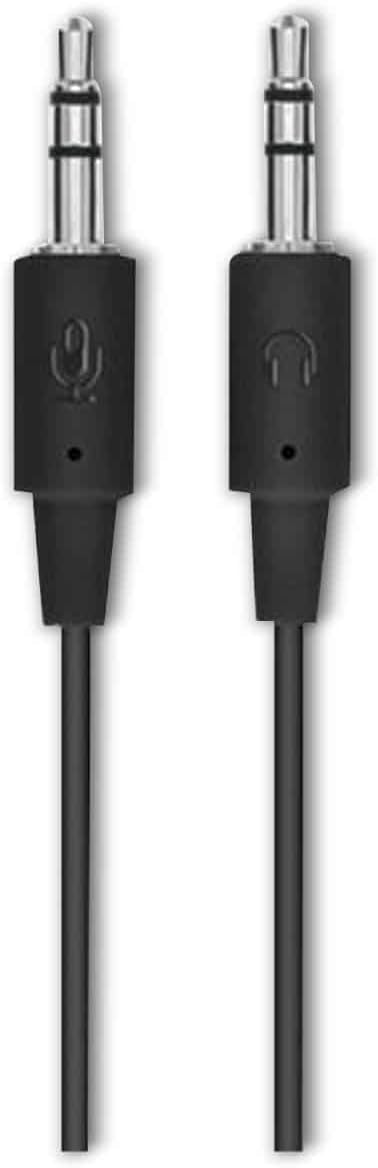
Зображення 2: The two 3.5mm audio jacks for the Logitech H110 headset. One jack is for audio output (headphones), and the other is for microphone input.
Налаштування
- Підключіть гарнітуру:
The Logitech H110 headset uses two 3.5mm audio jacks. One jack is typically green for audio output (headphones), and the other is pink for microphone input. Connect the green jack to your computer's audio output port and the pink jack to your computer's microphone input port.
Примітка: Some devices, such as laptops or smartphones, may use a single combined 3.5mm jack for both audio and microphone. An adapter (not included) may be required for compatibility with such devices.
- Adjust the Headset:
Adjust the headband for a comfortable fit on your head. The earcups should rest gently over your ears.
- Розташуйте мікрофон:
Position the flexible microphone boom so that the microphone is approximately 1-2 inches (2.5-5 cm) from your mouth for optimal voice clarity.
Інструкція з експлуатації
- Відтворення аудіо:
Once connected, your computer should automatically detect the headset as an audio output device. Play any audio (music, video, calls) to test the sound. Adjust the volume using your computer's system volume controls.
- Використання мікрофона:
For voice communication (e.g., video calls, online gaming), ensure the headset microphone is selected as the input device in your computer's sound settings or within the application you are using. Speak clearly into the microphone.
Технічне обслуговування
- Прибирання:
Wipe the headset surfaces with a soft, dry cloth. Do not use liquid cleaners or abrasive materials. For the foam earpads, gently dab with a slightly damp тканиною, якщо необхідно, та дайте повністю висохнути на повітрі перед використанням.
- Зберігання:
Зберігайте гарнітуру в чистому, сухому місці, подалі від екстремальних температур та прямих сонячних променів. Уникайте заплутування кабелю.
- Догляд за кабелем:
Не тягніть за кабель, щоб від’єднати гарнітуру. Завжди міцно тримайте штекер. Уникайте різких вигинів або зламів кабелю, щоб запобігти внутрішнім пошкодженням.
Усунення несправностей
| проблема | Можливе рішення |
|---|---|
| Немає звуку з гарнітури |
|
| Мікрофон не працює |
|
| Погана якість звуку |
|
Технічні характеристики
- модель: H110
- Номер деталі (P/N): 981-000271
- Підключення: Dual 3.5mm audio jacks (one for audio, one for microphone)
- Розміри (В x Ш x Г): Приблизно 5.91 x 2.36 x 0.79 дюйма (15 x 6 x 2 см)
- вага: Приблизно 5.3 унцій (150 грамів)
- Мікрофон: Adjustable, noise-cancelling (typical for basic headsets)
- Навушники: Foam padded
Гарантія та підтримка
Specific warranty information for the Logitech Stereo Headset H110 is typically provided with the product packaging or available on the official Logitech website. For technical support, product registration, or further assistance, please visit the official Logitech support page:
Примітка: Warranty terms and conditions may vary by region and purchase date. Please retain your proof of purchase for warranty claims.


