1. Вступ
This manual provides essential information for the proper installation, operation, and maintenance of your Western Digital WD1600HLFS hard drive. The WD1600HLFS is a high-performance 3.5-inch internal hard disk drive designed for demanding applications, featuring a 160GB storage capacity, SATA 3Gb/s interface, and a 10,000 RPM spindle speed for rapid data access.
2. Інформація про безпеку
Please read and understand all safety precautions before installing or operating this device. Failure to do so may result in personal injury or damage to the product or other components.
- Запобіжні заходи щодо електростатичного розряду (ESD): Always handle the hard drive by its edges and avoid touching the circuit board or connector pins. Use an anti-static wrist strap or ground yourself by touching a metal object before handling the drive to prevent ESD damage.
- Відключення живлення: Перед встановленням або видаленням жорсткого диска переконайтеся, що комп’ютер повністю вимкнено та від’єднано від електричної розетки.
- Фізичне поводження: Hard drives are delicate. Avoid dropping, striking, or exposing the drive to excessive vibration or shock.
- Вентиляція: Ensure adequate airflow around the hard drive within your computer case to prevent overheating.
- Резервне копіювання даних: Seller is not responsible for data loss. Always back up your data before servicing or making changes to your hard disk.
3. Вміст упаковки
Переконайтеся, що ваш пакет містить такі елементи:
- Western Digital WD1600HLFS 160GB Hard Drive
- Note: Additional accessories such as mounting screws, SATA data cables, or power adapters are typically supplied with your computer system or sold separately. The inclusion of a mounting tray may vary.
4. Налаштування та встановлення
4.1 Системні вимоги
- Available 3.5-inch drive bay in your computer case.
- Available SATA port on your motherboard.
- Available SATA power connector from your power supply.
- Сумісна операційна система (наприклад, Windows, macOS, Linux).
4.2 Фізичне встановлення
- Підготуйте свою систему: Power off your computer and unplug the power cord. Open the computer case according to your system's instructions.
- Монтування диска: Slide the WD1600HLFS hard drive into an available 3.5-inch drive bay. Secure it with screws on both sides of the drive bay. If your system uses a tool-less mounting mechanism, follow its specific instructions.
- Підключення кабелю передачі даних: Connect one end of a SATA data cable to the SATA data port on the hard drive and the other end to an available SATA port on your motherboard.
- Підключіть кабель живлення: Connect a SATA power connector from your power supply to the SATA power port on the hard drive.

Малюнок 1: Спереду view of the WD1600HLFS with its mounting tray, highlighting the SATA data and power interfaces.

Малюнок 2: Нижня частина view of the WD1600HLFS, illustrating the printed circuit board (PCB) and screw points for secure installation.
4.3 Початкове налаштування системи
- Конфігурація BIOS/UEFI: After reassembling your computer and powering it on, enter your system's BIOS or UEFI settings. Ensure the new hard drive is detected and configured correctly (e.g., SATA mode set to AHCI for optimal performance).
- Налаштування операційної системи:
- Нова установка: If installing an operating system on this drive, follow your OS installation media's instructions for partitioning and formatting the drive.
- Adding as Secondary Drive: If adding as a secondary drive, boot into your existing operating system. Use Disk Management (Windows) or Disk Utility (macOS/Linux) to initialize, partition, and format the new drive before use.
5. Операція
The Western Digital WD1600HLFS functions as a standard internal hard disk drive. Once properly installed and formatted, it can be used for:
- Operating System Storage: Install your operating system for fast boot times and application loading due to its 10,000 RPM speed.
- Зберігання даних: Магазин files, програми та медіа.
- Ігри: Benefit from quicker game loading times compared to slower drives.
- Workstation Applications: Ideal for applications requiring high I/O performance.
Отримайте доступ до диска через вашу операційну систему file explorer or command line interface, just like any other storage device.
6. Технічне обслуговування
To ensure the longevity and optimal performance of your WD1600HLFS hard drive, consider the following maintenance practices:
- Регулярні резервні копії даних: Periodically back up critical data to another storage device. Hard drives can fail, and backups are your only protection against data loss.
- Моніторинг стану диска: Utilize SMART (Self-Monitoring, Analysis and Reporting Technology) tools available in many operating systems or third-party utilities to monitor the drive's health status.
- Maintain Proper Cooling: Ensure your computer case has adequate ventilation to prevent the drive from overheating, which can reduce its lifespan.
- Дефрагментація (для жорстких дисків): While modern operating systems often handle this automatically, occasional defragmentation can help maintain performance on traditional hard drives.
- Уникайте фізичних потрясінь: Protect your computer from drops or impacts while the drive is operating.
7. Вирішення проблем
If you encounter issues with your WD1600HLFS hard drive, refer to the following common problems and solutions:
- Диск не виявлено:
- Check all SATA data and power cable connections.
- Verify the drive is enabled in your system's BIOS/UEFI settings.
- Спробуйте підключити диск до іншого порту SATA або використати інші кабелі.
- Ensure your power supply is providing sufficient power.
- Повільна продуктивність:
- Check for excessive background processes or malware.
- Ensure the drive is not nearly full.
- Verify SATA drivers are up to date.
- Run a disk defragmenter (if applicable).
- Monitor drive temperature; overheating can cause throttling.
- Unusual Noises (Clicking, Grinding):
- Негайно створіть резервну копію всіх доступних даних.
- Unusual noises often indicate a mechanical failure. Discontinue use to prevent further damage.
- Contact Western Digital support if the drive is under warranty.
- Пошкодження даних:
- Run disk error checking utilities (e.g., CHKDSK on Windows).
- Ensure proper system shutdown to prevent data loss.
If these steps do not resolve your issue, consult the Western Digital support webсайт або кваліфікований технік.
8. Технічні характеристики
Below are the technical specifications for the Western Digital WD1600HLFS hard drive:

Figure 3: Product label of the WD1600HLFS, detailing model, serial, and part numbers.
- Серійний номер (S/N): WXE0C79C3272
- Номер деталі (P/N): 490581-001
- Controller (CT): 2AHER013HY10B9
- Model (MDL): WD1600HLFS-60G6U1
- Spare Part Number (S/C): 8509C309GRH
| Особливість | опис |
|---|---|
| Номер моделі | WD1600HLFS |
| Ємність зберігання | 160 ГБ |
| Інтерфейс | SATA 3Gb/s (SATA/300) |
| Швидкість шпинделя | 10,000 об / хв |
| Розмір буфера | 16 Мб |
| Форм-фактор | 3.5-дюймовий |
| Average Read Speed | 80.5 МБ/с |
| Random Access (Read/Write) | 8.1 мс |
| Характеристики живлення | 5 В постійного струму, 0.90 А; 12 В постійного струму, 0.30 А |
| Вага товару | 1.25 фунта (0.57 кг) |
| Розміри продукту (ДxШxВ) | 0.09 x 0.07 x 0.04 дюйми (приблизно) |
| Схвалення регуляторних органів | BSMI, cULus, C-Tick, MIC, CE, WEEE |
| Дата першої доступності | 4 квітня 2010 р |
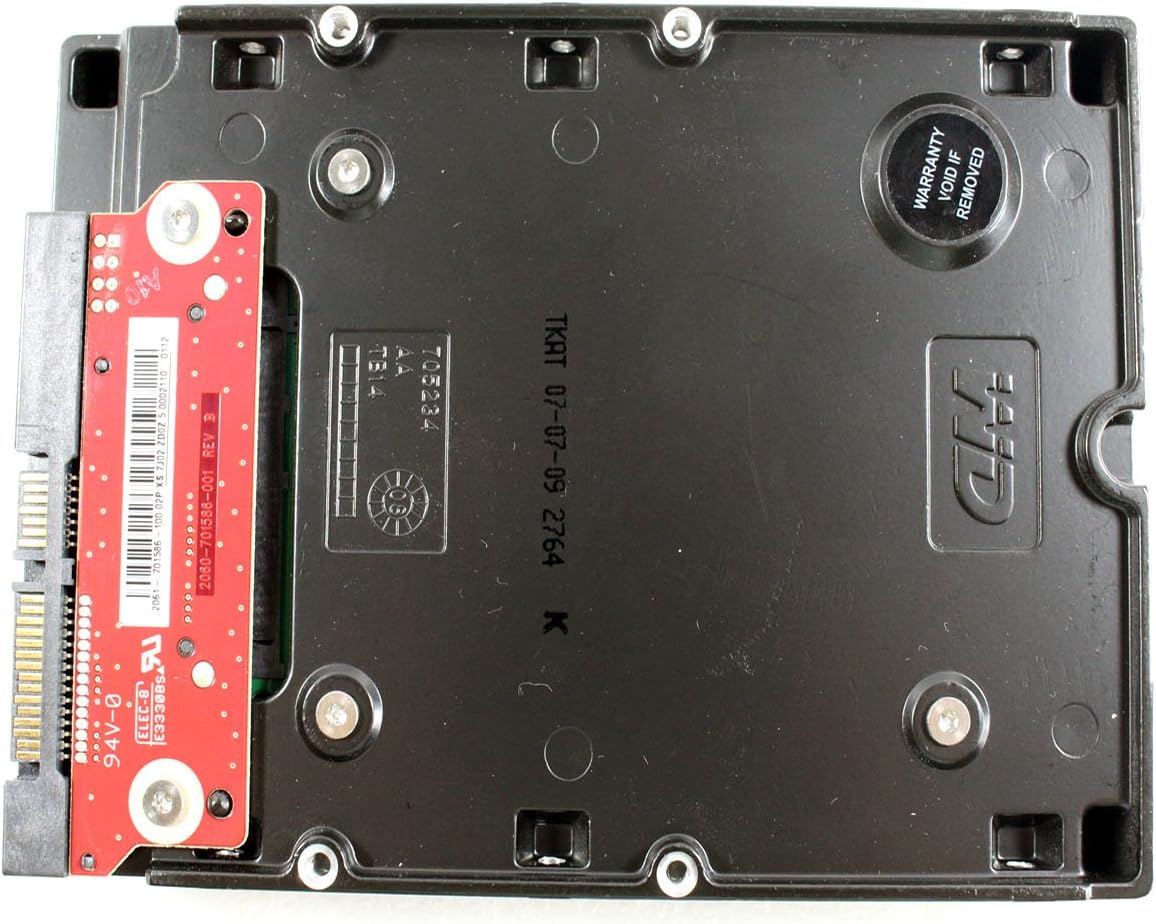
Малюнок 4: Нижня частина view of the WD1600HLFS without the tray, showing the PCB and a warranty sticker.

Малюнок 5: Детально view of the WD1600HLFS PCB, including component markings.
9. Гарантія та підтримка
Юридична відмова від відповідальності: Seller is not responsible for data loss. Always back up your data before servicing your hard disk.
The WD1600HLFS hard drive is manufactured by Western Digital. For specific warranty terms, conditions, and duration, please refer to the documentation provided with your purchase or visit the official Western Digital website. Note that tampering with the drive, such as removing certain labels or components, may void the warranty, as indicated by the 'Warranty Void If Removed' sticker on the drive.
For technical assistance, driver downloads, or further support, please visit the official Western Digital support portal:
- Western Digital Support: https://support.wdc.com