1. Вступ
The Antec TruePower TPQ-1200 is a high-performance 1200-watt power supply designed for demanding computer systems. It features an 80 PLUS Silver certification, indicating high energy efficiency, and provides stable power delivery through its six +12V rails. This manual provides essential information for the safe installation, operation, and maintenance of your TPQ-1200 power supply.
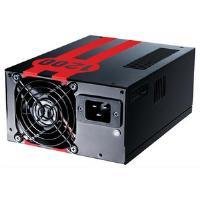
Image 1.1: The Antec TruePower TPQ-1200 Power Supply unit, showcasing its design and modular connectors.
2. Інформація про безпеку
Please read and understand all safety instructions before installing or operating the power supply. Failure to do so may result in personal injury or damage to your equipment.
- Завжди від’єднуйте шнур живлення від розетки перед встановленням, зняттям або очищенням блока живлення.
- This power supply is designed for use in personal computers only. Do not use it for any other purpose.
- Не відкривайте блок живлення casinг. Високий об'ємtagВсередині присутні пошкодження, і немає деталей, які може обслуговувати користувач. Відкриття кришкиasing призведе до анулювання гарантії.
- Забезпечте належне заземлення вашої комп'ютерної системи.
- Avoid operating the power supply in high humidity or extreme temperature environments.
- Keep the power supply away from liquids and sources of heat.
3. Вміст упаковки
Переконайтеся, що ваш пакет містить такі елементи:
- Antec TruePower TPQ-1200 Power Supply Unit
- Modular Cable Set (PCIe, SATA, Molex, Floppy)
- Шнур живлення змінного струму
- Монтажні гвинти
- Посібник користувача (цей документ)
If any items are missing or damaged, please contact your retailer or Antec customer support.
4. особливості
The Antec TruePower TPQ-1200 power supply offers advanced features for reliable and efficient performance:
- 1200 Watts Continuous Power: Забезпечує ample power for high-end gaming and workstation systems.
- 80 PLUS Silver Certified: Achieves up to 88% efficiency, reducing heat generation and operating costs.
- Six +12V Rails: Delivers stable and clean power to critical components.
- Розширене керування кабелями: Semi-modular design allows for cleaner builds and improved airflow.
- PowerCache High Performance Capacitors: Enhances stability and transient response.
- Ultra-Quiet Pulse Width Modulation (PWM) Fan: Provides efficient cooling with minimal noise.
- Industrial Grade Protection Circuitry: Включає захист від перевантаження по струму (OCP), захист від перенапруженняtage Захист (OVP), відповідно до випtage Protection (UVP), Short Circuit Protection (SCP), Over Power Protection (OPP), and Over Temperature Protection (OTP).
5. Налаштування та встановлення
Follow these steps carefully to install your Antec TruePower TPQ-1200 power supply.
5.1 Контрольний список перед установкою
- Ensure your computer case supports an ATX power supply.
- Підготуйте необхідні інструменти: хрестову викрутку.
- Unplug your computer from the wall outlet and discharge any residual power by pressing the power button.
5.2 Встановлення джерела живлення
- Carefully place the power supply into the designated PSU bay in your computer case. Ensure the fan is oriented correctly (typically facing down for bottom-mounted PSUs, or according to case design for top-mounted).
- Зіставте отвори для гвинтів на блоці живлення з отворами на корпусі.
- Secure the power supply using the provided mounting screws. Do not overtighten.
5.3 Підключення силових кабелів
Connect the necessary cables to your motherboard and components. The TPQ-1200 features both fixed and modular cables.
- 24-Pin ATX Motherboard Power: Connect the main 24-pin connector to the corresponding port on your motherboard. Ensure it clicks into place.
- 8-Pin EPS12V (CPU) Power: Connect the 8-pin (or 4+4 pin) EPS12V connector to the CPU power port on your motherboard.
- PCIe (Graphics Card) Power: For graphics cards requiring additional power, connect the appropriate 6-pin or 6+2 pin PCIe modular cables from the power supply to your graphics card(s).
- Живлення SATA: Connect SATA modular cables to your SATA hard drives, SSDs, and optical drives.
- Molex (Peripheral) Power: Use Molex modular cables for older peripherals or case fans that require this connector type.
- Управління кабелем: Route cables neatly behind the motherboard tray or in other designated areas of your case to improve airflow and aesthetics.
5.4 Початкове ввімкнення
- Переконайтеся, що всі з’єднання надійні.
- Підключіть шнур живлення змінного струму до джерела живлення, а потім до заземленої розетки.
- Flip the power switch on the back of the power supply to the 'ON' (I) position.
- Увімкніть комп'ютер.
6. Інструкція з експлуатації
The Antec TruePower TPQ-1200 is designed for continuous operation within its specified limits. Ensure adequate ventilation around your computer case to prevent overheating. The intelligent PWM fan will adjust its speed based on the power supply's temperature to maintain optimal cooling and noise levels.
Always shut down your computer properly through the operating system before turning off the power supply switch or unplugging the AC cord.
7. Технічне обслуговування
Регулярне технічне обслуговування допомагає забезпечити довговічність та оптимальну роботу вашого блоку живлення.
- Очищення від пилу: Periodically (e.g., every 6-12 months), disconnect the power supply from the wall outlet and use compressed air to gently clean dust from the fan grille and ventilation openings. Do not open the power supply casing.
- Перевірка кабелю: Occasionally check all power cable connections to ensure they are secure and free from damage.
8. Вирішення проблем
If you encounter issues with your power supply, refer to the following troubleshooting guide:
| проблема | Можлива причина | Рішення |
|---|---|---|
| Комп'ютер не вмикається. | AC power cord not connected or loose. Power supply switch is OFF. Faulty power supply. | Ensure AC cord is firmly connected. Flip PSU switch to 'ON' (I). Test with another power supply if possible. |
| Система вмикається, але одразу вимикається. | Overload, short circuit, or overheating. | Check for short circuits (e.g., loose screws). Ensure adequate ventilation. Disconnect non-essential components to check for overload. |
| System instability or random reboots. | Insufficient power, faulty component, or power supply issue. | Verify all power connectors are secure. Ensure total system wattage does not exceed PSU capacity. Test components individually if possible. |
| Гучний шум вентилятора від блоку живлення. | Dust accumulation, fan malfunction, or high load. | Clean dust from the fan grille. If noise persists and is excessive, contact support. |
If troubleshooting steps do not resolve the issue, contact Antec customer support for further assistance.
9. Технічні характеристики
Detailed technical specifications for the Antec TruePower TPQ-1200 power supply:
- Назва моделі: TruePower TPQ-1200
- Вихідна ватtage: 1200 Вт
- Форм-фактор: ATX12V
- Тип роз'єму: ATX
- Ефективність: 80 PLUS Silver Certified
- Спосіб охолодження: Air (PWM Fan)
- Кількість шанувальників: 1
- Сумісні пристрої: Персональний комп'ютер
- Вага товару: 4.96 фунта (2.25 кг)
- Розміри упаковки: 12.91 x 9.84 x 5.59 дюйми (32.8 x 25 x 14.2 см)
- Дата першої доступності: 17 квітня 2012 р
10. Гарантія та підтримка
Щоб отримати інформацію про гарантію та технічну підтримку, зверніться до офіційного представника Antec. webсайт або зверніться безпосередньо до служби підтримки клієнтів. Гарантійні умови можуть відрізнятися залежно від регіону та дати покупки.
Офіційний представник Antec Webсайт: www.antec.com


