вступ
This manual provides essential information for the proper setup, operation, and maintenance of your Fender '65 Princeton Reverb Guitar Amplifier. The '65 Princeton Reverb is a 15-watt all-tube amplifier designed for versatile use in various settings, from home practice to recording studios and small live performances. It features classic Fender tube tone, dynamic clean and overdriven sounds, and integrated long-spring reverb and tube vibrato effects.
Ключові особливості:
- 15-watt all-tube amplification with tube rectification.
- Equipped with a 1-10" Jensen C-10R, 8 Ohm, 40 Watt Speaker with Ceramic Magnet.
- Integrated long-spring Fender reverb and tube vibrato effects.
- Включає amplifier cover and a 2-button footswitch for remote control of reverb and vibrato.

Малюнок 1: Спереду view of the Fender '65 Princeton Reverb Guitar Ampрятувальник, шоуasing its classic black Tolex finish and silver grille cloth.
Налаштування
- Розпакування: Обережно вийміть ampВийміть виріб з упаковки. Зберігайте всі пакувальні матеріали для подальшого транспортування або зберігання.
- Розміщення: Розташуйте ampвипарник на стійкій, рівній поверхні. Забезпечте належну вентиляцію навколо пристрою, щоб запобігти перегріву. Уникайте розміщення ampзберігайте поблизу джерел тепла або під прямими сонячними променями.
- Підключення живлення: Забезпечити ampвимикач живлення рятувальника знаходиться в положенні «ВИМК.». Підключіть доданий шнур живлення до amplifier's AC inlet and then to a grounded electrical outlet. Verify that the outlet provides the correct voltage для вашого регіону.
- Підключення приладу: Connect your guitar or other instrument to one of the 'INSTRUMENTS' input jacks (Input 1 or Input 2) using a high-quality instrument cable. Input 1 typically offers higher sensitivity than Input 2.
- Підключення ножного перемикача (додатково): If using the included 2-button footswitch, connect it to the 'FOOTSWITCH' jack on the amplifier's rear panel. This allows remote activation of the Reverb and Vibrato effects.
Інструкція з експлуатації
Ознайомтеся з amplifier's front panel controls:
- Вимикач живлення: Перевертає amplifier ON or OFF. Allow a brief warm-up period after turning on.
- обсяг: Контролює загальний вихідний рівень ampліфірник.
- ВЧ: Adjusts the high-frequency response. Turn clockwise for brighter tones, counter-clockwise for warmer tones.
- Бас: Регулює низькочастотну характеристику. Поверніть за годинниковою стрілкою для посилення басів, проти годинникової стрілки для послаблення.
- Реверберація: Контролює інтенсивність вбудованого ефекту пружинної реверберації.
- швидкість: Adjusts the rate of the vibrato effect.
- Інтенсивність: Adjusts the depth or prominence of the vibrato effect.
Початкове включення:
- Ensure all volume and effect controls are set to their minimum positions.
- Flip the power switch to the 'ON' position. The pilot light will illuminate.
- Allow approximately 30-60 seconds for the tubes to warm up.
- Slowly increase the 'Volume' control to your desired listening level. Adjust 'Treble' and 'Bass' for tonal preference.
- Experiment with the 'Reverb', 'Speed', and 'Intensity' controls to achieve desired effects.
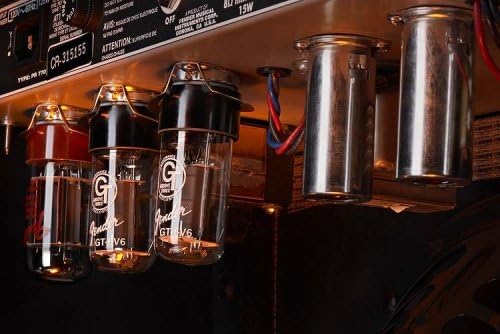
Малюнок 2: Внутрішній view з amplifier, highlighting the vacuum tubes which are crucial for its tonal characteristics.
Технічне обслуговування
- Прибирання: Для очищення використовуйте м’яку суху тканину ampзовнішню частину рятувальника. Уникайте абразивних засобів для чищення або розчинників.
- Догляд за трубкою: Vacuum tubes have a finite lifespan. If you notice a decrease in performance, unusual noise, or a change in tone, tubes may need replacement. Consult a qualified technician for tube replacement.
- Зберігання: Якщо він не використовується, зберігайте його amplifier in a dry, temperature-controlled environment. Use the included amplifier cover to protect it from dust and minor impacts.
- Транспорт: Always power off and unplug the amplifier before moving it. Use proper lifting techniques due to its weight.
Усунення несправностей
| проблема | Можлива причина | Рішення |
|---|---|---|
| Немає звуку | Power cord disconnected, instrument cable faulty, volume set to zero, speaker disconnected. | Check power and instrument cables. Ensure volume is up. Verify speaker connection. |
| Дзижчання або дзижчання | Ground loop, faulty instrument cable, proximity to other electronics, worn tubes. | Try a different outlet. Use shielded cables. Move away from other devices. Consult technician for tube inspection. |
| Слабкий або спотворений звук | Worn tubes, incorrect instrument input, speaker damage. | Check instrument input. Consult technician for tube or speaker inspection. |
| Reverb or Vibrato not working | Footswitch disconnected or faulty, effect controls set to zero, internal component failure. | Check footswitch connection and functionality. Ensure effect controls are adjusted. Consult technician. |
If troubleshooting steps do not resolve the issue, contact Fender customer support or a qualified service technician.
Технічні характеристики
- Бренд: Крило
- модель: '65 Princeton Reverb
- Номер моделі товару: 2172000000
- Вихідна ватtage: 15 Вт
- Доповідач: 1-10" Jensen C-10R, 8 Ohm, 40 Watt Speaker with Ceramic Magnet
- Розміри продукту: 28.25 x 22.5 x 12.25 inches (Length x Height x Depth)
- Вага товару: 34 фунта
- колір: чорний
- матеріал: Метал, Дерево
- Сумісні пристрої: гітара
- Виробник: Корпорація музичних інструментів Fender

Figure 3: Dimensional diagram of the amplifier, indicating its length, height, and depth.
Гарантія та підтримка
Fender products are designed for reliability and performance. For specific warranty information, please refer to the warranty card included with your amplifier or visit the official Fender website. For technical support, service, or replacement parts, please contact Fender customer service through their official channels. Always provide your model number (2172000000) and serial number when seeking support.
Інтернет-ресурси: For additional information, product registration, and support, visit the official Крило webсайт.


