1. Продукт закінчивсяview
The TP-Link TL-SF1008D Fast Ethernet Switch is designed to expand your network connectivity for small office or home office (SOHO) environments. This unmanaged switch offers 8 10/100 Mbps auto-negotiation RJ45 ports, providing a simple and efficient solution for adding more wired connections to your router or modem. Its plug-and-play design requires no configuration, making setup straightforward. The device incorporates innovative energy-efficient technology to reduce power consumption and features a fanless design for quiet operation.
Ключові характеристики:
- Підключи і грай: Easy setup with no configuration or software needed.
- 8 Fast Ethernet Ports: 8 10/100 Mbps auto-negotiation RJ45 ports for expanding network capacity.
- Енергоефективний: Innovative green technology saves power consumption by up to 70%.
- Дизайн без вентилятора: Ensures quiet operation, ideal for any environment.
- Автоматичний MDI/MDIX: Усуває необхідність використання перехресних кабелів.
- Надійна передача даних: IEEE 802.3x flow control provides dependable data transmission.
- Компактний дизайн: Desktop or wall-mounting options for flexible placement.
2. Вміст упаковки
Переконайтеся, що ваш пакет містить такі елементи:
- TP-Link 8-Port 10/100Mbps Desktop Switch (TL-SF1008D)
- Адаптер живлення
- Посібник користувача
3. Фізичний опис
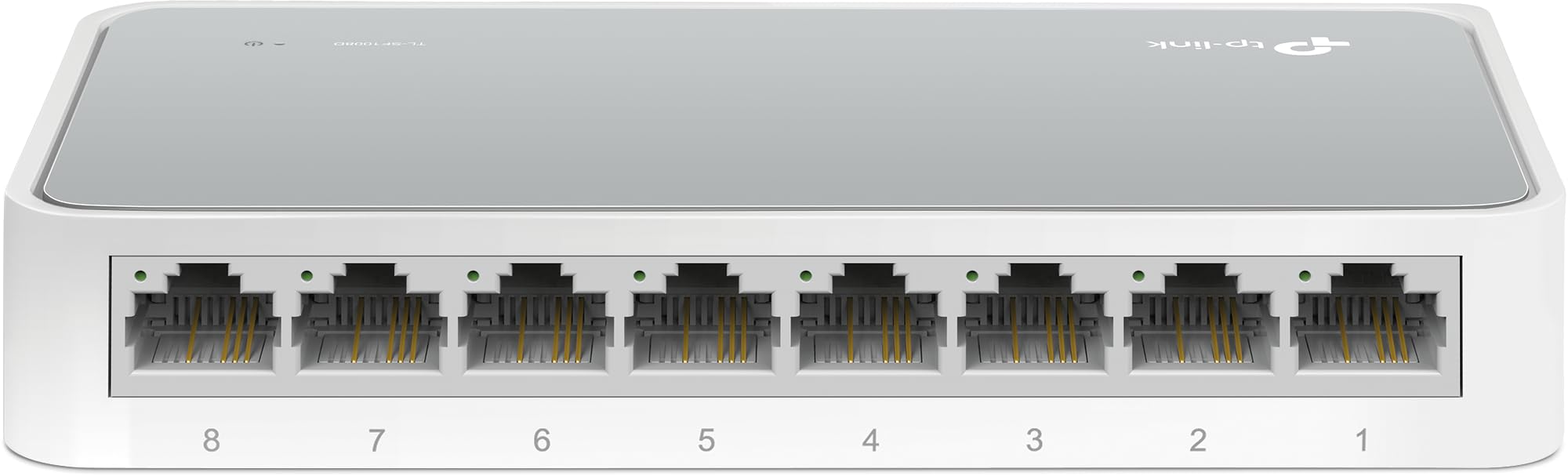
Рисунок 1: Кутовий вид зверху вниз view of the TP-Link TL-SF1008D 8-Port Fast Ethernet Switch, showing the compact white casing and the eight RJ45 ports on the front.

Рисунок 2: Передній кут view of the TP-Link TL-SF1008D 8-Port Fast Ethernet Switch, highlighting the eight RJ45 ports labeled 1 through 8, and the power LED indicator.

Малюнок 3: Верх view of the TP-Link TL-SF1008D 8-Port Fast Ethernet Switch, showing the TP-Link logo, model number, and the power and link/activity LED indicators.
Світлодіодні індикатори:
- Світлодіод живлення: Показує стан живлення комутатора. Увімкнено, коли живлення є, вимкнено, коли немає.
- Link/Act LEDs (1-8): Indicates the link status and network activity for each port. Solid green indicates a valid network link, blinking indicates data transmission.
4. Налаштування та встановлення
The TL-SF1008D switch is designed for simple plug-and-play installation. No software configuration is required.
- Підключіть адаптер живлення: Plug the provided power adapter into the switch's power port and then into a standard electrical outlet. Ensure the Power LED on the switch illuminates.
- Підключення до вашої мережі: Connect an Ethernet cable from your router or modem to any of the 8 RJ45 ports on the switch. The corresponding Link/Act LED for that port should light up, indicating a successful connection.
- Підключіть свої пристрої: Connect your network devices (e.g., computers, gaming consoles, printers, smart TVs) to the remaining RJ45 ports on the switch using Ethernet cables. The Link/Act LEDs for these connected devices should also light up.
The switch automatically detects the speed and cable type (Auto-MDI/MDIX) for each connected device, eliminating the need for manual configuration or special crossover cables.
5. Інструкція з експлуатації
Once installed, the TL-SF1008D operates automatically. It functions as an unmanaged switch, meaning it requires no user intervention for basic network operation. Data packets are forwarded and filtered at full wire-speed for maximum throughput.
Автоматичне узгодження:
Each port on the switch supports auto-negotiation, which automatically determines the optimal connection speed (10 Mbps or 100 Mbps) and duplex mode (half or full duplex) with the connected device. This ensures compatibility and optimal performance without manual settings.
Контроль потоку:
The switch supports IEEE 802.3x flow control. This mechanism helps prevent data loss during periods of high network traffic by temporarily pausing data transmission from a congested device, ensuring reliable data transfer across your network.
6. Технічне обслуговування
To ensure optimal performance and longevity of your TP-Link TL-SF1008D switch, consider the following maintenance tips:
- Розміщення: Place the switch in a well-ventilated area to prevent overheating. Avoid placing it near heat sources or in enclosed spaces.
- Прибирання: Регулярно очищуйте зовнішню частину вимикача м’якою сухою тканиною. Не використовуйте рідкі або аерозольні засоби для чищення.
- Управління кабелем: Ensure Ethernet cables are neatly organized and not excessively bent or kinked to prevent damage and maintain signal integrity.
- Джерело живлення: Використовуйте лише адаптер живлення, що постачається разом із пристроєм.
7. Вирішення проблем
If you encounter issues with your TL-SF1008D switch, try the following basic troubleshooting steps:
- Немає живлення: Check if the power adapter is securely connected to the switch and a working electrical outlet. Verify the Power LED is on.
- Немає з'єднання/активності на порту:
- Переконайтеся, що кабель Ethernet надійно підключено як до порту комутатора, так і до підключеного пристрою.
- Спробуйте використати інший кабель Ethernet, щоб виключити несправність кабелю.
- Переконайтеся, що підключений пристрій увімкнено та працює належним чином.
- Спробуйте підключити пристрій до іншого порту комутатора.
- Низька швидкість мережі:
- Ensure all connected devices and cables support 100 Mbps speeds for optimal performance.
- Перевірте наявність надмірного мережевого трафіку або запущених у вашій мережі програм, що використовують інтенсивне використання пропускної здатності.
Для отримання додаткової допомоги зверніться до інформації про підтримку в Розділі 9.
8. Технічні характеристики
| Розміри продукту | 5.3 см (Д) x 5.3 см (Ш) x 0.9 см (В) |
| Вага товару | 0.86 фунта (13.8 унції) |
| томtage | 110 вольт (перемінний струм) |
| Матеріал корпусу | Aluminum or Alloy Steel or Metal |
| Верхня температура | 40 градусів Цельсія |
| Тип інтерфейсу | RJ45 |
| Швидкість передачі даних | 100 мегабіт в секунду |
| Поточний рейтинг | 0.6 Amps |
| Кількість портів | 8 |
| Колір | Білий |
| Сумісні пристрої | Desktop, Gaming console, Router, Printer, Laptop, Camera |
9. Гарантія та підтримка
TP-Link provides unlimited 24/7 technical support for free. For any issues or questions regarding your TL-SF1008D switch, please contact TP-Link support.
Контактна інформація:
- Підтримка по телефону: (866) 225-8139
- Webсайт: myproducts.tp-link.com/us
- Підтримка електронною поштою: support.USA@tp-link.com
Юридична відмова від відповідальності:
Each item is provided AS IS, and there is no warranty on these items. If an item does not work, please contact the manufacturer directly, as we do not test every unit for reliability.


