1. Вступ
This manual provides essential information for the safe and effective use of your Leica D-Lux 4 Safari Special Edition Digital Camera. Please read it thoroughly before using your camera and keep it for future reference. The Leica D-Lux 4 Safari is a limited edition digital camera featuring a distinctive Safari Green color and a special case, designed for high-quality digital photography.
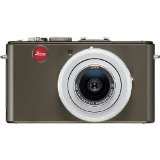
Figure 1: Leica D-Lux 4 Safari Special Edition Digital Camera. This image displays the compact digital camera with its distinctive green finish and lens.
2. Налаштування
2.1. Встановлення батареї
- Переконайтеся, що камеру вимкнено.
- Знайдіть кришку відсіку для батареї на нижній частині камери.
- Посуньте засувку, щоб відкрити кришку.
- Insert the provided battery, ensuring the correct orientation as indicated inside the compartment.
- Щільно закривайте кришку відсіку для батарейок, доки вона не зафіксується почутим клацанням.
2.2. Вставлення карти пам'яті
The camera supports SD and SDXC memory cards for storing photos and videos.
- With the camera powered off, open the battery/memory card compartment cover.
- Insert the memory card into the designated slot with the label facing the correct direction (usually towards the front of the camera). Push until it clicks into place.
- Закрийте кришку відсіку.
2.3. Початкове увімкнення
Press the power button to turn on the camera. Follow any on-screen prompts to set the date, time, and language.
3. Інструкція з експлуатації
3.1. Basic Photography (Point & Shoot)
- Увімкнення: Натисніть кнопку живлення.
- Виберіть режим: Use the mode dial to select "Automatic" for general use.
- Фокус: Point the camera at your subject. The camera will automatically focus using contrast detection.
- Захоплення: Натисніть кнопку спуску затвора наполовину, щоб сфокусуватися, потім натисніть повністю, щоб зробити знімок.
3.2. Запис відео
- Виберіть режим: Turn the mode dial to "Movie" mode.
- Почати/зупинити запис: Press the dedicated video record button to start and stop recording. The camera records in 1080p at 30 frames per second.
- Цифрова стабілізація зображення: The camera features digital image stabilization to reduce blur during video recording.
3.3. Функціональність масштабування
The camera features 2.5x optical zoom. Use the zoom lever (typically around the shutter button) to zoom in or out. Digital zoom is also available up to 16x.
3.4. Розширені режими зйомки
Explore various modes via the mode dial:
- Альбомний режим: Оптимізовано для ширококутних пейзажних знімків.
- Ручний контроль експозиції: For experienced users to manually adjust aperture and shutter speed.
- Параметри балансу білого: Customize white balance for accurate color reproduction under different lighting conditions.
3.5. Підключення
- Wi-Fi: Connect your camera to a Wi-Fi network for wireless transfer of images and remote control via a compatible smartphone app. Refer to the camera's on-screen menu for Wi-Fi setup.
4. Технічне обслуговування
4.1. Очищення камери
- Корпус камери: Використовуйте м’яку суху тканину для протирання корпусу камери. Для стійкого бруду злегкаampпрополощіть тканину водою. Уникайте агресивних хімікатів.
- Об'єктив: Використовуйте щіточку для об’єктивів, щоб видалити пил, потім обережно протріть її серветкою з мікрофібри. Для видалення плям використовуйте спеціальний розчин для чищення об’єктивів.
- екран: Wipe the LCD screen with a soft, dry microfiber cloth.
4.2. Догляд за акумулятором
- Always use the original Leica charger and battery.
- Уникайте впливу на акумулятор екстремальних температур.
- Зберігайте акумулятор у прохолодному сухому місці, коли він не використовується.
5. Вирішення проблем
5.1. Камера не вмикається
- Переконайтеся, що акумулятор повністю заряджений та правильно вставлений.
- Спробуйте використати інший, повністю заряджений акумулятор, якщо він є.
5.2. Погана якість зображення
- Check if the lens is clean and free from smudges or dust.
- Ensure adequate lighting for your shot.
- Adjust shooting modes or exposure settings if necessary.
5.3. Проблеми з підключенням до Wi-Fi
- Verify that Wi-Fi is enabled on the camera and your smartphone.
- Ensure the camera is within range of the Wi-Fi network.
- Restart both the camera and your smartphone.
6. Технічні характеристики
| Особливість | Деталь |
|---|---|
| Бренд | Leica |
| Назва моделі | D Lux4 Safari |
| Загальна роздільна здатність фотографій | 12 Мп |
| Технологія фотосенсора | CMOS |
| Оптичний зум | 2.5x |
| Цифровий зум | 16x |
| Максимальна діафрагма | 2.8 міліметрів |
| Стабілізація зображення | цифровий |
| Підтримується File Формат | JPEG, RAW |
| Роздільна здатність відео | 1080p |
| Частота кадрів | 30 FPS |
| Розмір екрана | 3 дюймів |
| Бездротова технологія | Wi-Fi |
| Матеріал корпусу | метал |
| Колір | Зелений |
| Батарейки в комплекті | так |
7. Гарантія та підтримка
7.1. Інформація про гарантію
The Leica D-Lux 4 Safari Special Edition Digital Camera comes with a 3-річна гарантія виробникаЦя гарантія поширюється на дефекти матеріалів та виготовлення за умов нормального використання. Будь ласка, збережіть чек про покупку для пред'явлення претензій за гарантією.
7.2. Підтримка клієнтів
For technical assistance, troubleshooting, or service inquiries, please visit the official Leica website or contact their customer support. You can find detailed contact information on the Leica website or in the documentation included with your camera.