1. Вступ
Thank you for choosing the NEC LCD4215 42-inch MultiSync LCD Monitor. This manual provides essential information for the safe and efficient use of your new display. Please read these instructions thoroughly before installation and operation, and retain them for future reference.
2. Інформація про безпеку
Дотримуйтесь наступних запобіжних заходів, щоб запобігти пошкодженню монітора та забезпечити безпеку користувача:
- Джерело живлення: Connect the monitor only to a grounded power outlet with the correct voltage, як зазначено на етикетці продукту.
- Вентиляція: Забезпечте належну вентиляцію навколо монітора. Не блокуйте вентиляційні отвори.
- Вплив рідини: Avoid exposing the monitor to rain, moisture, or excessive humidity. Do not place liquid-filled objects on or near the monitor.
- Прибирання: Від’єднайте шнур живлення перед чищенням. Використовуйте м’яку суху тканину. Уникайте рідких або аерозольних мийних засобів.
- Обслуговування: Не намагайтеся самостійно обслуговувати цей виріб. Зверніть усі послуги до кваліфікованого обслуговуючого персоналу.
- Розміщення: Розмістіть монітор на стійкій, рівній поверхні, щоб запобігти його падінню.
3. Вміст упаковки
Verify that all items are present in the package. If any items are missing or damaged, contact your dealer immediately.
- NEC LCD4215 42-inch MultiSync LCD Monitor
- Шнур живлення
- Кабель VGA
- Пульт дистанційного керування з батарейками
- Посібник користувача (цей документ)
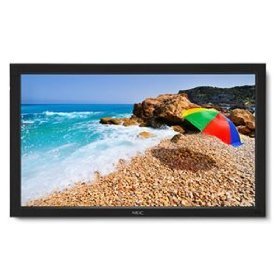
Image: The NEC LCD4215 42-inch MultiSync LCD Monitor, shown from the front with its stand. This image represents the primary display unit.
4. Налаштування
4.1 Розпакування
- Carefully open the packaging and remove the monitor and accessories.
- Place the monitor face down on a soft, clean surface to avoid scratching the screen.
4.2 Stand/Mounting Installation
The monitor can be used with its included desktop stand or mounted using a VESA-compatible wall mount (sold separately).
4.2.1 Desktop Stand Installation
- Прикріпіть основу підставки до шиї підставки за допомогою наданих гвинтів.
- Secure the assembled stand to the back of the monitor using the designated mounting points and screws.
- Carefully lift the monitor and place it on a stable, level surface.
4.2.2 Настінне кріплення (додатково)
If using a VESA-compatible wall mount, follow the instructions provided with your wall mount kit. Ensure the mount supports the weight and VESA pattern of the NEC LCD4215 monitor.
4.3 З'єднувальні кабелі
Before connecting any cables, ensure the monitor and all connected devices are powered off.
- Відеокабель: Connect one end of the appropriate video cable (VGA, DVI, HDMI, etc.) to the video output port of your computer or media device and the other end to the corresponding input port on the monitor.
- Аудіокабель (додатково): If using the monitor's internal speakers or audio output, connect an audio cable from your source device to the monitor's audio input.
- Кабель живлення: Connect the power cord to the monitor's AC input and then plug the other end into a grounded electrical outlet.
5. Інструкція з експлуатації
5.1 Увімкнення/вимкнення
- Press the power button on the front panel of the monitor or on the remote control to turn the monitor on. The power indicator light will illuminate.
- Щоб вимкнути монітор, знову натисніть кнопку живлення.
5.2 Вибір входу
The monitor can display content from multiple sources. To switch between inputs:
- Press the 'Input' or 'Source' button on the remote control or the monitor's control panel.
- Use the navigation buttons to select the desired input source (e.g., VGA, DVI, HDMI).
- Press 'Enter' or 'OK' to confirm your selection.
5.3 Основні налаштування дисплея
Access the On-Screen Display (OSD) menu to adjust various settings:
- Press the 'Menu' button on the remote control or the monitor's control panel.
- Use the navigation buttons (Up/Down/Left/Right) to browse through menu options such as 'Brightness', 'Contrast', 'Color Temperature', and 'Aspect Ratio'.
- Press 'Enter' or 'OK' to select an option and adjust its value.
- Press 'Menu' again to exit the OSD menu.
6. Технічне обслуговування
6.1 Очищення дисплея
To maintain optimal display quality, clean the screen and casing regularly:
- Завжди вимикайте живлення та від’єднуйте монітор від мережі перед чищенням.
- Злегка протріть м’якою тканиною без ворсу dampened with water or a non-abrasive, ammonia-free, and alcohol-free screen cleaner.
- Обережно протріть екран і casing. Do not apply excessive pressure.
- Avoid spraying liquid directly onto the screen or into any openings.
6.2 Зберігання
If storing the monitor for an extended period, ensure it is powered off, unplugged, and stored in a cool, dry place away from direct sunlight and extreme temperatures. Use the original packaging if available for protection.
7. Вирішення проблем
Перш ніж звертатися до служби підтримки клієнтів, зверніться до наступної таблиці, щоб дізнатися про поширені проблеми та їх вирішення:
| проблема | Можлива причина | Рішення |
|---|---|---|
| На екрані немає зображення | Монітор не увімкнено; відеокабель нещільно прикріплений або відключений; вибрано неправильне джерело вхідного сигналу. | Press the power button; Check video cable connections; Select the correct input source. |
| Зображення занадто темне/яскраве | Неправильні налаштування яскравості/контрастності. | Adjust 'Brightness' and 'Contrast' in the OSD menu. |
| Немає звуку | Audio cable disconnected; Volume too low; Muted. | Check audio cable connection; Increase volume; Unmute audio. |
| Мерехтливе зображення | Video cable faulty; Resolution/Refresh rate mismatch. | Replace video cable; Adjust display settings on your computer. |
8. Технічні характеристики
Detailed technical specifications for the NEC LCD4215 MultiSync LCD Monitor:
| Особливість | Специфікація |
|---|---|
| Номер моделі | LCD4215 |
| Розмір екрана | 42 дюймів |
| Максимальна роздільна здатність екрана | 1366 х 768 |
| Співвідношення сторін | 1.78:1 |
| Вага товару | 47 фунта |
| Розміри продукту (ДxШxВ) | 44 x 27.5 x 9.25 дюймів |
| Колір | чорний |
| Виробник | Nec Computers |
| Дата першої доступності | 31 липня 2008 р |
9. Гарантія та підтримка
9.1 Інформація про гарантію
This NEC LCD4215 monitor comes with a standard manufacturer's warranty. Please refer to the separate warranty card included in your product packaging for specific terms, conditions, and duration of coverage. Keep your proof of purchase for warranty claims.
9.2 Підтримка клієнтів
For technical assistance, troubleshooting beyond this manual, or warranty service, please contact NEC customer support. Visit the official NEC webсайт для отримання найактуальнішої контактної інформації, включаючи номери телефонів та онлайн-ресурси підтримки.
Webсайт: www.nec.com


