вступ
Дякуємо за покупкуasing the Technics SL-PD807 MASH 5 Disc CD Player. This manual provides detailed instructions for the proper setup, operation, and maintenance of your new audio component. Please read this manual thoroughly before using the unit to ensure optimal performance and longevity.
The SL-PD807 features a 5-disc carousel changer, allowing for extended playback without interruption, and incorporates MASH (Multi-stage Noise Shaping) D/A conversion for high-quality audio reproduction.
Важлива інформація з безпеки
- Джерело живлення: Ensure the unit is connected to an AC 120V, 60Hz power supply.
- Вентиляція: Не блокуйте вентиляційні отвори. Забезпечте достатній простір навколо пристрою для належної циркуляції повітря, щоб запобігти перегріву.
- вологість: Не піддавайте пристрій впливу дощу або вологи. Не ставте на пристрій предмети, наповнені рідинами, такі як вази.
- Прибирання: Перед чищенням від’єднайте пристрій від розетки. Використовуйте для чищення суху тканину.
- Обслуговування: Не намагайтеся обслуговувати цей пристрій самостійно. Зверніться до кваліфікованого сервісного персоналу з усіх питань обслуговування.
Вміст упаковки
Будь ласка, перевірте наявність усіх предметів у упаковці:
- Technics SL-PD807 MASH 5 Disc CD Player
- Шнур живлення
- Аудіокабелі RCA
Note: A remote control is not included with this unit.
Налаштування
1. Розпакування
Carefully remove the CD player and all accessories from the packaging. Retain the packaging materials for future transport or storage.
2. Розміщення
Place the CD player on a stable, level surface away from direct sunlight, heat sources, and excessive dust or vibrations. Ensure there is sufficient space around the unit for proper ventilation.

малюнок 1: Фронт view of the Technics SL-PD807 CD Player with included RCA cables.
3. Зв'язки
Підключіть програвач компакт-дисків до вашого amplifier or receiver using the supplied RCA audio cables.
- Connect one end of the RCA audio cables (red and white plugs) to the 'LINE OUT' jacks on the rear of the SL-PD807.
- Connect the other end of the RCA audio cables to an available 'CD IN' or 'AUX IN' input on your amplifier/receiver. Match the red plug to the 'R' (right) input and the white plug to the 'L' (left) input.
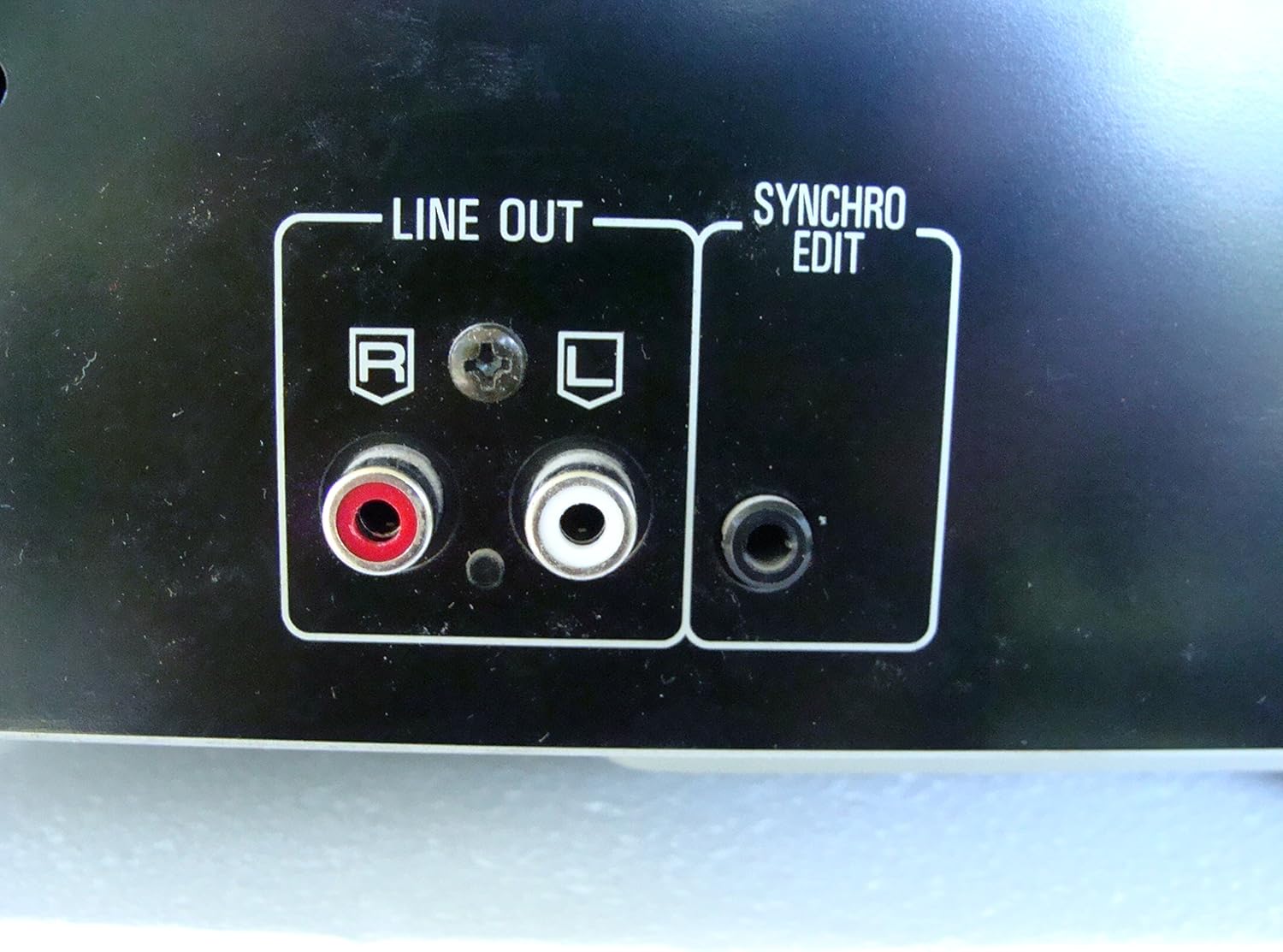
малюнок 2: Rear panel connections, highlighting the 'LINE OUT' (RCA) and 'SYNCHRO EDIT' ports.
- Plug the power cord into the AC inlet on the rear of the CD player, then plug the other end into a standard AC wall outlet.
Інструкція з експлуатації
1. Увімкнення/вимкнення живлення
Натисніть ПОТУЖНІСТЬ button located on the front left of the unit to turn the CD player on or off.
2. Loading Discs
The SL-PD807 features a 5-disc carousel. Press the ВІДКРИТИ/ЗАКРИТИ button to open the disc tray. Place up to five CDs onto the numbered disc slots with the label side facing up. Press ВІДКРИТИ/ЗАКРИТИ знову, щоб закрити лоток.

малюнок 3: Front panel controls including disc tray, display, and playback buttons.
3. Базове відтворення
- грати: Натисніть ГРАТИ button (►) to start playback.
- Пауза: Натисніть ПАУЗА button (⏸) to temporarily stop playback. Press again to resume.
- Стій: Натисніть СТІЙ кнопку (■), щоб зупинити відтворення.
- Пропустити доріжки: Натисніть ПРОПУСТИТИ buttons (⏭︎ / ⏮︎) to skip to the next or previous track.
- пошук: Утримуйте ПОШУК buttons (⏪︎ / ⏩︎) to fast forward or rewind within a track.
4. Disc Exchange
You can exchange discs while another disc is playing. Press the ПРОПУСК ДИСКА button to rotate the carousel to an empty slot or a disc you wish to remove/replace. The currently playing disc will continue to play until you select a new disc to play.
5. Режими відтворення
- Довільне відтворення: Натисніть ВИПАДКОВО button to play tracks on the current disc or all loaded discs in a random order.
- Програма відтворення: Використовуйте ПРОГРАМА button to create a custom playback sequence of tracks from the loaded discs. Refer to the on-screen display for programming steps.
- Повторне відтворення: Натисніть ПОВТОР кнопку для повторення поточної доріжки, поточного диска або всіх дисків.
Технічне обслуговування
1. Очищення пристрою
Wipe the exterior of the unit with a soft, dry cloth. For stubborn stains, slightly dampen the cloth with water and a mild detergent, then wipe dry. Do not use abrasive cleaners, benzene, thinner, or alcohol, as these can damage the finish.

малюнок 4: Top surface of the unit, illustrating areas that may require cleaning or show wear.
2. Догляд за дисками
- Тримайте диски за краї, щоб уникнути відбитків пальців на поверхні для відтворення.
- Keep discs clean. Wipe from the center outwards with a soft, lint-free cloth if necessary.
- Store discs in their cases to protect them from dust and scratches.
Усунення несправностей
If you experience problems with your CD player, please consult the following table before seeking service.
| проблема | Можлива причина | Рішення |
|---|---|---|
| Немає живлення | Шнур живлення ненадійно підключений. | Перевірте підключення шнура живлення до пристрою та розетки. |
| Ні звуку | RCA audio cables not connected correctly. Amplifier/receiver input not selected. | Ensure RCA cables are securely connected to both the CD player and ampліфтер. Виберіть правильний вхід на вашому ampліфтер/приймач. |
| Диск не відтворюється / Пропускає | Disc is dirty or scratched. Disc is inserted incorrectly. | Clean the disc with a soft, lint-free cloth. Ensure the disc is placed label-side up in the tray. Try another disc. |
| Carousel does not rotate | Obstruction in the disc tray. | Ensure no foreign objects are obstructing the carousel mechanism. |
Технічні характеристики
The following are the technical specifications for the Technics SL-PD807 MASH 5 Disc CD Player:
| Особливість | Специфікація |
|---|---|
| Назва моделі | SL-PD807 |
| Виробник | Техніка |
| Ємність диска | 5 дисків |
| Вимоги до живлення | AC 120 В, 60 Гц, 13 Вт |
| Розміри упаковки | 17 x 17 x 5 дюймів |
| Вага товару | 15.02 фунта |
| Технологія підключення | Auxiliary, Infrared |
| Особливість | Захист від пропуску |

малюнок 5: Product label displaying model number and power specifications.
Гарантія та підтримка
For information regarding warranty coverage and customer support for your Technics SL-PD807 CD Player, please refer to the warranty card included with your purchase or visit the official Technics website. If you require further assistance, please contact Technics customer service.


