1. Вступ
This manual provides essential information for the safe and efficient use of your Hama USB 7.1 Surround Sound Card, Model 00051620. Please read these instructions carefully before using the device and keep them for future reference. This external sound card allows you to connect headphones, microphones, or speakers with a 3.5mm jack to your computer or tablet via a USB-A port, enhancing your audio experience with simulated 7.1 surround sound.
2. Техніка безпеки
- Do not open the device. Opening the device voids the warranty and may lead to electric shock.
- Захищайте виріб від бруду, вологи та перегріву.
- Використовуйте товар тільки за призначенням.
- Не кидайте виріб та не піддавайте його сильним ударам.
- Тримайте цей виріб, як і всі електричні вироби, в недоступному для дітей місці.
- Негайно утилізуйте пакувальний матеріал відповідно до місцевих норм.
3. Вміст упаковки
Переконайтеся, що ваш пакет містить такі елементи:
- 1x Hama USB 7.1 Surround Sound Card (Model 00051620)
- 1x Інструкція з експлуатації
4. Продукт закінчивсяview
The Hama USB 7.1 Surround Sound Card is a compact audio adapter designed to provide enhanced sound capabilities for your computer or tablet. It features a USB-A connector for easy plug-and-play functionality and includes dedicated ports for audio input and output.
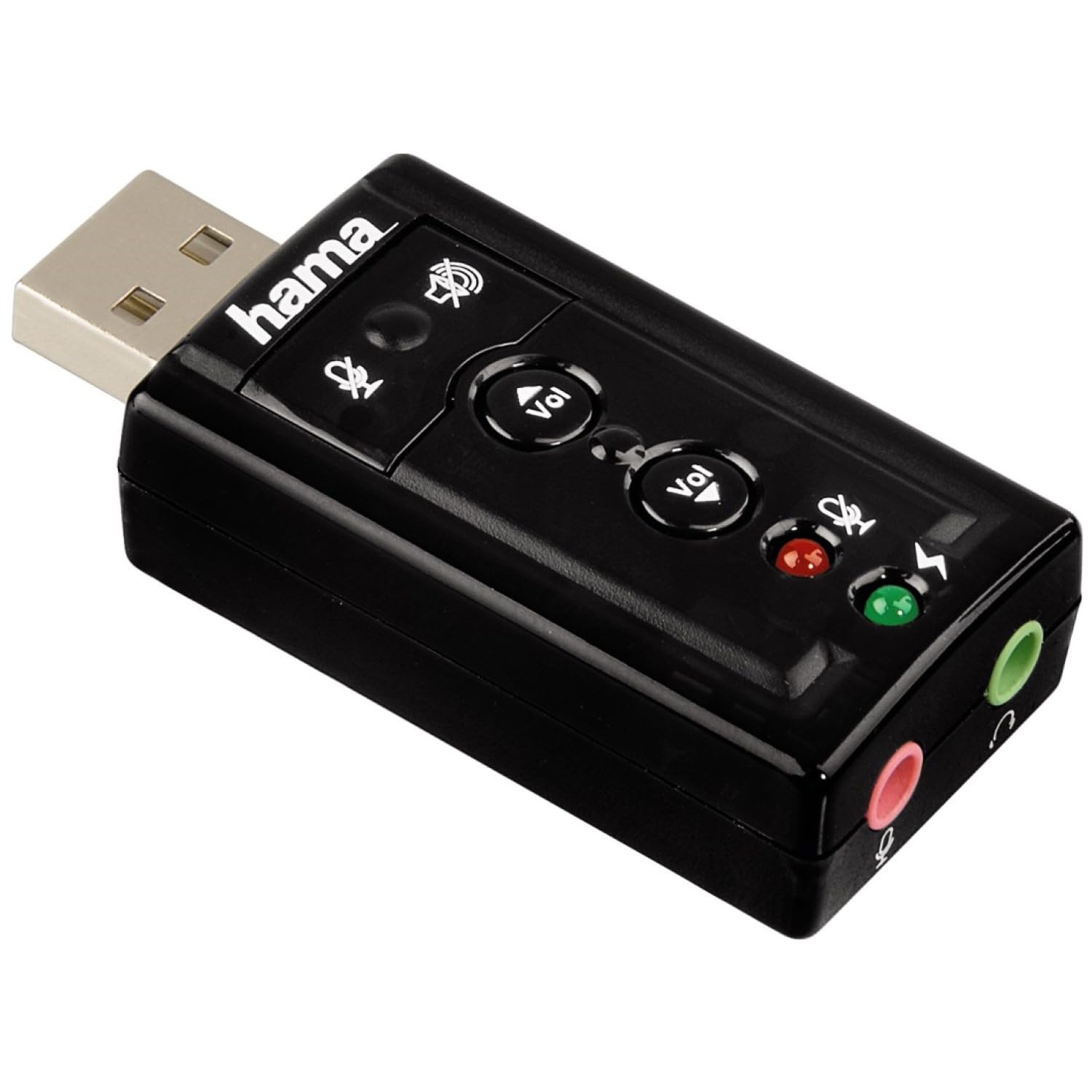
Зображення 1: Верх view of the Hama USB 7.1 Surround Sound Card, showing the USB-A connector, volume control buttons, and mute indicators.
Елементи керування та порти:
- Роз'єм USB-A: For connecting to your computer or tablet.
- Кнопки збільшення / зменшення гучності: Регулює гучність аудіовиходу.
- Кнопка вимкнення мікрофона: Mutes or unmutes the connected microphone.
- Кнопка вимкнення звуку динаміка: Mutes or unmutes the audio output to headphones/speakers.
- 3.5mm Microphone Jack (Red): Для підключення зовнішнього мікрофона.
- 3.5mm Headphone/Speaker Jack (Green): Для підключення навушників або динаміків.

Зображення 2: Кінець view of the Hama USB 7.1 Surround Sound Card, highlighting the red microphone input jack and the green headphone/speaker output jack.
5. Системні вимоги
- Operating System: Windows, macOS, or compatible tablet OS.
- Доступний порт USB-A.
- Headphones, microphone, or speakers with a 3.5mm jack connector.
6. Встановлення та налаштування
- Connect the Sound Card: Plug the USB-A connector of the Hama USB 7.1 Surround Sound Card into an available USB-A port on your computer or tablet.
- Встановлення драйвера: The device is typically plug-and-play, and your operating system should automatically detect and install the necessary drivers. If prompted, follow the on-screen instructions.
- Підключіть аудіопристрої:
- For headphones or speakers, connect the 3.5mm jack into the зелений port on the sound card.
- For a microphone, connect the 3.5mm jack into the червоний port on the sound card.
- Налаштування параметрів аудіо: Access your operating system's sound settings to ensure the Hama USB 7.1 Surround Sound Card is selected as the default playback and recording device.
- Встановлення програмного забезпечення (додатково): For advanced features like XeaR-Sound 7.1 surround simulation, 10-band equalizer, and karaoke functions, install the dedicated software. Refer to the manufacturer's website for software downloads and installation instructions.
7. Операція
Basic Audio Control:
- Регулювання гучності: Use the 'Vol +' and 'Vol -' buttons on the sound card to increase or decrease the output volume.
- Mute Audio Output: Press the speaker mute button to temporarily silence the audio output. Press again to unmute.
- Mute Microphone Input: Press the microphone mute button to temporarily disable microphone input. Press again to enable.
Розширені функції програмного забезпечення:
If you have installed the optional software, you can access the following features:
- XeaR-Sound Technology: Enables simulated 7.1 crystal-clear surround sound for stereo speakers or headsets.
- 10-смуговий еквалайзер: Customize your audio experience with various presets (e.g., Jazz, Rock, Classic) or create your own.
- Additional Sound Effects: Apply various sound effects to your audio.
- Adjustable Room Acoustics: Modify the perceived acoustic environment.
- Karaoke Recording: Record karaoke performances with original voice suppression and tone adjustment capabilities.
8. Технічне обслуговування
The Hama USB 7.1 Surround Sound Card requires minimal maintenance.
- Очищайте пристрій лише злегка damp, безворсова тканина. Не використовуйте агресивні миючі засоби.
- Ensure the USB port and audio jacks are free from dust and debris.
9. Вирішення проблем
Немає вихідного звуку:
- Ensure the sound card is securely plugged into a USB port.
- Check if your headphones/speakers are correctly connected to the green jack.
- Verify that the speaker mute button on the sound card is not active.
- Confirm that the Hama USB 7.1 Surround Sound Card is selected as the default playback device in your operating system's sound settings.
- Adjust the volume using the sound card's buttons and your computer's volume controls.
Мікрофон не працює:
- Ensure your microphone is correctly connected to the red jack.
- Verify that the microphone mute button on the sound card is not active.
- Confirm that the Hama USB 7.1 Surround Sound Card is selected as the default recording device in your operating system's sound settings.
- Перевірте налаштування конфіденційності мікрофона у вашій операційній системі.
Проблеми з якістю звуку:
- Переконайтеся, що всі з’єднання надійні.
- Try connecting the sound card to a different USB port.
- If using the optional software, check equalizer settings and disable any sound effects that might be causing distortion.
10. Технічні характеристики
| Особливість | Деталь |
|---|---|
| Бренд | Хама |
| Номер моделі | 00051620 (також відомий як 51620) |
| Колір | чорний |
| Роз'єм | USB A male |
| Стандарт USB | USB 2.0 |
| Підключення динаміка | 3.5mm female jack |
| Підключення навушників | 3.5mm female jack |
| Регулювання гучності | Yes, with mute function |
| Режим аудіовиходу | Об'ємний |
| Конфігурація каналу об’ємного звуку | 7.1 (simulated with software) |
| Максимум Sampлінг -курс | 48 кГц |
| Сумісні пристрої | USB (PC, Laptop, Tablets) |
| Виробник | Hama EURL |
11. Інформація про утилізацію
Observe the applicable local regulations for the disposal of electronic devices. The product must not be disposed of with normal household waste. Dispose of the product according to the European Directive 2012/19/EU on waste electrical and electronic equipment (WEEE) at a designated collection point for electrical and electronic equipment.
12. Гарантія
Hama GmbH & Co KG provides a limited warranty for this product. For detailed warranty terms and conditions, please refer to the official Hama webсайт або зверніться до місцевого продавця. Зберігайте чек про покупку для гарантійних випадків.
13. Підтримка клієнтів
If you have any questions about this product or require technical assistance, please contact Hama customer support. You can find contact information on the official Hama webсайт (www.hama.com) або через вашого місцевого продавця.