1. Вступ
This manual provides essential information for the safe and efficient operation of your Roline DesignSecure 525 Uninterruptible Power Supply (UPS). Please read this manual thoroughly before installation and use to ensure proper functionality and to prevent damage to the unit or connected equipment.
The Roline DesignSecure 525 UPS is designed to provide reliable emergency power for workstations and communication technology, protecting against power fluctuations, blackouts, and surges.
2. Інформація про безпеку
ПОПЕРЕДЖЕННЯ: Недотримання цих інструкцій з безпеки може призвести до ураження електричним струмом, пожежі або серйозних травм.
- Не відкривайте ДБЖasing. Усередині немає деталей, які може обслуговувати користувач. Звертайтеся до кваліфікованого сервісного персоналу з усіх питань щодо обслуговування.
- Do not connect appliances that could overload the UPS, such as laser printers or vacuum cleaners.
- Переконайтеся, що ДБЖ підключено до заземленої розетки.
- Do not expose the UPS to water or excessive humidity.
- Position the UPS in a well-ventilated area, away from direct sunlight and heat sources.
- Disconnect the UPS from the power outlet before cleaning. Use a dry cloth for cleaning.
3. Продукт закінчивсяview
The Roline DesignSecure 525 UPS provides uninterruptible power and protection for your electronic devices. Key features include:
- Надійне джерело живлення: Provides emergency power and protection against spikes, voltage variations, blackouts, interference, and overvoltage.
- Подовжений термін служби батареї: Features a battery management system for efficient charging and a digital display for battery status.
- Потужність: Supports 2000 VA / 1200 W, offering a full power runtime of 2 minutes and 4 minutes at mid-power.
- Built-in AVR: Автоматичний випtage Regulation protects against surges and undervoltages, regulating voltage variations via Buck and Boost technology.
- Програмне забезпечення для моніторингу: Includes built-in software for communication between the inverter microprocessor and a PC, compatible with common operating systems.
3.1. Компоненти
Below is an image of the Roline DesignSecure 525 UPS, highlighting its general appearance.
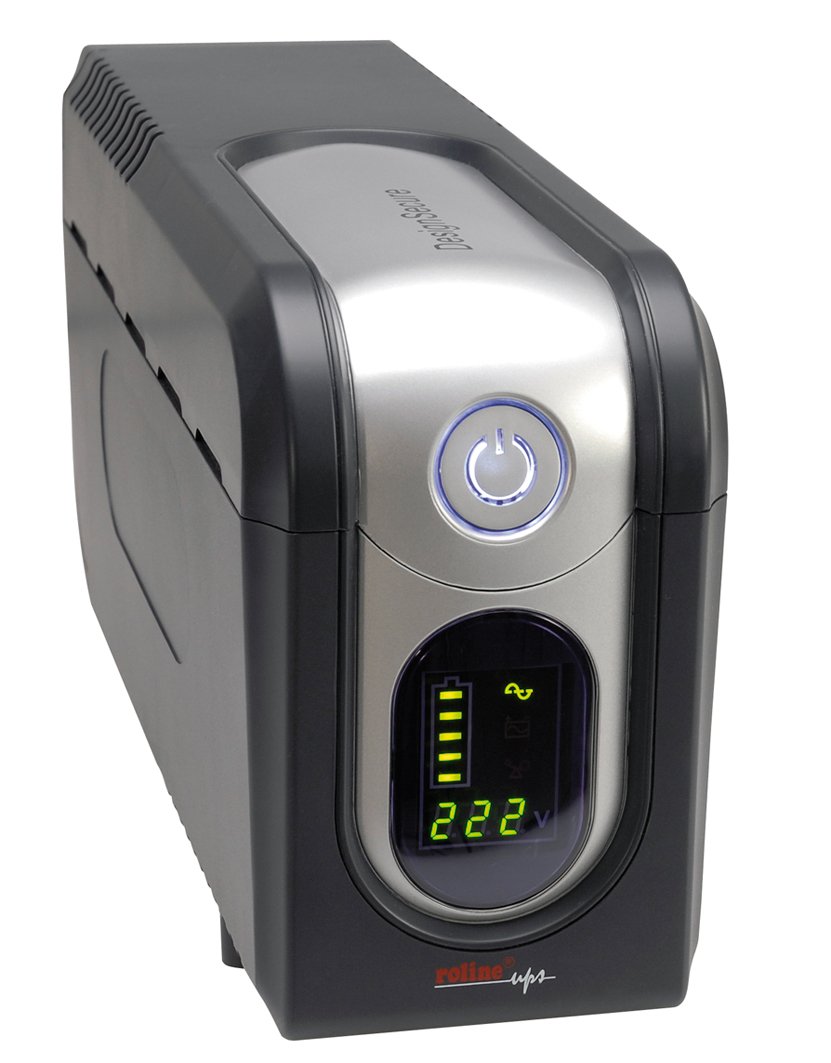
Малюнок 1: Спереду view of the Roline DesignSecure 525 UPS. This image shows the main unit, including the display panel and power outlets.
The UPS typically includes:
- Порт живлення
- Output Power Outlets (Type B - 3 pin North American)
- Control Panel / LCD Display
- Комунікаційний порт USB
- Telephone/Modem Protection Ports (RJ11)
4. Налаштування
4.1. Розпакування
Обережно розпакуйте ДБЖ та перевірте його на наявність пошкоджень під час транспортування. Зберігайте упаковку для подальшого транспортування або зберігання.
4.2. Розміщення
Place the UPS on a flat, stable surface in a clean, dry, and well-ventilated area. Ensure there is adequate space around the unit for proper airflow. Avoid placing it near heat sources or in direct sunlight.
4.3. Підключення до живлення
- Переконайтеся, що ДБЖ вимкнено.
- Connect the UPS power input cable to a grounded Type B (3-pin North American) wall outlet.
- Перед першим використанням дайте ДБЖ зарядитися щонайменше 8 годин, щоб забезпечити оптимальну роботу акумулятора.
4.4. Підключення обладнання
- Connect your computer, monitor, and other critical devices to the UPS output receptacles.
- For telephone/modem line protection, connect your incoming telephone/modem line to the "IN" port on the UPS, and then connect a cable from the "OUT" port to your telephone/modem device.
- Do not connect surge strips or extension cords to the UPS output.
4.5. Встановлення програмного забезпечення (необов'язково)
For advanced monitoring and management, install the provided smart monitoring software on your computer. Connect the UPS to your computer using a USB cable. Refer to the software's specific instructions for installation and configuration.
5. Інструкція з експлуатації
5.1. Turning On the UPS
Press and hold the power button on the front panel for approximately 2-3 seconds until you hear a beep and the display illuminates. The UPS will perform a self-test and then enter online mode.
5.2. Turning Off the UPS
To turn off the UPS, press and hold the power button for approximately 2-3 seconds until you hear a beep and the display turns off. Ensure all connected devices are properly shut down before turning off the UPS.
5.3. Індикатори дисплея
The digital display provides real-time information about the UPS status, including:
- Вхідний об'ємtage
- Вихідний випtage
- Рівень заряду акумулятора
- Рівень навантаження
- Режим роботи (онлайн, від батареї, від байпасу)
- Коди помилок (якщо такі є)
Refer to the software manual for detailed explanations of all display indicators and error codes.
5.4. Автоматичний Voltage Регламент (AVR)
The built-in AVR automatically corrects minor voltage fluctuations without switching to battery power, preserving battery life. If the input voltage goes too high or too low, the AVR will adjust it to a safe level for your connected devices.
5.5. Режим батареї
У разі вимкнення живленняtage, the UPS will automatically switch to battery power. An audible alarm will sound, and the display will indicate battery mode. The duration of battery backup depends on the load connected. The UPS will automatically shut down when the battery is depleted to prevent deep discharge.
6. Технічне обслуговування
6.1. Догляд за акумулятором
- To maintain optimal battery life, ensure the UPS is connected to a power source and charging when not in use.
- Уникайте частих глибоких розрядів.
- If storing the UPS for an extended period, fully charge it every three months to prevent battery degradation.
- Battery replacement should only be performed by qualified personnel.
6.2. прибирання
Ensure the UPS is turned off and disconnected from the power outlet before cleaning. Use a soft, dry cloth to wipe the exterior. Do not use liquid or aerosol cleaners.
6.3. Екологічні умови
Maintain the UPS in an environment with stable temperature and humidity. Extreme conditions can shorten battery life and affect performance.
7. Вирішення проблем
This section provides solutions to common issues you might encounter with your Roline DesignSecure 525 UPS.
| проблема | Можлива причина | Рішення |
|---|---|---|
| ДБЖ не вмикається. | No input power; Low battery; Power button not pressed long enough. | Check power cord connection; Allow UPS to charge for several hours; Press and hold power button for 2-3 seconds. |
| UPS beeps continuously in online mode. | Стан перевантаження; Внутрішня несправність. | Reduce connected load; Disconnect non-essential devices; If problem persists, contact support. |
| Короткий час автономної роботи від акумулятора. | Overload; Battery nearing end of life; Battery not fully charged. | Reduce connected load; Allow UPS to charge fully; Consider battery replacement if old. |
| Connected devices not receiving power. | UPS is off; UPS is in fault mode; Output receptacles are not active. | Turn on UPS; Check display for error codes; Ensure devices are connected to battery-backed outlets. |
If the problem persists after attempting these solutions, please contact Roline customer support.
8. Технічні характеристики
| Особливість | Деталь |
|---|---|
| Номер моделі | 19401205 |
| Розміри продукту | 4.13 x 6.61 x 13.15 дюймів |
| Вага товару | 12.79 фунта |
| Вихідний випtage | 120 вольт (перемінний струм) |
| Тип штепсельної вилки | Тип B - 3-контактний (Північна Америка) |
| Колір | Чорний / Срібний |
| Виробник | РОЛАЙН |
| Дата першої доступності | 20 серпня 2012 р |
9. Гарантія та підтримка
9.1. Інформація про гарантію
Roline products are manufactured to high quality standards. For specific warranty terms and conditions, please refer to the warranty card included with your product or visit the official Roline webсайт. Зберігайте чек про покупку для гарантійних претензій.
9.2. Підтримка клієнтів
If you require technical assistance or have questions not covered in this manual, please contact Roline customer support. Contact information can typically be found on the Roline webсайті або на упаковці продукту.
Звертаючись до служби підтримки, будь ласка, підготуйте номер моделі (19401205) та дату покупки.


