1. Вступ
The Extech EX310 is a compact, manual-ranging digital multimeter designed for a variety of electrical measurements. It features an extra-large 2000-count LCD and a built-in Non-Contact AC Voltage Detector (NCV) for enhanced safety. This device is capable of measuring AC/DC Voltage, AC/DC Current, Resistance, Diode, and Continuity, and includes a battery test function for 1.5V and 9V batteries. Its robust design, including a protective rubber holster and tilt stand, makes it suitable for field use.
2. Інформація про безпеку
Always adhere to safety precautions when using any electrical testing equipment. Failure to do so may result in injury or damage to the meter or equipment under test.
- The Extech EX310 is UL listed with a CAT III – 600 Volt safety rating.
- Не застосовуйте більше номінального об’ємуtagе., як зазначено на лічильнику, між клемами або між будь-якою клемою та землею.
- Always inspect test leads for damage before use. Replace if insulation is compromised.
- Будьте гранично обережні під час роботи з електричними колами під напругою.
- Use the Non-Contact Voltage (NCV) detector as a preliminary check for live AC voltage, but always verify with direct contact measurements when possible.
- Ensure the function switch is set to the correct range before making measurements.
3. Особливості продукту
- 9-Function Manual-Ranging DMM: Вимірює AC/DC voltage, AC/DC current (up to 10 A), resistance, diode, continuity, plus 1.5 V/9 V battery tests.
- Безконтактний випtagДетектор e (NCV): Built-in NCV with red LED and audible beeper alerts to the presence of live AC (100-600 VAC) without probes.
- Extra-Large 2000-Count Display: Clear, easy-to-read 1-inch digits on a high-count LCD ensure readability.
- Rugged, Portable Design: Compact meter (5.7 × 2.9 × 1.6 in, 9 oz) with protective rubber holster, tilt stand, and low-battery indicator.
- Reliable Safety & Accuracy: 0.5% basic accuracy. Designed to UL/CAT II-1000 V & CAT III-600 V safety standards.
4. Вміст упаковки
The Extech EX310 package includes the following items:
- Extech EX310 Mini Digital Multimeter
- Тестові провідники
- Батарея 9 вольт
- Нахильна підставка
5. Продукт закінчивсяview (Controls and Display)
Familiarize yourself with the components of your EX310 multimeter:

Зображення: спереду view of the Extech EX310 Mini Digital Multimeter, showing the large LCD display, function dial, NCV button, and input jacks.
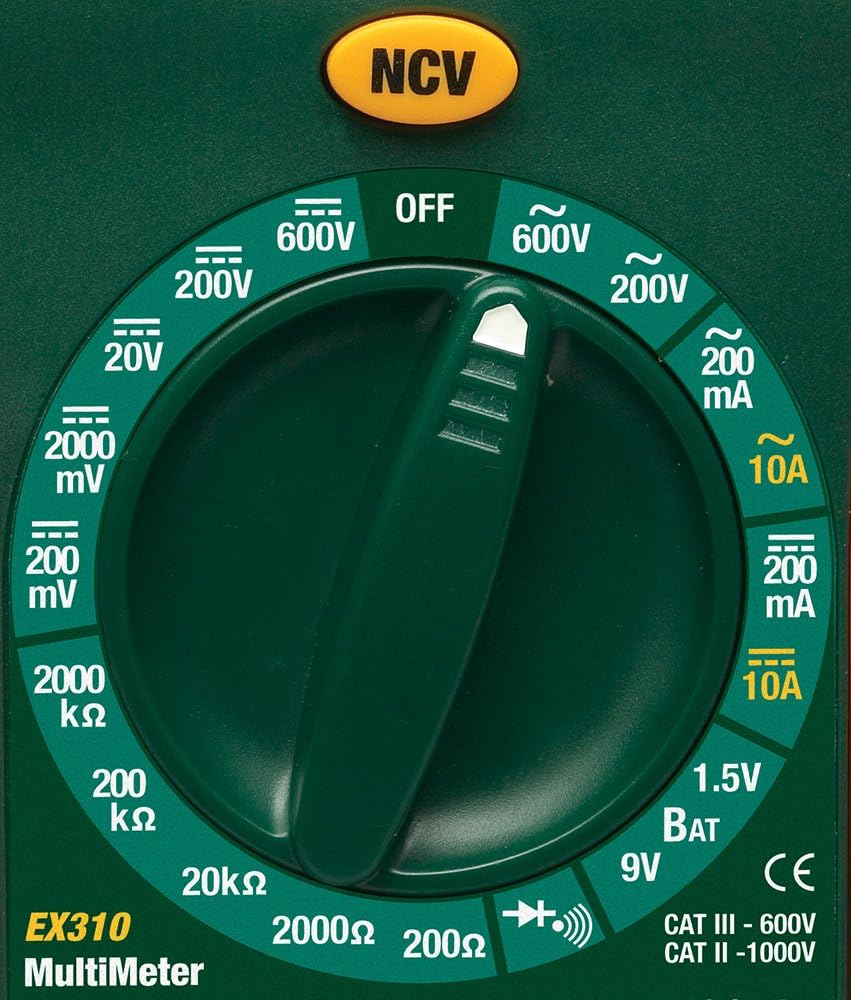
Image: Close-up of the Extech EX310's function dial, illustrating the various measurement ranges and functions such as voltage, current, resistance, diode, continuity, and battery test.
- РК-дисплей: Відображає показники вимірювань, одиниці вимірювання та індикатори функцій.
- Перемикач функцій: Rotary dial to select the desired measurement function and range.
- Кнопка NCV: Activates the Non-Contact Voltage detection feature.
- Вхідні гнізда: Terminals for connecting test leads (COM, VΩmA, 10A).
6. Налаштування
6.1. Встановлення батареї
- Переконайтеся, що мультиметр вимкнено.
- Знайдіть кришку відсіку для батарейок на задній панелі глюкометра.
- Відкрутіть кріпильний(і) гвинт(и) та зніміть кришку.
- Вставте нову батарейку 9 В, дотримуючись правильної полярності.
- Встановіть кришку назад і закріпіть її гвинтом(ами).
Індикатор низького заряду батареї з’явиться на дисплеї, коли батарею потрібно замінити.
6.2. Підключення вимірювальних щупів
Підключіть вимірювальні щупи до відповідних вхідних гнізд:
- Вставте чорний тестовий провод у COM (звичайний) домкрат.
- Для більшості вимірювань (об.tage, Resistance, Diode, Continuity, mA Current), insert the red test lead into the VΩmA Джек.
- Для вимірювань високого струму (до 10 А) вставте червоний вимірювальний дріт у 10А Джек.
7. Інструкція з експлуатації
Before making any measurement, ensure the test leads are correctly connected and the function switch is set to the desired range.
7.1. AC/DC Voltage Вимірювання
- Set the function switch to the desired ACV (~) or DCV (---) range (e.g., 200V, 600V).
- Connect the red test lead to the VΩmA jack and the black test lead to the COM jack.
- Доторкніться вимірювальними щупами до точок кола, деtage потрібно виміряти.
- Прочитайте томtage значення на РК -дисплеї.
7.2. Вимірювання змінного/постійного струму
Увага: Never attempt to measure current on a circuit with voltage present across the current terminals. This can blow the fuse or damage the meter.
- Вимкніть живлення ланцюга.
- Set the function switch to the desired ACA (~) or DCA (---) range (e.g., 200mA, 10A).
- Connect the red test lead to the appropriate current jack (VΩmA for mA, 10A for 10A) and the black test lead to the COM jack.
- Розімкнути коло, де потрібно виміряти струм, і з'єднати вимірювач послідовно.
- Apply power to the circuit and read the current value on the LCD.
7.3. Вимірювання опору
- Переконайтеся, що ланцюг або компонент знеструмлені.
- Set the function switch to the desired Resistance (Ω) range (e.g., 200Ω, 20kΩ).
- Connect the red test lead to the VΩmA jack and the black test lead to the COM jack.
- Touch the test probes across the component or circuit to be measured.
- Зчитайте значення опору на РК-дисплеї.

Image: The Extech EX310 Multimeter displaying a reading while test leads are connected to a circuit board, demonstrating a typical measurement scenario.
7.4. Перевірка діодів
- Ensure the component is de-energized.
- Set the function switch to the Diode (→|) position.
- Connect the red test lead to the VΩmA jack and the black test lead to the COM jack.
- Торкніться червоного щупа до анода, а чорного щупа до катода діода.
- Прочитайте передній томtage drop on the LCD. Reverse the probes to check for an open circuit (OL).
7.5. Перевірка безперервності
- Переконайтеся, що ланцюг або компонент знеструмлені.
- Set the function switch to the Continuity (→))) position.
- Connect the red test lead to the VΩmA jack and the black test lead to the COM jack.
- Торкніться вимірювальними щупами кола або компонента.
- An audible tone will sound if continuity exists (resistance below approximately 30Ω).

Зображення: Крупний план view of the Extech EX310 Multimeter with its test leads connected to an internal electronic circuit, demonstrating precise measurement capabilities.
7.6. Безконтактний Voltage (NCV) Виявлення
- Встановіть перемикач функцій у будь-яке положення.
- Press and hold the NCV button.
- Move the top of the meter (where the NCV sensor is located) close to the suspected AC voltage source (e.g., wire, outlet).
- A red LED will illuminate and an audible beeper will sound, increasing in intensity as the meter gets closer to the live AC voltage.

Image: A hand holding the Extech EX310 Multimeter near an electrical wall outlet, demonstrating the use of the Non-Contact Voltage (NCV) detection feature to identify live circuits.
7.7. Battery Test (1.5V/9V)
- Set the function switch to the 1.5V BAT or 9V BAT position.
- Connect the red test lead to the VΩmA jack and the black test lead to the COM jack.
- Touch the red probe to the positive terminal and the black probe to the negative terminal of the battery.
- Прочитайте об’єм акумулятораtage на РК -дисплеї.
8. Технічне обслуговування
8.1. Заміна батареї
Refer to Section 6.1 for detailed instructions on replacing the 9V battery when the low battery indicator appears.
8.2. Заміна запобіжника
If the current measurement functions cease to operate, the internal fuse(s) may need replacement. The fuses are typically located beneath the battery compartment. Refer to the full product manual for specific fuse ratings and replacement procedures. Always replace with fuses of the identical type and rating.
8.3. прибирання
Періодично протирайте корпус рекламоюamp тканиною та м’яким миючим засобом. Не використовуйте абразивні засоби або розчинники. Перед використанням переконайтеся, що глюкометр повністю сухий.
9. Вирішення проблем
- Немає дисплея: Check the 9V battery. Ensure it is correctly installed and has sufficient charge.
- Неправильні показання: Verify that the function switch is set to the correct measurement type and range. Ensure test leads are properly connected and making good contact with the circuit.
- Поточне вимірювання не працює: Check the internal fuse(s). Refer to the Maintenance section for fuse replacement.
- NCV не виявляється: Ensure the NCV button is pressed and held. Confirm the presence of AC voltage (100-600 VAC) in the area being tested.
10. Технічні характеристики
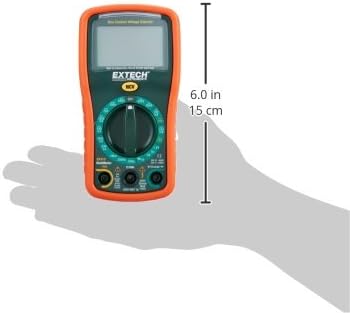
Image: Diagram illustrating the physical dimensions of the Extech EX310 Multimeter, showing a length of 6.0 inches (15 cm).
| Специфікація | Значення |
|---|---|
| Бренд | Extech |
| Номер моделі | EX310 |
| Тип вимірювання | мультиметр |
| Стиль | Ручне визначення дальності |
| Основна точність | +/-0.5% |
| Дисплей | 2000-Count LCD |
| Рейтинг безпеки | UL listed CAT III - 600V, CAT II - 1000V |
| Джерело живлення | Акумулятор 9В |
| Розміри предмета (Д x Ш x В) | 5.7 x 1.6 x 2.9 дюйми (14.5 x 4.1 x 7.4 см) |
| Вага товару | 0.704 унцій (0.02 кілограма) |
| Включені компоненти | Test leads, 9 Volt battery, tilt stand |
11. Інформація про гарантію
The Extech EX310 Mini Digital Multimeter is covered by a Гарантія на запчастини та роботу 1 роки from the date of purchase. Please retain your proof of purchase for warranty claims. This warranty covers manufacturing defects and workmanship under normal use.
12. Підтримка клієнтів
For technical assistance, troubleshooting beyond this manual, or warranty service, please contact Extech customer support. Refer to the official Extech webсайт або упаковку продукту для отримання найактуальнішої контактної інформації.


