1. Вступ
Welcome to the user manual for your new Singing Machine SMVG-620 CD+G Karaoke System. This system is designed to provide hours of entertainment with its CD+G playback capabilities, built-in camera, 5.5-inch monitor, and AM/FM radio. Please read this manual thoroughly before operating your unit to ensure proper use and to maximize your enjoyment.
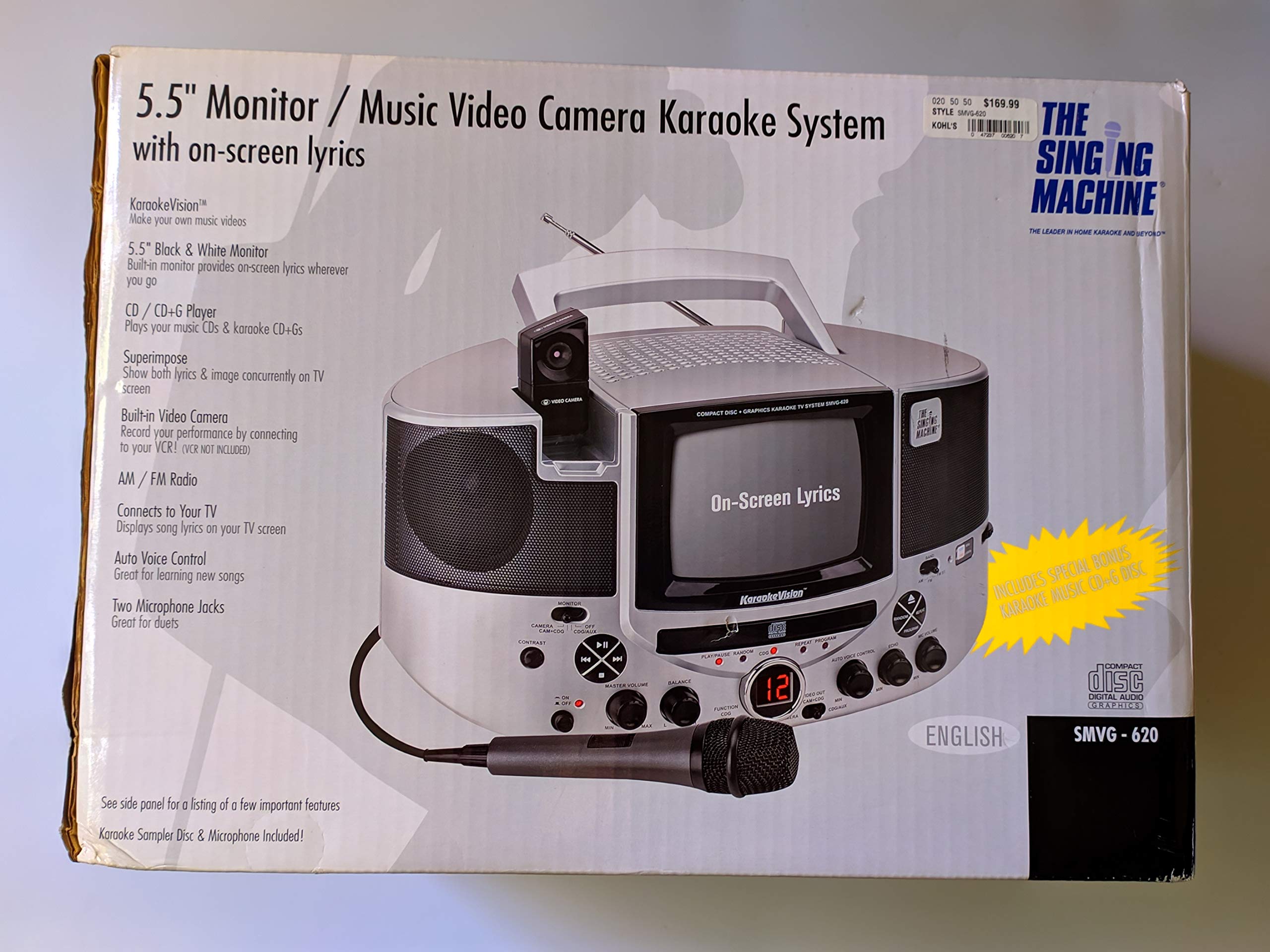
малюнок 1.1: The Singing Machine SMVG-620 CD+G Karaoke System.
For optimal performance and safety, always follow the instructions and warnings provided.
2. Важлива інформація з безпеки
- Прочитайте інструкції: Перед початком експлуатації приладу необхідно прочитати всі інструкції з техніки безпеки та експлуатації.
- Зберігайте інструкції: Інструкції з техніки безпеки та експлуатації слід зберегти для використання в майбутньому.
- Зверніть увагу на попередження: Необхідно дотримуватися всіх попереджень на приладі та в інструкції з експлуатації.
- Дотримуйтесь інструкцій: Слід дотримуватися всіх інструкцій з експлуатації та використання.
- Вода і вологість: Не використовуйте цей пристрій поблизу води.
- Прибирання: Чистіть тільки сухою ганчіркою.
- Вентиляція: Не блокуйте вентиляційні отвори. Встановлюйте відповідно до інструкцій виробника.
- Тепло: Не встановлюйте поблизу будь-яких джерел тепла, таких як радіатори, обігрівачі, печі або інші пристрої (включаючи ampліфікатори), які виробляють тепло.
- Захист шнура живлення: Захищайте шнур живлення від наступання або защемлення, особливо біля вилок, розеток і в місці виходу з пристрою.
- Додатки/аксесуари: Використовуйте лише насадки/аксесуари, зазначені виробником.
- Блискавка: Відключайте цей пристрій від мережі під час грози або якщо він не використовується протягом тривалого часу.
- Обслуговування: Зверніть усі послуги до кваліфікованого обслуговуючого персоналу. Технічне обслуговування вимагається, якщо прилад будь -яким чином пошкоджений.
3. Вміст упаковки
Carefully unpack your Singing Machine SMVG-620 system and ensure all items listed below are present and in good condition.
- SMVG-620 CD+G Karaoke System
- One (1) Microphone
- Sampler CD+G Disc
- Audio/Video RCA Cables
- Адаптер змінного струму
- Інструкція з експлуатації

малюнок 3.1: Contents of the box, including the microphone, RCA cables, and the instruction manual.
4. Продукт закінчивсяview
Familiarize yourself with the various parts and controls of your SMVG-620 Karaoke System.

малюнок 4.1: Задня view of the product packaging highlighting key features and components of the SMVG-620 system.
Ключові характеристики:
- 5.5" Black & White Monitor: For on-screen lyrics from CD+G discs.
- Built-in Color Camera: Allows you to see yourself on the monitor or connected TV.
- Dual Microphone Jacks: Connect two microphones for duets (one microphone included).
- AM/FM радіо: Налаштуйтеся на свої улюблені радіостанції.
- Програвач CD+G: Plays standard audio CDs and CD+Graphics discs.
- Автоматичне голосове керування (AVC): Helps maintain vocal balance by automatically reducing the main vocal track when you sing.
- Контроль відлуння: Adds depth and resonance to your voice.
- Professional Style Microphone: For clear vocal pickup.
- Вихід аудіо/відео: Connects to your TV for larger screen display and enhanced audio.
5. Налаштування
5.1 Підключення живлення
- Переконайтеся, що пристрій встановлено на стійкій, рівній поверхні.
- Connect the AC power adapter to the DC IN jack on the back of the SMVG-620 unit.
- Plug the other end of the AC power adapter into a standard wall outlet (AC 120V ~ 60Hz).
5.2 Підключення до телевізора
до view lyrics on a larger screen and enhance audio, connect the SMVG-620 to your television using the supplied Audio/Video RCA cables.
- Locate the AUDIO OUT (white and red) and VIDEO OUT (yellow) jacks on the back of the SMVG-620.
- Connect the white plug of the RCA cable to the white AUDIO OUT jack on the karaoke system and to the white AUDIO IN jack on your TV.
- Connect the red plug of the RCA cable to the red AUDIO OUT jack on the karaoke system and to the red AUDIO IN jack on your TV.
- Connect the yellow plug of the RCA cable to the yellow VIDEO OUT jack on the karaoke system and to the yellow VIDEO IN jack on your TV.
- Turn on your TV and select the correct A/V input source (e.g., AV1, Video 1) that corresponds to the jacks you used.
5.3 Підключення мікрофона
Plug the microphone into either the MIC 1 or MIC 2 jack on the front of the SMVG-620 unit.
6. Операція
6.1 Увімкнення/вимкнення
Натисніть ПОТУЖНІСТЬ button located on the front panel to turn the unit ON or OFF.
6.2 CD+G Playback
- Open the CD compartment door and carefully place a CD+G disc (or standard audio CD) onto the spindle with the label side facing up. Close the door.
- Виберіть CD+G mode using the FUNCTION selector.
- Натисніть ВІДТВОРЕННЯ/ПАУЗА , щоб розпочати відтворення.
- Відрегулюйте ГОЛОВНИЙ ОБ'ЄМ встановіть потрібний рівень прослуховування.
- Використовуйте ПРОПУСТИТИ кнопки (<< or >>) для переміщення між доріжками.
- Щоб зробити паузу, натисніть ВІДТВОРЕННЯ/ПАУЗА знову. Натисніть ще раз, щоб відновити.
- Щоб зупинити відтворення, натисніть кнопку СТІЙ кнопку.
6.3 Використання мікрофона
- Ensure the microphone is connected to a MIC jack.
- Відрегулюйте МІКРОФІЧНИЙ ОБ'ЄМ ручку для керування рівнем вихідного сигналу мікрофона.
- Поверніть ЛУНА регулятор, щоб додати ефект луни до вашого голосу.
- The AUTO VOICE CONTROL (AVC) switch can be toggled ON/OFF. When ON, the original vocal track on a CD+G disc will be reduced when you sing into the microphone.
6.4 AM/FM радіо
- Виберіть AM or FM mode using the FUNCTION selector.
- Розширте FM-антену для кращого прийому.
- Поверніть ТЮНІНГ ручку, щоб вибрати потрібну радіостанцію.
- Відрегулюйте ГОЛОВНИЙ ОБ'ЄМ ручка.
6.5 Функція камери
The built-in camera allows you to display your image on the 5.5-inch monitor or a connected TV.
- Ensure the unit is powered on and connected to a TV if you wish to use an external display.
- The camera feed will automatically display when the unit is in CD+G or Video mode, or when no other video source is active.
7. Технічне обслуговування
7.1 Очищення пристрою
- Завжди відключайте пристрій від розетки перед очищенням.
- Для очищення зовнішніх поверхонь використовуйте м’яку суху тканину.
- Не використовуйте абразивні засоби для чищення, віск або розчинники, оскільки вони можуть пошкодити покриття.
- Для лінз компакт-дисків використовуйте спеціальний диск для очищення лінз компакт-дисків.
7.2 Догляд за компакт-дисками
- Тримайте компакт-диски за краї, щоб уникнути відбитків пальців на поверхні для відтворення.
- Зберігайте диски в їхніх футлярах, коли вони не використовуються, щоб запобігти подряпинам.
- Протирайте диски м’якою тканиною без ворсу, рухаючись від центру до країв.
8. Вирішення проблем
If you encounter any issues with your SMVG-620, please refer to the following common problems and solutions.
| проблема | Можлива причина | Рішення |
|---|---|---|
| Немає живлення | Шнур живлення під’єднано неправильно. | Переконайтеся, що адаптер змінного струму надійно підключено до пристрою та до справної розетки. |
| Немає звуку з динаміків | Master Volume is too low. Вибрано неправильний режим роботи. | Increase the MASTER VOLUME. Select the correct FUNCTION (CD+G, AM, FM). |
| Немає звуку з мікрофона | Мікрофон не підключено. MIC VOLUME is too low. Перемикач мікрофона вимкнено. | Plug microphone into MIC 1 or MIC 2 jack. Increase the MIC VOLUME. Ensure microphone switch is ON. |
| No video on TV / No lyrics | RCA cables not connected correctly. Вибрано неправильний вхід для телевізора. Not a CD+G disc. | Check all RCA cable connections (yellow for video). Select the correct A/V input on your TV. Ensure you are playing a CD+G disc for lyrics. |
| CD skipping | Диск забруднений або подряпаний. Пристрій стоїть на нестійкій поверхні. | Очистіть диск або спробуйте інший диск. Place the unit on a stable, vibration-free surface. |
9. Технічні характеристики
| Номер моделі | SMVG-620 (SIN SMVG620) |
| Джерело живлення | AC 120V ~ 60Hz (via AC Adapter) |
| Монітор | 5.5-inch Black & White |
| Кількість спікерів | 2 |
| Сумісні пристрої | телебачення |
| Тип носія | CD, CD+G |
| Розміри продукту (ДxШxВ) | 35.8 x 20.8 x 19.3 см (14.1 x 8.2 x 7.6 дюйма) |
| Вага товару | 3.9 кг (8.6 фунта) |
10. Гарантія та підтримка
For warranty information and customer support, please refer to the warranty card included with your product or contact The Singing Machine directly. You may also consult your retailer for details regarding their return and warranty policies.
Виробник: СПІВОЧА МАШИНА


