вступ
This manual provides essential instructions for the setup, operation, and maintenance of your Oregon Scientific DS6628 ThinCam 1.3MP Digital Flash Camera. Please read this manual thoroughly before using your camera to ensure proper function and longevity.
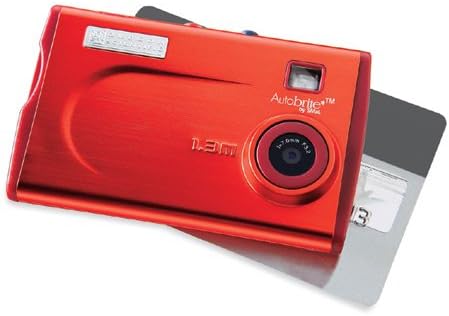
малюнок 1: The Oregon Scientific DS6628 ThinCam 1.3MP Digital Flash Camera, showcasing its compact red design with the lens, flash, and "Autobrite" branding visible. A memory card is partially inserted on the right side.
Вміст упаковки
Перевірте наявність усіх предметів у вашій упаковці:
- Цифрова камера DS6628
- Flash Attachment
- Software CD (for driver installation and image management)
- USB кабель
- Чохол для транспортування
The camera features a built-in Li-polymer battery.
Налаштування
1. Зарядка батареї
The DS6628 ThinCam features a built-in Li-polymer battery. To charge the camera, connect it to your computer using the provided USB cable. The camera will charge automatically when connected to a powered USB port. A full charge provides power for up to 500 images.
2. Встановлення програмного забезпечення та драйверів
Before connecting the camera to your computer for the first time, install the included software and drivers from the provided CD. This ensures proper recognition and functionality on both PC and Mac operating systems. Follow the on-screen instructions during installation.
3. Вставлення карти пам’яті (додатково)
The camera has 16MB of internal memory, sufficient for approximately 21 high-resolution or 91 low-resolution pictures. For expanded storage, the camera supports SD and MMC cards.
- Знайдіть гніздо для карти пам’яті збоку камери.
- Insert a compatible SD or MMC card into the slot until it clicks into place. Ensure the card is inserted in the correct orientation.
- To remove the card, gently push it inward until it springs out.
Керування камерою
1. Увімкнення/вимкнення живлення
Locate the power button, typically on the top or side of the camera. Press and hold it for a few seconds to power the camera on or off.
2. Фотографування
The DS6628 ThinCam captures images at 1.3-megapixel resolution (1288 x 962 pixels).
- Переконайтеся, що камеру ввімкнено.
- Point the camera at your subject. The camera features a pop-up/focus-free lens pad and an optical viewfinder for framing your shots.
- Press the shutter button firmly to capture an image.
3. Використання спалаху
The camera includes a detachable flash module. Attach the flash module to the designated port on the camera when additional lighting is required. The flash operates in automatic mode.
4. Transferring Images to a Computer
After installing the necessary software and drivers, connect the camera to your computer using the USB cable. The computer should recognize the camera as a removable storage device. You can then transfer images directly or use the included software for management.
Технічне обслуговування
Догляд за акумулятором
- Перед першим використанням повністю зарядіть акумулятор.
- Уникайте частої повної розрядки акумулятора, щоб продовжити термін його служби.
- If the camera will not be used for an extended period, charge it partially (around 50%) before storing.
- Зберігайте камеру в прохолодному, сухому місці.
прибирання
- Використовуйте м’яку тканину без ворсу для очищення корпусу камери.
- Для лінз використовуйте спеціальну серветку та розчин для чищення лінз. Уникайте агресивних хімікатів.
- Ensure the flash module contacts are clean and free of debris.
Усунення несправностей
| проблема | Можлива причина / рішення |
|---|---|
| Камера не вмикається. | Battery may be depleted. Connect the camera to a computer via USB to charge. |
| Cannot transfer images to computer. |
|
| Poor image quality (washed out, out of focus). |
|
| Акумулятор довго не тримає заряд. |
|
Технічні характеристики
| Особливість | Деталь |
|---|---|
| Бренд | OREGON SCIENTIFIC |
| Назва моделі | DS6628 ThinCam |
| Ефективне вирішення проблеми | 1.3 МП (1288 x 962 пікселів) |
| Внутрішня пам'ять | 16 MB (approx. 21 high-res / 91 low-res images) |
| Підтримка карт пам'яті | SD, MMC |
| Тип об'єктива | Pop-up, focus-free lens |
| Оптичний зум | 1x |
| Стабілізація зображення | цифровий |
| Viewшукач | Оптичний |
| Спалах | Detachable module, Automatic modes |
| Тип батареї | Built-in Li-polymer, rechargeable via USB |
| Термін служби батареї | Up to 500 images per charge |
| Підключення | USB |
| Сумісність | ПК і Mac |
| Колір | Червоний |
| Розміри (прибл.) | 2.1 дюйма (В) x 3.4 дюйма (Ш) x 0.3 дюйма (Г) |
Гарантія та підтримка
For warranty information and technical support, please refer to the documentation included with your purchase or visit the official Oregon Scientific webсайт. Зберігайте чек про покупку для гарантійних претензій.


