вступ
This manual provides comprehensive instructions for the setup, operation, and maintenance of your VTech t2451 2.4 GHz Analog Cordless Phone with Answering System and Caller ID. Please read this manual thoroughly before using your new phone system to ensure proper functionality and to take full advantagе його особливостей.
Key features of your VTech t2451 include:
- 2.4 GHz analog reception for clear communication.
- Digital answering system with 3 mailboxes and 15 minutes of recording time.
- 50 name/number phonebook directory for easy contact management.
- 99 name/number Caller ID history to review пропущені дзвінки.
- Headset compatibility (2.5 mm jack) for hands-free operation.
- Hold function, page/handset locator, and selectable ring tones.
- Wall-mountable design for flexible placement.
Налаштування
Follow these steps to set up your VTech t2451 cordless phone system.
- Розпакування: Carefully remove all components from the packaging. Ensure you have the cordless handset, base unit, AC power adapter, telephone line cord, and battery pack.
- Установка батареї: Open the battery compartment on the back of the cordless handset. Connect the battery pack connector to the jack inside the compartment, ensuring correct polarity. Place the battery pack into the compartment and close the cover.
- Підключення базового блоку:
- Підключіть один кінець телефонного шнура до гнізда TEL LINE на базовій станції, а інший кінець – до телефонної розетки.
- Connect the small end of the AC power adapter to the DC IN 9V jack on the base unit. Plug the large end of the AC power adapter into a standard electrical outlet.
- Зарядка телефону: Place the cordless handset in the base unit's charging cradle. The charge indicator on the handset should illuminate, indicating that the battery is charging. Allow the handset to charge for at least 12 hours before initial use.
- Настінне кріплення (опціонально): The base unit is designed to be wall-mountable. Refer to the included wall-mount bracket and instructions for secure installation.
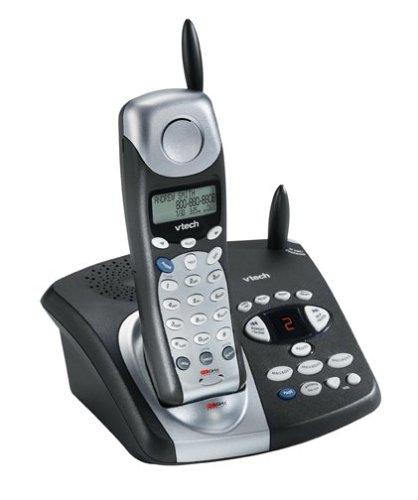
Image: The VTech t2451 cordless phone system, showing the black base unit with the silver and black handset docked in its charging cradle. The base unit features an integrated digital answering system with controls and a display.
Інструкція з експлуатації
Здійснення та отримання дзвінків
- Щоб зателефонувати: Натисніть ПОГОВОРИТИ button, wait for a dial tone, then dial the phone number.
- Щоб прийняти дзвінок: Коли телефон дзвонить, натисніть кнопку ПОГОВОРИТИ button or any key on the keypad (Any Key Answer).
- Щоб завершити дзвінок: Натисніть КІНЕЦЬ button or place the handset back in the base unit.
- Функція утримання: Під час дзвінка натисніть ТРИМАТИ button to place the call on hold. Press ПОГОВОРИТИ знову, щоб продовжити дзвінок.
Цифрова система відповіді
Your phone system includes a digital answering system with 3 mailboxes and 15 minutes of recording time.
- Відтворення повідомлень: Натисніть ГРАТИ кнопку на базі, щоб прослухати нові повідомлення.
- Запис вихідного повідомлення (OGM): Follow the voice prompts to record a personalized outgoing message.
- Mailbox Management: The system supports up to 3 distinct mailboxes. Refer to the detailed instructions in the full user guide for setting up and accessing individual mailboxes.
Ідентифікація абонента та телефонна книга
- Ідентифікатор абонента: When subscribed to Caller ID service, the handset display will show the caller's name and number. Press the CID кнопку повторноview the 99-name/number Caller ID history.
- Телефонна книга: Store up to 50 names and numbers in the phonebook. Use the navigation buttons to scroll through entries and the МЕНЮ/ВИБІР button to add or edit entries.
Інші функції
- Page/Handset Locator: Натисніть СТОРІНКА button on the base unit to locate a misplaced handset.
- Ringer Tones: Customize your phone's ringer by selecting from various available tones. Refer to the handset settings menu.
- Headset Use: Connect a 2.5 mm compatible headset to the headset jack on the side of the handset for hands-free communication.
Технічне обслуговування
Proper care ensures the longevity of your VTech t2451 phone system.
- Прибирання: Протріть телефон і базу м’якою губкоюamp тканина. Не використовуйте агресивні хімікати або абразивні засоби для чищення.
- Догляд за акумулятором:
- Always return the handset to the base unit when not in use to ensure it remains charged.
- If the phone will not be used for an extended period, remove the battery from the handset.
- Replace the battery when its performance significantly degrades. Use only the specified replacement battery pack.
- Умови навколишнього середовища: Уникайте впливу екстремальних температур, прямих сонячних променів або вологи на телефон.
Усунення несправностей
If you experience issues with your VTech t2451, try these common troubleshooting steps.
| проблема | Рішення |
|---|---|
| Немає тону набору. |
|
| Поганий прийом або статичні перешкоди. |
|
| Телефон не заряджається. |
|
| Автовідповідач не записує повідомлення. |
|
Технічні характеристики
| Особливість | Деталь |
|---|---|
| Бренд | VTech |
| Номер моделі | T2451 |
| Тип телефону | Бездротові |
| Частота | 2.4 GHz Analog |
| Тип автовідповідача | цифровий |
| Ємність запису | 15 хвилин |
| Mailboxes | 3 |
| Телефонна книга | 50 names/numbers |
| Пам'ять ідентифікатора абонента | 99 names/numbers |
| Сумісність гарнітури | Роз'єм 2.5 мм |
| Джерело живлення | Провідний електричний |
| Розміри продукту | 7.1 x 8.5 x 5.1 дюймів |
| Вага товару | 2.19 фунта |
| Виробник | Vtech |
Гарантія та підтримка
For warranty information, please refer to the warranty card included with your product packaging or visit the official VTech website. VTech provides customer support for product inquiries, technical assistance, and service. Contact information can typically be found on the VTech webсайті або в оригінальній документації до продукту.
Виробник: VTech