1. Вступ
The D-Link DWL-500 is an 11 Mbps Wireless LAN PCI Network Card designed to provide wireless network connectivity for desktop personal computers. This card enables your desktop PC to connect to a wireless network, allowing you to share hard drives, printers, and access the internet without the need for physical network cables. It operates at a high-speed 11 Mbps Ethernet wireless standard and is compliant with PCI local bus 2.2 specifications.
This manual provides essential information for the proper installation, operation, and maintenance of your DWL-500 network card.
2. Вміст упаковки
- D-Link DWL-500 11Mb Wireless LAN PCI Network Card
- Короткий посібник з встановлення (якщо входить до комплекту)
- Driver CD (if included)
Please verify that all items are present. If any items are missing or damaged, contact your retailer.
3. Системні вимоги
- Desktop PC with an available PCI slot
- Compatible operating system (e.g., Windows 98SE/ME/2000/XP)
- CD-ROM drive for driver installation (if using driver CD)
4. Налаштування та встановлення
4.1 Встановлення обладнання
- Вимкніть комп'ютер: Before beginning, ensure your computer is completely powered off and unplugged from the wall outlet.
- Відкрийте корпус комп'ютера: Remove the side panel of your computer case to access the motherboard and PCI slots.
- Знайдіть вільний слот PCI: Identify an empty PCI slot on your motherboard. These are typically white or cream-colored slots.
- Remove the Slot Cover: Обережно зніміть металеву кришку слота, що відповідає вибраному слоту PCI, із задньої частини корпусу комп'ютера.
- Insert the DWL-500 Card: Align the DWL-500 card with the PCI slot and firmly press it down until it is securely seated. Ensure the gold connectors are fully inserted into the slot.
- Захистіть картку: Use a screw to fasten the metal bracket of the DWL-500 card to the computer case.
- Закрийте корпус комп’ютера: Замініть бічну панель корпусу комп'ютера.
- Знову підключіть живлення: Plug your computer back into the wall outlet and power it on.
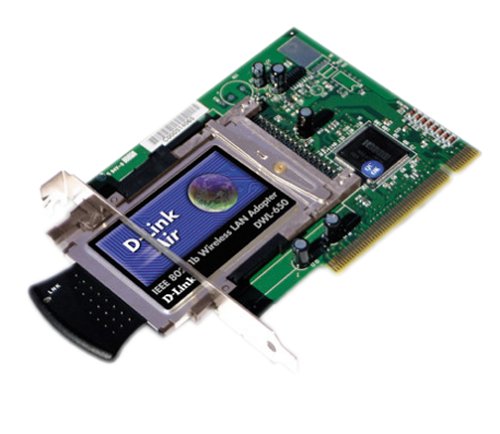
Image: The D-Link DWL-500 11Mb Wireless LAN PCI Network Card. This image shows the physical appearance of the network card, which is designed to be inserted into a PCI slot on a desktop computer's motherboard.
4.2 Встановлення драйвера
After hardware installation, your operating system may automatically detect the new hardware. If it prompts for drivers, or if the device does not function correctly, you will need to install the drivers manually.
- Insert Driver CD: Place the D-Link DWL-500 driver CD into your computer's CD-ROM drive.
- Запустіть програму налаштування: If an auto-run window appears, select the option to install drivers or run the setup program. If not, navigate to the CD-ROM drive in 'My Computer' and locate and run the 'Setup.exe' or 'Install.exe' file.
- Дотримуйтесь інструкцій на екрані: Follow the prompts provided by the installation wizard. You may need to restart your computer after the installation is complete.
- Перевірте встановлення: After restarting, check your computer's Device Manager to ensure the D-Link DWL-500 is listed correctly without any error symbols.
5. Operating the Wireless Card
5.1 Підключення до бездротової мережі
Once the drivers are installed, your DWL-500 card will enable your computer to detect available wireless networks.
- Access Wireless Network Settings: Depending on your operating system, access the wireless network connection utility. This is often found in the system tray (bottom right corner of the screen) or within the Network Connections section of the Control Panel.
- Сканування мереж: Use the utility to scan for available wireless networks.
- Виберіть свою мережу: Choose your desired wireless network (SSID) from the list of detected networks.
- Enter Security Key (if applicable): If the network is secured, you will be prompted to enter the network's security key or passphrase (e.g., WEP key).
- Підключити: Click 'Connect' to establish a connection to the wireless network.
The DWL-500 supports 11 Mbps data transfer rates, providing sufficient bandwidth for typical internet browsing and file sharing within its indoor range of 115 to 328 feet and outdoor range of 328 to 984 feet.
6. Технічне обслуговування
To ensure optimal performance and longevity of your D-Link DWL-500 wireless card, consider the following maintenance tips:
- Оновлення драйверів: Періодично перевіряйте офіційну версію D-Link webсайт для оновлених драйверів. Підтримка актуальності драйверів може покращити продуктивність та сумісність.
- Фізичне очищення: If your computer case accumulates dust, carefully clean around the PCI card and its antenna connection points using compressed air. Ensure the computer is powered off and unplugged before cleaning.
- Розташування антени: Ensure the antenna is positioned optimally for the best signal reception. Avoid placing the computer in locations where the signal might be obstructed by large metal objects or thick walls.
7. Вирішення проблем
If you encounter issues with your D-Link DWL-500, try the following troubleshooting steps:
- No Wireless Networks Detected:
- Ensure the card is properly seated in the PCI slot.
- Verify that the drivers are correctly installed in Device Manager.
- Check if your wireless router/access point is powered on and broadcasting its SSID.
- Move closer to the wireless access point to rule out range issues.
- Cannot Connect to a Specific Network:
- Double-check the security key (WEP/WPA) you are entering. It is case-sensitive.
- Ensure your network's security settings (e.g., WEP, WPA) are compatible with the DWL-500.
- Restart both your computer and the wireless router.
- Низька швидкість з'єднання:
- Ensure there are no major obstructions between your computer and the wireless access point.
- Check for sources of interference (e.g., cordless phones, microwave ovens).
- Update your wireless card drivers.
- Картку не розпізнає ОС:
- Re-seat the card in the PCI slot.
- Try installing the card in a different PCI slot.
- Ensure your operating system is supported by the DWL-500 drivers.
8. Технічні характеристики
| Бренд | D-Link |
| Номер моделі | DWL-500 |
| Апаратний інтерфейс | Ethernet, PCI |
| Швидкість передачі даних | 11 мегабіт в секунду |
| Закритий діапазон | 115 до 328 футів |
| Зовнішній хребет | 328 до 984 футів |
| Розміри продукту | 12.07 x 1.91 x 17.15 см; 362.87 g |
| ASIN | B000051SHN |
| UPC | 790069232244, 790069232459 |
| Виробник | D-Link Systems, Inc. |
| Дата першої доступності | 19 грудня 2000 року |
| Знято з виробництва виробником | так |
9. Гарантія та підтримка
For detailed warranty information, please refer to the documentation included with your product at the time of purchase or visit the official D-Link webсайт. Гарантійні умови можуть відрізнятися залежно від регіону та продукту.
For technical support, driver downloads, and additional product information, please visit the D-Link support website or contact D-Link customer service directly. Contact information can typically be found on the D-Link official webсайт: www.dlink.com


