1. Вступ
The Microsoft Visual Basic 6.0 Programmer's Guide serves as a comprehensive resource for individuals ranging from beginning to intermediate proficiency in Visual Basic programming. Developed by the Microsoft Visual Basic development team, this guide is designed to facilitate optimal utilization of one of Microsoft's prominent programming systems for Windows environments.
This manual provides fundamental insights into programming, guides users through the creation of their initial Visual Basic programs, and offers strategies for optimizing and distributing applications. The content is derived from the Programmer's Guide documentation available online, presented in a convenient printed format. It offers crucial perspectives on developing applications for various platforms, including stand-alone desktop systems, networked personal computers, the Internet, intranets, and the components market.

Image 1.1: Front cover of the Microsoft Visual Basic 6.0 Programmer's Guide. The cover features the title prominently with a graphic of abstract 3D shapes, indicating a technical programming manual.
2. Getting Started with Visual Basic 6.0
This section introduces the foundational concepts necessary to begin programming with Visual Basic 6.0. It covers the basic environment and the event-driven programming paradigm.
2.1. Understanding the Visual Basic Environment
Familiarize yourself with the integrated development environment (IDE) of Visual Basic 6.0. This includes understanding the project explorer, properties window, form designer, and code editor.
2.2. Creating Your First Program
Follow these steps to create a simple "Hello World" application:
- Launch Visual Basic 6.0.
- Select "Standard EXE" from the New Project dialog.
- Перетягніть a CommandButton на Форма1.
- Двічі клацніть на CommandButton to open its code window.
- Enter the following code within the Command1_Click() subroutine:
MsgBox "Hello World!" - Run the application by pressing F5 or clicking the Start button.
- Click the button on the form to see the message box.
3. Core Programming Concepts
This section delves into the fundamental building blocks of Visual Basic applications, including forms, controls, and the structure of the language itself.
3.1. Forms, Controls, and Projects
Visual Basic applications are built around forms, which serve as the visual interface, and controls, which are the interactive elements placed on forms. Projects organize all the files and components of your application.
- форми: The windows and dialog boxes of your application.
- Елементи керування: Elements like buttons, text boxes, labels, and list boxes that users interact with.
- проекти: The container for all forms, modules, classes, and other files that make up your application.
3.2. Visual Basic Language Fundamentals
Understanding the syntax, data types, variables, constants, operators, and control structures is crucial for effective programming.
- Типи даних: Define the type of data a variable can hold (e.g., Ціле число, Рядок, Логічний).
- Variables and Constants: Used to store data. Variables can change value, constants cannot.
- Оператори: Perform operations on values (e.g., arithmetic, comparison, logical).
- Control Structures: Dictate the flow of execution (e.g., If...Then...Else, For...Next, Do While...Loop).
3.3. Procedures and Functions
Modularize your code using subroutines (суб) and functions (функція) to improve readability and reusability.
4. Advanced Development Topics
This section covers more advanced aspects of Visual Basic 6.0 development, including user interface design, ActiveX components, and graphics manipulation.
4.1. User Interface Creation
Learn to design effective user interfaces, including single and multiple-document interfaces (SDI/MDI), implementing dialogs, and customizing toolbars. Adherence to user interface guidelines is recommended for intuitive applications.
4.2. Working with ActiveX Components
ActiveX components extend the functionality of your Visual Basic applications. This includes using existing ActiveX controls and developing your own custom components.
4.3. Text and Graphics Manipulation
Explore techniques for handling text, drawing graphics, and incorporating multimedia elements into your applications.
4.4. Application Optimization and Distribution
Strategies for improving application performance and preparing your applications for distribution to end-users are detailed. This includes project compilation concepts and packaging your application.
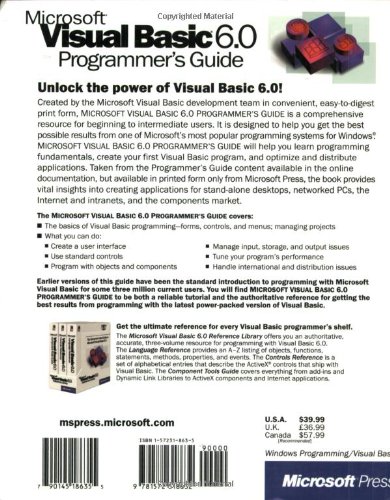
Image 4.1: Back cover of the Microsoft Visual Basic 6.0 Programmer's Guide. The back cover provides a summary of the book's content and lists key topics covered, along with ISBN and pricing information.
5. Troubleshooting and Error Handling
Effective error handling and debugging are critical for robust application development. This section provides guidance on managing events and handling runtime errors.
5.1. Event Handling
Understand how to respond to user actions and system events. Visual Basic is an event-driven language, and proper event handling is fundamental to its operation.
5.2. Error Handling Techniques
Implement error trapping using statements like On Error GoTo і On Error Resume Next to gracefully manage unexpected issues during program execution. This ensures applications remain stable even when errors occur.
5.3. Debugging Your Code
Utilize the Visual Basic IDE's debugging tools, such as breakpoints, the Immediate window, and Watch window, to identify and resolve logical errors in your code.
6. Технічні характеристики продукту
This section provides key specifications for the Microsoft Visual Basic 6.0 Programmer's Guide книга.
| Атрибут | Деталь |
|---|---|
| Видавець | Microsoft Pr |
| Дата публікації | 1 січня 1998 р |
| Мова | англійська |
| Довжина друку | 959 сторінки |
| ISBN-10 | 1572318635 |
| ISBN-13 | 978-1572318632 |
| Вага товару | 3.25 фунта |
| Розміри | 7.75 x 1.75 x 9.25 дюймів |
7. Додаткові ресурси та підтримка
For further learning and support beyond this guide, consider the following resources:
- Official Microsoft Documentation: Refer to the online documentation for Visual Basic 6.0, which provides detailed information and API references.
- Microsoft Visual Basic 6.0 Reference Library: This companion set offers an authoritative, accurate, and thorough guide to programming with Visual Basic 6.0. It includes the Language Reference, Objects, Functions, Statements, Methods, Properties, and Events.
- Форуми спільноти: Engage with the developer community through online forums and discussion groups for peer support and shared knowledge.
While this guide is comprehensive, the dynamic nature of software development means continuous learning is beneficial. Always consult official sources for the most accurate and up-to-date information.


