
1. Вступ
This manual provides detailed instructions for the safe and effective use of your DIGIERA DGW100BL 5K Digital Camera. Please read this manual thoroughly before operating the camera and retain it for future reference.
The DIGIERA DGW100BL is a versatile digital camera designed for high-quality photography and videography, featuring 5K video recording, 80MP photo resolution, a 3.0-inch IPS LCD flip screen, and advanced autofocus capabilities.
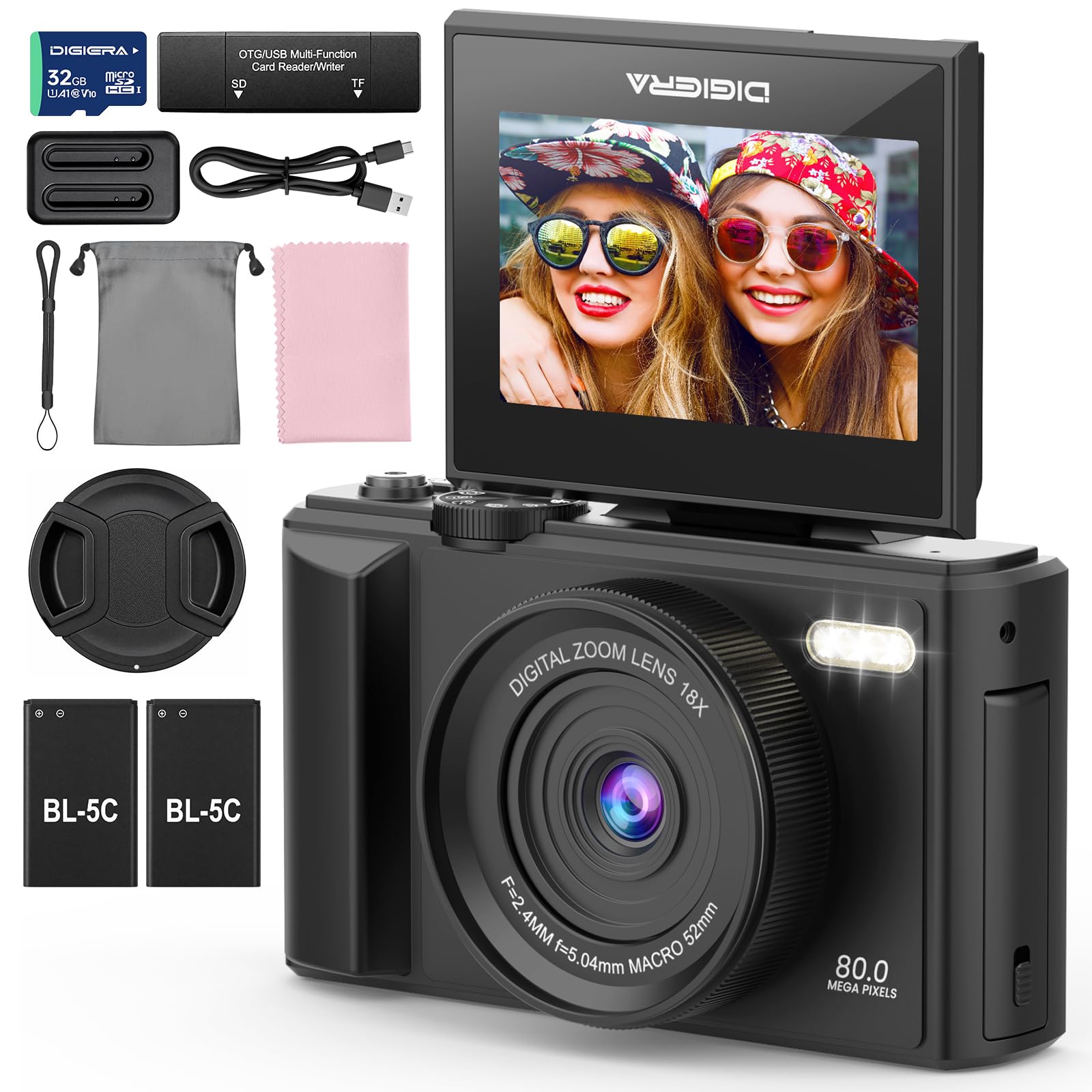
Image 1.1: The DIGIERA DGW100BL 5K Digital Camera.
2. Вміст упаковки
Перевірте наявність усіх предметів у вашій упаковці:
- DIGIERA DGW100BL Camera Body
- 2 x Detachable Rechargeable Lithium-ion Batteries
- Зарядний пристрій
- SD-карта на 32 ГБ
- USB кабель
- Посібник користувача
- Ремінець на зап'ясті
3. Налаштування
3.1. Встановлення та зарядка акумулятора
- Відкрийте кришку відсіку для батареї, розташовану на нижній частині камери.
- Insert a rechargeable lithium-ion battery, ensuring the contacts align correctly. Close the cover.
- To charge the battery, insert it into the provided external charger. Connect the charger to a power source using the USB cable. The indicator light on the charger will show charging status.
- A fully charged battery provides approximately 80 minutes of 4K video recording.
3.2. Встановлення SD-карти
- Знайдіть слот для SD-карти, зазвичай збоку або знизу камери.
- Insert the included 32GB SD card with the metal contacts facing the correct direction (refer to the diagram near the slot). Push until it clicks into place.
- Щоб вийняти, обережно натисніть на SD-карту всередину, доки вона не вискочить.
3.3. Увімкнення/вимкнення живлення
- Щоб увімкнути живлення, натисніть і утримуйте кнопку живлення, доки екран не підсвітиться.
- To power off, press and hold the Power button again until the screen shuts down.
3.4. Початкові налаштування
Upon first power-on, you may be prompted to set the date, time, and language. Use the navigation buttons to select and confirm your preferences.
4. Робота з камерою
4.1. Basic Photography and Video Recording
The camera supports 80MP still images and 5K video recording.

Image 4.1: Demonstrating 5K video and 80MP photo capabilities.
- Перемикання режимів: Use the mode dial or menu options to switch between photo, video, and playback modes.
- Фотографування: In photo mode, frame your shot and press the Shutter button halfway to focus, then fully to capture the image.
- Запис відео: In video mode, press the Record button to start and stop recording.
- Snapshot While Recording: You can capture still photos during video recording by pressing the Shutter button.
4.2. Режими фокусування
The camera offers flexible focusing options:
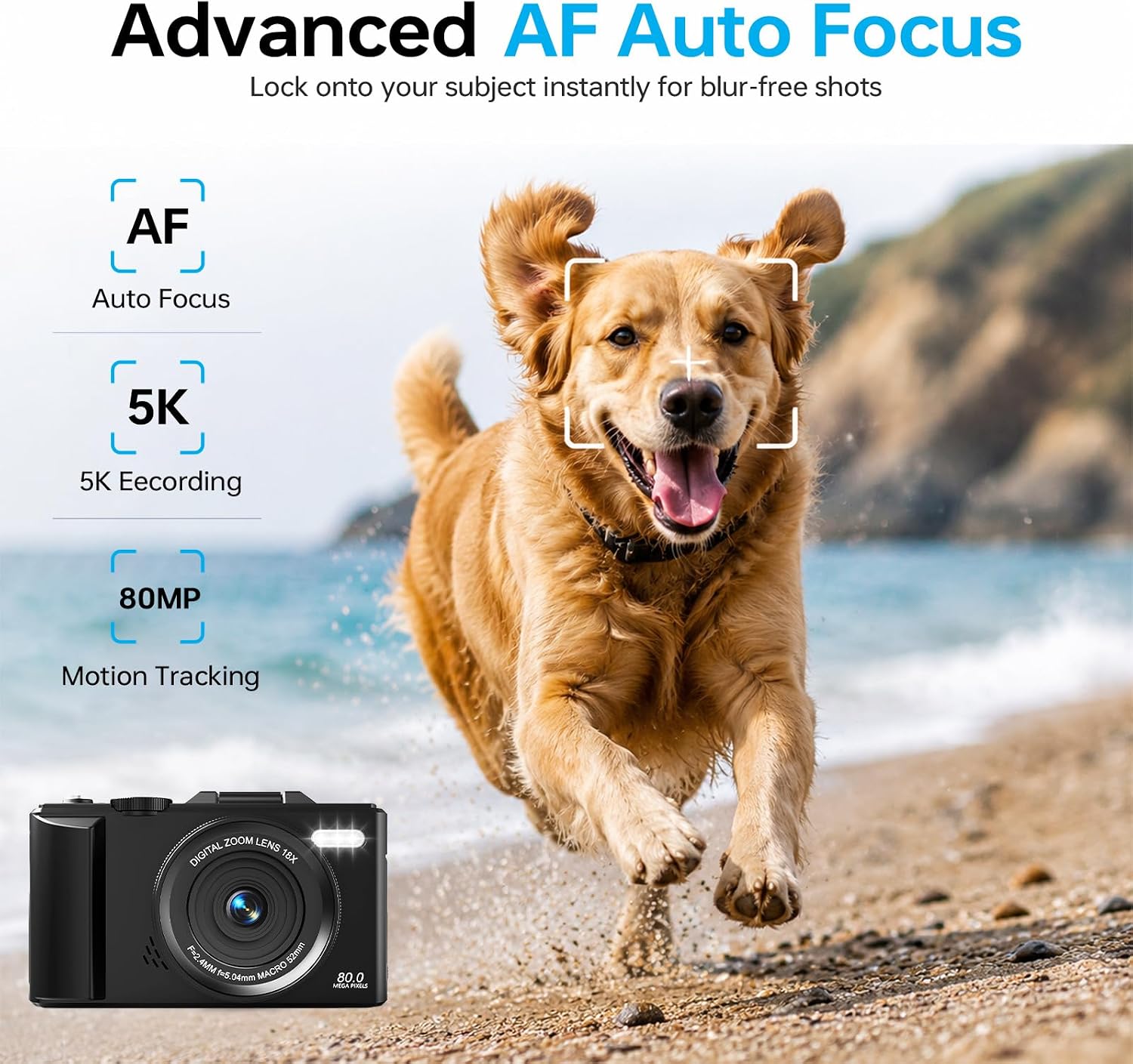
Image 4.2: Advanced Autofocus for sharp images.
- Автофокус (АФ): The camera automatically detects and focuses on subjects. This is ideal for most situations, including moving subjects.
- Фіксований фокус: Maintains a fixed focus distance, suitable for specific scenarios where manual adjustment is not desired.
- Ручне фокусування (MF): Allows you to manually adjust the focus for precise control.
4.3. Using the Flip Screen and Digital Zoom

Image 4.3: The 180° flip screen for easy selfies and vlogging.
- Перевернути екран: The 3.0-inch IPS LCD screen can be flipped 180 degrees, making it convenient for self-portraits, vlogging, and monitoring your shots from various angles.
- 18-кратне цифрове збільшення: Use the zoom controls (usually 'W' for wide and 'T' for telephoto) to digitally zoom in or out on your subject. Note that digital zoom may reduce image quality compared to optical zoom.
4.4. Anti-Shake Technology
The built-in anti-shake technology helps to stabilize your footage and photos, reducing blur caused by camera movement, especially useful during handheld shooting or when using digital zoom.
4.5. Особливості
- Проміжок часу: Capture sequences of images over time to create time-lapse videos. Access this feature through the camera's menu. For extended sessions, consider connecting a power bank.
- Сповільнений рух: Record videos at a higher frame rate to play back in slow motion.
- Творчі фільтри: Apply various artistic filters and effects directly to your photos and videos.

Зображення 4.4: Наприкладamples of built-in creative filters.
4.6. Підключення до Wi-Fi та керування застосунками

Image 4.5: Wi-Fi transfer for instant sharing.
The camera features built-in Wi-Fi for seamless transfer of photos and videos to your smartphone via a dedicated mobile app. This also enables remote control for convenient selfies and group shots.
- Download the official DIGIERA camera app from your device's app store.
- Enable Wi-Fi on your camera and connect your smartphone to the camera's Wi-Fi network.
- Use the app to browse, transfer, and share your media, or to control the camera remotely.
4.7. External Lens Support

Image 4.6: The camera supports external 52mm wide-angle lenses (sold separately).
The camera supports external 52mm wide-angle lenses (not included) to expand your field of view, ideal for capturing landscapes or group photos.
5. Технічне обслуговування
5.1. Очищення камери
- Об'єктив: Use a soft, lint-free cloth or a lens brush to gently remove dust. For smudges, use a specialized lens cleaning solution applied to a cloth, not directly to the lens.
- екран: Wipe the LCD screen with a soft, dry microfiber cloth. Avoid harsh chemicals.
- Тіло: Use a dry, soft cloth to clean the camera body. Do not use water or cleaning solvents.
5.2. Догляд за акумулятором
- Зберігайте батареї в прохолодному сухому місці, коли вони не використовуються.
- Уникайте частого повного розряджання акумуляторів, щоб продовжити термін їхньої служби.
- Не піддавайте батареї впливу екстремальних температур.
5.3. Зберігання
When storing the camera for extended periods, remove the battery and SD card. Store the camera in a protective case in a dry, dust-free environment.
6. Вирішення проблем
Якщо у вас виникли проблеми з камерою, зверніться до наступних поширених проблем та способів їх вирішення:
| проблема | Можлива причина | Рішення |
|---|---|---|
| Камера не вмикається. | Батарейка розряджена або неправильно вставлена. | Переконайтеся, що акумулятор повністю заряджений та правильно вставлений. Спробуйте інший заряджений акумулятор. |
| Не вдається робити фотографії/записувати відео. | SD-карта заповнена, заблокована або не вставлена. | Check SD card status. Ensure it is unlocked, has sufficient space, and is inserted correctly. Format the SD card if necessary (this will erase all data). |
| Зображення розмиті. | Неправильний фокус, тремтіння камери або брудний об'єктив. | Check focus mode. Ensure anti-shake is enabled. Clean the lens. Hold the camera steady. |
| Проблеми з підключенням до Wi-Fi. | Неправильні налаштування Wi-Fi або проблеми з програмою. | Ensure Wi-Fi is enabled on both camera and phone. Reconnect to the camera's Wi-Fi network. Restart the camera and the app. |
| Короткий час автономної роботи. | Frequent use of power-intensive features or old battery. | Reduce screen brightness, limit continuous recording. Ensure batteries are fully charged. Consider replacing old batteries. |
Якщо проблема не зникає після спроби цих рішень, зверніться до служби підтримки клієнтів.
7. Технічні характеристики
| Особливість | Деталь |
|---|---|
| Назва моделі | DGW100BL |
| Технологія фотосенсора | CMOS |
| Максимум WebРоздільна здатність зображення камери | 80 Мп |
| Роздільна здатність відео | 5K |
| Цифровий зум | 18X |
| Розмір екрана | 3.0 дюймів |
| Тип дисплея | IPS LCD (Flip Screen) |
| Стабілізація зображення | Цифровий (стабілізуючий) |
| Режими фокусування | Autofocus, Fixed Focus, Manual Focus |
| Підтримується File Формат | JPEG (Photos) |
| Ємність пам'яті | 32 ГБ (SD-карта в комплекті) |
| Compatible Flash Memory Type | microSD |
| Технологія підключення | USB, Wi-Fi |
| Тип батареї | Detachable Rechargeable Lithium-ion |
| Середній термін служби батареї | Approx. 80 minutes (4K recording) |
| Особливості | Anti-Shake, Slow Motion, Wi-Fi Control, Time-Lapse, Snapshot While Recording, 5K Ultra-HD |
| Виробник | Shenzhen Kerun E-commerce Co.,Ltd |
8. Інформація про гарантію
This DIGIERA DGW100BL camera comes with a Гарантія від виробника 1 рік з дати покупки. Ця гарантія поширюється на виробничі дефекти та дефекти виготовлення за умов нормального використання. Вона не поширюється на пошкодження, спричинені неправильним використанням, нещасними випадками, несанкціонованими модифікаціями або стихійними лихами.
Зберігайте підтвердження покупки для гарантійних претензій.
9. Підтримка клієнтів
For technical assistance, troubleshooting not covered in this manual, or warranty inquiries, please contact DIGIERA customer support. We offer 4/7 after-sale support to assist you.
- Електронна пошта: Refer to your product packaging or the official DIGIERA webна сайті для отримання контактної інформації.
- Webсайт: Visit the DIGIERA Store on Amazon