
1. Вступ
This manual provides instructions for the VTSYIQI Color Spectrometer Handheld Spectrophotometer. This device is designed for precise color measurement and quality control across various industries, including plastics, textiles, paint, and ceramics. It features a D/8 optical structure, SCI/SCE modes, a full waveband balanced LED light source, and a CMOS dual beam splitting sensor for accurate and efficient data processing.
2. Інформація про безпеку
Будь ласка, прочитайте всі інструкції з безпеки перед експлуатацією пристрою.
- Не піддавайте пристрій дії екстремальних температур або вологості.
- Avoid direct exposure of the measurement aperture to strong light sources.
- Use only the provided accessories and power adapter.
- Не намагайтеся розбирати або ремонтувати пристрій самостійно. Зверніться за допомогою до кваліфікованого сервісного персоналу.
- Тримайте пристрій подалі від води та інших рідин.
- Ensure the measurement surface is clean and dry before use.
3. Вміст упаковки
Перевірте наявність усіх елементів в упаковці:
- Main Host (Color Spectrometer)
- Intelligent Calibration Base
- USB кабель
- Посібник користувача
- SQCX Quality Management Software (via download or included media)
- Сертифікат калібрування
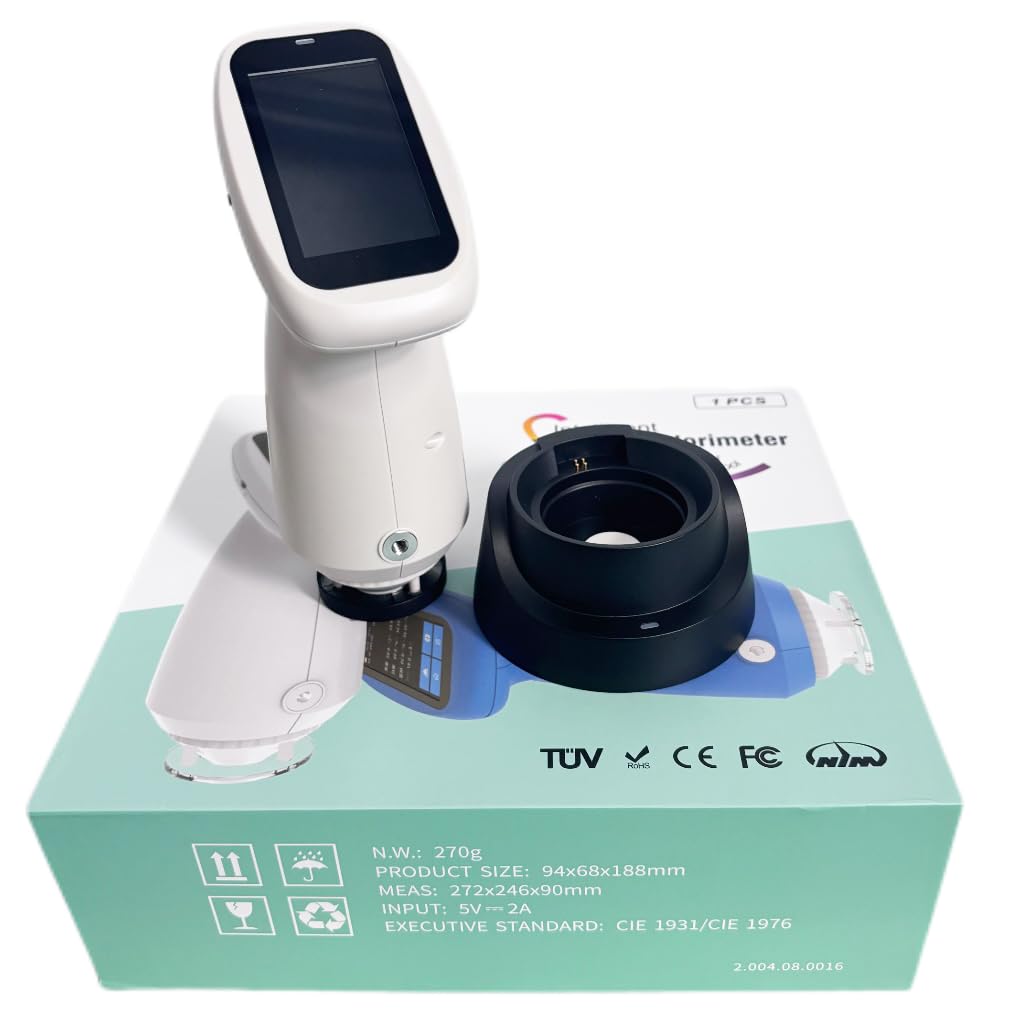
Image: The VTSYIQI Color Spectrometer, its intelligent calibration base, and other accessories neatly packaged in the product box.
4. Налаштування
4.1 Початкове заряджання
Before first use, fully charge the device using the provided USB cable and a compatible power adapter. Connect the USB cable to the charging port on the intelligent calibration base, then place the spectrometer onto the base.

Image: The VTSYIQI Color Spectrometer resting on its black intelligent calibration and charging base.
4.2 Увімкнення/вимкнення
To power on, press and hold the power button located on the side of the device until the screen illuminates. To power off, press and hold the power button until the shutdown prompt appears, then confirm.
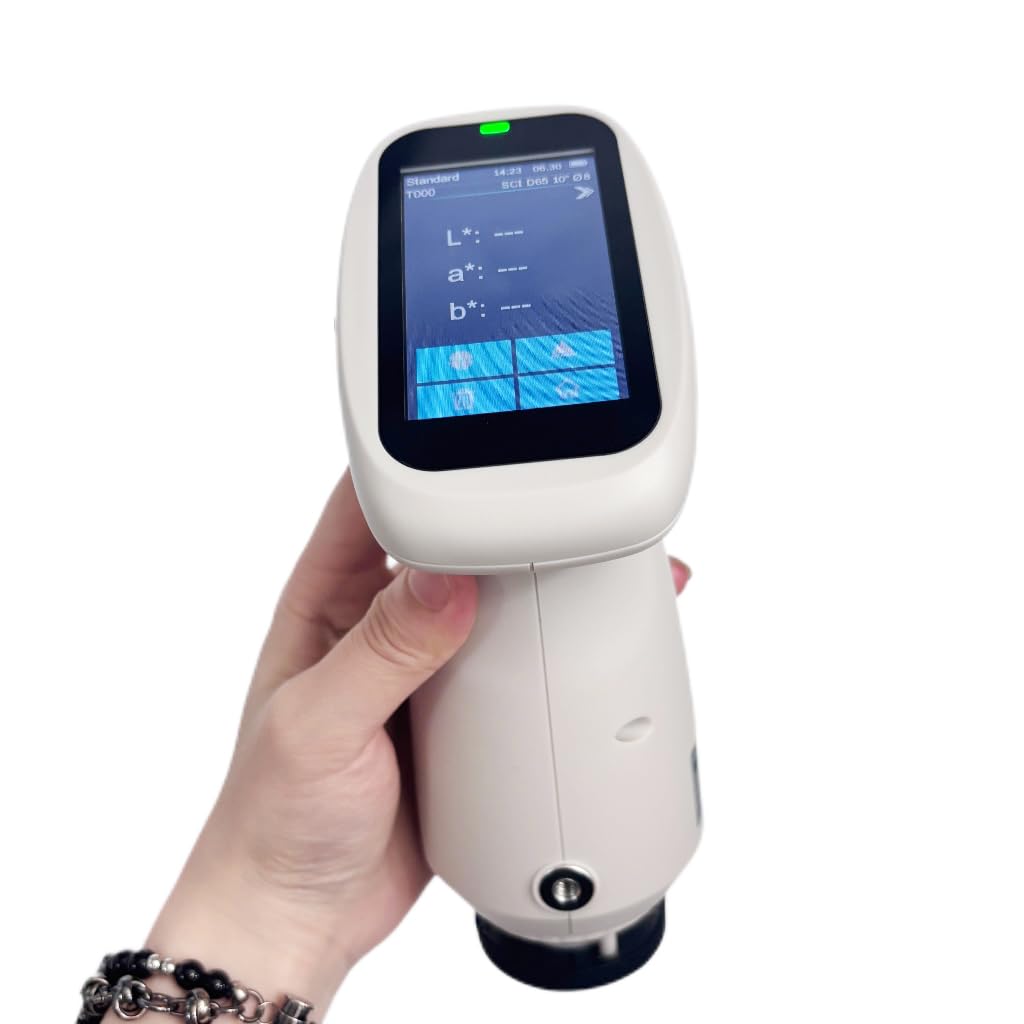
Image: A hand holding the VTSYIQI Color Spectrometer, with its display showing measurement parameters like L*, a*, b* values.
4.3 Whiteboard Calibration
The device requires regular whiteboard calibration for accurate measurements.
- Ensure the intelligent calibration base is clean and free of dust.
- Place the spectrometer onto the calibration base, ensuring it is seated correctly.
- Access the calibration function from the device menu or press the designated measurement button while on the base. The device will perform an automatic whiteboard calibration.
- Wait for the calibration process to complete. A confirmation message will appear on the screen.
Video: This video demonstrates the operation of the VTSYIQI Spectrocolorimeter, including the whiteboard calibration process. It shows how to place the device on its base and initiate calibration.
5. Інструкція з експлуатації
5.1 Режими вимірювання
The spectrometer supports various measurement modes and color spaces. Navigate through the on-screen menu to select the desired mode (e.g., SCI/SCE) and color space (e.g., CIE LAB, LCh).
5.2 Вимірювання
- Ensure the device is calibrated.
- Select the appropriate measurement aperture (MAV: Φ8mm/Φ10mm) for your sample.
- Place the measurement aperture firmly and flatly against the sample поверхня.
- Press the measurement button. The device will take a reading, typically within 1 second.
- The measurement results, including spectral reflectance and colorimetric indices, will be displayed on the screen.

Image: The VTSYIQI Color Spectrometer next to its black calibration base, with the device's screen displaying measurement data.
5.3 Data Management with SQCX Software
The included SQCX Quality Management Software allows for comprehensive color data management.
- Connect the spectrometer to a computer via USB.
- Install and launch the SQCX software.
- Transfer measurement data from the device to the software.
- Use the software for color management, color difference comparison, test report generation, and customization of color management systems.
Video: This video provides a display overview of the VTSYIQI Color Spectrometer, showcasing its user interface and various measurement options.
6. Технічне обслуговування
6.1 Очищення
Regularly clean the device, especially the measurement aperture and the whiteboard on the calibration base. Use a soft, dry cloth. For stubborn dirt, a slightly damp Можна використовувати тканину з м’яким миючим засобом, а потім висушити. Не використовуйте абразивні засоби для чищення або розчинники.
6.2 Зберігання
When not in use, store the spectrometer in its original packaging or a protective case in a cool, dry place, away from direct sunlight and extreme temperatures.
6.3 Калібрування
Perform whiteboard calibration before each measurement session or if the device has been moved or subjected to significant temperature changes.
7. Вирішення проблем
| проблема | Можлива причина | Рішення |
|---|---|---|
| Пристрій не включається. | Низький заряд батареї або неправильно натиснута кнопка живлення. | Charge the device. Press and hold the power button for a few seconds. |
| Неточні вимірювання. | Device not calibrated, dirty aperture/whiteboard, or incorrect measurement technique. | Perform whiteboard calibration. Clean the aperture and whiteboard. Ensure proper contact with the sample. |
| Cannot connect to SQCX software. | USB cable issue, software not installed, or driver problems. | Check USB connection. Reinstall SQCX software and drivers. |
| Екран не реагує. | Програмний збій або тимчасове зависання. | Restart the device by holding the power button. If issue persists, contact support. |
8. Технічні характеристики
| Особливість | Деталь |
|---|---|
| Оптична геометрія | D/8 (diffused illumination, 8-degree viewing angle), SCI/SCE Mode, Comply to CIE No.15, GB/T 3978, GB 2893, GB/T 18833, ISO7724-1, ASTM E1164, DIN5033 Teil7 |
| Джерело світла | Combined full spectrum LED light source |
| Розмір інтеграції сфери | Φ40 мм |
| датчик | CMOS dual beam splitting sensor |
| Діапазон довжин хвиль | 400-700 нм |
| Вимірювання діафрагми | Two Apertures: MAV: Φ8mm/Φ10mm |
| дзеркальний компонент | SCI/SCE |
| Колірний простір | CIE LAB, XYZ, Yxy, LCh, CIE LUV, s-RGB, HunterLab, βxy, DIN Lab99 |
| Формула різниці кольорів | ΔE*ab, ΔE*uv, ΔE*94, ΔE*cmc(2:1), ΔE*cmc(1:1), ΔE*00, DINΔE99, ΔE(Hunter) |
| Кут спостерігача | 2°/10° |
| Освітлювач | D65, A, C, D50, D55, D75, F1, F2(CWF), F3, F4, F5, F6, F7(DLF), F8, F9, F10(TPL5), F11(TL84), F12(TL83/U30), U35, NBF, ID50, ID65 (Partially realize through the PC software /APP software) |
| Дисплей | Спектрограма/значення, СampЗначення кольоровості, значення різниці кольорів/графік, результат ЗДАВАННЯ/ПОМИЛКИ, імітація кольорів, зсув кольорів |
| Вимірювання часу | Близько 1с |
| Repeatability (Chromaticity value) | MAV/SCI, within ΔE*ab 0.035 (After preheating and correction, the average value of the whiteboard was measured for 30 times at an interval of 5s) |
| Repeatability (Spectral reflectance) | MAV/SCI, Standard deviation within 0.1% (400nm to 700nm: within 0.2%) |
| Помилка між приладами | MAV/SCI, Within ΔE*ab 0.35 (Average for 12 BCRA Series II color tiles) |
| Displayed Accuracy | 0.01 |
| Measured Reflectance Range | 0-200% |
| Reflectance Resolution | 0.01% |
| Режим вимірювання | Single Measurement, Average Measurement (2-99 times) |
| Метод визначення місця розташування | Stabilizer position |
| White Calibration Mode | Contact type calibration |
| Розміри | 94 мм x 68 мм x 188 мм |
| Вага товару | Approximately 11.02 pounds (device and accessories) |
9. Гарантія та підтримка
The VTSYIQI Color Spectrometer comes with a standard manufacturer's warranty. Please refer to the warranty card included in your package for specific terms and conditions.
For technical support, service, or warranty claims, please contact VTSYIQI customer service through their official webсайт або контактну інформацію, надану в документації до вашого продукту.
Зберігайте чек про покупку як підтвердження покупки для гарантійних цілей.